
1. Introduction
The TKMARS TK903 is a compact and portable 4G magnetic GPS tracker designed for real-time tracking of vehicles, assets, and loved ones. Its small size and strong magnetic attachment allow for discreet and effortless installation. Equipped with advanced features such as real-time updates, historical route playback, and various alarm systems, the TK903 provides reliable location monitoring and enhanced security.

Image: The TKMARS TK903 GPS tracker shown alongside a smartphone displaying its real-time tracking application, illustrating its compact size and user interface.

Image: An illustration demonstrating the versatility of the TKMARS TK903, highlighting its suitability for tracking cars, monitoring the elderly, securing pets, luggage, and personal items like keys.
2. Key Features
- Compact and Portable Design: Measuring 2.17*1.42*0.83 inches and weighing 58 grams, ideal for discreet placement.
- Extended Battery Life: 25-60 days depending on tracking frequency, powered by a 7800mAh Lithium Ion battery.
- 4G Real-Time Tracking: Utilizes 4G technology for updates as frequent as every 10 seconds.
- Historical Route Playback: Access up to 180 days of location history.
- Effortless Magnetic Installation: Built-in strong magnets allow attachment to any metal surface without tools.
- Multi-Device Management: Manage multiple trackers from a single user account.
- Advanced Alarm Systems: Includes overspeed, vibration, low battery, movement, and geofence alerts.
- IP65 Waterproof Rating: Provides protection against dust and water splashes.
- USB Charging: Convenient charging via USB.
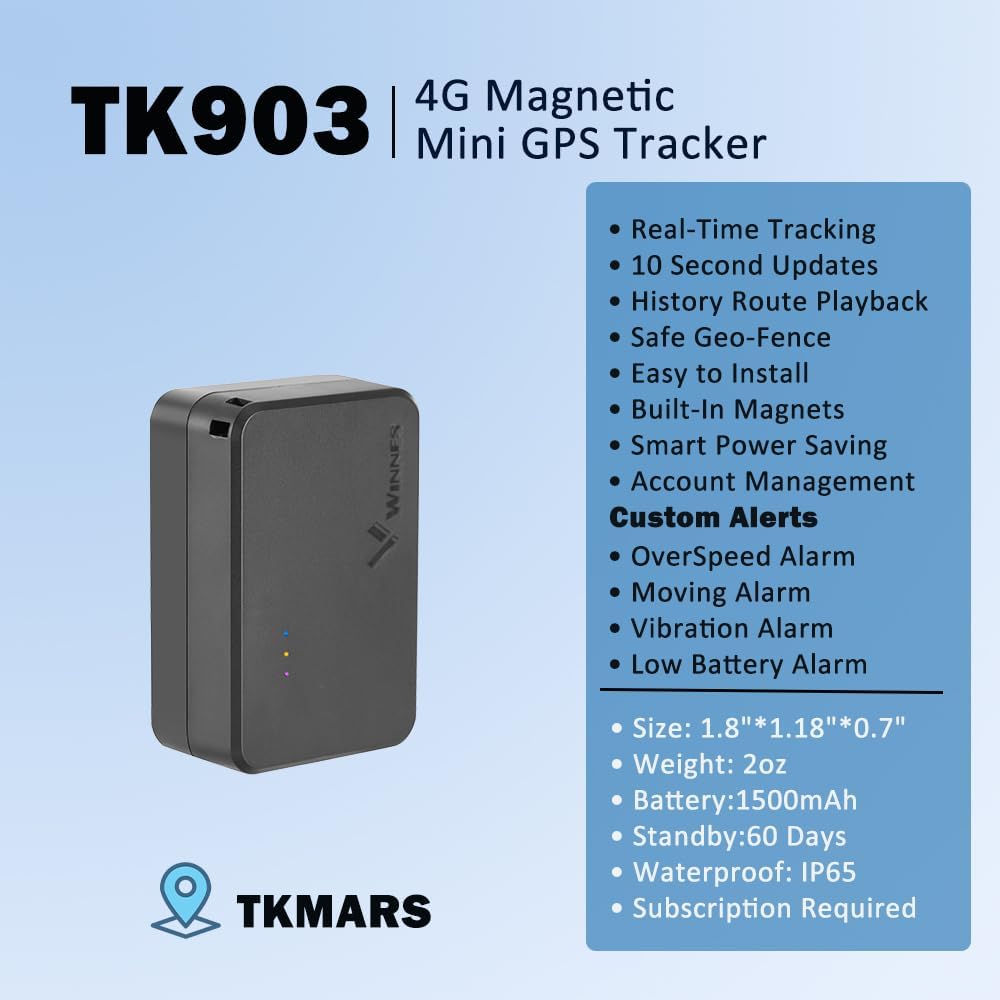
Image: An infographic highlighting the core features of the TKMARS TK903, such as real-time tracking, 10-second updates, historical route playback, geofencing, magnetic installation, and various customizable alerts.
3. Setup
3.1 Unboxing and Initial Inspection
Upon receiving your TKMARS TK903, carefully unbox the device and inspect its contents. Ensure all components are present and undamaged. The package typically includes the TK903 tracker, a USB charging cable, and a user manual.
Video: An unboxing video demonstrating the contents of a MyLoc8 GPS tracker package, which is similar in nature to the TKMARS TK903. This video shows the device, charging cable, and documentation.
3.2 Charging the Device
Before first use, fully charge your TK903 tracker. Connect the provided USB charging cable to the device's charging port and plug the other end into a compatible USB power source. The device's indicator lights will show charging status. A full charge can provide 25-60 days of battery life depending on usage patterns.
3.3 Platform Activation and Device Pairing
The TK903 operates with a subscription-based tracking platform. To activate your device and begin tracking:
- Visit the official TKMARS tracking website or download the dedicated mobile application (iOS/Android).
- Create a user account or log in with an existing one.
- Follow the on-screen instructions to add your TK903 device. This typically involves entering the device's unique IMEI number or scanning a QR code found on the device or packaging.
- Select a suitable subscription plan to enable full tracking functionalities.
4. Operating Instructions
4.1 Real-Time Tracking
Once activated, you can view the real-time location of your TK903 tracker via the web platform or mobile app. The device utilizes 4G technology to provide location updates as frequently as every 10 seconds, ensuring you have the most current information.

Image: The real-time tracking feature displayed across a smartphone, tablet, and PC, showing a truck's live location on Google Maps with data updates every 10 seconds.
4.2 Historical Route Playback
The platform stores up to 180 days of historical route data. You can review past movements and routes, including details such as speed and duration at various points along the journey.
4.3 Geofencing
Set up virtual boundaries (geofences) on the map. You will receive instant alerts on your mobile app or web platform whenever the tracker enters or exits these designated areas. This feature is useful for monitoring specific zones for vehicles or individuals.

Image: A smartphone screen showing a geofence boundary drawn around a residential area on a map, with associated alert types like movement, leaving an area, low battery, overspeeding, and tampering.
4.4 Alarm Functions
The TK903 includes several customizable alarm features:
- Overspeed Alarm: Receive alerts if the tracker exceeds a predefined speed limit.
- Vibration Alarm: Get notified if the device detects unusual vibrations or movement after being stationary.
- Low Battery Alarm: Alerts you when the device's battery level is critically low.
- Movement Alarm: Notifies you if the device moves from its location.

Image: Visual examples of the vibration alarm (triggered by a car collision) and the overspeed alarm (showing a car exceeding a speed limit), both sending alerts.
4.5 Multi-Device Management
For users with multiple TKMARS trackers, the platform allows for convenient multi-device management. All devices can be added to a single account, enabling simultaneous monitoring and control from one interface.

Image: A composite image illustrating multi-facility management with several trucks tracked on a mobile app, alongside icons for low battery alerts and the device's IP65 waterproof rating.
5. Maintenance
5.1 Battery Charging
The TK903 is equipped with a rechargeable Lithium Ion battery. To maintain optimal performance, ensure the device is charged regularly. Battery life varies based on tracking frequency; more frequent updates will consume battery faster. Use the provided USB cable for charging.
5.2 Waterproofing
The TK903 has an IP65 waterproof rating, meaning it is protected against dust ingress and low-pressure water jets from any direction. While it can withstand splashes and light rain, it is not designed for submersion in water.
6. Troubleshooting
- Device Not Tracking: Ensure the device is fully charged and has an active subscription plan. Check for proper 4G signal in the area.
- Inaccurate Location: GPS accuracy can be affected by environmental factors such as dense urban areas, heavy tree cover, or indoor placement. Move the device to an open area for better signal reception.
- Alarms Not Triggering: Verify that alarm settings (e.g., geofence boundaries, speed limits) are correctly configured within the app/web platform.
- Battery Draining Quickly: Reduce the frequency of location updates in the device settings to extend battery life.
7. Specifications
| Feature | Detail |
|---|---|
| Model Number | TK903 |
| Product Dimensions | 2.17 x 1.42 x 0.83 inches (5.5 x 3.6 x 2.1 cm) |
| Item Weight | 7 ounces (58 grams) |
| Battery | 1 Lithium Ion battery (included), 7800mAh capacity |
| Battery Life | 25-60 days (depending on tracking frequency) |
| Connectivity | 4G LTE |
| Waterproof Rating | IP65 |
| Special Features | Alert Notification, Geo-Fence, Real-Time Tracking, iOS/Android App, Location History, Magnetic, Multi-device Management, USB Charging, Vibration Alarm, Motion Alarm, Low Battery Alarm, Overspeed Alarm |
8. Warranty and Support
The TKMARS TK903 GPS Tracker is backed by a lifetime warranty, ensuring long-term reliability. For any support inquiries or technical assistance, please refer to the contact information provided in your product packaging or visit the official TKMARS website.


