
Introduction
This manual provides detailed instructions for the installation, operation, and maintenance of your Goodream RGB Rock Lights. These lights are designed to provide customizable illumination for various vehicles, enhancing visibility and aesthetic appeal. Please read this manual thoroughly before installation and use to ensure proper function and safety.
Safety Information
- Always disconnect the vehicle's battery before performing any electrical work to prevent short circuits and electrical shock.
- Ensure all wiring connections are secure and properly insulated to prevent water ingress and electrical hazards.
- Do not modify the product in any way. Unauthorized modifications may void the warranty and create safety risks.
- Keep wiring away from hot engine parts, moving components, and sharp edges.
- Verify that the vehicle's electrical system can support the additional load of the lights. The lights operate on 12V DC.
- Consult a professional if you are unsure about any part of the installation process.
Package Contents
Verify that all components are present in your package:
- 8 x RGB LED Rock Light Pods
- 8 x Extension Wires
- 1 x Control Box with Wiring Harness
- 1 x RF Remote Controller
- Mounting Screws (16 pieces)

Setup and Installation
1. Pre-Installation Checklist
- Ensure the vehicle's battery is disconnected.
- Gather necessary tools: wire strippers, crimpers, electrical tape, zip ties, drill, screwdriver.
- Plan the placement of each rock light pod and the control box. Consider areas that are protected from direct impact and excessive heat.
2. Wiring Diagram and Connections
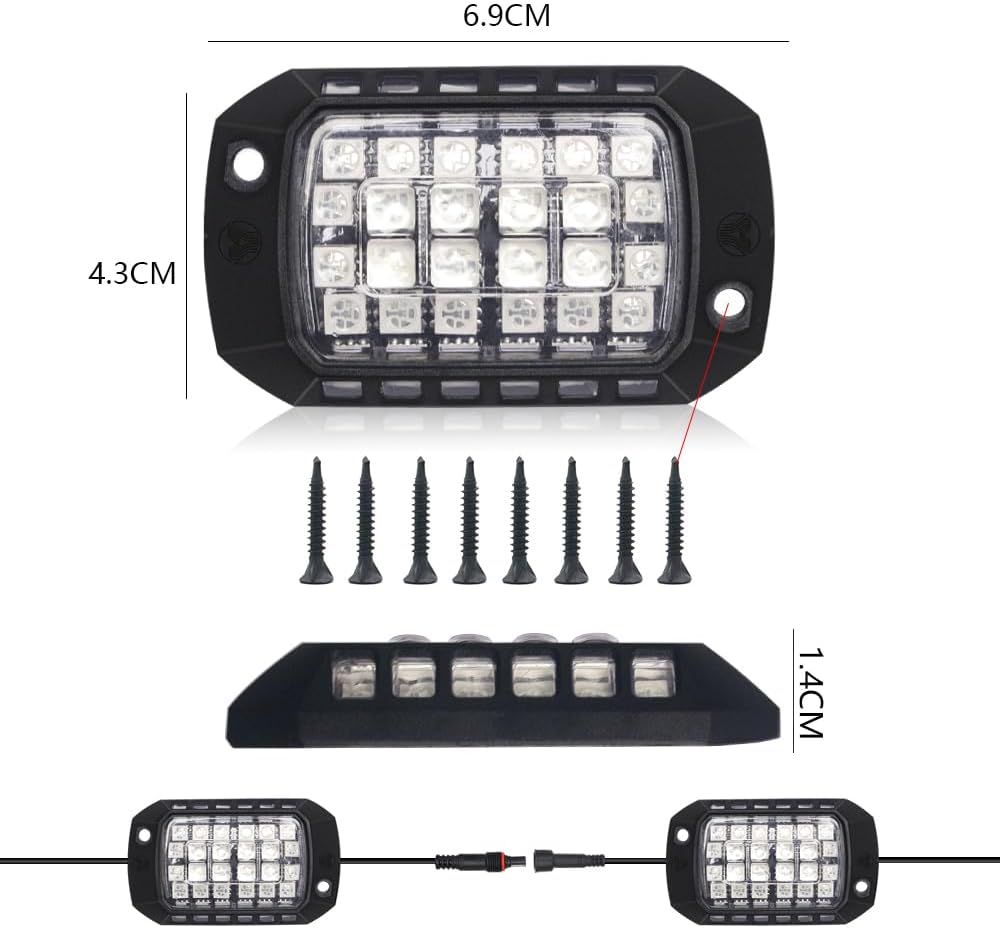
Connect the rock light pods to the control box using the provided extension wires. Ensure each connection is secure. The control box should then be connected to the vehicle's 12V power source (e.g., battery or an accessory fuse box) ensuring proper polarity (red to positive, black to negative).

3. Mounting Instructions
Each rock light pod can be mounted using the integrated screw holes. For a secure installation, drill pilot holes and use the provided screws. The pods also feature an adhesive backing for initial positioning, but screws are recommended for permanent and robust attachment, especially in off-road applications.
4. Initial Power-Up
Once all connections are made and secured, reconnect the vehicle's battery. The lights should briefly illuminate or be ready for control via the app or remote.
Operating Instructions
Your Goodream RGB Rock Lights can be controlled via a smartphone application (Bluetooth) or the included RF remote controller.

1. APP Control (Bluetooth)
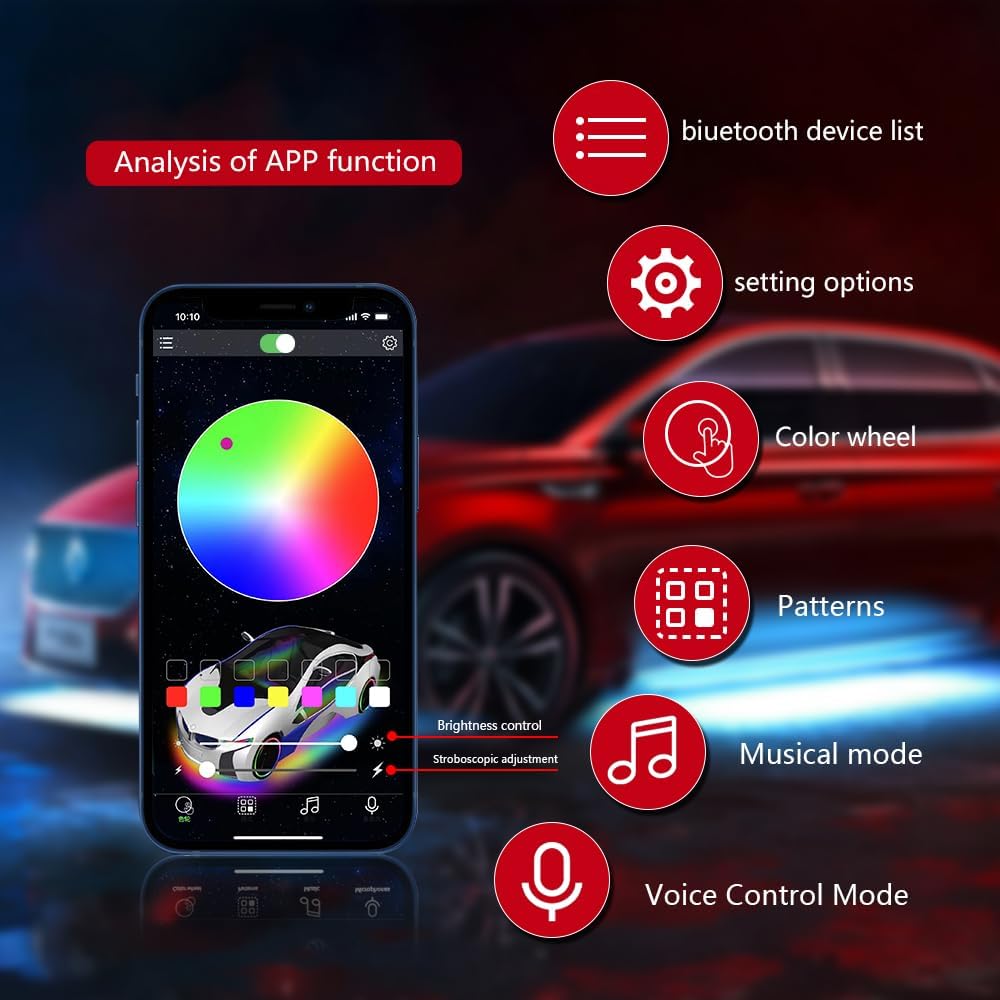
Download the compatible app (search for 'Goodream LED' or similar in your app store, or scan the QR code on the control box). Enable Bluetooth on your smartphone and open the app. The app should automatically detect and connect to the control box.
- Color Wheel: Select from 16 million colors.
- Mode Selection: Choose from various dynamic modes (flash, strobe, fade, smooth).
- Music Mode: Lights synchronize with music played through your phone's microphone.
- Voice Control Mode: Control lights using voice commands.
- Brightness Adjustment: Adjust the intensity of the lights.
- Timing Mode: Set schedules for lights to turn on/off.

2. RF Remote Control
The RF remote provides quick access to basic functions:
- ON/OFF: Power the lights on or off.
- Color Choices: Select from preset static colors.
- Mode Selection: Cycle through various dynamic lighting effects.
- Brightness Adjustment: Increase or decrease light intensity.
Maintenance
- Cleaning: Periodically clean the light pods with a soft, damp cloth to remove dirt and debris. Avoid abrasive cleaners.
- Inspection: Regularly check wiring for any signs of wear, fraying, or damage. Ensure all connections remain tight and secure.
- Water Resistance: The pods are waterproof, but the control box should be installed in a location protected from direct water exposure.
Troubleshooting
| Problem | Possible Cause | Solution |
|---|---|---|
| Lights do not turn on. | No power, incorrect wiring, faulty control box. | Check power connection to the vehicle's battery. Verify positive and negative wires are correctly connected. Ensure all light pod connections are secure. Test the control box if possible. |
| Bluetooth app cannot connect. | Bluetooth not enabled, app not paired, interference. | Ensure Bluetooth is enabled on your phone. Restart the app and try reconnecting. Move closer to the control box. Check if other Bluetooth devices are causing interference. |
| Remote control not working. | Dead battery in remote, remote out of range, interference. | Replace the remote control battery. Ensure you are within range of the control box. Check for obstructions or strong radio frequency interference. |
| Lights are dim or inconsistent. | Low voltage, loose connection, damaged pod. | Check vehicle's battery voltage. Inspect all wiring connections for looseness or corrosion. If a single pod is affected, it may be damaged and require replacement. |
Specifications
- Brand: Goodream
- Model Number: GD070
- Light Source Type: LED (SMD 5050 RGB)
- Number of LEDs per Pod: 36
- Number of Pods: 8
- Voltage: 12V DC
- Material Type: ABS Plastic
- Water Resistance Level: Waterproof (Pods)
- Connectivity: Bluetooth (App Control), RF (Remote Control)
- Special Features: Multi-Color, Multi-Modes, Music Sync, Voice Control, Timing Mode, 3D Lens Design
- Fit Type: Universal Fit (ATV, Passenger Car, SUV, Snowmobile, Tractor, Trailer, Truck, UTV, Van)
- Item Weight: 0.62 kg


Warranty and Support
Goodream provides a one-year warranty service for this product. If you encounter any quality issues with the product within one year of purchase, please contact the seller or Goodream customer support immediately. We are committed to resolving any issues as quickly as possible.
For support, please refer to the contact information provided at the point of purchase or visit the official Goodream website.