1. Introduction
Welcome to the OUKITEL WP28S Rugged Smartphone user manual. This guide provides essential information for setting up, operating, maintaining, and troubleshooting your device. The OUKITEL WP28S is designed for durability and performance, featuring a robust build, long-lasting battery, and advanced Android 14 operating system.
2. What's in the Box
Please check the contents of your package. If any items are missing or damaged, contact customer support.
- OUKITEL WP28S Rugged Phone x 1
- USB Data Cable x 1
- Charger x 1
- Quick Start Guide x 1
- Warranty Card x 1
3. Device Overview
Familiarize yourself with the physical components of your OUKITEL WP28S smartphone.
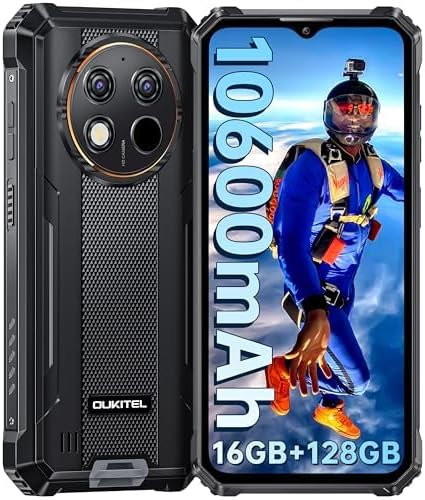
Image 3.1: Front and back view of the OUKITEL WP28S Rugged Smartphone. The front features the display and front camera, while the back shows the multi-camera module and ruggedized texture.
3.1 Physical Components
- Front Display: 6.52-inch HD IPS screen.
- Front Camera: Located at the top of the display.
- Rear Camera Module: Includes 13MP main camera, macro camera, and LED flash.
- Power Button: Typically on the right side, often integrated with the fingerprint sensor.
- Volume Buttons: Located on the side for adjusting audio levels.
- USB-C Port: For charging and data transfer, usually at the bottom.
- SIM/TF Card Slot: For inserting SIM cards and expandable storage.
4. Initial Setup
4.1 Installing SIM and TF Cards
Your OUKITEL WP28S supports dual Nano SIM cards or one Nano SIM card and one TF (microSD) card for expanded storage.
- Locate the SIM card tray on the side of the device.
- Use the provided SIM ejector tool to open the tray.
- Carefully place your Nano SIM card(s) and/or TF card into the designated slots. Ensure correct orientation.
- Gently push the tray back into the device until it is flush.

Image 4.1: Illustration of the SIM card tray, showing slots for two Nano SIM cards and one TF card for storage expansion.
4.2 Powering On/Off
- To Power On: Press and hold the Power button until the OUKITEL logo appears.
- To Power Off: Press and hold the Power button until the power options menu appears, then select "Power off."
- To Restart: Press and hold the Power button until the power options menu appears, then select "Restart."
4.3 Initial Configuration
Upon first power-on, follow the on-screen prompts to complete the initial setup, including language selection, Wi-Fi connection, Google account setup, and security settings.
5. Operating Your Device
5.1 Basic Navigation (Android 14)
Your device runs on Android 14, offering an intuitive user experience. Navigate using gestures or on-screen buttons as configured during setup.
- Home Screen: Your central hub for apps and widgets.
- Notification Panel: Swipe down from the top of the screen to access notifications and quick settings.
- App Drawer: Swipe up from the bottom of the screen to view all installed applications.
5.2 Calls and Messaging
Use the Phone app for making and receiving calls. The Messages app handles SMS and MMS communications.
5.3 Internet and Connectivity
- Wi-Fi: Go to Settings > Network & internet > Wi-Fi to connect to available networks.
- Bluetooth 5.0: Go to Settings > Connected devices > Connection preferences > Bluetooth to pair with other Bluetooth devices.
- NFC: Near Field Communication allows for quick pairing and mobile payments (e.g., Google Pay). Enable it in Settings > Connected devices > Connection preferences > NFC.
- GPS: The device supports GPS, GLONASS, Beidou, and Galileo for accurate location services. Ensure Location is enabled in Quick Settings or Settings > Location.

Image 5.1: Visual representation of the OUKITEL WP28S's security and connectivity features, including Face ID, fingerprint unlocking, Bluetooth 5.0, NFC for payments, and multi-system GPS support.
5.4 Camera Usage
The OUKITEL WP28S features a 13MP rear camera and a 5MP front camera. Open the Camera app to capture photos and videos.
- Rear Camera: 13MP main sensor for detailed photos.
- Front Camera: 5MP for selfies and video calls.
- Modes: Explore various shooting modes such as Panorama, Portrait, and Beauty within the camera application.

Image 5.2: Depicts the camera specifications of the OUKITEL WP28S, highlighting the 5MP front camera, flash, and 13MP rear camera, alongside a scenic photo captured by the device.
5.5 Security Features
- Fingerprint Unlock: Register your fingerprint(s) in Settings > Security & privacy > Device unlock.
- Face Recognition: Set up face unlock for convenient access in Settings > Security & privacy > Device unlock.
6. Key Features
6.1 Rugged Design
The OUKITEL WP28S is built to withstand harsh environments, complying with industry-leading durability standards.
- IP68: Water-resistant up to 1.5 meters for 30 minutes.
- IP69K: Resistant to high-pressure, high-temperature water jets.
- MIL-STD-810H: Military-grade drop resistance up to 1.5 meters.
- Corning Gorilla Glass: 6th generation glass for enhanced scratch resistance.

Image 6.1: The OUKITEL WP28S submerged in water, dropped onto a hard surface, and covered in dust, illustrating its IP68 waterproof, MIL-STD-810H drop-proof, and IP69K dustproof ratings.
6.2 Long-Lasting Battery
Equipped with a high-capacity battery for extended usage.
- Capacity: 10600mAh.
- Usage: Up to 1000 hours standby, 60 hours call time, 18 hours video playback, 50 hours music playback.
- OTG Reverse Charging: Can charge other electronic devices in emergencies.

Image 6.2: The OUKITEL WP28S with a prominent '10600mAh' graphic, indicating its large battery capacity and estimated usage durations for various activities.
6.3 Display
Enjoy clear visuals on the large HD display.
- Size: 6.52-inch HD IPS display.
- Resolution: 1280 x 576 pixels.
- Brightness: 400 nits, ensuring visibility even in sunlight.
6.4 Performance and Storage
The device offers smooth performance and ample storage for your applications and media.
- Processor: Octa-core processor.
- Operating System: Android 14.
- RAM: 16GB (4GB physical + 12GB virtual memory).
- Internal Storage: 128GB ROM.
- Expandable Storage: Supports up to 1TB via TF card.

Image 6.3: A graphic illustrating the OUKITEL WP28S's memory specifications, including 4GB RAM, an additional 12GB of virtual memory, 128GB of internal storage, and support for up to 1TB of external TF card storage.
7. Maintenance
To ensure the longevity and optimal performance of your OUKITEL WP28S, follow these maintenance guidelines:
- Cleaning: Use a soft, damp cloth to clean the device. Avoid harsh chemicals or abrasive materials. Ensure all ports are dry before charging.
- Battery Care: Avoid extreme temperatures. Do not fully discharge the battery regularly. Use the original charger for optimal charging.
- Software Updates: Regularly check for and install system updates to ensure your device has the latest security patches and features. Go to Settings > System > System update.
- Storage Management: Periodically clear unnecessary files and apps to maintain performance.
8. Troubleshooting
This section addresses common issues you might encounter with your OUKITEL WP28S.
| Problem | Possible Solution |
|---|---|
| Device does not power on | Ensure the battery is charged. Connect the charger and wait a few minutes before attempting to power on again. If unresponsive, perform a forced restart by holding the Power button for 10-15 seconds. |
| Poor network signal | Check if the SIM card is correctly inserted. Try restarting the device. Ensure you are in an area with network coverage. Contact your service provider if the issue persists. |
| Apps are slow or crashing | Close background applications. Clear app cache (Settings > Apps > [App Name] > Storage & cache > Clear cache). Restart the device. Ensure sufficient free storage space. |
| Battery drains quickly | Reduce screen brightness. Disable unused features like Wi-Fi, Bluetooth, GPS, and NFC when not needed. Close power-intensive apps running in the background. Check battery usage in Settings > Battery. |
| Fingerprint/Face unlock not working | Ensure your finger/face is clean and dry. Re-register your fingerprint/face in Settings > Security & privacy > Device unlock. Ensure sufficient lighting for face unlock. |
9. Specifications
Detailed technical specifications for the OUKITEL WP28S Rugged Smartphone.
| Feature | Specification |
|---|---|
| Model Name | WP28S |
| Operating System | Android 14 |
| CPU Speed | 2.2 GHz (Octa-Core) |
| RAM | 16 GB (4GB physical + 12GB virtual) |
| Internal Storage | 128 GB |
| Expandable Storage | Up to 1 TB (TF Card) |
| Screen Size | 6.52 Inches |
| Resolution | 1280 x 576 |
| Refresh Rate | 60 Hz |
| Battery Capacity | 10600 mAh |
| Charging Time | Approximately 3.5 Hours |
| Rear Camera | 13 MP |
| Front Camera | 5 MP |
| Connectivity | 4G Dual SIM, Wi-Fi, Bluetooth 5.0, NFC |
| Navigation | GPS, GLONASS, Beidou, Galileo |
| Durability Ratings | IP68, IP69K, MIL-STD-810H |
| Dimensions | 6.85 x 3.24 x 0.68 inches |
| Item Weight | 1.46 pounds |
10. Warranty and Support
OUKITEL provides comprehensive support for your WP28S device.
- Warranty: Your OUKITEL WP28S comes with a 2-year long-term warranty.
- Returns: A 30-day free return guarantee is provided.
- Customer Service: 24-hour online customer service and year-round customer support are available.
- Contact: For any product-related questions or support, please contact OUKITEL customer service via email. Refer to the warranty card for specific contact details.


