
Linocell GS-W35A0947C
Linocell 60W 4-Port USB C Wall Charger Instruction Manual
Model: GS-W35A0947C
1. Introduction
Thank you for choosing the Linocell 60W 4-Port USB C Wall Charger. This device is designed to provide efficient and safe charging for a wide range of electronic devices, featuring both USB-C and USB-A ports for versatile compatibility. This manual provides essential information for the proper setup, operation, and maintenance of your charger.
Package Contents:
- 2 x Linocell 60W 4-Port USB C Wall Charger Block (Dual PD&QC3.0 Power Type C Fast Charging Adapter USB-A Charger)
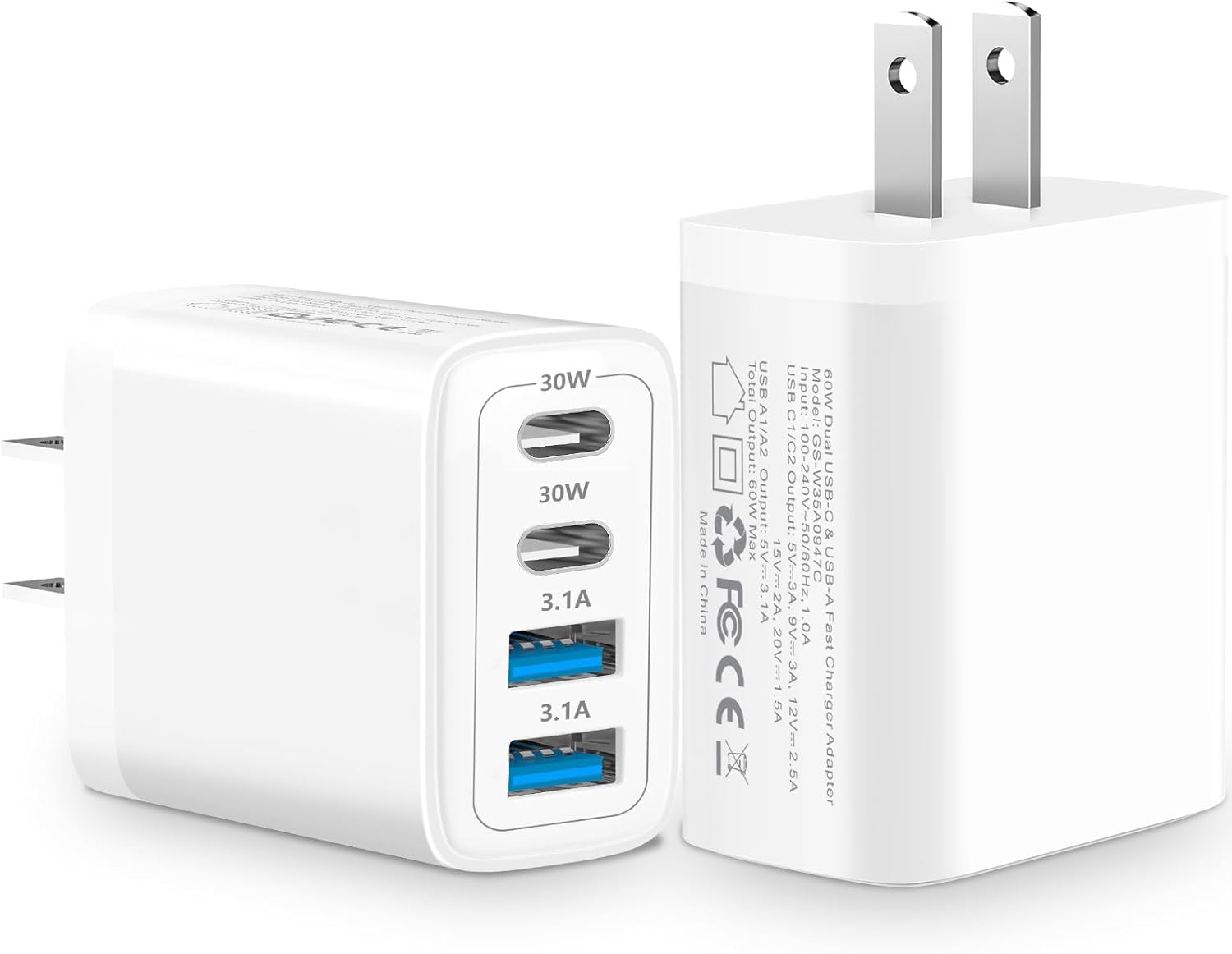
Image 1.1: Linocell 60W 4-Port USB C Wall Charger, showing its two USB-C ports and two USB-A ports, along with the foldable plug design.
2. Key Features
2.1. Dynamic Temperature Sensors
The charger incorporates a built-in Dynamic Power Chipset and a Dynamic Temperature Sensor. This system actively monitors temperature and adjusts power output to prevent overheating, ensuring optimal charging speed and efficiency while safeguarding connected devices.
2.2. Intelligent Power Management Chip
Equipped with a Smart-IC Chip, the charger automatically detects the connected device and identifies the appropriate current for fast charging. Integrated superconductor material reduces resistance, boosting charging efficiency and protecting battery health.

Image 2.1: Internal view of the charger highlighting the automatic chip recognition and intelligent power management features.
2.3. Advanced Safety Features
The charger is certified by MFi, UL, ETL, FCC, CE, and ROHS. It features an intelligent temperature control system, over-current, over-voltage, over-heating, and short-circuit protection. Linocell's Automatic Power Distribution Tech with overload protection provides continuous temperature monitoring and output control for enhanced safe charging.

Image 2.2: Diagram illustrating the multiple layers of protection, including over-current, short-circuit, over-voltage, under-voltage, over-temperature, and over-power protection.
2.4. 4-in-1 Charging Ports
Equipped with two 60W USB-C ports (Power Delivery) and two USB-A ports (Quick Charge 3.0), allowing simultaneous charging of up to four devices.

Image 2.3: Visual representation of the charger's 4-port design, highlighting 60W output and four smart chips.
2.5. Military Grade Material and Design
The housing is constructed from all-carbon fiber and strong military fiber for durability. Special Strain Relief design and built-in laser welding with compound pressurization technology enhance longevity and resistance to breakage.
3. Setup and Installation
- Unpack the Charger: Carefully remove the Linocell 60W 4-Port USB C Wall Charger from its packaging.
- Inspect for Damage: Before use, visually inspect the charger for any signs of physical damage. Do not use if damaged.
- Plug into Wall Outlet: Insert the charger's prongs into a standard 120V AC wall outlet. The compact design ensures that the lower outlet remains accessible.
- Connect Devices: Use appropriate USB-C or USB-A cables (not included) to connect your devices to the corresponding ports on the charger.
- Begin Charging: Once connected, the charger will automatically detect your device and begin charging at the optimal speed.
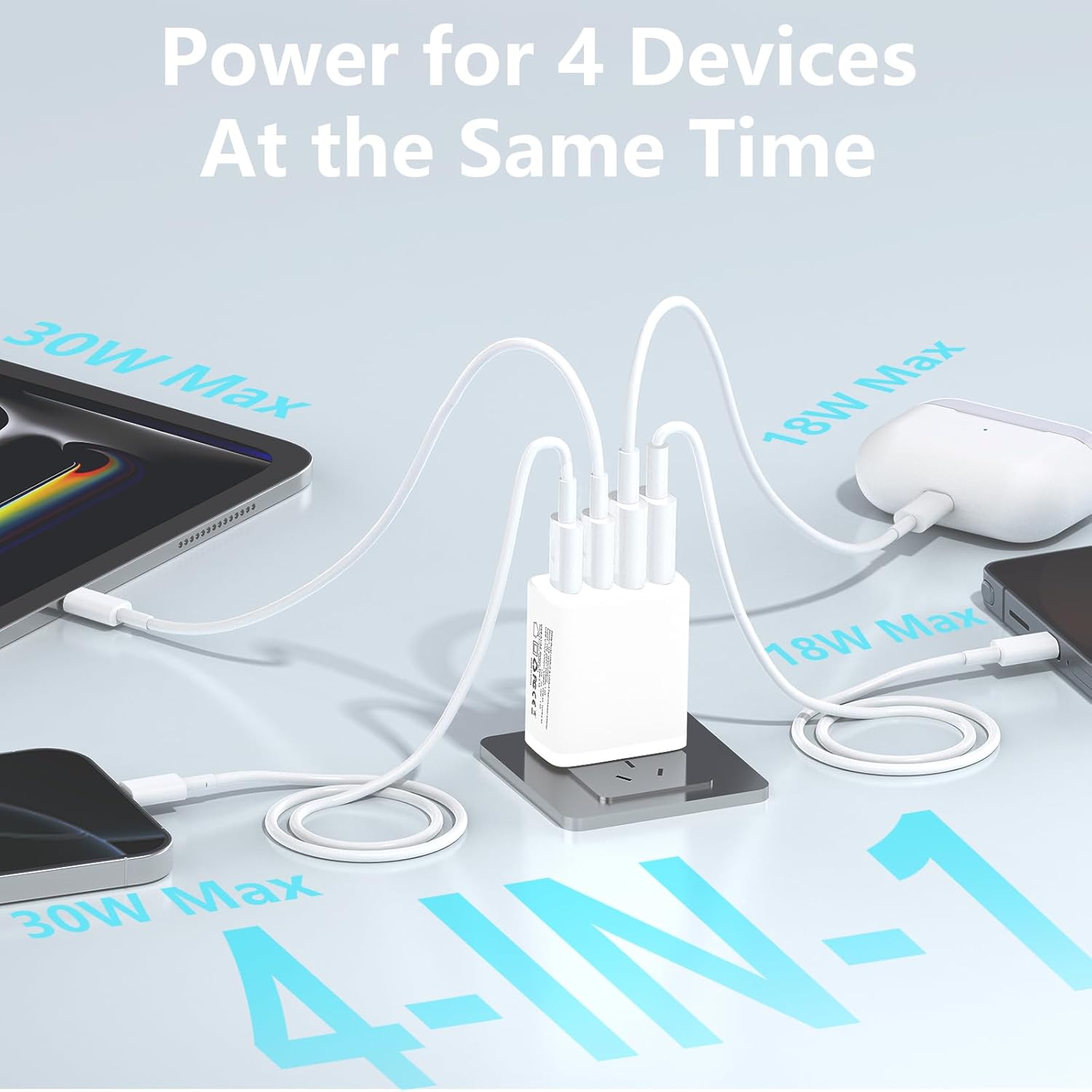
Image 3.1: The charger connected to a wall outlet, simultaneously charging a tablet, earbuds, and two smartphones, demonstrating its 4-in-1 capability.
4. Operating Instructions
The Linocell 60W 4-Port USB C Wall Charger features intelligent power distribution to optimize charging for multiple devices simultaneously.
4.1. Power Distribution:
The total output of the charger is 60W. The intelligent chip dynamically distributes power based on the connected devices' needs. For example:
- When only one USB-C port is used, it can deliver up to 30W.
- When both USB-C ports are used, each can deliver up to 30W.
- When all four ports are in use, the power is distributed across all ports, with USB-C ports prioritizing higher power delivery (up to 30W each) and USB-A ports providing standard charging (up to 15.5W each), ensuring the total output does not exceed 60W.

Image 4.1: Diagram illustrating various power distribution scenarios across the four ports, showing how the 60W maximum is managed.
4.2. Fast Charging Capability:
The charger supports Power Delivery (PD) and Quick Charge (QC) protocols, enabling rapid charging for compatible devices. For instance, an iPhone 16 can be charged to 60% in approximately 20 minutes.

Image 4.2: Visual demonstration of fast charging, showing an iPhone 16 reaching 60% charge in 20 minutes.
5. Universal Compatibility
This charger is compatible with a wide range of electronic devices, including but not limited to:
- Smartphones: iPhone 16/16 Plus/16 Pro/16 Pro Max, iPhone 15/15 Plus/15 Pro/15 Pro Max, iPhone 14/14 Plus/14 Pro/14 Pro Max, iPhone 13/13 Mini/13 Pro/13 Pro Max, iPhone 12/12 Mini/12 Pro/12 Pro Max, iPhone 11/11 Pro/11 Pro Max, iPhone XR/XS/XS Max/X, iPhone 8/7/6/5, Samsung Galaxy S25/S24/S23/S22/S21/S20/S10, Note 20/Note 10, Google Pixel series, Moto devices.
- Tablets: iPad Mini/Air/Pro, Samsung Tab A7/A/S10/S9/S8.
- Laptops: MacBook Air/Pro (models compatible with USB-C charging).
- Other Devices: AirPods, Cameras, GPS devices, Power Banks, Driving Recorders, Drones, Apple Watch, Nintendo Switch, and other electronic devices that charge via USB-C or USB-A.

Image 5.1: A visual chart displaying various compatible devices including iPhones, Samsung Galaxy phones, Google Pixel phones, iPads, Samsung Tabs, MacBooks, Drones, Apple Watch, AirPods, and Nintendo Switch.
6. Product Specifications
| Attribute | Detail |
|---|---|
| Brand | Linocell |
| Model Number | GS-W35A0947C |
| Input Voltage | 120 Volts |
| Total Output Power | 60W Max |
| USB-C Output (PD) | Up to 30W per port (when used individually or dual USB-C) |
| USB-A Output (QC3.0) | Up to 3.1A per port |
| Total USB Ports | 4 (2 x USB-C, 2 x USB-A) |
| Connectivity Technology | Integrated Superconductor Material |
| Item Weight | 4.2 ounces |
| Package Dimensions | 6.85 x 4.88 x 1.14 inches |
| Certifications | MFi, UL, ETL, FCC, CE, ROHS |
| Country of Origin | China |
7. Care and Maintenance
- Cleaning: Disconnect the charger from the power outlet before cleaning. Use a soft, dry cloth to wipe the surface. Do not use liquid cleaners or aerosols.
- Storage: Store the charger in a cool, dry place away from direct sunlight and extreme temperatures.
- Handling: Avoid dropping or subjecting the charger to strong impacts. Do not attempt to disassemble or modify the charger, as this will void the warranty and may cause damage or injury.
- Environmental Conditions: Do not expose the charger to water, moisture, or high humidity.
8. Troubleshooting
| Problem | Possible Cause | Solution |
|---|---|---|
| Device not charging. | Loose connection, faulty cable, incompatible device, or charger not receiving power. | Ensure the charger is securely plugged into the wall outlet. Check if the charging cable is properly connected to both the charger and the device. Try a different cable or device to isolate the issue. Verify device compatibility. |
| Slow charging. | Cable not supporting fast charging, device not supporting fast charging, or multiple high-power devices connected. | Use a high-quality cable that supports fast charging (PD/QC). Ensure your device supports fast charging protocols. If charging multiple devices, power distribution may reduce individual port speeds. Disconnect other devices to test maximum speed for a single device. |
| Charger feels warm. | Normal operation during high power output, or excessive load. | It is normal for the charger to become warm during operation, especially when charging multiple devices or high-power devices. If it becomes excessively hot or emits smoke/odor, immediately unplug it and discontinue use. |
| Ports not working. | Dust/debris in port, internal fault. | Gently inspect ports for obstructions. Try a different port. If the issue persists, contact customer support. |
9. Warranty Information
Specific warranty details for your Linocell 60W 4-Port USB C Wall Charger are typically provided with your purchase documentation or on the product packaging. Please refer to those materials for the most accurate and up-to-date warranty terms and conditions. In general, Linocell products are designed for durability and reliability.
10. Customer Support
For technical assistance, troubleshooting, or warranty claims, please contact Linocell customer support through the retailer where you purchased the product or visit the official Linocell website for contact information. Please have your product model number (GS-W35A0947C) and purchase details ready when contacting support.
Related documentsGS-W35A0947C


Ask a question about this manual
Ask about setup, troubleshooting, compatibility, parts, safety, or missing instructions. Manuals+ will review the question and use this page’s manual context to help answer it.