
1. Introduction
Thank you for choosing the Maclean MC-484 Horizontal Bicycle Wall Mount. This product is designed to provide a secure and space-saving solution for storing your bicycle horizontally on a wall. It is ideal for use in garages, homes, apartments, or cellars, helping to minimize the space required for bicycle storage. The mount features a robust steel construction, adjustable arms, and protective padding to prevent scratches to your bicycle frame. Please read this manual carefully before installation and use to ensure proper setup and safe operation.
2. Safety Information
- Maximum Load Capacity: Do not exceed the maximum load capacity of 30 kg (66 lbs). Overloading can cause the mount to fail, resulting in injury or damage to property.
- Wall Type: Ensure the wall material is suitable for supporting the weight of the mount and your bicycle. Concrete, solid brick, or wood studs are recommended. Avoid mounting on drywall or plasterboard without proper reinforcement.
- Installation: Always use appropriate tools and follow the installation instructions precisely. If you are unsure about the installation process, consult a qualified professional.
- Secure Fastening: Verify that all screws and bolts are securely tightened before placing a bicycle on the mount. Regularly check fasteners for tightness.
- Children and Pets: Keep children and pets away from the installation area during setup and ensure the mounted bicycle is out of their reach to prevent accidents.
- Maintenance: Periodically inspect the mount for any signs of wear, damage, or loose components. Replace damaged parts immediately.
3. Package Contents
Please check that all components are present before beginning installation:
- Maclean MC-484 Bicycle Wall Mount (1 unit)
- Mounting Hardware (screws, wall anchors, wrench, Allen key)

4. Specifications
| Model Number | MC-484 |
| Material | Steel |
| Maximum Load Capacity | 30 kg (66 lbs) |
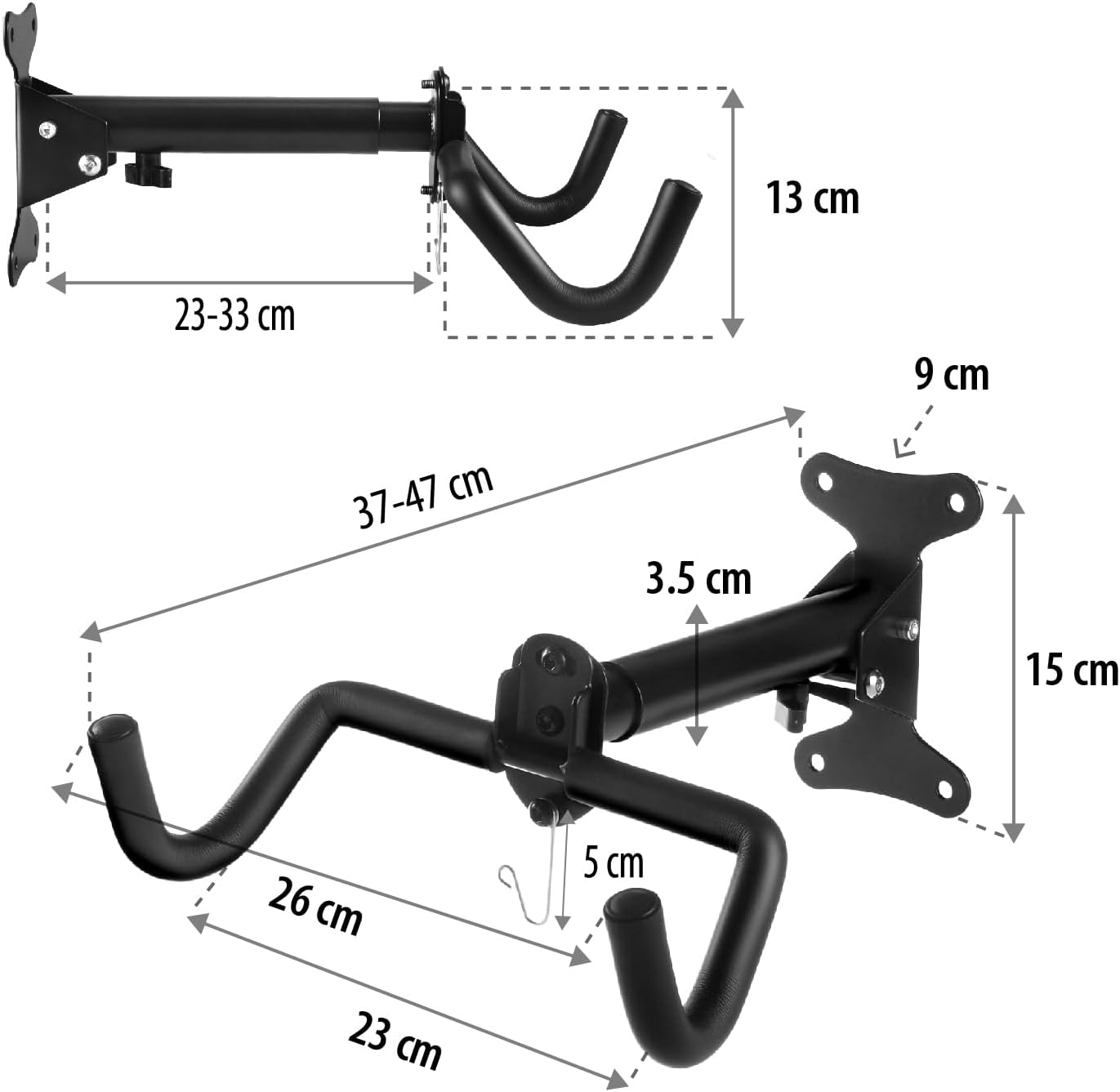
| Product Dimensions (folded) | 37 x 26 x 15 cm (approximate) |
| Adjustable Wall Distance | 37 - 47 cm |
| Item Weight | 1.3 kg |
| Features | Foldable arms, adjustable length, soft protective padding, additional helmet hook |
5. Setup & Installation
Follow these steps for secure installation of your bicycle wall mount:
- Choose a Suitable Location: Select a sturdy wall capable of supporting the weight of the mount and your bicycle (up to 30 kg). Ensure there is enough clear space for the bicycle to be mounted horizontally.
- Mark Drilling Points: Hold the wall mount against the desired location on the wall. Use a pencil to mark the positions for the four mounting holes. Ensure the mount is level.
- Drill Holes: Using an appropriate drill bit for your wall type (e.g., masonry bit for concrete/brick), drill holes at the marked positions. The depth and diameter of the holes should match the provided wall anchors.
- Insert Wall Anchors: Insert the wall anchors into the drilled holes. Tap them gently with a hammer until they are flush with the wall surface.
- Mount the Bracket: Align the wall mount with the inserted anchors. Insert the screws through the mounting holes of the bracket and into the anchors. Tighten the screws firmly using the provided wrench or an appropriate tool until the mount is securely fixed to the wall. Do not overtighten.
- Adjust Arm Length (Optional): The arms of the mount are adjustable in length (37-47 cm from the wall). Loosen the adjustment knob, extend or retract the arms to your desired length, and then securely tighten the knob.
- Adjust Arm Angle (Optional): The arms can be folded up when not in use. To adjust the angle or fold, loosen the central bolt, position the arms as desired, and then re-tighten the bolt.


6. Operation
Using your Maclean MC-484 bicycle wall mount is straightforward:
- Hanging Your Bicycle: Carefully lift your bicycle and place its top tube onto the two padded arms of the mount. Ensure the bicycle is balanced and stable. The soft protection on the arms prevents scratches to your bike's frame.
- Using the Helmet Hook: An additional hook is provided below the arms for hanging your helmet or other lightweight accessories.
- Folding the Mount: When the mount is not in use, you can fold the arms upwards to save space. Loosen the central bolt, pivot the arms upwards, and then re-tighten the bolt to secure them in the folded position.


7. Maintenance
To ensure the longevity and safe operation of your Maclean MC-484 wall mount, perform the following maintenance:
- Regular Inspection: Periodically (e.g., monthly) check all mounting screws and bolts to ensure they remain tight. Re-tighten if necessary.
- Cleanliness: Wipe the mount with a damp cloth to remove dust or dirt. Avoid using abrasive cleaners that could damage the finish.
- Damage Check: Inspect the steel frame and protective padding for any signs of damage, cracks, or excessive wear. If any damage is found, discontinue use and contact support for replacement parts or advice.
8. Troubleshooting
| Problem | Possible Cause | Solution |
|---|---|---|
| Mount feels unstable or wobbly. | Loose mounting screws or unsuitable wall material. | Ensure all mounting screws are securely tightened. Verify the wall material is strong enough; if not, consider relocating or reinforcing the wall. |
| Bicycle slides on the arms. | Protective padding is worn or dirty. | Clean the protective padding. If padding is severely worn, contact support for replacement. Ensure the bicycle is properly balanced. |
| Arms do not fold or adjust smoothly. | Adjustment bolt is too tight or mechanism is dirty. | Loosen the central adjustment bolt slightly. Clean any debris from the pivot points. Apply a small amount of lubricant if necessary. |
9. Warranty and Support
Maclean products are manufactured to high-quality standards. For any questions, technical support, or warranty claims, please refer to your purchase documentation or visit the official Maclean store on Amazon:
Official Maclean Store: Maclean Store on Amazon.it
Please have your model number (MC-484) and purchase date ready when contacting support.