
Introduction
The DEPOW Dual Layer Desk Clamp Power Strip & Surge Protector (Model AC1760-CU) is designed to provide extensive power and charging capabilities while optimizing workspace organization. This unit features a total of 17 AC outlets and 7 USB ports (including 3 USB-C ports), offering a comprehensive solution for powering up to 24 devices simultaneously. Its unique dual-layer, clamp-mount design allows for flexible installation on or under desks, helping to reduce cable clutter. Equipped with 1700 Joules of surge protection and an 8-fold safety system, it ensures the safety of your connected electronics. The integrated 10-foot flat extension cord and space-saving slim plug enhance its versatility and ease of use in various environments.

Figure 1: The DEPOW Dual Layer Desk Clamp Power Strip with its 10-foot extension cord.
Setup Instructions
The DEPOW Dual Layer Desk Clamp Power Strip is designed for easy, tool-free installation on desks up to 2.75 inches thick. Follow these steps to set up your power strip:
- Unpack Components: Carefully remove all components from the packaging. You will find two power strip units, a central clamp bracket, and a thumbwheel screw.
- Attach Power Strips to Bracket: The two power strip units connect to the central clamp bracket. Ensure the short connecting cable between the two units is properly routed.
- Position the Clamp: Place the clamp bracket onto the edge of your desk. The upper power strip unit should rest on the desk surface, and the lower unit should hang below.
- Secure the Clamp: Tighten the thumbwheel screw on the underside of the clamp until the unit is firmly secured to the desk. Ensure it is stable and does not wobble. The clamp can accommodate desk thicknesses up to 2.75 inches.
- Connect to Power: Plug the 10-foot flat extension cord into a grounded wall outlet. The ultra-thin, 45-degree angled plug is designed to fit in tight spaces without blocking other outlets.

Figure 2: Illustration of the desk clamp installation, highlighting the maximum desk thickness of 2.75 inches.
Video 1: This video demonstrates the installation process of the DEPOW Dual Layer Desk Clamp Power Strip, showing how to attach it to a desk and connect the power. It highlights the ease of setup and the dual-layer design.
Alternatively, the individual power strip units can be wall-mounted using the keyhole slots on their backs, without using the clamp bracket. This provides flexibility for various installation needs.

Figure 3: The power strip installed under a desk, showcasing its space-saving design and cable management capabilities.
Operating Instructions
The DEPOW Dual Layer Desk Clamp Power Strip provides convenient access to power and charging ports. Once installed and plugged into a wall outlet, it is ready for use.
- AC Outlets: The unit features 17 standard AC outlets (North American Type B - 3 pin). These outlets are distributed across the top and bottom units, allowing for organized power distribution for various devices such as monitors, computers, and other electronics. The outlets are widely spaced (1.7 inches apart) to accommodate larger power adapters without blocking adjacent ports.
- USB Charging Ports: A total of 7 USB ports are available, including 3 USB-C ports and 4 USB-A ports. These ports provide a shared maximum output of 5V/3.4A/17W, suitable for charging smartphones, tablets, smartwatches, and other USB-powered devices.
- Power Switch: Each power strip unit is equipped with an individual On/Off switch. This allows you to easily power on or off connected devices without unplugging them, conserving energy when not in use.

Figure 4: The top and bottom units of the power strip, showing the arrangement of 17 AC outlets and 7 USB ports.
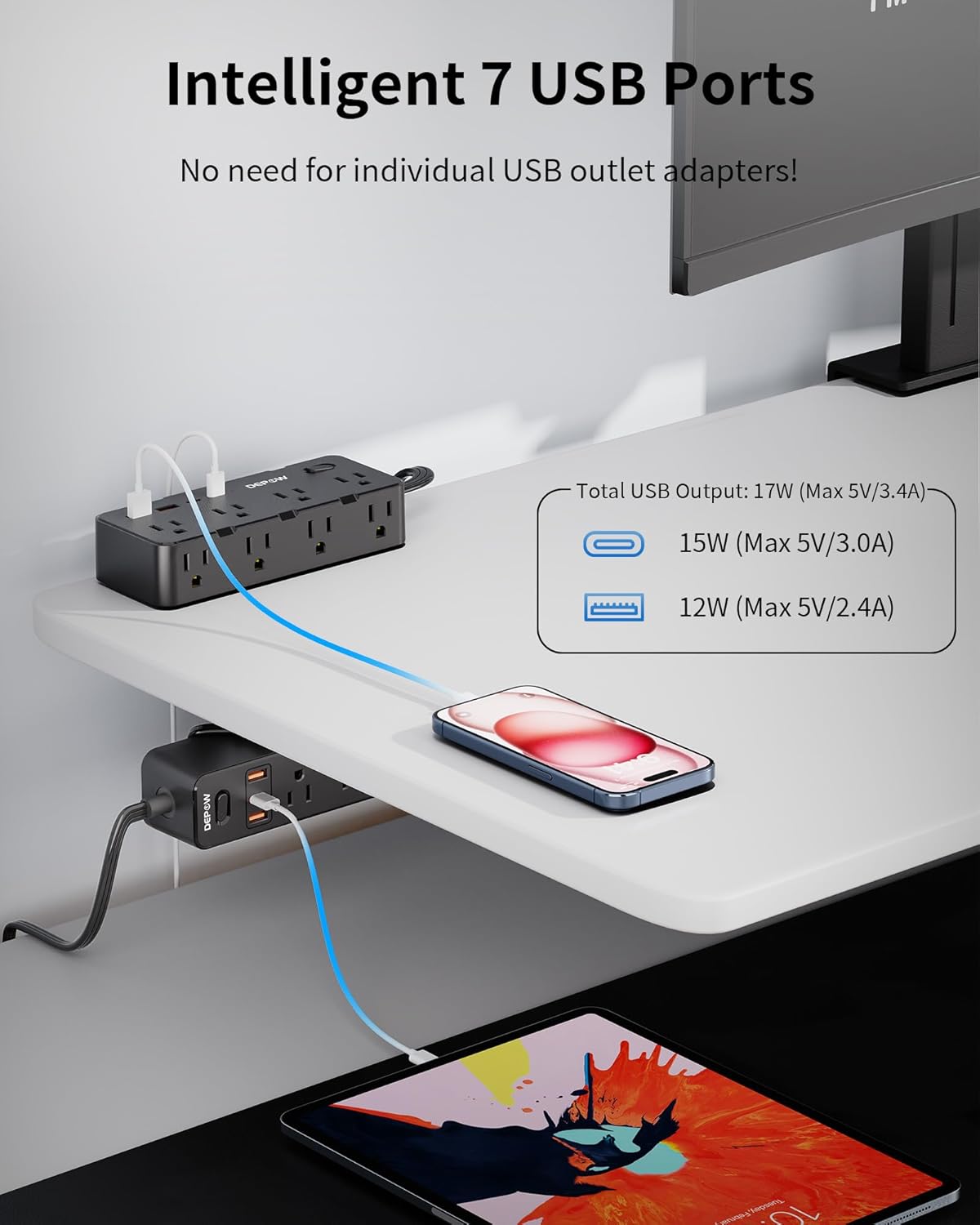
Figure 5: A detailed view of the integrated USB-A and USB-C charging ports on the power strip.

Figure 6: The widely spaced AC outlets, designed to accommodate bulky power adapters.
Safety Features
The DEPOW Dual Layer Desk Clamp Power Strip is engineered with multiple safety features to protect your devices and ensure safe operation:
- 1700J Surge Protection: Provides protection against power surges and spikes, safeguarding connected electronics from damage.
- Overload Protection (1875W/15A): An integrated 15A circuit breaker automatically shuts off power if the connected load exceeds the maximum capacity, preventing overheating and potential fire hazards.
- 8-Fold Safety Protection: Includes over-current protection, short-circuit protection, over-voltage protection, overheat protection, grounded protection, and flame-retardant housing for comprehensive safety.

Figure 7: Visual representation of the 1700J surge protection safeguarding electronics during electrical disturbances.

Figure 8: A diagram detailing the various safety protections, including surge, overload, over-current, short-circuit, over-voltage, overheat, grounded, and flame-retardant features.
Specifications
| Feature | Detail |
|---|---|
| Brand | DEPOW |
| Model Number | AC1760-CU |
| Color | Black |
| Total AC Outlets | 17 |
| Total USB Ports | 7 (3 USB-C, 4 USB-A) |
| Voltage | 125 Volts |
| Maximum Current | 15 Amps |
| Power Rating | 1875 Watts |
| Surge Protection Rating | 1700 Joules |
| Extension Cord Length | 10 Feet |
| Power Plug Type | Type B - 3 pin (North American) |
| Material | Polycarbonate |
| Max Install Thickness (Clamp) | 2.75 inches |
Maintenance
To ensure optimal performance and longevity of your DEPOW Power Strip, follow these maintenance guidelines:
- Regular Cleaning: Disconnect the power strip from the wall outlet before cleaning. Use a dry, soft cloth to wipe down the exterior. Avoid using liquid cleaners or abrasive materials.
- Inspect Cords and Plugs: Periodically check the power cord and plugs for any signs of damage, fraying, or loose connections. If any damage is found, discontinue use immediately and contact customer support.
- Avoid Overloading: Do not exceed the maximum power rating of 1875W/15A. Overloading can trigger the circuit breaker and potentially damage the unit or connected devices.
- Proper Storage: If storing the power strip, ensure the cord is neatly wrapped and secured to prevent tangling or damage. Store in a cool, dry place away from direct sunlight and moisture.
Troubleshooting
If you encounter issues with your DEPOW Power Strip, refer to the following common troubleshooting steps:
- No Power to Outlets/USB Ports:
- Check if the power strip's main plug is securely inserted into a working wall outlet.
- Ensure the On/Off switch on the power strip is in the 'On' position.
- Verify that the wall outlet itself is functioning by plugging in another device.
- If the power strip has an overload protection reset button, press it to reset the circuit breaker. This usually happens if the total power draw exceeds 1875W/15A. Reduce the number of connected devices or their power consumption.
- Devices Not Charging via USB:
- Ensure the USB cable is properly connected to both the power strip and your device.
- Try a different USB port or a different USB cable to rule out cable or port issues.
- Confirm your device is compatible with the USB charging specifications (Max 5V/3.4A/17W Shared).
- Loose Clamp:
- Re-tighten the thumbwheel screw on the clamp to ensure a secure fit on the desk.
- Ensure the desk thickness is within the supported range (up to 2.75 inches).
If the issue persists after attempting these steps, please contact DEPOW customer support for further assistance.
Warranty and Support
The DEPOW Dual Layer Desk Clamp Power Strip (Model AC1760-CU) comes with a limited warranty. For specific warranty details, claims, or technical support, please refer to the warranty information included with your product packaging or visit the official DEPOW website. Please have your model number (AC1760-CU) and purchase information ready when contacting support.