
Xixini 074
Xixini Vanity Desk with Mirror and Lights
Model: 074
Introduction
This instruction manual provides detailed guidance for the assembly, operation, and maintenance of your Xixini Vanity Desk with Mirror and Lights. Please read all instructions carefully before beginning assembly and retain this manual for future reference.
Safety Information
- Assembly may involve small parts. Keep away from children.
- Always follow electrical safety guidelines when handling lights and the charging station. Ensure all connections are secure before use.
- Use proper lifting techniques due to the weight of the components. It is recommended to have two people for assembly.
- Do not overload shelves or drawers.
- Place the vanity on a flat, stable surface to prevent tipping.
Package Contents
Verify that all components listed below are present before beginning assembly. If any parts are missing or damaged, please contact customer support.
- Vanity Desk Components (P2 Engineered Wood panels)
- Mirror with LED Lights
- RGB Storage Cabinet
- Power Strip with 2 AC Outlets and 2 USB Ports
- Assembly Hardware (screws, dowels, cam locks, etc.)
- Instruction Manual
- Makeup Stool
Setup and Assembly
Follow the step-by-step instructions provided in the included accessory bag. Assembly typically requires a screwdriver and may take a couple of hours. Refer to the assembly video for visual guidance.
Video: Assembly and Features Overview of the Xixini Vanity Desk. This video demonstrates the assembly process and highlights key features of the vanity desk, including lighting modes, storage, and the charging station.
Key Assembly Steps:
- Unpack and Identify Parts: Lay out all components and hardware. Refer to the parts list in your assembly guide.
- Assemble Base Structure: Connect the main side panels and bottom supports using the provided hardware.
- Install Drawers and Shelves: Secure drawer slides and internal shelves within the main structure.
- Attach Mirror and Top Panels: Carefully mount the mirror unit and secure the top desktop panels.
- Connect Electrical Components: Install the power strip and connect the LED and RGB lighting systems according to the wiring diagram.
- Assemble RGB Cabinet: Construct the glass-door cabinet and integrate the RGB lighting.
- Assemble Stool: Follow the separate instructions for stool assembly.
Operating Instructions
1. Mirror Lighting (3 Modes & Adjustable Brightness)
The vanity mirror features 7 Hollywood-style LED bulbs with three lighting modes: warm yellow, natural light, and bright white. The brightness is adjustable.

Image: The vanity mirror's three lighting modes (Cool White, Warm White, Warm Yellow) and controls for adjusting brightness and changing color.
- Change Mode: Press the touch button on the mirror to cycle through warm yellow, natural light, and bright white modes.
- Adjust Brightness: Press and hold the touch button to dim or brighten the lights. Release when the desired brightness is achieved.
2. RGB Ambient Lighting (Storage Cabinet)
The glass cabinet is equipped with RGB ambient lighting, offering over 60,000 static colors and multiple dynamic modes.
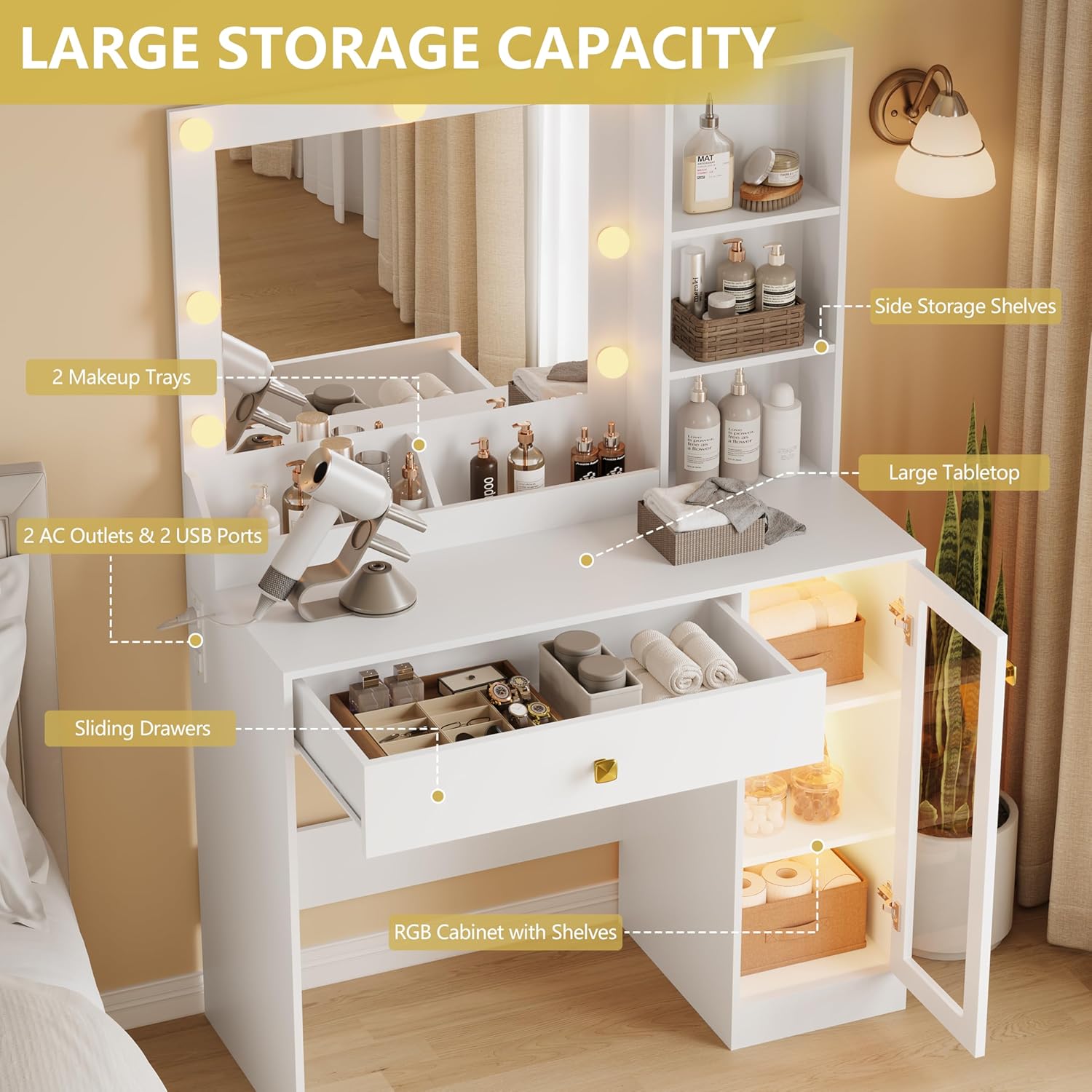
Image: The RGB ambient lighting feature in the glass storage cabinet, highlighting control options via mobile app or button, and various light modes.
- Control: Use the dedicated button or a mobile application to control the RGB lights.
- Features: Explore static colors, dynamic light modes, music mode (lights flash to rhythm), microphone mode, and timing functions.
3. Convenient Charging Station
The vanity desk includes a built-in charging station for your electronic devices.

Image: The integrated charging station, featuring 2 AC outlets and 2 USB ports, designed for convenient power access.
- Outlets: Two standard AC outlets (125V/12V) are available for hair dryers, curling irons, or other appliances.
- USB Ports: Two 5V/2A USB ports are provided for charging phones, tablets, and other USB-powered devices.
4. Storage Features
The vanity desk offers various storage solutions to keep your items organized.
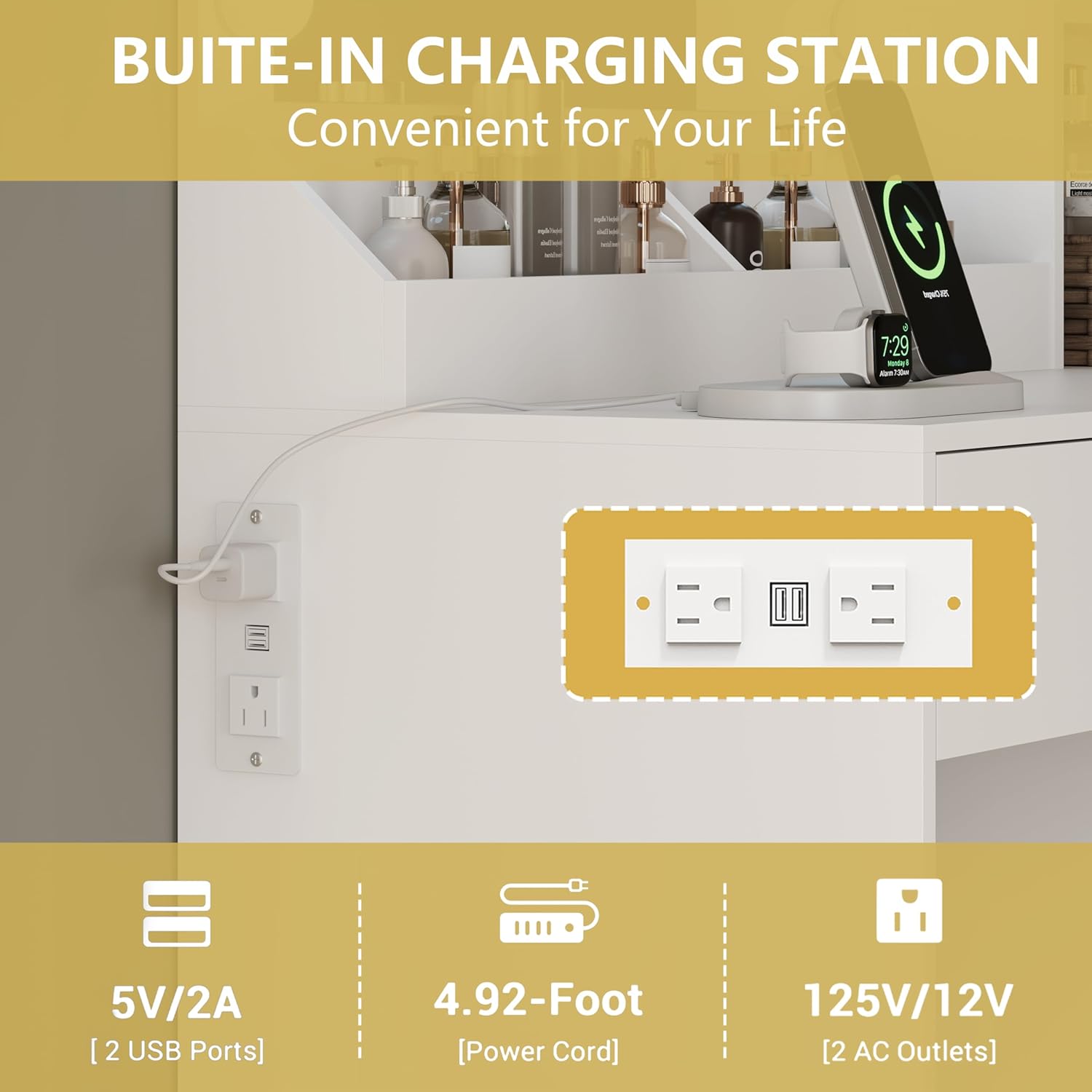
Image: An overview of the vanity desk's storage capabilities, including a large drawer, RGB-lit cabinet, and open shelving for various items.
- Spacious Drawer: Ideal for storing larger items or frequently used accessories.
- RGB Storage Cabinet: Features a glass door and internal shelves for display and storage, enhanced by RGB lighting.
- Open Side Shelves: Three open shelves provide easy access to perfumes, lotions, or decorative items.
- Makeup Trays: Two dedicated trays on the desktop help organize smaller makeup items.
5. Extendable Tabletop
An extendable tabletop provides additional workspace when needed.
- Extension: Pull out the side panel to extend the desktop surface.
- Retraction: Push the panel back in when not in use to save space.
6. Stool Storage
The included stool offers hidden storage space.
- Access: Lift the padded seat of the stool to reveal an internal storage compartment.
- Use: Store hair tools, accessories, or other personal items.
Maintenance
- Cleaning: Wipe the vanity desk surfaces with a damp cloth. Avoid harsh chemicals that may damage the finish.
- Mirror Care: Clean the mirror with a glass cleaner and a soft, lint-free cloth.
- Electrical Components: Ensure the power strip and lighting connections are dry and free from debris. Do not immerse electrical components in water.
- Hardware: Periodically check and tighten all assembly hardware to ensure stability.
Troubleshooting
| Problem | Possible Cause | Solution |
|---|---|---|
| Lights not turning on | Power cord not plugged in; loose connection; bulb failure | Check power connection; ensure all wires are securely connected; contact support if bulbs are faulty. |
| RGB lights not responding | App not connected; loose wiring; controller issue | Ensure app is correctly paired; check wiring to the RGB strip; try button control. |
| Desk feels unstable | Loose assembly hardware; uneven floor | Tighten all screws and cam locks; use shims if the floor is uneven. |
| Drawers stick or don't slide smoothly | Improperly installed slides; obstruction | Recheck drawer slide installation; remove any obstructions. |
Specifications
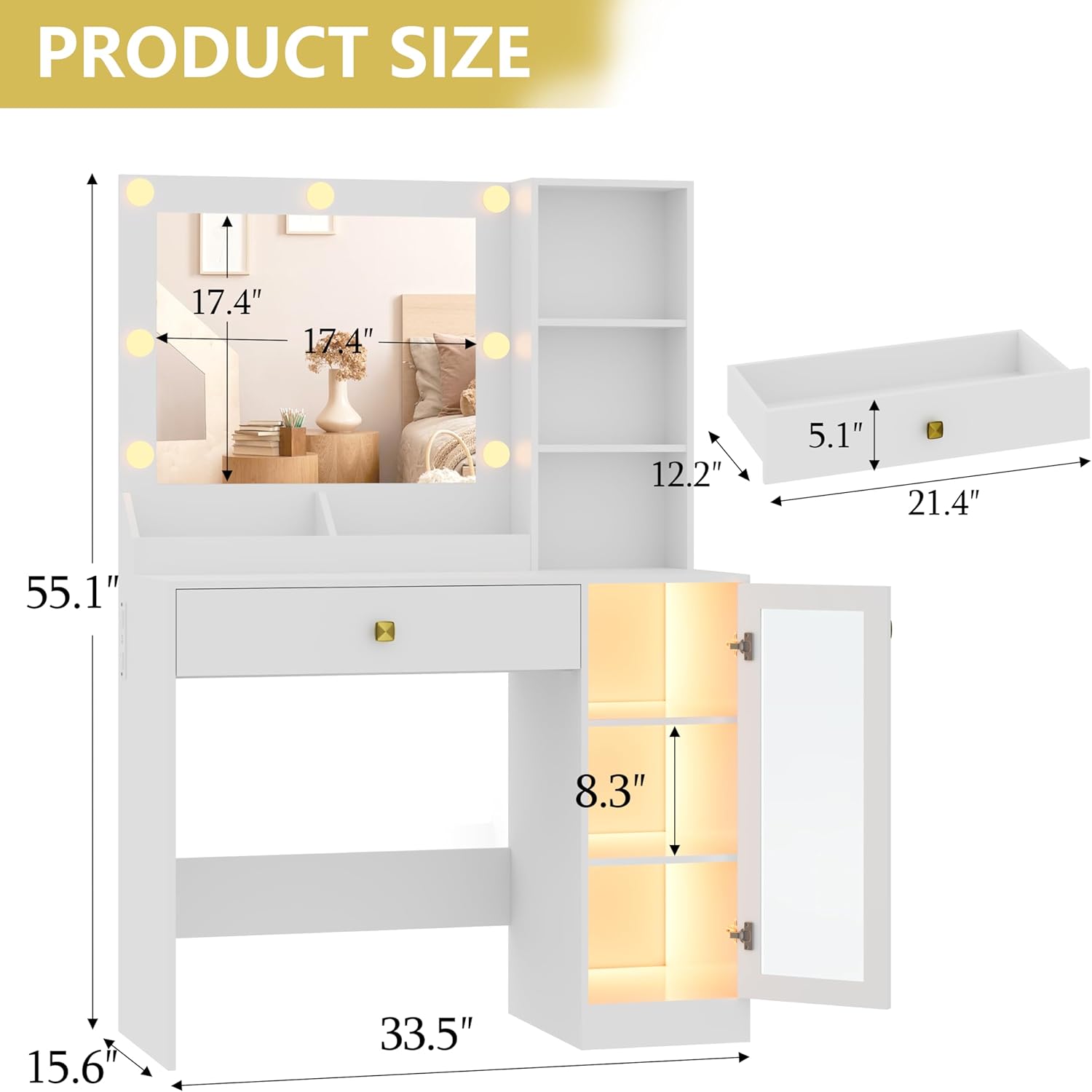
Image: Detailed product dimensions, including overall height, width, depth, and internal measurements for shelves and drawers.
| Feature | Detail |
|---|---|
| Model Number | 074 |
| Dimensions (L x W x H) | 33.5 x 15.55 x 55 inches (85 x 39.5 x 140 cm) |
| Weight | 57.8 lbs (26.2 kg) |
| Material | P2 Engineered Wood |
| Color | White |
| Mirror Lighting | 7 Hollywood bulbs, 3 modes (warm yellow, natural, bright white), adjustable brightness |
| Cabinet Lighting | RGB ambient light (60,000+ colors, dynamic modes, music/mic mode, timing) |
| Charging Station | 2 AC outlets (125V/12V), 2 USB ports (5V/2A) |
| Storage | 1 spacious drawer, RGB storage cabinet, 3 open side shelves, 2 makeup trays, stool storage |
| Max Tabletop Load | 50 lbs |
Warranty and Support
For warranty information, please refer to the documentation included with your purchase or contact Xixini customer service. If you encounter any issues or require assistance, please reach out to our support team through the contact information provided on our official website or your purchase platform.
Ask a question about this manual
Ask about setup, troubleshooting, compatibility, parts, safety, or missing instructions. Manuals+ will review the question and use this page’s manual context to help answer it.