Download PDFFree PDF. The Save button below keeps a bookmark and private notes in your account.
Lockin Veno Plus Palm Vein Video Smart Lock User Manual
Brand: Lockin | Model: LKMSD551
1. Product Overview
The Lockin Veno Plus is an advanced smart lock system designed to enhance home security and convenience. It integrates a smart lock, a 2K HD 180° camera, and a smart video doorbell into a single unit. This device offers multiple secure unlocking methods, including palm vein scanning and fingerprint recognition, along with built-in Wi-Fi and 8GB local storage, eliminating the need for monthly fees.
Image: The Lockin Veno Plus smart lock, showcasing its sleek design, palm vein recognition feature, and accompanying mobile application interface.
2. Key Features
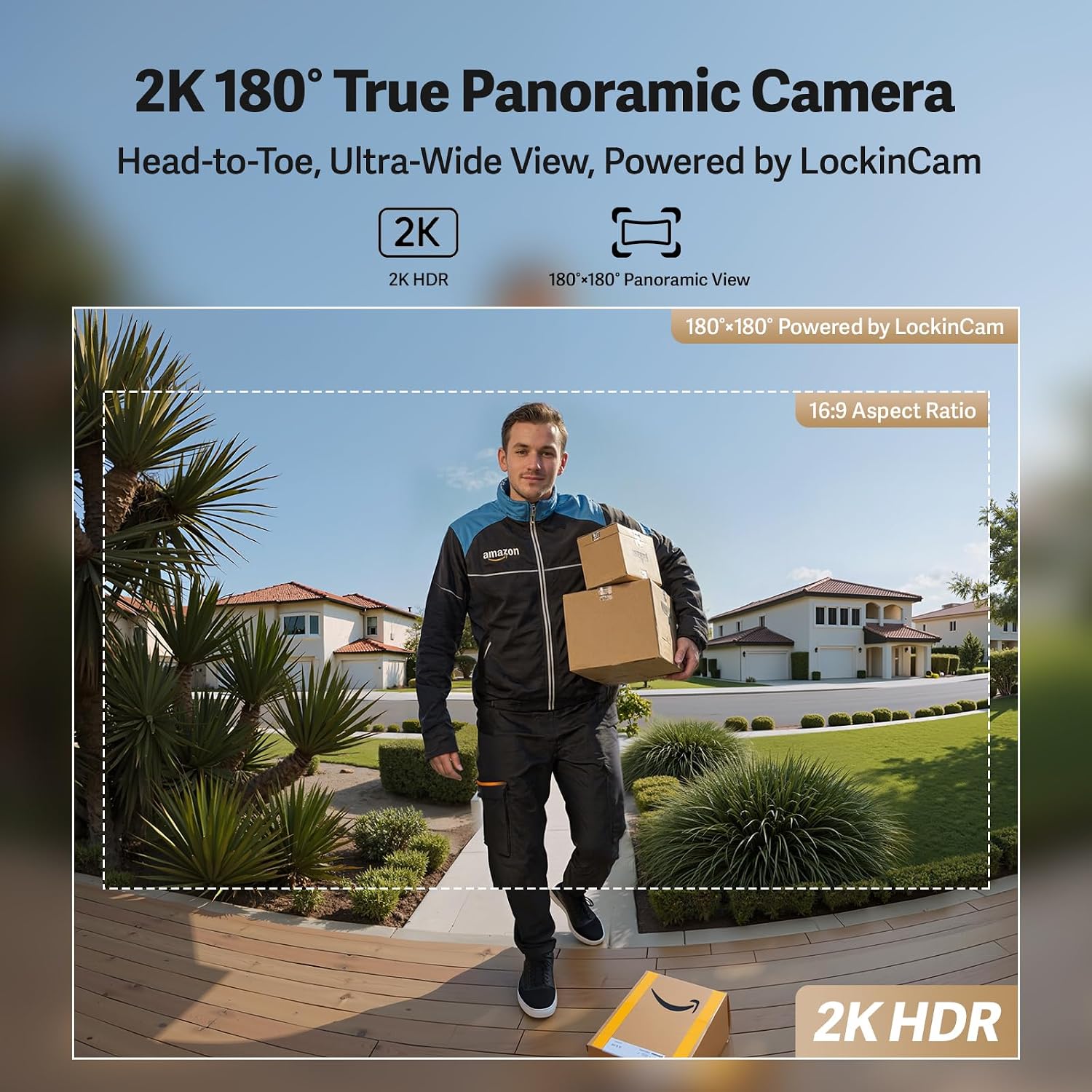
2.1. LockinCam 2K 180° True Panoramic Camera
The Veno Plus features a revolutionary 180°×180°×180° camera, significantly reducing blind spots within 4 inches (approx. 10cm) from the door frame. This provides a comprehensive head-to-toe, ultra-wide view of your doorstep. The camera includes motion detection, IR night vision for clear visibility in low light, and two-way talk functionality. All video data is stored on the integrated 8GB storage, ensuring no recurring monthly fees.
Image: A visual representation of the 2K 180-degree panoramic camera's wide field of view, capturing a person from head to toe at the doorstep.
2.2. 3-in-1 Smart Lock with Palm Vein & Fingerprint
This device combines a smart lock, a 2K HD 180° camera, and a smart video doorbell into one integrated system. It offers secure unlocking through both palm vein scanning and fingerprint recognition, providing dual biometric options for enhanced security without requiring an additional hub or base unit.
Image: A diagram illustrating the dual biometric unlock capabilities of the Lockin Veno Plus, highlighting palm vein and fingerprint recognition, along with the integrated 2K 180° camera and smart video doorbell.
2.3. Venokey Palm Vein Recognition
Experience touchless unlocking with the Venokey palm vein recognition technology. Certified by TÜV Rheinland, it boasts a 0.17s recognition speed and 99.9% accuracy. This method works reliably even with messy hands, peeling fingers, faint fingerprints, or long nails. The False Acceptance Rate (FAR) is less than 0.00001%, ensuring high security.
Image: A collage demonstrating the versatility of palm vein recognition, showing it functions effectively with hands that are dirty, aged, or have faint fingerprints.
Video: An official Lockin video explaining the benefits and reliability of palm vein recognition technology for smart locks.
2.4. Multiple Unlocking Methods
The Veno Plus offers six distinct unlocking methods: palm vein, fingerprint, PIN code, App control, voice control, and traditional mechanical keys. This versatility makes it suitable for various users, including tech enthusiasts, multi-generational families, and Airbnb hosts.
Image: An infographic detailing the six available unlocking methods: Palm Vein, Fingerprint, PIN Code, Mechanical Key, Voice Control, and App control.
2.5. Triple-Layer Security Protection
The lock features a robust security architecture with local storage, on-device processing, and P2P transmission. All computations occur locally on the device, minimizing reliance on cloud services and reducing privacy risks associated with data transmission. This design prevents unauthorized access and safeguards user privacy.
2.6. Power Management
The Veno Plus is equipped with a built-in removable rechargeable lithium battery that provides up to 3 months of power per charge. For continuous power, it supports optional solar charging (solar panel sold separately) and allows for an additional backup rechargeable lithium battery (sold separately).
2.7. Tempered Glass Finish & Durability
The lock features an elegant, weatherproof tempered glass finish that resists scratches and fading, maintaining its appearance over time. It is IP53 waterproof and BHMA certified, ensuring 10-year mechanical durability. The lock functions reliably in temperatures ranging from -22°F to 158°F (-30°C to 70°C).
2.8. Advanced Anti-False Trigger Technology
This technology prevents accidental inputs from environmental factors like rain and sunlight, eliminating unnecessary beeping and false alarms, ensuring a reliable and undisturbed user experience.
3. Setup and Installation
The Lockin Veno Plus is designed for easy installation, typically requiring only a screwdriver and about 15 minutes, with no drilling needed for standard setups.
3.1. Compatibility Check
Before installation, ensure your door meets the following specifications:
Door Hole Diameter: 1 in / 25.4 mm
Crossbore Diameter: 2⅛ in / 54 mm
Backset: 2⅜ in / 60 mm or 2¾ in / 70 mm
Door Thickness: 1⅜ in - 2⅛ in (35 mm - 55 mm)
Minimum Distance Between Handle and Crossbore Center: 3 in / 75 mm
The lock is compatible with single cylinder deadbolts and rectangular latch plate cutouts. It is not compatible with mortise locks, rounded latch holes, or storm doors.
Image: A detailed diagram illustrating door compatibility requirements and incompatible door types for the Lockin Veno Plus smart lock.
3.2. Installation Steps Overview
For a detailed visual guide on installation, please refer to the official installation video below.
Video: Official Lockin installation guide for the Veno Plus smart lock, demonstrating the step-by-step process.
Prepare the door: Ensure the door hole and crossbore meet the specified dimensions.
Install the latch and strike plate: Secure the latch into the door edge and the strike plate onto the door frame.
Install the exterior assembly: Insert the exterior lock unit into the door, ensuring cables pass through the correct openings.
Install the interior mounting plate: Detach the interior mounting plate, battery cover, and silicone plug from the interior assembly. Run the cables through the slot on the mounting plate. Straighten the door status cable carefully to avoid damage. Align and insert the screws, ensuring that the cable is positioned below them without being pinched.
Connect cables and install interior assembly: Connect the cables from the exterior unit to the interior assembly. Secure the interior assembly to the mounting plate.
Insert battery: Place the fully charged lithium battery into the interior assembly.
Test the lock: Verify all unlocking methods function correctly and the lock operates smoothly.
4. Operating Instructions
4.1. Unlocking Methods
Palm Vein: Present your registered palm to the sensor for touchless, rapid unlocking.
Fingerprint: Place your registered finger on the fingerprint sensor for quick access.
PIN Code: Enter your unique PIN code on the keypad.
App Control: Use the Lockin Smart App on your smartphone for remote unlocking and management.
Voice Control: Integrate with compatible smart home ecosystems (Apple Home, Alexa, Google Home, Samsung SmartThings) for voice commands. A Matter over Thread border router hub is required for full voice control functionality.
Mechanical Key: Use the provided physical keys as a traditional backup method. The key slot is discreetly located.
4.2. Lockin Smart App Control
The Lockin Smart App provides comprehensive control over your Veno Plus lock from anywhere.
Remote Unlock: Unlock your door remotely for guests or deliveries.
Two-Way Talk: Communicate with visitors at your doorstep via the integrated camera and microphone.
Instant Alerts: Receive real-time notifications for activity at your door.
Passcode Management: Generate one-time passcodes or manage user permissions for various access levels.
Smart Modes: Choose from Home, Away, and Geofencing modes to customize alerts and lock behavior.
Image: A smartphone screen displaying the Lockin Smart App, highlighting features like two-way talk, remote unlock, and instant alerts for door activity.
4.3. Voice Control Integration
The Lockin Veno Plus supports voice control across major smart home ecosystems, including Apple Home, Amazon Alexa, Google Home, and Samsung SmartThings.
Image: An illustration showing the Lockin Veno Plus's compatibility with various voice control platforms like Apple Home, Alexa, Google Home, and Samsung SmartThings.
5. Maintenance
5.1. Battery Management
The Veno Plus is powered by a removable, rechargeable lithium battery.
A full charge provides up to 3 months of battery life, depending on usage.
The battery can be recharged via USB-C.
Consider purchasing an optional solar panel (sold separately) for continuous charging or a backup rechargeable lithium battery for extended power continuity.
The exterior lock/keypad also has a USB-C port on the bottom for emergency power using a power bank if the battery runs out.
5.2. Cleaning and Care
The tempered glass finish is designed for durability and resistance to scratches and fading. To clean, wipe with a soft, damp cloth. Avoid abrasive cleaners or solvents that could damage the finish or electronic components.
5.3. Weather Resistance
The Lockin Veno Plus is IP53 waterproof, meaning it is protected from limited dust ingress and from water spray from any direction. It is designed to function perfectly in a wide temperature range from -22°F to 158°F (-30°C to 70°C).
6. Troubleshooting
6.1. False Triggers
The advanced anti-false trigger technology is designed to prevent accidental inputs from rain or sunlight. If you experience persistent false alarms or beeping, ensure the sensor area is clean and unobstructed.
6.2. Connectivity Issues
Ensure your Wi-Fi network is stable and within range of the lock.
Restart your home router and the lock (by removing and reinserting the battery).
Check the Lockin Smart App for any firmware updates, as these often resolve connectivity issues.
6.3. Biometric Recognition Issues
For palm vein recognition, ensure your hand is clean and positioned correctly, about 6-8 inches from the camera.
For fingerprint recognition, ensure your finger is clean and covers the sensor completely.
Re-enroll your palm or fingerprint in the app if recognition issues persist.
6.4. Battery Depletion
If the battery is completely depleted, you can use a power bank connected to the USB-C port on the bottom of the exterior unit to temporarily power the lock and gain entry. Alternatively, use the mechanical key.
7. Specifications
Feature
Detail
Model Number
LKMSD551
Dimensions (L x W x H)
7.24 x 3.29 x 1.48 inches
Item Weight
3.66 pounds
Material
Aluminum
Color
Black
Power Source
Battery Powered (Lithium Polymer)
Voltage
7.4 Volts
Connectivity Technology
Bluetooth, Wi-Fi, Thread
Camera Resolution
2K (4 MP Effective Still Resolution)
Camera Field of View
180°x180°x180° Panoramic
Storage
8GB Built-in Local Storage
Water Resistance Rating
IP53
Operating Temperature
-22°F to 158°F (-30°C to 70°C)
Certifications
BHMA Certified (10-year mechanical durability)
8. Warranty and Customer Support
The Lockin Veno Plus Smart Lock comes with a 1-year warranty. Lockin provides round-the-clock customer care and multi-channel support via phone or email to assist with any inquiries or issues.
Ask about setup, troubleshooting, compatibility, parts, safety, or missing instructions. Manuals+ will review the question and use this page’s manual context to help answer it.