
ODK B011418SPD01003USDF
ODK 40 Inch Small Computer Desk User Manual
Model: B011418SPD01003USDF
1. Introduction
Thank you for choosing the ODK 40 Inch Small Computer Desk. This modern and versatile desk is designed to optimize your workspace with its compact size, ample storage, and reversible design. This manual provides essential information for safe assembly, proper use, and effective maintenance to ensure the longevity of your desk.
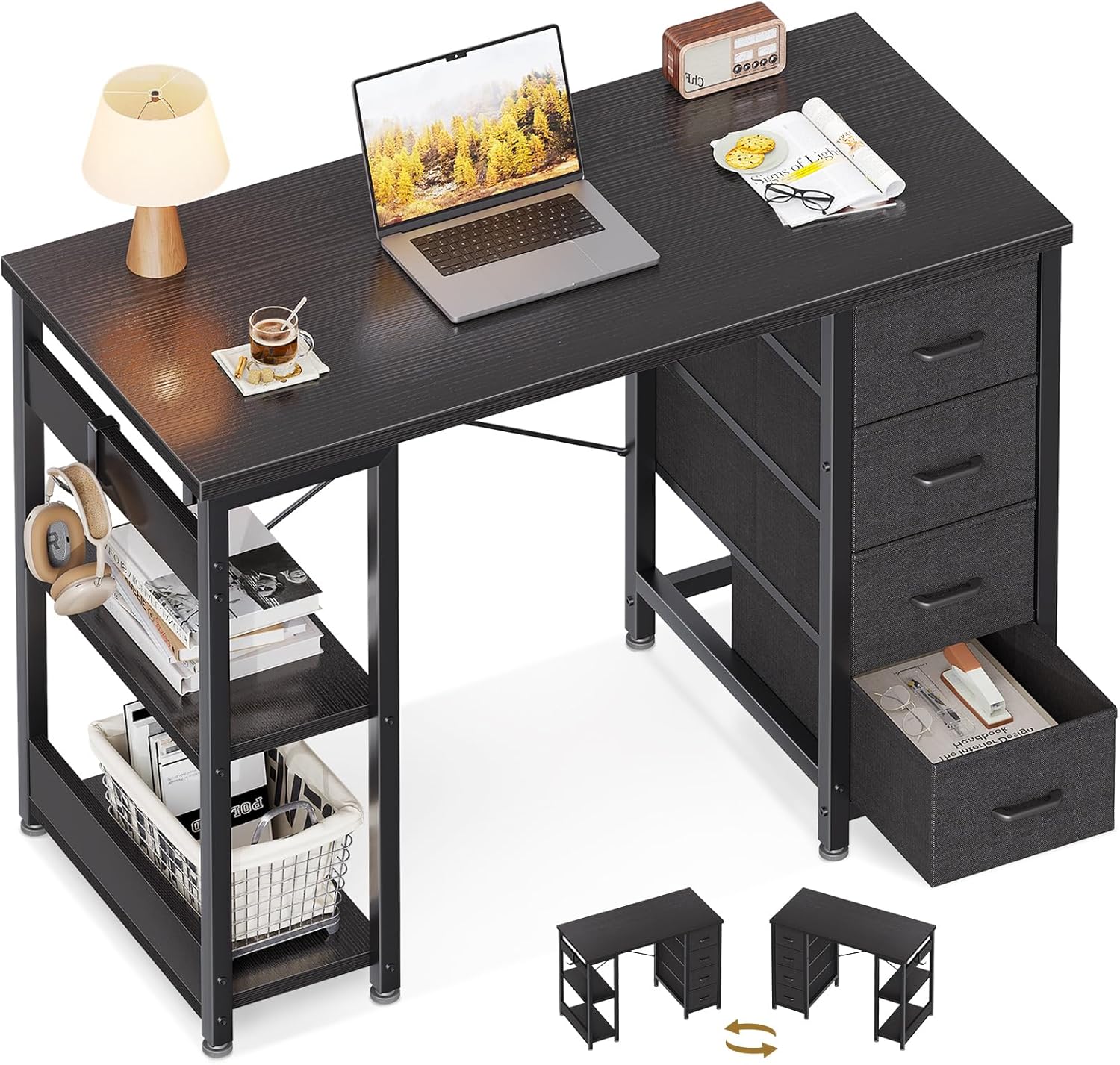
Figure 1: ODK 40 Inch Small Computer Desk, showcasing its compact design and integrated storage.
2. Safety Information
- Read all instructions carefully before assembly and use.
- Keep all small parts and packaging materials away from children and pets to prevent choking hazards.
- Ensure all screws and fasteners are securely tightened before use. Periodically check and re-tighten as necessary.
- Do not overload the desk or shelves. Refer to specifications for weight capacities.
- Place the desk on a flat, stable surface to prevent tipping.
- Avoid exposing the desk to direct sunlight, extreme temperatures, or high humidity, which can damage the materials.
3. Package Contents
Please verify that all components listed below are present before beginning assembly. If any parts are missing or damaged, please contact ODK customer service for assistance.
- Desk Top Panel
- Metal Frame Components
- Fabric Drawers (x4)
- Storage Shelf Panels (x2)
- Hardware Pack (screws, bolts, Allen wrench)
- Adjustable Foot Pads
- Side Hook
4. Setup and Assembly
Assembly of the ODK Computer Desk is designed to be straightforward. It is recommended to assemble the desk with two people for ease and safety. The desk features a reversible design, allowing you to install the fabric drawers and storage shelves on either the left or right side to best suit your space and preference.
- Unpack and Identify Parts: Lay out all components on a clean, soft surface to prevent scratches. Refer to the package contents list to ensure all parts are present.
- Assemble the Metal Frame: Connect the metal frame components according to the diagrams provided in your included assembly guide. Ensure all connections are finger-tightened initially.
- Determine Orientation: Decide whether you want the fabric drawers and storage shelves on the left or right side of the desk. This will dictate how you attach the corresponding frame sections.
- Attach Storage Sections: Secure the frame for the fabric drawers and the frame for the storage shelves to the main desk frame using the provided hardware.
- Install Desk Top: Carefully place the desk top panel onto the assembled frame and secure it with the appropriate screws.
- Insert Fabric Drawers: Fold and insert the fabric drawers into their designated slots.
- Install Storage Shelves: Place the two storage shelf panels onto their supports within the shelf frame.
- Attach Adjustable Foot Pads: Screw the adjustable foot pads into the bottom of the desk legs. Adjust them to level the desk on uneven surfaces.
- Install Side Hook: Attach the side hook to the designated area on the shelf unit for convenient storage of headphones or bags.
- Final Tightening: Once all components are in place and the desk is correctly oriented, fully tighten all screws and fasteners using the provided Allen wrench. Do not overtighten.

Figure 2: Desk dimensions and illustration of the reversible design for drawer and shelf placement.
5. Operating Instructions
The ODK Computer Desk is designed for functional use in various settings, including home offices, studies, and bedrooms. Its features are intuitive and easy to use.
5.1 Utilizing Fabric Drawers
The four spacious fabric drawers provide ample storage for office supplies, documents, personal items, and more. Simply pull the handle to open and push to close. The smooth slide mechanism ensures easy access.

Figure 3: Detailed view of the four fabric drawers, demonstrating their storage capacity for various items.
5.2 Using Storage Shelves
The double-tier storage shelves are ideal for organizing books, binders, decorative items, or small electronic devices. Arrange items to optimize your workspace and keep essentials within reach.

Figure 4: The double-tier storage shelves, perfect for books, files, and other office necessities.
5.3 Side Hook Functionality
A convenient side hook is included, allowing you to hang headphones, bags, or other items, keeping your desktop clear and organized.

Figure 5: The integrated side hook, providing a convenient spot for hanging headphones or other accessories.
6. Maintenance
Proper care and maintenance will help preserve the appearance and functionality of your ODK Computer Desk.
- Cleaning: Wipe the desk surfaces (MDF board and metal frame) with a soft, damp cloth. Avoid using harsh chemicals, abrasive cleaners, or polishes that may damage the finish.
- Fabric Drawers: For light cleaning, use a lint roller or a soft brush to remove dust. For spills, spot clean with a mild detergent and water, then air dry completely. Do not machine wash.
- Spills: Immediately wipe up any spills to prevent staining or damage to the desk surface.
- Hardware: Periodically check all screws and fasteners to ensure they remain tight. Re-tighten as needed to maintain stability.
- Avoid Heat and Moisture: Do not place hot items directly on the desk surface. Protect the desk from excessive moisture.
7. Troubleshooting
| Problem | Possible Cause | Solution |
|---|---|---|
| Desk wobbles or is unstable. | Uneven floor; loose fasteners. | Adjust the foot pads on the bottom of the legs until the desk is stable. Check and tighten all assembly screws. |
| Fabric drawers do not slide smoothly. | Drawer is overloaded; fabric is caught; drawer not fully inserted. | Reduce the weight in the drawer. Ensure no fabric is obstructing the slide path. Push the drawer in completely. |
| Difficulty with assembly steps. | Instructions unclear; parts oriented incorrectly. | Review the assembly diagrams carefully, especially for the reversible sections (drawers/shelves). Ensure parts are facing the correct direction. Contact customer service if issues persist. |
8. Specifications
| Feature | Detail |
|---|---|
| Brand | ODK |
| Model Name | Computer Desk |
| Model Number | B011418SPD01003USDF |
| Product Dimensions | 15.8"D x 39.4"W x 29.8"H |
| Color | Black |
| Style | Modern |
| Base Material | Metal |
| Top Material Type | Engineered Wood |
| Finish Type | Laminated |
| Special Feature | Storage |
| Item Weight | 23.1 Pounds |
| Number of Drawers | 4 |
| Required Assembly | Yes |
9. Warranty and Support
ODK is committed to providing high-quality products and excellent customer service. If you encounter any issues with your ODK 40 Inch Small Computer Desk, please do not hesitate to contact us.
- Customer Service: ODK Customer Service offers 24-hour online professional pre-sale and after-sale support.
- Quality Assurance: We provide fast refunds or replacements for any quality problems encountered with the product.
- Returns: This product is eligible for a refund or replacement within 30 days of purchase, as per standard return policies.
For further assistance, please visit the official ODK store or contact us through your purchase platform.
Related documentsB011418SPD01003USDF


Ask a question about this manual
Ask about setup, troubleshooting, compatibility, parts, safety, or missing instructions. Manuals+ will review the question and use this page’s manual context to help answer it.