
ALGAM LIGHTING LAL MINIPARCOB30-RGB
Algam Lighting MINIPARCOB 30 RGB User Manual
Compact 30W RGB COB LED PAR Light
1. Introduction
The Algam Lighting MINIPARCOB 30 RGB is a compact and powerful LED PAR light designed for various applications. It features a 30W COB LED source capable of producing a wide range of vibrant colors. Its compact size makes it easy to install in any space. This user manual provides essential information for the safe and efficient operation of your MINIPARCOB 30 RGB.
Key features include:
- Compact and powerful 30W RGB COB LED PAR light.
- Ideal for private parties, DJs, small events, bars, and restaurants.
- Small dimensions (13 cm side) and lightweight (0.6 kg) for easy installation in confined spaces.
- Control via DMX (3 or 7 channels), Auto mode, Sound-activated mode, DMX512, and infrared remote control.
- LCD control panel for easy navigation.
- Color jump with dimming, static colors, color mixing, color jump with gradient, and strobe effects.
- Adjustable yoke for various orientations: placed on a surface or suspended.
- Data Inputs/Outputs: 3-pin XLR.
- IP20 rating for indoor use.
2. Product Overview
Familiarize yourself with the components of your MINIPARCOB 30 RGB.

Figure 2.1: Front view of the MINIPARCOB 30 RGB LED PAR light, showing the main COB LED lens and the adjustable mounting bracket.
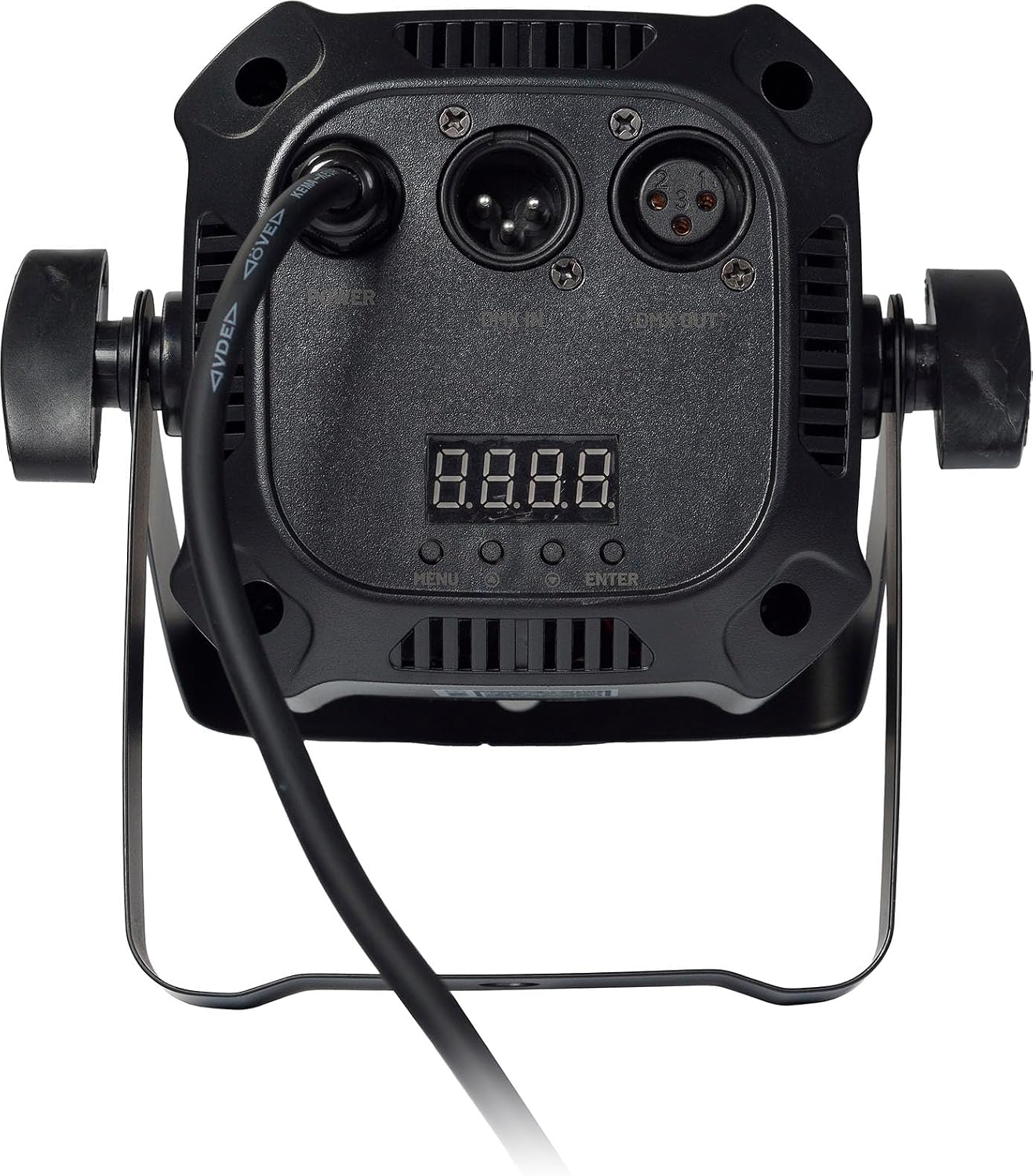
Figure 2.2: Rear panel of the MINIPARCOB 30 RGB, displaying the LCD control panel, menu buttons, DMX input/output (XLR 3-pin), and power input.

Figure 2.3: Contents of the MINIPARCOB 30 RGB package, including the LED PAR light, power cable, infrared remote control, and user manual.
Package Contents:
- MINIPARCOB 30 RGB LED PAR Light
- Power Cable
- Infrared Remote Control
- User Manual
3. Setup
3.1 Placement
The MINIPARCOB 30 RGB can be placed on a flat surface or suspended using its adjustable yoke. Ensure the surface is stable or the mounting point is secure enough to hold the fixture's weight (0.77 kg).
3.2 Power Connection
Connect the provided power cable to the power input on the rear panel of the fixture and then to a suitable power outlet. Ensure the voltage matches the fixture's requirements.
3.3 DMX Connection (Optional)
For DMX control, connect a 3-pin XLR DMX cable from your DMX controller's output to the DMX IN port on the MINIPARCOB 30 RGB. If linking multiple fixtures, connect from the DMX OUT of the first fixture to the DMX IN of the next, and so on.
4. Operating Instructions
The MINIPARCOB 30 RGB offers multiple control modes for versatile operation.
4.1 Control Panel Navigation
Use the LCD control panel and buttons on the rear of the unit to navigate menus and select modes.
- MENU: Press to cycle through main menu options.
- UP/DOWN: Use to adjust values or select sub-menu options.
- ENTER: Confirm selection or save settings.
4.2 Operating Modes
- Auto Mode: The fixture runs through pre-programmed light shows automatically. Select this mode from the menu.
- Sound-Activated Mode: The light reacts to ambient sound. Ensure the built-in microphone is not obstructed.
- DMX512 Mode: Allows external control via a DMX controller. Set the DMX address and channel mode (3 or 7 channels) using the control panel. Refer to the DMX chart for channel functions.
- Master/Slave Mode: Link multiple MINIPARCOB 30 RGB units. Set one unit as "Master" and others as "Slave" to synchronize their operation.
- Infrared Remote Control: Use the included remote for convenient control of basic functions, color selection, and mode changes.
4.3 Color and Effect Control
The MINIPARCOB 30 RGB can produce a variety of colors and effects:
- Static Colors: Select specific colors (Red, Green, Blue, or mixed combinations).
- Color Mixing: Adjust RGB values to create custom colors.
- Color Jump: Rapidly switch between different colors.
- Color Jump with Gradient: Transition between colors with a smooth fade.
- Strobe: Create a flashing light effect with adjustable speed.

Figure 4.1: The MINIPARCOB 30 RGB emitting a vibrant red light, demonstrating its color capabilities.

Figure 4.2: The MINIPARCOB 30 RGB emitting a bright blue light, showcasing another color option.
5. Maintenance
Regular maintenance ensures the longevity and optimal performance of your MINIPARCOB 30 RGB.
5.1 Cleaning
- Disconnect the fixture from power before cleaning.
- Use a soft, lint-free cloth to wipe the exterior.
- For the lens, use a specialized lens cleaning solution and a microfiber cloth to avoid scratches.
- Do not use abrasive cleaners or solvents.
5.2 Storage
When not in use, store the fixture in a cool, dry place, away from direct sunlight and extreme temperatures. It is recommended to store it in its original packaging or a padded case to prevent damage.
6. Troubleshooting
If you encounter issues with your MINIPARCOB 30 RGB, refer to the following common problems and solutions:
| Problem | Possible Cause | Solution |
|---|---|---|
| Fixture does not power on. | No power supply; faulty cable. | Check power connection; try a different outlet; inspect power cable for damage. |
| No DMX control. | Incorrect DMX address; wrong channel mode; faulty DMX cable; no DMX signal. | Verify DMX address and channel mode settings; check DMX cable connections; ensure DMX controller is sending a signal. |
| Colors are incorrect or inconsistent. | Incorrect DMX values; internal setting issue. | Check DMX values for RGB channels; reset fixture to factory defaults if possible. |
| Remote control not working. | Dead battery; obstructed sensor. | Replace remote battery; ensure clear line of sight to the IR sensor on the fixture. |
If the problem persists after trying these solutions, please contact Algam Lighting customer support.
7. Specifications
| Feature | Detail |
|---|---|
| Brand | ALGAM LIGHTING |
| Model Number | LAL MINIPARCOB30-RGB |
| Light Source | 30W COB LED (RGB) |
| DMX Channels | 3 or 7 channels |
| Control Modes | DMX, Auto, Sound-activated, Master/Slave, Infrared Remote |
| Data Connectors | 3-pin XLR (Input/Output) |
| Ingress Protection (IP) Rating | IP20 (Indoor use only) |
| Dimensions (Package) | 15.4 x 13.7 x 13.7 cm |
| Item Weight | 770 grams |
| Included Components | Remote control, power supply |
8. Warranty and Support
For warranty information and technical support, please refer to the official Algam Lighting website or contact your local distributor. Keep your proof of purchase for any warranty claims.
Manufacturer: ALGAM LIGHTING
ASIN: B0DYJKVYT7
Date First Available on Amazon.com.be: February 26, 2025
Related documentsLAL MINIPARCOB30-RGB


Ask a question about this manual
Ask about setup, troubleshooting, compatibility, parts, safety, or missing instructions. Manuals+ will review the question and use this page’s manual context to help answer it.