
Product Overview
This manual provides detailed instructions for the installation, setup, and operation of your XTRONS Android 14 Car Stereo. This advanced head unit features an 8-inch IPS touch screen, GPS navigation, Bluetooth, built-in DSP, Wireless CarPlay, and Android Auto, designed specifically for select Audi A3, S3, and RS3 models.

Figure 1: XTRONS Android 14 Car Stereo main unit.
Vehicle Compatibility
This XTRONS car stereo is compatible with the following Audi models and years:
- Audi A3 8P (2003-2012)
- Audi A3 8P1 3-door Hatchback (2003-2012)
- Audi S3 8P (2006-2012)
- Audi RS3 Sportback (2011-2012)
Important Note on Compatibility:
Please verify whether your vehicle’s original CD player is single DIN size. If it is, this unit is NOT compatible with your car. This plug-and-play radio kit is designed to integrate seamlessly, retaining original features such as steering wheel controls, AC information display, and BOSE sound system functionality.

Figure 2: Visual guide for applicable Audi models and years.
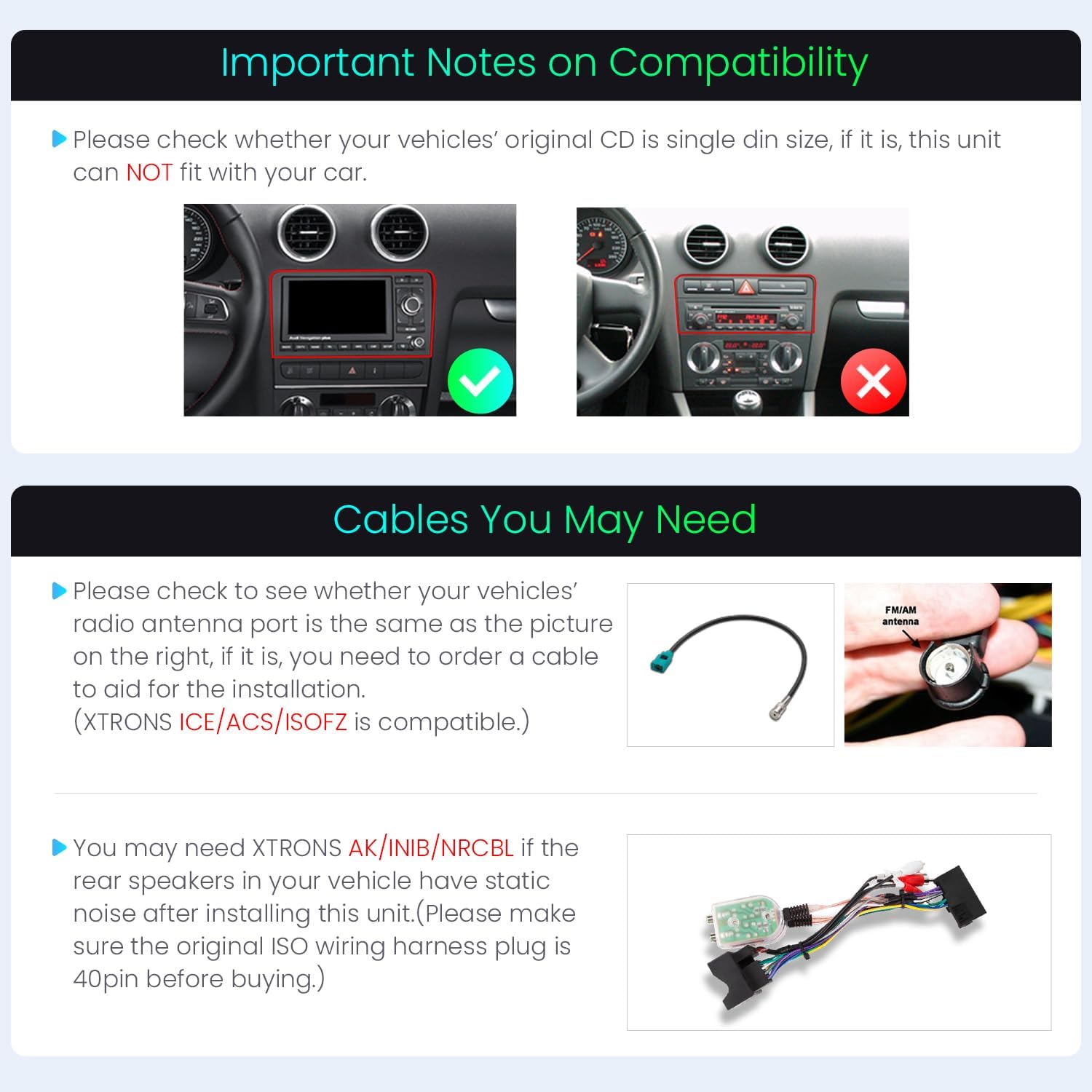
Figure 3: Visual representation of compatibility check, showing a compatible and incompatible setup.
Cables You May Need:
Check your vehicle's radio antenna port. If it matches the type shown in Figure 4, you may need to order an additional cable for proper installation. XTRONS ICE/ACS/ISOFZ is compatible.
If your vehicle's rear speakers experience static noise after installation, you may need XTRONS AK/INIB/NRCBL. Ensure your original ISO wiring harness plug is 40-pin before purchasing this accessory.

Figure 4: Examples of additional cables that may be required for installation.
Package Contents
Verify that all items listed below are included in your package:
- 1 × Main Unit
- 2 × ISO Wiring Harness
- 2 × USB Cable
- 1 × 4G Antenna
- 1 × GPS Antenna
- 1 × Amplifier Box for BOSE System
- 2 × Uninstallation Tool
- 1 × User Manual
- 1 × CANbus Box
- 1 × Radio Antenna Cable
- 1 × Camera Cable
- 1 × SIM Card Slot Cable (Note: 4G Function is not supported in US)
- 2 × Clip

Figure 5: All included accessories in the package.
Installation Guide
Professional installation is recommended. Ensure the vehicle's power is disconnected before beginning installation. Refer to the detailed wiring diagram and your vehicle's specific wiring instructions.
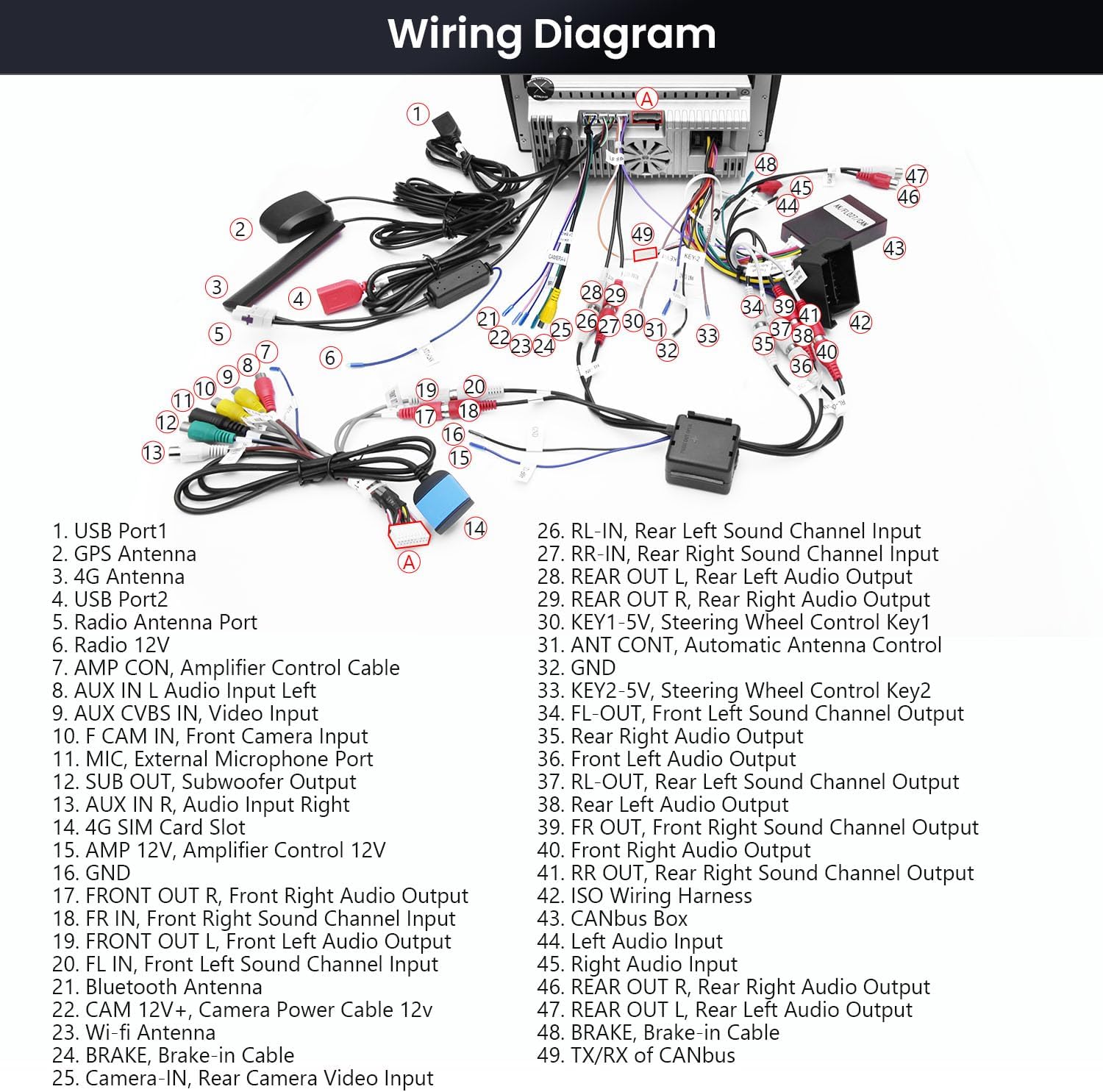
Figure 6: Comprehensive wiring diagram for connecting the XTRONS car stereo.
Setup and Initial Configuration
Connecting to Wi-Fi
To access online features and download themes, connect your device to a Wi-Fi network. Navigate to Settings > Wi-Fi and select your preferred network.
Changing UI Themes
Personalize your XTRONS ID series with multiple UI themes. Follow these steps:
- Connect your device to Wi-Fi.
- Open the App Store and navigate to 'Themes'.
- Browse and install your preferred theme.
- Tap 'Apply' to activate the new theme.
Video 1: Instructions on how to refresh themes on XTRONS ID series.
Operating Instructions
Your XTRONS car stereo offers a range of features to enhance your driving experience:
Display Features
The unit features an 8-inch High Definition IPS screen with a resolution of 1280x720 pixels. The IPS panel provides a 178° viewing angle, ensuring clear visibility from various positions without eye fatigue.

Figure 7: Details of the 8-inch IPS display technology.
Smartphone Connectivity (CarPlay & Android Auto)
Enjoy seamless integration with your smartphone through built-in Wireless and Wired CarPlay and Android Auto. Bluetooth 5.0 ensures quick and stable connections for calls and voice control. Access navigation, music, messages, and more directly from the head unit, enhancing driving safety.

Figure 8: User interface examples for CarPlay and Android Auto.
Audio Features (Built-in DSP)
The integrated Digital Sound Processor (DSP) allows for advanced audio customization. Features include a 15-band graphic equalizer, 8 preset EQ modes, and smart field sound positioning to optimize your listening experience.

Figure 9: Customizable audio settings with the built-in DSP.
Navigation (Built-in GPS)
The unit includes built-in GPS for reliable navigation. You can use pre-installed maps or download your preferred navigation apps.
Radio (FM/AM with RDS)
Access your favorite radio stations with the built-in FM/AM tuner, featuring Radio Data System (RDS) for enhanced information display.
Multitasking (Picture in Picture - PiP)
The Picture in Picture (PiP) mode allows you to keep a video playing in a small window while using other applications, such as navigation or browsing.
Camera Support (AHD Camera Input)
The system supports AHD camera input, providing clear visuals for reversing or front-view assistance.
CANbus Integration
Optimized CANbus decoding ensures that original vehicle features, such as steering wheel controls and air-conditioner information, function correctly after the stereo upgrade.
Figure 10: Display showing CANbus integration with steering wheel controls. Note: Works with analog steering wheel controls. For digital steering wheel systems, additional ISO adapter and CANbus adapter are required.
Connectivity (Built-in 4G)
The unit features built-in 4G support, compatible with 99% of carriers worldwide, allowing for internet access on the go (Note: 4G Function is not supported in US).
Video 2: Overview of XTRONS 8 Inch Android Car Stereo features for Audi A3 S3 RS3.
Troubleshooting
If you encounter any issues with your XTRONS car stereo, please refer to the comprehensive user manual included in your package for detailed troubleshooting steps. Common issues can often be resolved by checking connections, power supply, or software settings. For persistent problems, contact XTRONS customer support.
Product Specifications
| Feature | Specification |
|---|---|
| Brand | XTRONS |
| Connectivity Technology | Bluetooth, USB, Wi-Fi |
| Controller Type | Android |
| Special Features | Android Auto, Apple CarPlay, Built-in DSP |
| Compatible Devices | Smartphone, iPhone |
| Manufacturer | XTRONS |
| ASIN | B0DYJ9MQK4 |
Warranty and Support
This XTRONS car stereo comes with a 1-Year Manufacturer Warranty. For warranty claims, technical support, or further assistance, please refer to the contact information provided in the physical user manual or visit the official XTRONS website.


