
Introduction
Thank you for choosing the Hichain 65W 20000mAh Laptop Power Bank. This portable charger is designed to provide efficient and fast power delivery for a wide range of devices, including laptops, smartphones, tablets, and more. With its high capacity and versatile charging options, it is an ideal companion for travel, business trips, and outdoor activities. This manual provides essential information on setting up, operating, maintaining, and troubleshooting your device.
Product Overview
The Hichain 65W 20000mAh Power Bank features a compact design with multiple charging ports and a digital display for convenience.
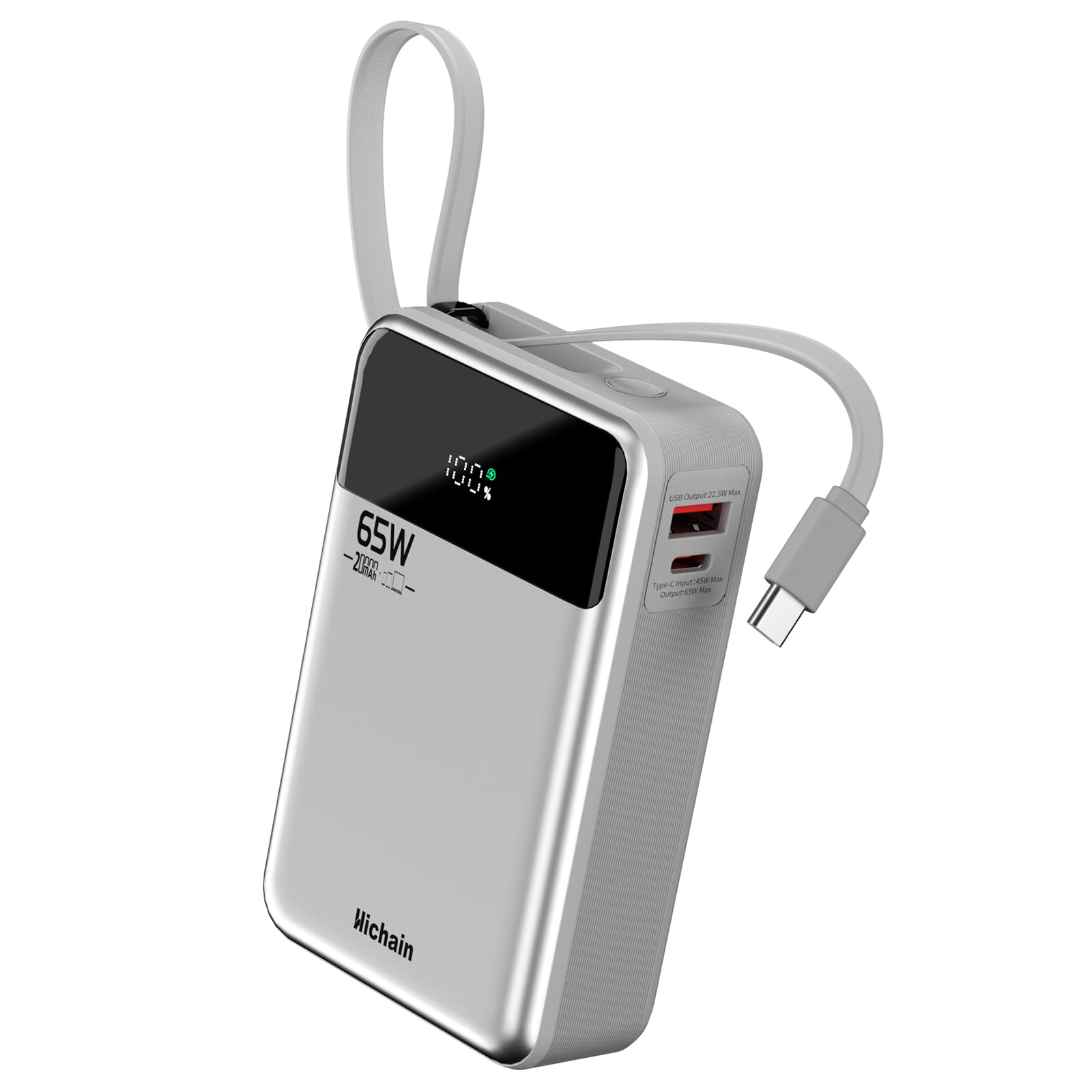
Figure 1: Front view of the Hichain 65W 20000mAh Power Bank, showing the digital display and Hichain branding.

Figure 2: Side view of the power bank highlighting the USB-A (22.5W Max) and USB-C (65W Max) output ports.

Figure 3: The power bank featuring its integrated USB-C cable, designed for portability and convenience.
Key Features:
- 20000mAh High Capacity: Provides multiple charges for smartphones and tablets, and significant power for laptops.
- 65W Max Fast Charging: Delivers rapid charging speeds for compatible devices, including laptops.
- Built-in USB-C Cable: Offers convenient charging without needing to carry extra cables.
- Triple Output Ports: Includes a built-in USB-C cable, an additional USB-A port, and a USB-C port for charging up to three devices simultaneously.
- Digital Display: Shows the remaining battery percentage and a green indicator for fast charging status.
- Travel-Friendly Design: Compact and lightweight, suitable for airline travel.
Setup
1. Charging the Power Bank:
Before initial use, fully charge your Hichain Power Bank. This ensures optimal performance and battery longevity.
- Connect the built-in USB-C cable or an external USB-C cable to the power bank's Type-C input port.
- Connect the other end of the cable to a compatible USB wall charger (45W or higher recommended for fastest charging).
- The digital display will show the charging percentage, and a green light will indicate fast charging.
- The power bank is fully charged when the display shows 100%.

Figure 4: Illustration of the two-way fast recharging process for the power bank.
Operating Instructions
1. Checking Battery Level:
Press the power button located on the top of the power bank. The digital display will illuminate, showing the current battery percentage.
2. Charging Devices:
The power bank offers multiple ways to charge your devices:
- Using the Built-in USB-C Cable:
Pull out the integrated USB-C cable from its storage slot. Connect it directly to your USB-C compatible device (e.g., laptop, smartphone, tablet). The power bank will automatically begin charging.
- Using the USB-A Port:
Connect your device's USB-A charging cable to the USB-A output port on the power bank. Connect the other end to your device. The power bank will automatically begin charging.
- Using the USB-C Output Port:
Connect your device's USB-C charging cable to the USB-C output port on the power bank. Connect the other end to your device. The power bank will automatically begin charging.

Figure 5: The power bank simultaneously charging a laptop, smartphone, and wireless earbuds, demonstrating its multi-device charging capability.

Figure 6: The power bank providing 65W super fast charging to a laptop and a smartphone.
Video 1: Demonstrates the Hichain 20000mAh power bank's features and charging capabilities.
Video 2: An overview of the Hichain Laptop Power Bank, showcasing its design and functionality.
Maintenance
- Keep the power bank away from water, fire, and extreme temperatures.
- Avoid dropping or subjecting the device to strong impacts.
- Clean the exterior with a soft, dry cloth. Do not use harsh chemicals or abrasive materials.
- Store the power bank in a cool, dry place when not in use. For long-term storage, ensure it is charged to about 50-75% to preserve battery health.
- Do not attempt to disassemble or repair the power bank yourself. Contact customer support if service is required.
Troubleshooting
| Problem | Possible Cause | Solution |
|---|---|---|
| Power bank not charging | Charging cable is faulty or not properly connected. Wall adapter is not working or insufficient power. | Ensure the charging cable is securely connected. Try a different USB-C cable and a different wall adapter. Use a 45W or higher adapter for optimal charging. |
| Device not charging from power bank | Power bank battery is depleted. Charging cable is faulty or not properly connected. Device is not compatible. | Check the power bank's battery level on the digital display. Ensure the cable is securely connected to both the power bank and the device. Try a different cable or port. Verify device compatibility. |
| Slow charging | Cable or adapter not supporting fast charging. Multiple devices connected. | Use a high-quality USB-C cable and a fast-charging wall adapter. Disconnect other devices to maximize power delivery to a single device. |
| Digital display not working | Power bank is off or battery is completely drained. | Press the power button to activate the display. Charge the power bank if the battery is completely drained. |
Specifications
| Model Number | T173LP |
| Battery Capacity | 20000mAh |
| Max Output Power | 65W |
| USB-A Output | 22.5W Max |
| USB-C Output | 65W Max |
| Type-C Input | 45W Max |
| Built-in Cable | USB-C |
| Dimensions | 4.25 x 2.7 x 1.3 inches |
| Weight | 12.8 ounces |
| Special Features | Built-in Cable, Digital Display, Fast Charging |
Safety Information
- Do not expose the power bank to direct sunlight, heat sources, or high humidity.
- Avoid using the power bank in environments with extreme temperatures (below 0°C or above 45°C).
- Keep out of reach of children.
- Do not short-circuit the power bank.
- Dispose of the power bank according to local regulations. Do not dispose of it in household waste.
- If the power bank swells, leaks, or emits an unusual odor, discontinue use immediately.
Warranty and Support
Hichain products come with a standard manufacturer's warranty. For detailed warranty information, product support, or technical assistance, please visit the official Hichain website or contact our customer service team. Please have your model number (T173LP) and purchase information ready when contacting support.
Website: Hichain Store on Amazon
