
1. Introduction
The WiiM Vibelink Amp is a high-performance pure power amplifier designed to deliver powerful, distortion-free audio. Featuring a premium ESS 9039Q2M DAC and TI TPA3255 amplifier chip, it provides superior clarity, deep bass, and dynamic range for an immersive listening experience. This amplifier is engineered for seamless integration with WiiM Mini, Pro, Pro Plus, and Ultra streamers, offering low-latency, high-resolution playback.
This manual provides essential information for setting up, operating, maintaining, and troubleshooting your WiiM Vibelink Amp to ensure optimal performance and longevity.
2. Safety Information
Please read all safety instructions carefully before using the device. Keep this manual for future reference.
- Do not expose the device to water, moisture, or extreme temperatures.
- Ensure proper ventilation to prevent overheating.
- Use only the provided power adapter.
- Do not attempt to open or repair the device yourself. Refer all servicing to qualified personnel.
- Keep out of reach of children.
3. Package Contents
Please check that all items are present in your package:
- WiiM Vibelink Amp Unit
- Power Cable
- 4x Banana Plugs (for speaker wire connection)
- User Manual (this document)
4. Product Overview
4.1 Front Panel
The front panel features a minimalist design with essential controls:
- Volume Knob: Adjusts the output volume.
- Input Selector Button: Cycles through available inputs (COAX, OPTICAL, RCA).
- Input Indicators: LEDs to show the currently selected input.

Figure 1: Front view of the WiiM Vibelink Amp, showing the volume knob and input selector.
4.2 Rear Panel
The rear panel provides all necessary connection ports:
- Speaker Outputs: Connects to your passive speakers.
- RCA Input: Analog audio input.
- Optical Input: Digital audio input (Toslink).
- Coaxial Input: Digital audio input (RCA).
- 12V Trigger In: For synchronized power control with compatible devices.
- Power Input: Connects to the AC power supply.

Figure 2: Rear view of the WiiM Vibelink Amp, detailing the various input and output connections.
5. Setup
5.1 Connecting Speakers
- Ensure the Vibelink Amp is powered off.
- Connect your passive speakers to the speaker output terminals on the rear panel. Use the provided banana plugs for a secure connection. Ensure correct polarity (+ to + and - to -) for each speaker.
5.2 Connecting Audio Sources
The Vibelink Amp supports multiple audio inputs:
- RCA Input: For analog audio sources (e.g., CD player, turntable with pre-amp). This input offers pure analog signal path without Analog-to-Digital Conversion (ADC).
- Optical Input: For digital audio sources (e.g., TV, game console). Supports bit-perfect 192kHz/24-bit playback.
- Coaxial Input: For digital audio sources. Supports bit-perfect 192kHz/24-bit playback.
Connect your desired audio source to the corresponding input on the rear panel.

Figure 3: The WiiM Vibelink Amp integrated into a home audio setup, demonstrating its capability to deliver 100W power at 8 ohms.
5.3 Integration with WiiM Streamers
The Vibelink Amp is designed for optimal compatibility with WiiM Mini, Pro, Pro Plus, and Ultra streamers. Connect your WiiM streamer's audio output (Optical, Coaxial, or RCA) to the corresponding input on the Vibelink Amp.
For enhanced convenience, utilize the 12V Trigger In port. When connected to a compatible WiiM streamer (e.g., WiiM Ultra), the Vibelink Amp can automatically power on/off with the streamer, providing hands-free operation and energy savings.
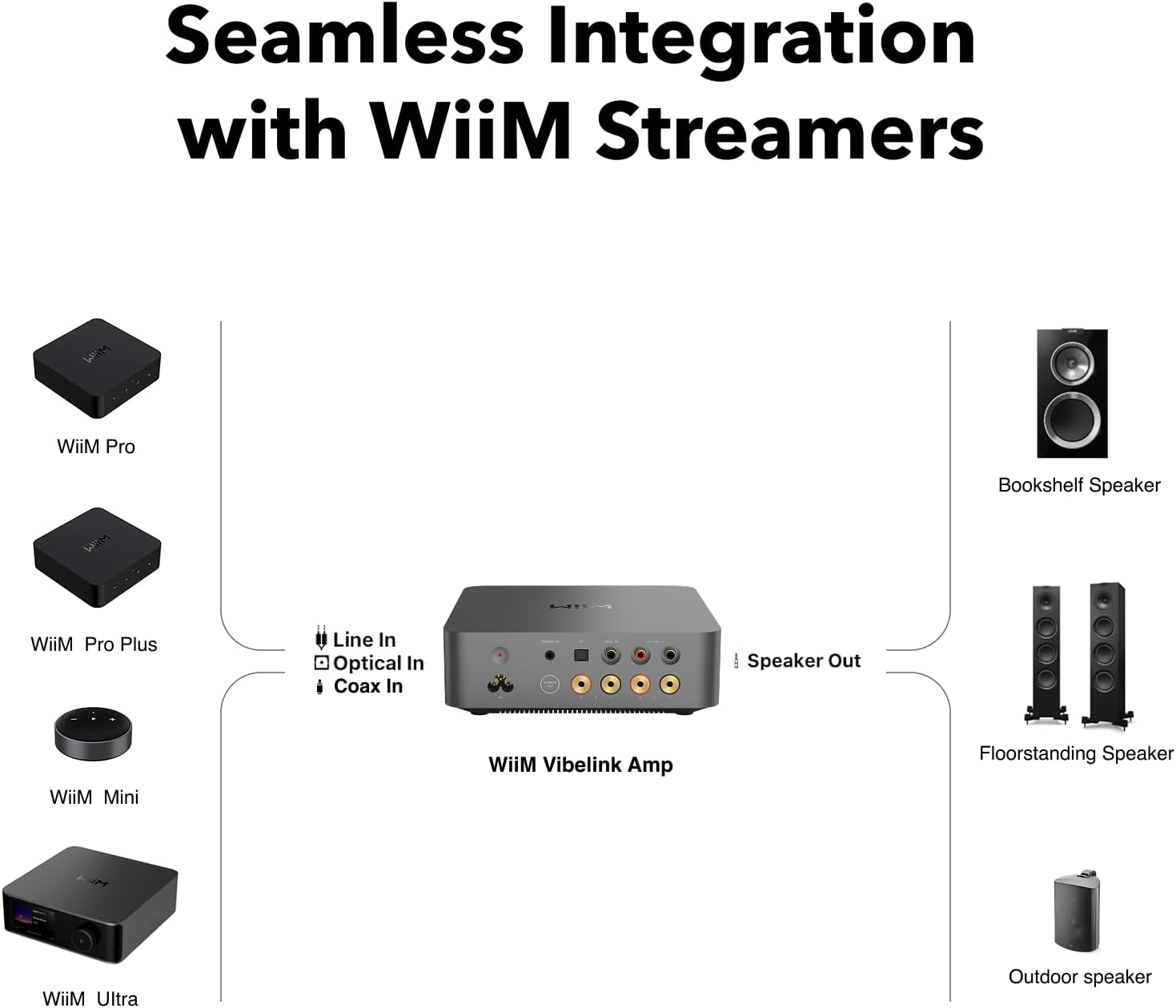
Figure 4: Diagram illustrating the seamless integration of the WiiM Vibelink Amp with WiiM streamers (Mini, Pro, Pro Plus, Ultra) and various speaker types.

Figure 5: The WiiM Vibelink Amp paired with a WiiM Ultra streamer, showcasing their complementary design and enhanced audio potential.
6. Operating Instructions
6.1 Power On/Off
Connect the power cable to the Vibelink Amp and a power outlet. The unit will enter standby mode. Press the input selector button briefly to power on the unit. To put the unit into standby, press and hold the input selector button for a few seconds.
The Vibelink Amp also features an Auto Standby Mode for energy efficiency. It will automatically enter standby after a period of inactivity. The 12V Trigger In allows external devices to control the power state.
6.2 Input Selection
Press the input selector button on the front panel to cycle through the available inputs: COAXIAL, OPTICAL, and RCA. The corresponding LED indicator will illuminate to show the active input.
6.3 Volume Control
Rotate the large knob on the front panel clockwise to increase the volume and counter-clockwise to decrease it.
6.4 Firmware Updates
Firmware updates for the WiiM Vibelink Amp can be performed over Bluetooth using the WiiM Home app on your smartphone. Ensure your device is connected to the internet and follow the instructions within the app for updates.
7. Maintenance
To maintain the performance and appearance of your WiiM Vibelink Amp:
- Cleaning: Use a soft, dry cloth to wipe the exterior. Do not use liquid cleaners or abrasive materials.
- Ventilation: Ensure the unit has adequate airflow around it. Do not block the ventilation openings. The advanced thermal management system with a copper heat pipe and graphene heatsink is designed to keep the unit cool, but proper ventilation is still crucial.
- Storage: If storing the unit for an extended period, disconnect it from power and store it in a cool, dry place.
8. Troubleshooting
If you encounter issues with your WiiM Vibelink Amp, refer to the following common problems and solutions:
| Problem | Possible Cause | Solution |
|---|---|---|
| No sound output | Incorrect input selected; Loose speaker connections; Source device not playing. | Verify input selection; Check speaker wire connections; Ensure audio source is active and playing. |
| Distorted sound | Volume too high; Improper source signal; Speaker impedance mismatch. | Reduce volume; Check source device output; Ensure speakers are within supported impedance range. |
| Unit does not power on | Power cable not connected; Power outlet issue. | Check power cable connection; Try a different power outlet. |
| Pops or clicks when changing tracks/sources | Normal behavior for some transitions; Rare with Anti-Pop Noise Design. | The Vibelink Amp features advanced anti-pop noise technology to minimize these occurrences. If persistent, ensure firmware is updated. |
| Lower output power than expected | Using RCA input. | Note that the device delivers 60W output when using the RCA input and 100W when using a digital input (Optical/Coaxial). This is by design. |
9. Specifications
Key technical specifications for the WiiM Vibelink Amp:
- Power Output: 100W per channel at 8Ω, 200W per channel at 4Ω (via digital inputs); 60W per channel at 8Ω, 120W per channel at 4Ω (via RCA input).
- DAC: Premium ESS 9039Q2M
- Amplifier Chip: TI TPA3255
- Inputs: RCA (Analog), Optical (Digital), Coaxial (Digital)
- Supported Sample Rates/Bit Depths: Up to 192kHz/24-bit (Optical and Coaxial inputs)
- Features: PFFB technology, 12V Trigger In, Auto Standby Mode, Anti-Pop Noise Design
- Chassis: Precision-crafted unibody aluminum with advanced thermal management
- Dimensions: 7.9 x 7.9 x 2.58 inches
- Item Weight: 4.5 pounds
- Model Number: V-AMP-001
- Manufacturer: Linkplay Technology Inc.

Figure 6: The WiiM Vibelink Amp's ability to adapt to variable resolutions, ensuring true high-resolution playback.

Figure 7: High-fidelity audio is achieved through premium components like the ESS 9039Q2M DAC, TI TPA3255 Amplifier, and TI OPA1612 Op Amp.
10. Warranty and Support
The WiiM Vibelink Amp comes with a standard manufacturer's warranty. For detailed warranty information, please refer to the warranty card included with your product or visit the official WiiM website.
For technical support, troubleshooting assistance beyond this manual, or service inquiries, please contact WiiM customer support through their official website or the WiiM Home app.


