
1. Introduction and Overview
This manual provides detailed instructions for the installation, setup, and operation of your XTRONS Android 14 Car Stereo. This advanced head unit offers a 7-inch IPS touchscreen, built-in DSP, wireless CarPlay, Android Auto, and 4G LTE connectivity, enhancing your driving experience with modern infotainment features.
The device runs on Android 14 with an Octa-Core processor and 4GB RAM + 64GB ROM, ensuring responsive performance and ample storage for applications. It is designed to integrate seamlessly with your vehicle's existing systems.
2. Vehicle Compatibility
This XTRONS car stereo is compatible with the following vehicle models and years:
- For BMW E46 4-door Sedan (1998-2005)
- For BMW E46 2-door Coupe (1999-2006)
- For BMW E46 2-door Convertible (1999-2006)
- For BMW E46 5-door Touring (1999-2005)
- For BMW E46 3-door Hatchback (2000-2004)
- For BMW E46 M3 (2000-2006)
- For Rover 75 (1999-2005)
- For MG ZT (2001-2005)
The plug-and-play design retains most of your vehicle's original functions, including steering wheel controls, reversing control, and door status.

Image 1: Comparison of the vehicle dashboard before and after installing the XTRONS car stereo, showing seamless integration.
3. What's in the Box
Please check the contents of the package against the list below:
- 1 × ISO Wiring Harness
- 1 × SIM Card Slot Cable
- 1 × 4G Antenna
- 1 × Camera Cable
- 1 × GPS Antenna
- 1 × Radio Cable Adapter
- 2 × Installation Holder
- 1 × Microphone
- 2 × USB Cable
- 1 × Radio Antenna Cable
- 1 × CANbus Box
- 1 × User Manual

Image 2: All components and accessories included in the product package.
4. Key Features
4.1. 7-inch IPS Touch Screen
The unit features a 7-inch IPS panel with 1280*720 high definition, offering a 178° viewing angle for clear visuals without eye fatigue from any position.

Image 3: The 7-inch premium HD IPS screen with G+G touch technology.
4.2. Android 14 with Octa-Core
Equipped with the latest Android 14 operating system and an Octa-Core processor, along with 4GB RAM and 64GB ROM, the head unit provides a stable, responsive, and powerful user experience. Download your favorite apps from the Play Store.
4.3. Global 4G LTE & Dual Band Wi-Fi
Stay connected with built-in Global 4G LTE support (requires a Micro-SIM card) and dual-band Wi-Fi (2.4GHz and 5GHz) for fast and stable internet access, avoiding connection issues and interferences.
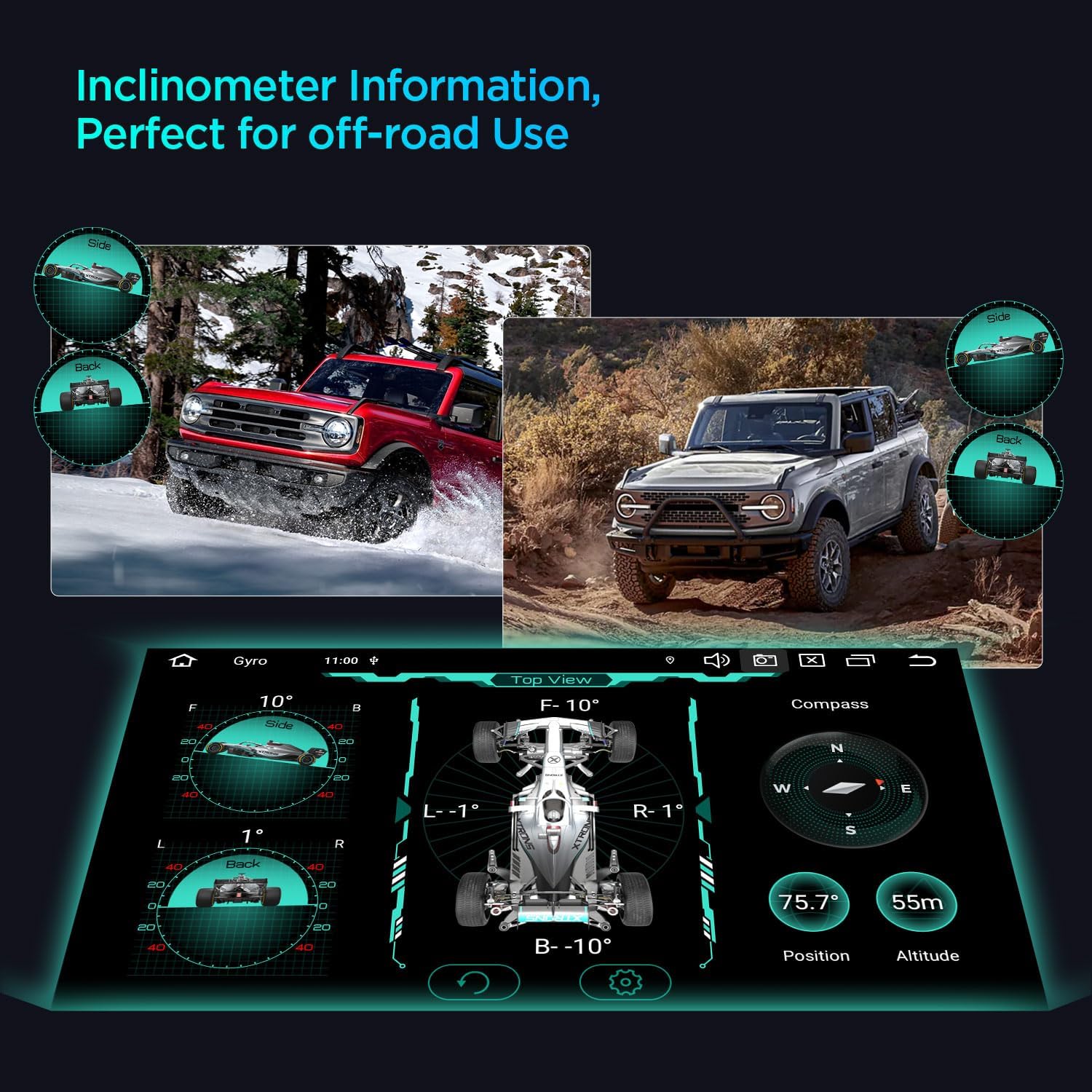
Image 4: Illustration of 4G LTE and Dual Band Wi-Fi capabilities for seamless connectivity.
4.4. Wireless CarPlay & Android Auto
Enjoy seamless smartphone integration with built-in Wireless CarPlay and Wireless/Wired Android Auto. Access navigation, music, calls, and voice control (Hey Siri or Hey Google) directly from the head unit, enhancing driving safety.

Image 5: Overview of smartphone connection options including CarPlay, Android Auto, and Screen Mirroring.
4.5. Built-in DSP (Digital Sound Processor)
The integrated DSP allows for dynamic audio adjustments, providing a superior sound experience tailored to your preferences. Fine-tune bass, treble, and other audio settings for optimal sound quality.

Image 6: Visual representation of the built-in AKM DSP interface for sound customization.
4.6. Off-Road Inclinometer Function
Built-in high-precision gyroscope sensors accurately display the vehicle's current ride height, roll, and pitch angles, enhancing driving safety and providing useful information for off-road conditions.

Image 7: Display of the inclinometer function, showing real-time vehicle pitch and roll angles.
5. Installation
Before beginning installation, ensure your vehicle is turned off and the battery is disconnected. Refer to the detailed wiring diagrams provided in the user manual for specific connections.
5.1. Wiring Considerations
Depending on your vehicle's original setup, you may need specific adapters or extension cables. For instance, if your car has a fiber optic amplifier system or a navigation unit with a 12-pin plug, additional components may be required. Always ensure proper connections to avoid damage to the unit or vehicle.

Image 8: Detailed diagrams illustrating various wiring scenarios and necessary adapters for installation.
5.2. Important Notes on Compatibility
Verify your car's center console and check for any air-conditioning covers that might obstruct installation. If present, remove them to ensure the unit fits perfectly. For Rover 75 and MG ZT models, trimming of the unit's side may be necessary for a flush fit.
5.3. Installation Video Guide
Video 1: An official XTRONS video demonstrating the installation process for the 7-inch car stereo in BMW E46, Rover 75, and MG ZT models.
6. Setup and Configuration
After successful installation, power on the unit to begin the initial setup. The Android 14 interface allows for extensive customization and configuration.
6.1. Customizing UI Themes
You can personalize the look and feel of your head unit by selecting from multiple UI themes. Connect to Wi-Fi, open the App Store, and navigate to the 'Themes' section to browse and install your preferred theme.
Video 2: Guide on how to refresh and apply multiple UI themes on your XTRONS ID series head unit.
6.2. Product Function Introduction
Explore the various functions and settings of your new car stereo. This video provides an overview of the main features and how to access them.
Video 3: A detailed introduction to the various functions and features of the product.
7. Operating Instructions
7.1. CarPlay and Android Auto
Connect your smartphone wirelessly via Bluetooth for CarPlay or Android Auto. This allows you to use phone applications, make calls, send messages, and get directions through the car stereo's interface.
7.2. GPS Navigation
The unit supports online and offline navigation with multiple map app software. Ensure the GPS antenna is properly installed for accurate positioning.
7.3. Radio
Access FM/AM radio stations with RDS (Radio Data System) for enhanced information display. Scan for stations and save your favorites for quick access.
7.4. Split-Screen Functionality
Utilize the split-screen mode to run two applications simultaneously, such as navigation and music playback, for enhanced multitasking.
7.5. Video Playback
The unit supports various video formats and resolutions. You can play videos from USB drives or other connected media. The Picture-in-Picture (PIP) mode allows you to watch videos while using other applications.
8. Optional Accessories
Enhance your car stereo's functionality with optional accessories:
- OBD Function: For on-board diagnostics.
- TPMS Function: For tire pressure monitoring.
- Front / Reversing Camera: For improved visibility and parking assistance.
- External DVR: For dash cam recording.
9. Specifications
| Feature | Specification |
|---|---|
| Display Size | 7 Inches |
| Screen Size | 7 Inches |
| Operating System | Android 14 |
| Memory Storage Capacity | 64 GB |
| Connectivity Technology | Bluetooth, USB, Wi-Fi |
| Special Feature | Bluetooth, Touchscreen, Wireless CarPlay, Android Auto, Built-in DSP, 4G LTE |
| Voice Command | Microphone, Touchscreen |
| Map Type | Road |
| Touch Screen Type | In-Cell |
10. Troubleshooting
If you encounter any issues with your XTRONS car stereo, please refer to the following common troubleshooting steps:
- No Power: Check all power connections and fuses. Ensure the ACC wire is properly connected.
- No Sound: Verify speaker connections and amplifier settings (if applicable). Check DSP settings for proper configuration.
- GPS Signal Loss: Ensure the GPS antenna is installed in a clear line of sight and is securely connected.
- Bluetooth Connectivity Issues: Ensure Bluetooth is enabled on both the head unit and your smartphone. Try unpairing and re-pairing the devices.
- Touchscreen Unresponsive: Perform a soft reset of the unit. If the issue persists, check for firmware updates.
- CarPlay/Android Auto Not Connecting: Ensure your phone's software is up to date. Try restarting both the phone and the head unit. Check USB cable if using wired connection.
For further assistance, please contact XTRONS customer support.
11. Warranty and Support
Your XTRONS Android 14 Car Stereo comes with a 1-Year Manufacturer Warranty. Please retain your proof of purchase for warranty claims.
For technical support, warranty inquiries, or service requests, please visit the official XTRONS website or contact their customer service department. Contact information can typically be found in the included User Manual or on the XTRONS brand store page.


