
Fujifilm 16840957
Fujifilm Instax Wide Evo Hybrid Instant Film Camera User Manual
Model: 16840957
Brand: Fujifilm
Introduction
This manual provides essential information for the safe and effective use of your Fujifilm Instax Wide Evo Hybrid Instant Film Camera. Please read this manual thoroughly before using the product and keep it for future reference.
The Fujifilm Instax Wide Evo Hybrid Instant Film Camera combines the tactile experience of analog instant prints with the convenience of digital imaging. It features a 16MP sensor, a fixed 16mm f/2.4 lens, and offers 10 lens effects and 10 film effects for creative customization. It supports Instax WIDE film and allows digital saving and sharing via a companion smartphone app.
Important Safety Information
- Do not disassemble, modify, or attempt to repair the camera yourself. This may cause electric shock or injury.
- Keep the camera away from water and moisture. Do not operate with wet hands.
- Use only the specified battery and charging accessories.
- Avoid exposing the camera to extreme temperatures, direct sunlight, or high humidity.
- Keep out of reach of children.
- Handle film packs carefully. Do not open film packs in direct light.
Package Contents
Please ensure all items listed below are included in your package:
- Fujifilm Instax Wide Evo Hybrid Instant Film Camera
- Camera Bag
- 6Ave Camera and Lens Cleaning Kit
- 32GB Memory Card
- USB Card Reader, SD/microSD + Adapter
- USB Wall Charging Adapter

Image showing the Fujifilm Instax Wide Evo camera along with the bundled accessories: camera bag, 32GB memory card, USB card reader, USB wall adapter, and cleaning kit.
Parts and Controls
Familiarize yourself with the various parts and controls of your Instax Wide Evo camera.

Detailed diagram illustrating the key components of the Instax Wide Evo camera, including the Lens Dial, Film Dial, Image Sensor, Wide Angle Switch, and Print Crank.
- Lens Dial: Used to select and adjust lens effects.
- Film Dial: Used to select and adjust film effects.
- Image Sensor: The 16MP sensor captures images.
- Wide Angle Switch: Activates the wide-angle mode for broader shots.
- Print Crank: Used to initiate the printing process for instant photos.
- LCD Monitor: 3.5-inch display for composition and reviewing images.
- Shutter Button: To capture photos.
- Flash: Built-in flash for low-light conditions.
- MicroSD Card Slot: For additional digital storage.
- USB-C Port: For charging the battery.
- Tripod Mount: For stable shooting with a tripod.
Setup
1. Charging the Battery
Connect the camera to a USB power source using the supplied USB-C cable. The charging indicator will show the charging status. A full charge typically takes a few hours.
2. Inserting a MicroSD Card
Locate the microSD card slot on the camera. Insert the 32GB microSD card (included in the bundle) with the gold contacts facing down until it clicks into place. This card is essential for saving digital copies of your photos.
3. Loading Instax WIDE Film
- Open the film compartment cover on the back of the camera.
- Align the yellow mark on the film pack with the yellow mark on the camera.
- Insert the film pack straight into the compartment. Do not press down on the film pack.
- Close the film compartment cover firmly until it clicks. The black protective sheet will eject automatically.
- Do not open the film compartment cover until all 10 films have been used.
4. Initial Power On
Press and hold the power button to turn on the camera. Follow any on-screen prompts for initial setup, such as setting the date and time.
Operating Instructions
1. Taking Photos
- Composition: Use the 3.5-inch LCD monitor to compose your shot.
- Lens Effects: Rotate the Lens Dial to select from 10 different lens effects. These effects modify the optical characteristics of your image.
- Film Effects: Rotate the Film Dial to select from 10 different film effects. These effects apply various color tones and textures to your image.
- Wide-Angle Mode: Flip the Wide Angle Switch to activate the wide-angle mode, ideal for landscapes and group shots.
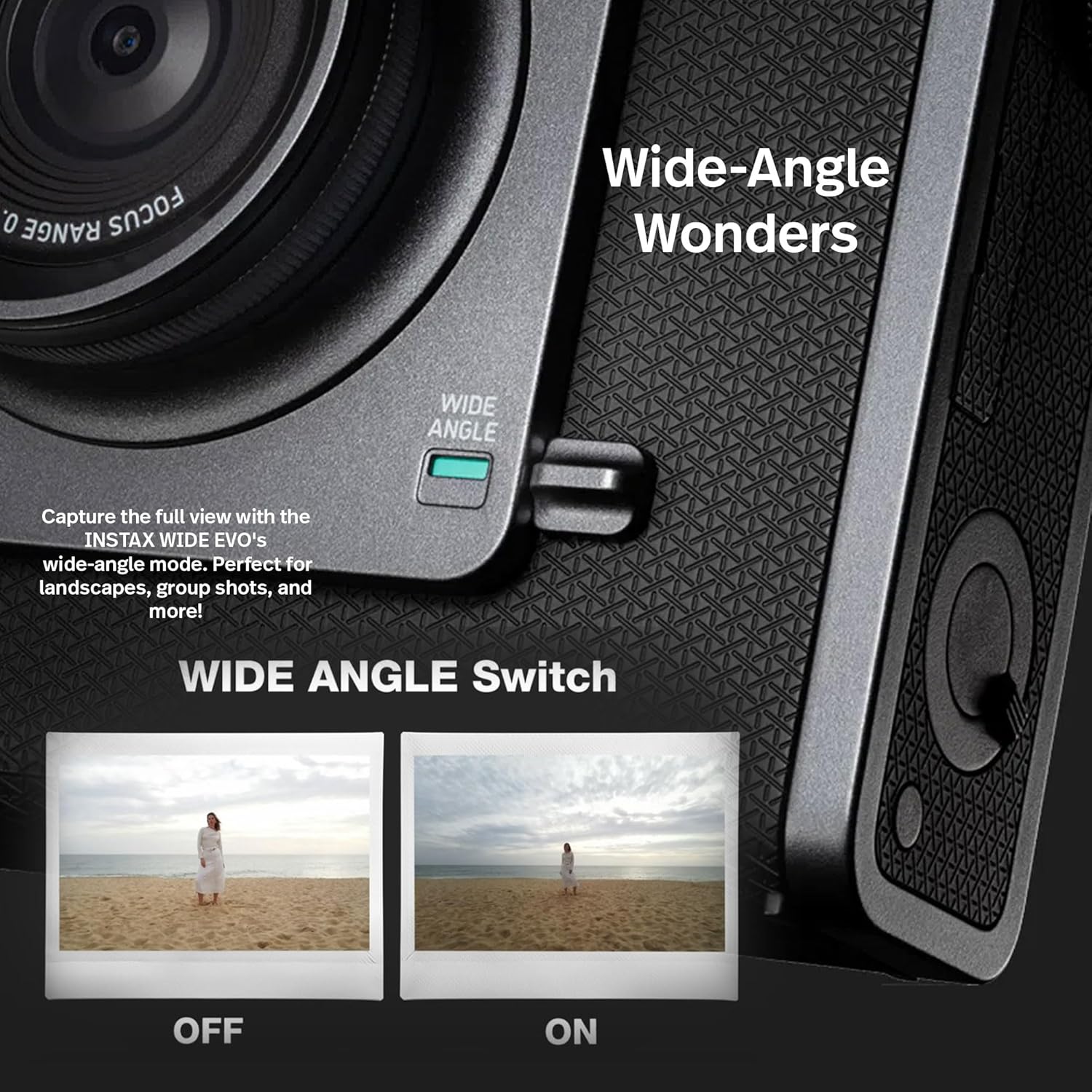
Illustration demonstrating the effect of the Wide Angle Switch, showing a narrower view when off and a broader view when on.
- Capturing: Press the Shutter Button to take the photo. The image will be saved to the microSD card.
2. Printing Photos
After taking a photo, you can choose to print it instantly:
- Review your captured image on the LCD screen.
- If you wish to print, pull the Print Crank. The camera will process and eject the Instax WIDE print.

Image depicting the Instax Wide Evo camera printing an instant photo, with a printed photo emerging from the top.
- Allow the print to develop for approximately 90 seconds.
3. Using the INSTAX WIDE EVO App
The camera can connect to your smartphone via Bluetooth for enhanced functionality:
- Download the "INSTAX WIDE EVO" app from your device's app store.
- Enable Bluetooth on your smartphone and pair it with the camera.
- Remote Shooting: Control the camera's shutter remotely from your phone.
- Image Transfer: Transfer digital images from the camera's microSD card to your smartphone for easy sharing and backup.
- Direct Print from Smartphone: Print photos directly from your smartphone's gallery using the camera as a printer.

Visual representation of the Instax Wide Evo camera connected to a smartphone via the app, demonstrating remote shooting and image transfer capabilities.
4. Applying Lens and Film Effects
The Instax Wide Evo offers a wide range of creative effects:
- 10 Lens Effects: Experiment with different optical effects by rotating the Lens Dial. These include options like vignette, soft focus, and more.

Grid display showing nine different visual outcomes when applying various lens effects through the Instax Wide Evo camera.
- 10 Film Effects: Apply various film-like looks and color treatments using the Film Dial. Options range from classic black and white to vibrant color shifts.

Grid display showing nine different visual outcomes when applying various film effects through the Instax Wide Evo camera.
Maintenance
- Cleaning: Use the provided cleaning kit to gently wipe the lens and LCD screen. Do not use abrasive cleaners or solvents. For the camera body, use a soft, dry cloth.
- Storage: Store the camera in a cool, dry place away from direct sunlight and extreme temperatures. When not in use for extended periods, ensure the camera is powered off.
- Film Storage: Store Instax film in a cool, dry place as per the film packaging instructions.
Troubleshooting
| Problem | Possible Cause / Solution |
|---|---|
| Camera does not power on. | Battery may be depleted. Charge the battery using the USB-C cable. Ensure the power button is pressed firmly. |
| Photos are not printing. | Check if film is loaded correctly. Ensure there is film remaining in the pack. The Print Crank must be pulled fully. |
| Images are blurry. | Ensure the lens is clean. Hold the camera steady when taking photos. Check lighting conditions; use flash if necessary. |
| Cannot connect to smartphone app. | Ensure Bluetooth is enabled on both devices. Restart the camera and the app. Check app permissions on your smartphone. |
| "No SD Card" error. | Ensure the microSD card is inserted correctly and fully. Try reinserting the card. The card may be corrupted; try a different card. |
Specifications
- Model Name: 16840957
- Brand: Fujifilm
- Image Sensor: 16 Megapixels
- Lens: Fixed 16mm f/2.4
- Film Format: Instax Wide
- Print Resolution: 318 DPI
- Display: 3.5-inch LCD Monitor
- Storage: MicroSD/MicroSDHC/MicroSDXC card slot (up to 32GB included)
- Connectivity: Bluetooth, USB-C
- Dimensions (L x W x H): 2.47 x 5.46 x 4.92 inches (6.27 x 13.87 x 12.5 cm)
- Item Weight: 2.38 pounds (1.08 kg)
- Power: Built-in rechargeable battery (USB-C charging)
- Features: 10 Lens Effects, 10 Film Effects, Wide-Angle Mode, Built-in Flash, Tripod Mount, Selfie Mirror
Warranty and Support
For warranty information, technical support, or service inquiries, please refer to the official Fujifilm website or contact their customer support directly. Keep your proof of purchase for warranty claims.
You can also visit the official Fujifilm store on Amazon for more product information and support resources: Fujifilm Amazon Store
Related documents16840957


Ask a question about this manual
Ask about setup, troubleshooting, compatibility, parts, safety, or missing instructions. Manuals+ will review the question and use this page’s manual context to help answer it.