
Important Safety Information
Please read all safety instructions carefully before using the ALIENPRO T1200 Soundbar and Subwoofer Audio System. Retain this manual for future reference.
- Power Source: Only use the provided power cables and connect the units to a 120V AC power outlet. Do not overload power outlets.
- Ventilation: Ensure adequate space around the soundbar and subwoofer for proper ventilation. Do not block any ventilation openings.
- Water and Moisture: Do not expose the units to water, rain, or moisture. Do not place objects filled with liquids, such as vases, on or near the units.
- Heat: Keep the units away from heat sources such as radiators, heat registers, stoves, or other apparatus (including amplifiers) that produce heat.
- Cleaning: Disconnect the power before cleaning. Use a soft, dry cloth. Do not use liquid or aerosol cleaners.
- Servicing: Do not attempt to service this product yourself. Refer all servicing to qualified service personnel. Opening or removing covers may expose you to dangerous voltage or other hazards.
- Placement: Place the units on a stable, flat surface to prevent them from falling.
Package Contents
Verify that all items are present in your ALIENPRO T1200 package:
- ALIENPRO T1200 Soundbar
- Active Subwoofer
- Power Cable (for Soundbar)
- Power Cable (for Subwoofer)
- Remote Control
- Quick Start Guide
Product Overview
The ALIENPRO T1200 is a 2.1 channel sound system designed to enhance your audio experience. It consists of a soundbar and an active subwoofer, offering high-resolution audio and versatile connectivity options including Bluetooth and HDMI.
Soundbar and Subwoofer

Figure 1: The ALIENPRO T1200 Soundbar and Subwoofer system. The soundbar is a long, slender unit designed to sit horizontally, while the subwoofer is a cylindrical unit providing deep bass.
Subwoofer Details

Figure 2: Top view of the active subwoofer, showing its sleek, textured black finish and circular top panel.
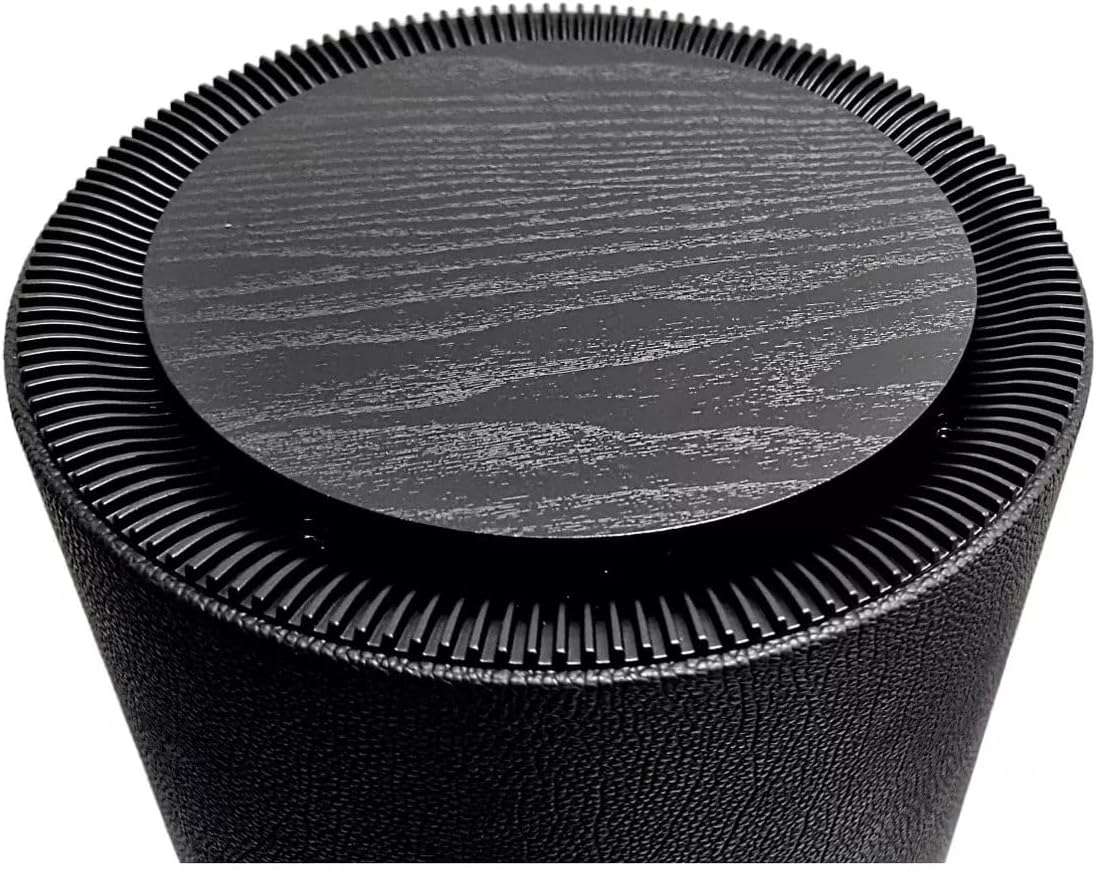
Figure 3: Close-up of the subwoofer's top panel, featuring a textured, wood-grain-like finish surrounded by a ribbed design.

Figure 4: Bottom view of the active subwoofer, revealing the downward-firing speaker and integrated support feet.
Setup
Placement
For optimal audio performance, position the soundbar centrally below your television. The active subwoofer can be placed on the floor near the soundbar, ideally in a corner or against a wall to enhance bass response. Ensure adequate ventilation around both units.

Figure 5: Example of the ALIENPRO T1200 Soundbar and Subwoofer placed in a home entertainment setting, with the soundbar positioned below a television and the subwoofer on the floor.
Connections
The ALIENPRO T1200 offers multiple connectivity options:
- HDMI (ARC): Connect an HDMI cable from the soundbar's HDMI ARC port to your TV's HDMI ARC port. This allows audio to be sent from the TV to the soundbar and enables control of the soundbar with your TV remote.
- Optical: Connect an optical audio cable from your TV's optical output to the soundbar's optical input.
- Bluetooth: For wireless audio streaming from compatible devices.
- Power: Connect the provided power cable to the soundbar and the subwoofer, then plug them into a 120V AC power outlet.
Operating Instructions
Power On/Off
Press the Power button on the remote control or on the soundbar to turn the system on or off.
Input Selection
Use the "Input" button on the remote control or soundbar to cycle through available input sources (HDMI, Optical, Bluetooth).
Bluetooth Pairing
- Select Bluetooth input on the soundbar.
- On your mobile device, enable Bluetooth and search for "ALIENPRO T1200".
- Select "ALIENPRO T1200" to pair. Once paired, the soundbar will indicate a successful connection.
Volume Control
Adjust the volume using the Volume Up (+) and Volume Down (-) buttons on the remote control or soundbar.
Sound Modes
The system may offer various sound modes (e.g., Movie, Music, News). Refer to the Quick Start Guide for specific remote control buttons to cycle through these modes and customize your listening experience.
Maintenance
To maintain the performance and appearance of your ALIENPRO T1200 system:
- Disconnect the power cable before cleaning.
- Use a soft, dry cloth to wipe the surfaces of the soundbar and subwoofer.
- Do not use liquid cleaners, abrasive cleaners, or solvents, as these may damage the finish.
- Keep the units free from dust and debris.
Troubleshooting
| Problem | Possible Cause | Solution |
|---|---|---|
| No power | Power cable not connected; power outlet not active. | Ensure power cables are securely connected and the outlet is functional. |
| No sound | Incorrect input selected; volume too low; cables not connected properly. | Select the correct input source. Increase volume. Check all audio cable connections. |
| Bluetooth pairing fails | Device too far; soundbar not in pairing mode; interference. | Ensure devices are within range. Re-enter Bluetooth pairing mode on the soundbar. Minimize interference. |
| Poor sound quality | Incorrect audio settings; poor source quality; improper placement. | Adjust sound modes or equalizer settings. Use high-quality audio sources. Optimize soundbar and subwoofer placement. |
Specifications
| Feature | Detail |
|---|---|
| Model Name | T1200 |
| Brand | ALIENPRO |
| Speaker Type | Soundbar with Active Subwoofer |
| Channel Configuration | 2.1 |
| Connectivity Technology | Bluetooth, HDMI (ARC), Optical |
| Special Feature | High-Resolution Audio |
| Maximum Speaker Output Power | 150 Watts |
| Frequency Response | 60 Hz |
| Input Voltage | 120 Volts |
| Power Source | Corded Electric |
| Material | Plastic |
| Color | Black |
| Product Dimensions (Soundbar) | 100 cm (Width) x 10 cm (Depth) x 5 cm (Height) |
| Product Weight | 5 Kilograms |
| Mounting Type | Table Mount |
| Components Included | Power Cable, Remote Control, Quick Start Guide, Active Subwoofer |
Warranty and Support
The ALIENPRO T1200 system comes with a limited warranty. For detailed information regarding warranty terms, coverage, and duration, please refer to the Quick Start Guide included in your package or visit the official ALIENPRO website.
For technical support, troubleshooting assistance beyond this manual, or service inquiries, please contact ALIENPRO customer support through their official channels. Contact information can typically be found in the Quick Start Guide or on the ALIENPRO official website.


