
1. Introduction
The PopBloom RL90 Full Spectrum LED Aquarium Light is designed for marine aquariums, providing optimal lighting for hard and soft corals (SPS/LPS) and marine fish. This advanced lighting system features a balanced PAR and coverage, homogeneous light distribution, and smart APP control for customizable programming. It incorporates high-speed quiet fans and upgraded aluminum heat sinks for efficient heat dissipation.
2. Package Contents
Please verify that all components are present in your package:
- 4 x RL90 LED Light Panels
- 4 x DC Power Adapters
- 4 x Hang Kits
- 4 x Power Cords
- 1 x User Manual
3. Product Specifications
The RL90 light system is engineered for performance and durability. Below are the key specifications:
| Feature | Specification |
|---|---|
| LED Array Power | 90W per panel |
| PAR @ Water Surface | 500 PAR |
| PAR @ 60cm (24") Depth | 150 PAR |
| Channels | 4 independently programmable channels |
| Channel 1 (White) | 10W 8000K White |
| Channel 2 (Moon UV&Blue) | 5W Moon UV&Blue |
| Channel 3 (Reef Blue) | 65W Reef Blue |
| Channel 4 (Cyan Blue) | 10W Cyan Blue |
| Product Dimensions (each) | 12L x 12W x 5.5H Centimetres (4.7" x 4.7" x 2.2") |
| Material | Aluminum |
| Mounting Type | Hanging |
| Cooling | PWM Smart Fan, Aluminum Heatsink |
| Fan Noise | 32 dB |
| Control | Smart APP (WiFi & Bluetooth) |
The RL90 is designed to provide a homogeneous light spread with consistent PAR values throughout the aquarium, minimizing hotspots.

Figure 1: RL90 Light Specifications and Physical Dimensions. Each light panel measures 12cm x 12cm x 5.5cm.
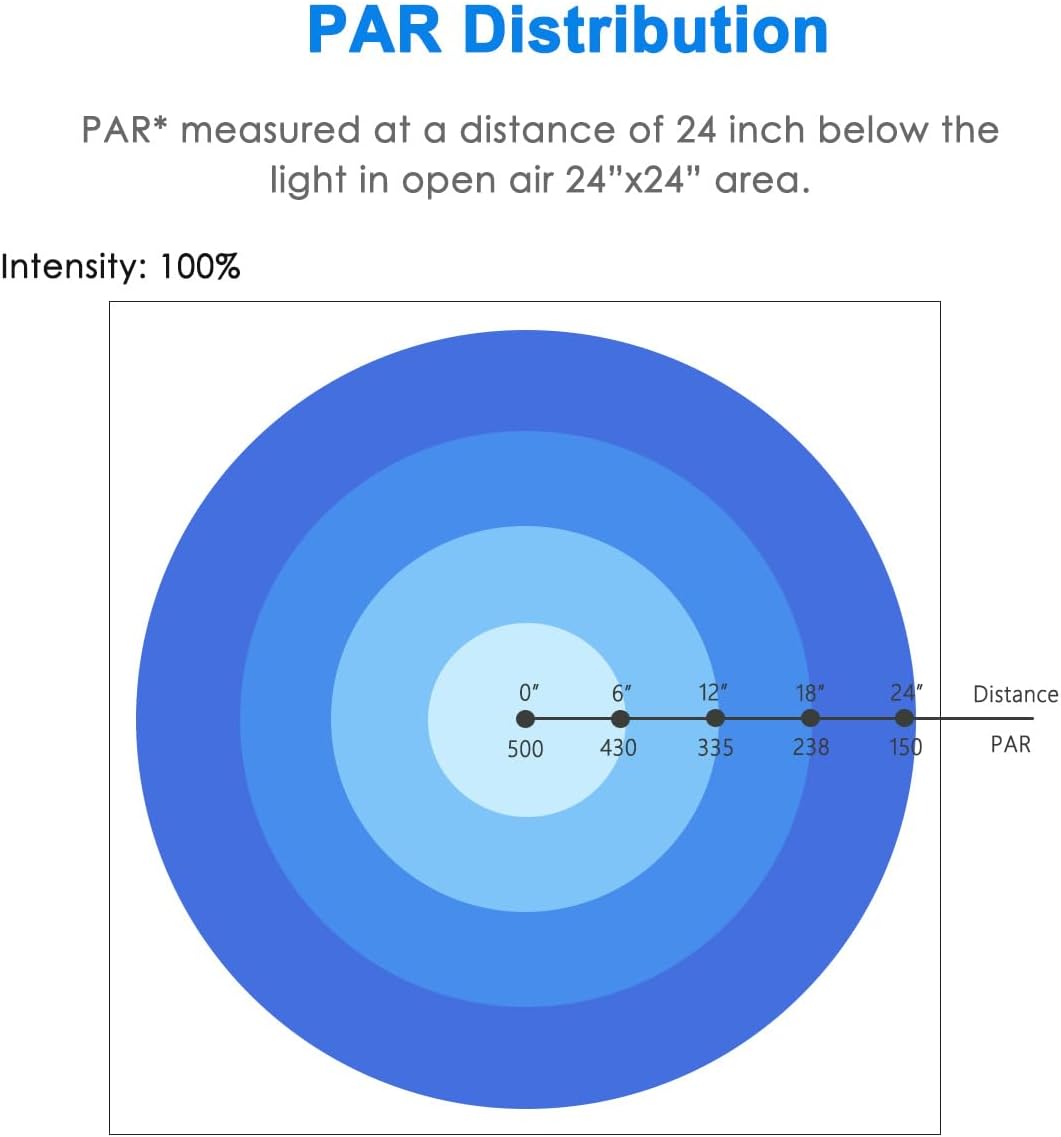
Figure 2: Full Spectrum Graph for the RL90 Light. This graph illustrates the relative intensity across different wavelengths (380nm to 780nm), highlighting the broad spectrum provided.

Figure 3: Ideal PAR Distribution and Individual Channel Spectrums. The top diagram shows PAR levels at various depths and lengths, while the bottom graphs display the spectral output for each of the four channels.
4. Setup and Installation
Follow these steps to properly install your PopBloom RL90 LED Aquarium Light system:
- Unpack Components: Carefully remove all items from the packaging and ensure all parts listed in Section 2 are present and undamaged.
- Assemble Hang Kit: Attach the hanging wires to the designated points on each RL90 light panel. Refer to the hang kit instructions for specific assembly details.
- Position Lights: Suspend the light panels above your aquarium using the hang kits. Ensure the lights are securely mounted and positioned to provide even coverage over your tank. For a 72-96 inch marine aquarium, 4 lights are recommended.
- Connect Power: Connect each RL90 light panel to its respective DC power adapter, then plug the power adapters into a suitable power outlet.
- Daisy Chain Connection (Optional): The RL90 supports real daisy chain functionality, allowing one system to control up to 10 panels simultaneously. Connect the lights using appropriate daisy chain cables (sold separately if not included) if you wish to control multiple units from a single point.

Figure 4: Example of PopBloom RL90 lights installed over various aquariums. This image demonstrates how the lights can be positioned for optimal coverage.
5. Operation
The PopBloom RL90 light system is controlled via a smart application, offering extensive customization options.
5.1 Smart APP Control
The RL90 features both WiFi and Bluetooth dual-control capabilities, ensuring operability even in offline WiFi conditions. Use the smart app to manage and adjust your aquarium's lighting settings.
- Download the App: Scan the QR code below or search for "Smart Life" in your device's app store (available on Apple App Store and Google Play Store).
Download Smart Life App - Connect to Device: Follow the in-app instructions to connect your RL90 lights via WiFi or Bluetooth.
- Access Controls: Once connected, you can access the various programming and control features.

Figure 5: Screenshots of the Smart Life App interface, demonstrating various programming options for the RL90 light.
5.2 Channel Programming
The RL90 has 4 independently programmable channels, adjustable from 1% to 100% intensity.
- Channel 1 (White): 10W 8000K White, designed for deep penetration.
- Channel 2 (Moon UV&Blue): 5W Moon UV&Blue, for simulating natural moonlighting.
- Channel 3 (Reef Blue): 65W Reef Blue, for deep penetration and optimal growth of SPS/LPS corals.
- Channel 4 (Cyan Blue): 10W Cyan Blue, for enhanced coloration.
5.3 Programming Modes
The app offers flexible programming options:
- Program Mode: Set up to 8 time-points with automatic ramp-up and ramp-down for each channel, simulating natural day-night cycles.
- DIY Mode: Customize moon settings, time offsets, and limit output for advanced control.
6. Light Distribution and Lens Design
The RL90 is engineered for optimal light delivery and visual comfort.

Figure 6: Close-up of the RL90 Panel LED Array. This image highlights the homogeneous light output and the anti-glare recessed lens design.

Figure 7: Illustration of the Glare-Proof Recessed Lens. This design ensures homogeneous light with a gentle shimmer, providing a balanced power and spread, and reaching depths of up to 80cm with high uniformity, unlike individual lenses that can cause non-uniform illumination.
7. Maintenance
Regular maintenance ensures the longevity and optimal performance of your RL90 LED Aquarium Light.
- Cleaning: Periodically wipe the light panels and lenses with a soft, dry cloth to remove dust and salt creep. Ensure the light is unplugged before cleaning. Do not use abrasive cleaners or solvents.
- Fan Inspection: Check the cooling fans for any obstructions or excessive dust buildup. Clean gently with compressed air if necessary to maintain efficient heat dissipation.
- Cable Check: Inspect power cords and daisy chain cables for any signs of wear or damage. Replace damaged cables immediately.
8. Troubleshooting
If you encounter issues with your RL90 light, refer to the following common solutions:
- Light Not Turning On:
- Ensure the power cord is securely plugged into both the light and the power outlet.
- Verify the power outlet is functional.
- Check the power adapter for any visible damage.
- App Connectivity Issues:
- Ensure your mobile device's WiFi or Bluetooth is enabled.
- Restart the Smart Life app.
- Restart the RL90 light by unplugging and re-plugging the power.
- Ensure your router is within range and functioning correctly if using WiFi.
- Inconsistent Light Output:
- Check your app programming schedule for any unintended settings.
- Ensure all daisy chain connections are secure if multiple units are linked.
- Excessive Noise from Fans:
- Inspect fans for dust or obstructions and clean as per maintenance instructions.
- If noise persists, contact customer support.
9. Warranty and Support
The PopBloom RL90 Full Spectrum LED Aquarium Light comes with a 1-Year Manufacturer Warranty.
For technical support, warranty claims, or any other inquiries, please contact PopBloom customer service through your retailer or the official PopBloom website.


