
Introduction
This manual provides comprehensive instructions for the proper use and care of your Fossil Men's Neutra Quartz Chronograph Watch, Model FS5525. Designed with a blend of classic and modern aesthetics, this timepiece offers reliable timekeeping and chronograph functionality. Please read this manual thoroughly to ensure optimal performance and longevity of your watch.
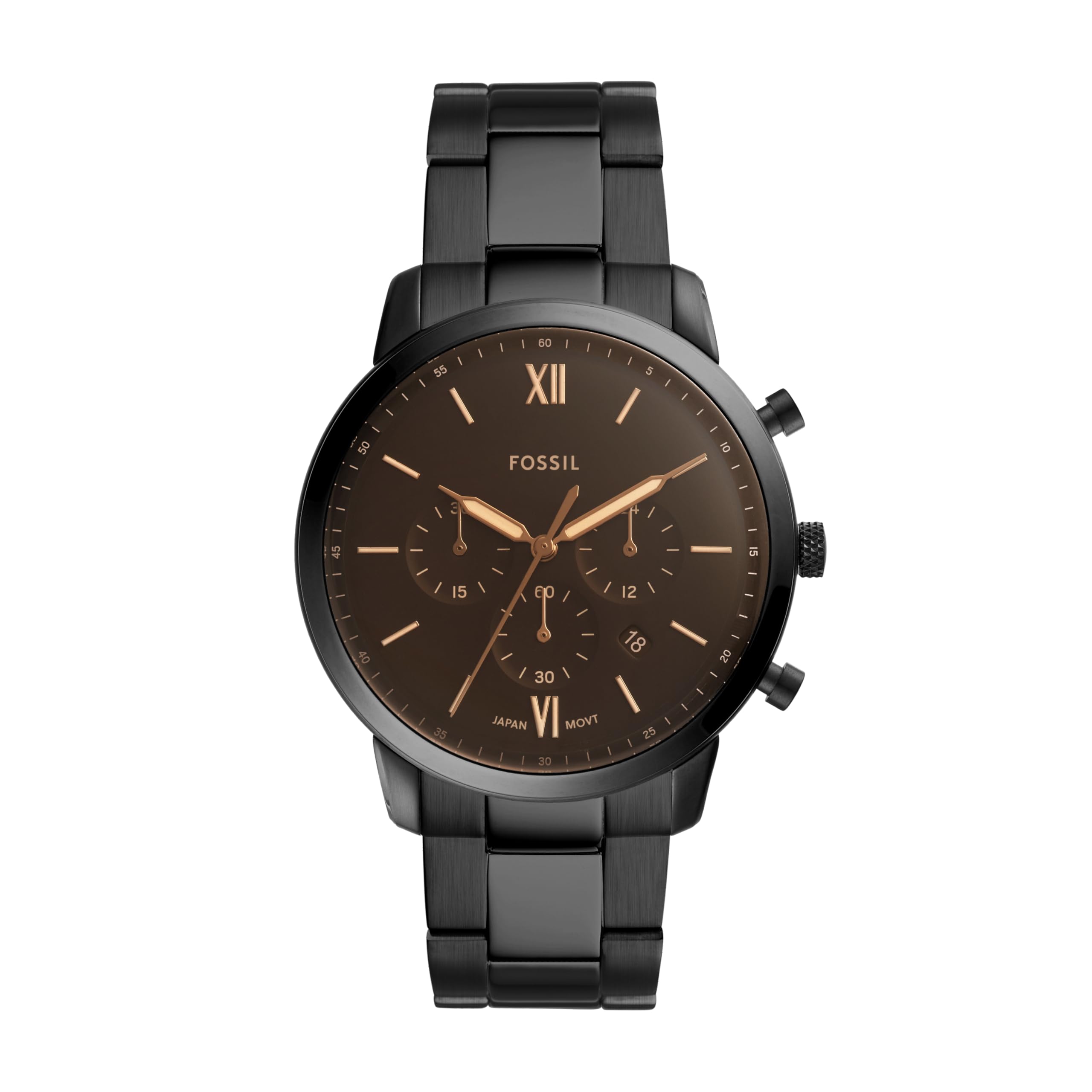
Front view of the Fossil Men's Neutra Quartz Chronograph Watch.
1. Setup
1.1 Unboxing and Initial Inspection
Upon receiving your Fossil Neutra watch, carefully remove it from its packaging. The watch typically comes in a decorative tin box. Inspect the watch for any visible damage or defects. Ensure all protective films are removed from the crystal and case back before use.

Your watch may arrive in a Fossil tin box, similar to those shown.
1.2 Setting Time and Date
- Pull the crown out to position 2: This is the outermost position. The second hand will stop.
- Rotate the crown: Turn the crown clockwise or counter-clockwise to set the hour and minute hands to the correct time. Pay attention to the 24-hour subdial if present, to distinguish AM/PM for correct date change.
- Push the crown back to position 1: Once the time is set, push the crown back into its normal operating position. The second hand will resume movement.
- Setting the Date (if applicable): If your watch has a date window, pull the crown out to position 1 (the first click). Rotate the crown to adjust the date. Once the correct date is displayed, push the crown back to its normal position. Avoid setting the date between 9 PM and 3 AM, as this can damage the movement.

The crown (center knob) and pushers (buttons above and below) are used for setting and operating the watch.
1.3 Adjusting the Bracelet
The stainless steel bracelet can be adjusted by removing links to achieve a comfortable fit. This procedure typically requires specialized tools and is best performed by a professional jeweler. If you choose to adjust it yourself, follow these general steps:
- Identify removable links: Look for small arrows on the underside of the bracelet links, indicating the direction to push the pins out.
- Remove pins: Using a small pointed tool, insert it into the hole on the underside of the link and push the pin out. Grasp the pin and pull it completely out.
- Remove links: Remove an equal number of links from both sides of the clasp to maintain the symmetry of the wristband.
- Reassemble: After removing the necessary links, tap the remaining pins back into place using a small hammer or pin press. Ensure pins are fully seated.

Diagram illustrating the process of sizing a link strap by removing pins.

Ensure the watch fits comfortably on your wrist after adjustment.
2. Operating Your Watch
2.1 Basic Timekeeping
Your Fossil Neutra watch is powered by a precise quartz movement, ensuring accurate timekeeping. The main hour, minute, and second hands continuously display the current time.
2.2 Chronograph Function
The chronograph feature allows you to measure elapsed time independently of the main time display. Your watch features three subdials to track minutes, seconds, and 24-hour time, along with a stopwatch function.
- Start: Press the top pusher (button A) to start the chronograph. The chronograph second hand will begin to move.
- Stop: Press the top pusher (button A) again to stop the chronograph. The elapsed time will be indicated by the chronograph hands.
- Reset: Press the bottom pusher (button B) to reset the chronograph. All chronograph hands will return to their zero positions.
Close-up view of the chronograph subdials and hands.
Official video demonstrating the Fossil Men's Neutra Chronograph Stainless Steel Quartz Watch features and design.
3. Maintenance
3.1 Water Resistance
Your Fossil Neutra watch is water resistant up to 50 meters (165 feet), or 5 ATM. This means it is suitable for short periods of recreational swimming and showering. However, it is not recommended for diving or snorkeling. Avoid operating the crown or pushers while the watch is wet to prevent water intrusion.
3.2 Cleaning Your Watch
To maintain the appearance of your watch, wipe the case and bracelet with a soft, damp cloth. For stainless steel bracelets, a mild soap solution can be used, followed by thorough rinsing and drying. Avoid using harsh chemicals or abrasive materials, as these can damage the finish.
3.3 Battery Replacement
The watch is powered by a CR2 battery. When the battery runs low, the watch may stop or the second hand may skip. Battery replacement should be performed by a qualified watch technician to ensure proper sealing and water resistance. Attempting to replace the battery yourself may void the warranty and compromise the watch's water resistance.

The case back, which should only be opened by a professional for battery replacement.
4. Troubleshooting
- Watch not running:
- Check if the crown is pushed all the way in to position 0.
- The battery may need replacement. Contact a service center.
- Date not changing at midnight:
- The AM/PM setting might be incorrect. Advance the time by 12 hours.
- Chronograph hands not resetting to zero:
- This may require a chronograph reset procedure. Consult a professional watch repair service.
- Water inside the watch:
- Immediately take the watch to a service center. Do not attempt to dry it yourself.
5. Specifications
| Model Number | FS5525 |
| Movement Type | Quartz Chronograph |
| Case Material | Stainless Steel |
| Case Diameter | 44 mm |
| Case Thickness | 11 mm |
| Band Material | Stainless Steel |
| Band Width | 22 mm |
| Water Resistance | 5 ATM (50 meters / 165 feet) |
| Crystal Type | Hardened Mineral Crystal |
| Battery Type | CR2 (included) |
| Weight | 113 Grams |

Reference guide for watch case sizes and thickness.
6. Warranty Information
Your Fossil watch is covered by a manufacturer's warranty. The specific terms and duration of the warranty may vary by region. Please refer to the warranty card included with your purchase or visit the official Fossil website for detailed information regarding warranty coverage, limitations, and service procedures. Keep your proof of purchase for warranty claims.
7. Support
For further assistance, product inquiries, or service requests, please contact Fossil customer support. You can find contact information and frequently asked questions on the official Fossil website:
Visit Fossil's Official Website
Additionally, you may find digital versions of user guides and other support documents on the product page where you made your purchase.


