1. Introduction
This manual provides comprehensive instructions for the Zerone Replacement Air Conditioner Remote Control, model Zeroneay9eiszox3. Designed as a direct replacement for specific GZ series air conditioner remotes, this guide will help you set up, operate, maintain, and troubleshoot your new remote control, ensuring optimal performance and convenience.
2. Product Overview
The Zerone Replacement Air Conditioner Remote Control is engineered to provide seamless control over your compatible air conditioning unit. It requires no complex programming, making it ready to use right out of the box after battery installation.
Key Features:
- Direct replacement for GZ-1002A-E3, GZ-1002B-E1, GZ-1002B-E3, GZ01-BEJ0-000 models.
- No programming or pairing required.
- Effective operating distance of up to 10 meters (33 feet).
- Ergonomic design with clear button layout.
Product Images:

Front view of two Zerone replacement air conditioner remote controls, showcasing their identical design and button layout.

A hand holding the Zerone remote control, pointing towards an air conditioning unit mounted on a wall, illustrating its intended use.

An illustration demonstrating the remote control's effective operating distance of up to 10 meters (33 feet) from the air conditioner unit.

The Zerone remote control shown with its approximate dimensions: 15.0 cm length, 5.5 cm width, and 1.5 cm thickness.
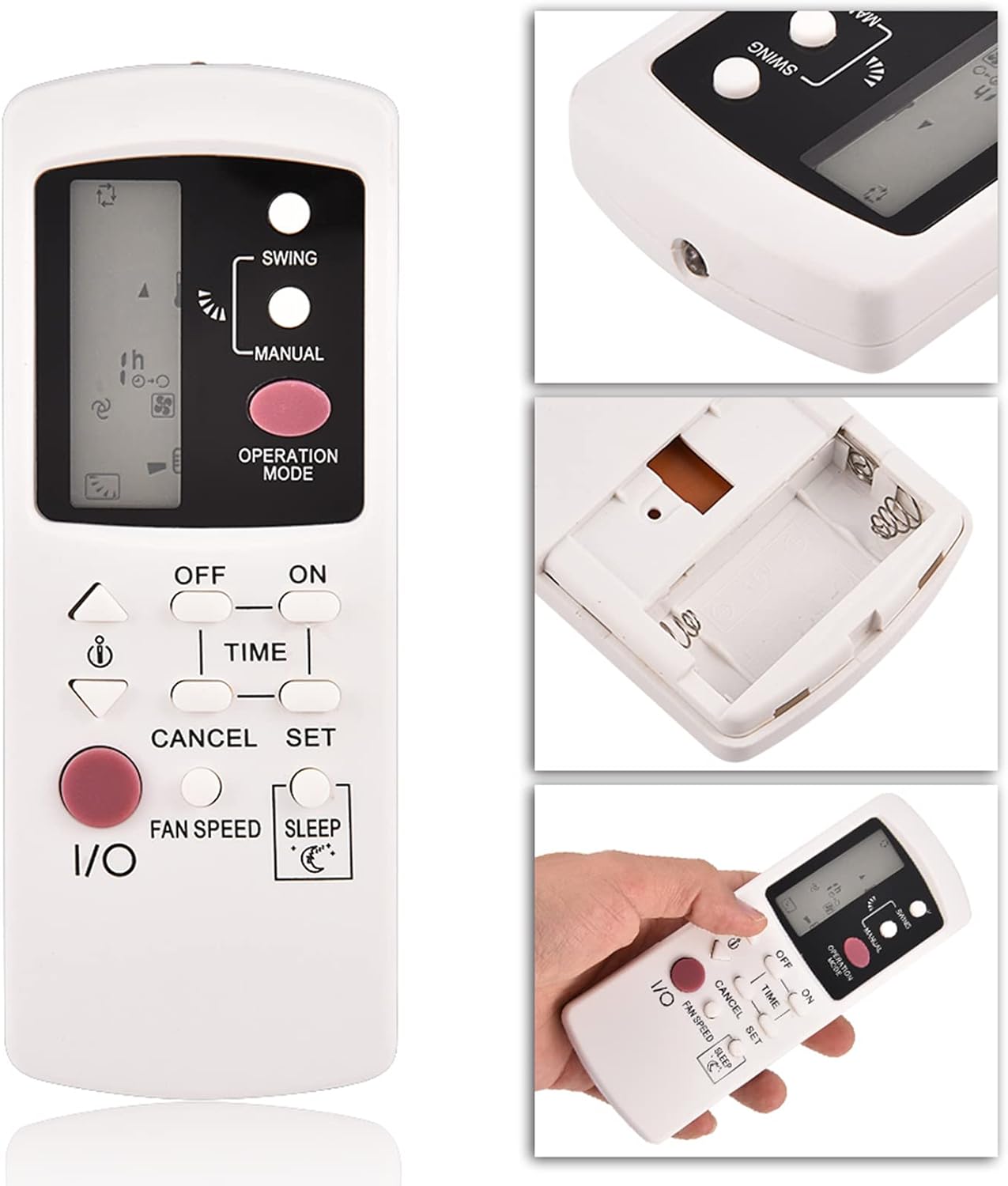
A collage of detailed views of the remote control, highlighting the display screen, button area, and overall ergonomic design.
3. Setup
Battery Installation:
The remote control requires two AAA 1.5V alkaline batteries (not included) for operation. Follow these steps to install them:
- Open the battery compartment cover located on the back of the remote control.
- Insert two AAA/1.5V alkaline batteries, ensuring that the positive (+) and negative (-) terminals align correctly with the markings inside the compartment.
- Close the battery compartment cover securely.
- If the remote has been unused for a long time or after battery replacement, locate the small recessed RESET button (usually on the back or inside the battery compartment) and press it briefly with a pointed object (e.g., a pen tip). This will initialize the remote and prepare it for use.

The back of the Zerone remote control with the battery compartment cover removed, showing the slots for two AAA batteries.

A close-up view of the instruction label located on the back of the remote control, detailing battery installation and reset procedures.
4. Operating Instructions
This remote control is designed for intuitive operation. Point the remote directly at the air conditioner's receiver for best results.
Button Functions:
- I/O (Power): Press to turn the air conditioner ON or OFF.
- OPERATION MODE: Cycles through available operating modes such as Cool, Heat, Fan, Dry, and Auto.
- Temperature Adjustment Arrows (Up/Down): Increases or decreases the desired temperature setting.
- FAN SPEED: Adjusts the fan intensity (e.g., Low, Medium, High, Auto).
- SWING: Activates or deactivates the automatic louver swing function.
- TIME / SET / CANCEL: Used for setting and canceling timer functions. Refer to your air conditioner's main manual for detailed timer programming.
- SLEEP: Activates the sleep mode, which typically adjusts temperature gradually and operates quietly for comfortable sleep.
- MANUAL: This button may offer basic control or diagnostic functions. Consult your air conditioner's original manual for specific uses.
5. Maintenance
Proper maintenance ensures the longevity and reliable performance of your remote control.
- Cleaning: Wipe the remote control with a soft, dry cloth. Do not use liquid cleaners, abrasive materials, or chemical solvents, as these can damage the surface or internal components.
- Battery Replacement: Replace batteries when the remote's operating range decreases or it stops responding. Always replace both batteries simultaneously with new, fresh AAA alkaline batteries.
- Storage: If you do not plan to use the remote control for an extended period (e.g., several months), remove the batteries to prevent potential leakage and damage to the remote. Store the remote in a cool, dry place away from direct sunlight.
6. Troubleshooting
If you encounter issues with your remote control, refer to the following common problems and solutions:
| Problem | Possible Cause / Solution |
|---|---|
| Remote not responding to air conditioner. |
|
| Short operating range. |
|
| Specific functions not working. |
|
7. Specifications
| Feature | Detail |
|---|---|
| Brand | Zerone |
| Model Number | Zeroneay9eiszox3 |
| Compatible Models | GZ-1002A-E3, GZ-1002B-E1, GZ-1002B-E3, GZ01-BEJ0-000 |
| Special Feature | No Programming Required |
| Color | White |
| Max Number of Supported Devices | 1 |
| Item Weight | 2.46 ounces (approx. 70 grams) |
| Dimensions (L x W x H) | 15.0 cm x 5.5 cm x 1.5 cm (approx. 5.9 x 2.2 x 0.6 inches) |
| Operating Distance | Up to 10 meters (33 feet) |
| Power Source | 2 x AAA 1.5V Alkaline Batteries (not included) |
8. Warranty and Support
No specific warranty information is provided in this manual. For details regarding warranty coverage, returns, or technical support, please refer to the seller's policy where you purchased the product or contact Zerone customer support directly. Keep your purchase receipt as proof of purchase.
