
LiitoKala Lii-402
LiitoKala Lii-402 Smart Universal Battery Charger User Manual
Model: Lii-402 | Brand: LiitoKala
Introduction
The LiitoKala Lii-402 is a smart universal battery charger designed for various rechargeable battery types. It features an LED display for monitoring charging status, automatic battery identification, and multiple safety protections to ensure efficient and safe charging.

Image: The LiitoKala Lii-402 charger, showing its four charging slots and the included USB cable.
Product Features
- Versatile Compatibility: Charges most rechargeable batteries from 30mm to 72mm in length, including Ni-MH, Ni-Cd (AA, AAA), Li-ion (10440, 14500, 16340, 17500, 18650, 21700, 26650).
- Smart Charging System: LED indicators display charging progress (25%, 50%, 75%, 100%), battery type (Ni-MH/1.2V, Li-Fe/3.2V, Li-ion/3.7V, Li-ion/3.85V), and selected charging current (2000mA/1000mA/700mA/500mA).
- Automatic Diagnosis: Automatically identifies lithium-ion and Ni-MH batteries. Manual adjustment is required for LiFePO4 and 3.85V batteries.
- USB Output: Features a 5V/1A USB output, allowing the charger to function as a portable power bank for mobile phones, digital cameras, and other electronic devices when a battery is inserted in the rightmost slot.
- Multiple Voltage Outputs: Provides 1.42V, 3.65V, 4.2V, and 4.35V for optimal charging of different battery types.
- Safety Features: Includes over-charging protection, intelligent identification of bad batteries, short circuit protection, and reverse battery protection.
Setup
To set up your LiitoKala Lii-402 charger:
- Connect the provided USB cable to the charger's input port (IN: 5V/2A).
- Plug the other end of the USB cable into a compatible 5V/2A USB power adapter (not included), a computer USB port, or a power bank.
- The LED indicators on the charger will light up upon successful connection, indicating it is ready for use.

Image: The charger can be powered by a wall adapter, power bank, solar panel, car charger, or laptop.
Operating Instructions
Charging Batteries
Insert the rechargeable battery into one of the four independent charging slots, ensuring correct polarity (+ and -). The charger will automatically detect the battery type (Li-ion or Ni-MH) and begin charging.
- For LiFePO4 or 3.85V Li-ion batteries, the charger requires manual selection. After inserting the battery, lightly press the "MODE" button to cycle through battery types until the correct one is selected. The charger will enter the charging state after 5 seconds if no further input is detected.
- Once charging begins, a light press of the "MODE" button will display the battery type, but you cannot select the type again for that battery during the current charging cycle.
- The LED indicators will show the charging progress (25%, 50%, 75%, 100%).

Image: The charger automatically recognizes Li-ion and Ni-MH batteries, with manual selection for LiFePO4 and 3.85V batteries.

Image: The LED display indicates charging status and battery type. The "MODE" button allows selection of battery type before charging begins.
Selecting Charging Current
The charger allows you to choose the charging current. When powered on, long press the "MODE" button for 2 seconds to cycle through the available charging currents: 500mA, 700mA, 1000mA, and 2000mA.
- The 2000mA current is exclusively available for the fourth slot.
- The selected current will be indicated on the LED display.

Image: The LED display shows the charging current options (500mA, 700mA, 1000mA, 2000mA) and how to cycle through them using the MODE button.
USB Output Function (Portable Power Supply)
The Lii-402 can also function as a portable power bank. Insert a charged battery into the rightmost slot (marked "for USB output"). The USB output port (OUT: 5V) will then provide 5V/1000mA power to charge external devices like mobile phones or digital cameras.

Image: The charger connected to a smartphone via its USB output port, demonstrating its portable power supply capability.
Compatibility
The LiitoKala Lii-402 charger is compatible with a wide range of rechargeable batteries:
- Ni-MH / Ni-Cd: AA, AAA, A, SC sizes.
- Li-ion / IMR / LiFePO4: 10440, 14500, 16340 (RCR123A), 17500, 18350, 18650, 21700, 26650.
- Supports batteries with lengths from 30mm to 72mm.
Safety Precautions
The LiitoKala Lii-402 charger incorporates several safety features to protect both the charger and your batteries:
- Over-charging Protection: Prevents batteries from being overcharged, extending their lifespan.
- Over-discharge Protection: Helps protect batteries from being discharged too deeply.
- 0V Voltage Activation Function: Can activate deeply discharged batteries.
- Intelligent Identification of Bad Battery: Detects and indicates faulty batteries.
- Short Circuit Protection: Automatically cuts off power in case of a short circuit.
- Reverse Battery Protection: Prevents damage if batteries are inserted with incorrect polarity.

Image: A visual representation of the charger's safety features, including overcharge, over-discharge, 0V activation, bad battery identification, short circuit, and reverse battery protection.
Specifications
| Specification | Value |
|---|---|
| Model Number | Lii-402 |
| Input Voltage | DC 5V/2A |
| Output Voltage | 1.42V / 3.65V / 4.2V / 4.35V |
| Output Current | 2000mA (Slot 4 only) / 1000mA / 700mA / 500mA |
| USB Output | 5V/1000mA |
| Product Dimensions | 4.4 x 3.54 x 1.18 inches (112 x 90 x 30 mm) |
| Item Weight | 4.2 ounces (120 Grams) |
| Color | Black |

Image: A detailed view of the charger's output voltage and current specifications.
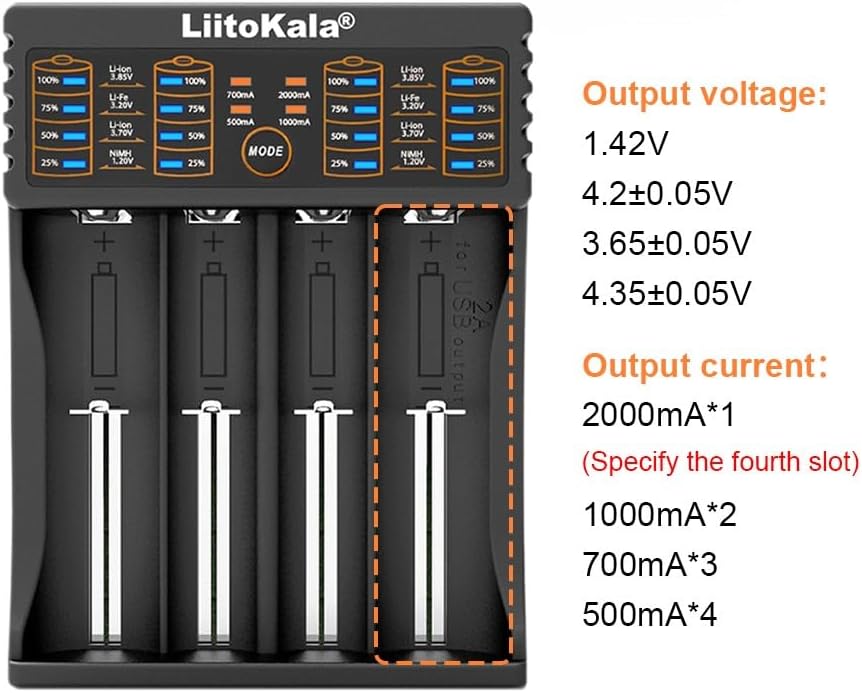
Image: The physical dimensions and weight of the LiitoKala Lii-402 charger.
Troubleshooting
- Charger not powering on: Ensure the USB cable is securely connected to both the charger and a compatible 5V/2A power source. Try a different USB cable or power adapter.
- Battery not detected or charging:
- Check battery polarity.
- Ensure the battery is fully seated in the slot.
- For LiFePO4 or 3.85V Li-ion batteries, manually select the correct battery type using the "MODE" button.
- If the battery is deeply discharged (0V), the charger's activation function should attempt to revive it. If it still doesn't charge, the battery might be faulty.
- Incorrect battery type detected: For LiFePO4 or 3.85V Li-ion batteries, ensure you manually select the correct type. The charger automatically identifies standard Li-ion and Ni-MH.
- Overheating during charging: While the charger has temperature protection, excessive heat can indicate a faulty battery. Discontinue charging immediately if a battery becomes excessively hot. Ensure proper ventilation around the charger.
- USB output not working: Ensure a sufficiently charged battery is inserted into the rightmost slot (Slot 4) for the USB output function to operate.
Maintenance
To ensure the longevity and optimal performance of your LiitoKala Lii-402 charger:
- Keep the charger clean and dry. Use a soft, dry cloth to wipe down the exterior.
- Avoid exposing the charger to extreme temperatures, direct sunlight, or high humidity.
- Store the charger in a cool, dry place when not in use.
- Do not attempt to disassemble or modify the charger. This will void the warranty and could lead to malfunction or injury.
Official Product Video
Video: An official product video demonstrating the unboxing and basic operation of the LiitoKala Lii-402 battery charger.
Warranty and Support
For warranty information, technical support, or further inquiries, please refer to the product packaging or contact LiitoKala customer service through their official channels. You can also visit the LiitoKala Store on Amazon for more product details and support options.
Related documentsLii-402


Ask a question about this manual
Ask about setup, troubleshooting, compatibility, parts, safety, or missing instructions. Manuals+ will review the question and use this page’s manual context to help answer it.