
Introduction
Thank you for choosing the ORION CDF12 Cobalt 12-inch Passive Down-Firing Subwoofer Enclosure. This manual provides essential information for the proper installation, operation, and maintenance of your subwoofer enclosure. Please read this manual thoroughly before installation and retain it for future reference.
Safety Information
Always observe the following safety precautions during installation and operation:
- Disconnect the vehicle's negative battery terminal before beginning any electrical work to prevent short circuits.
- Ensure all wiring is properly insulated to prevent damage and electrical hazards.
- Mount the enclosure securely to prevent movement during vehicle operation, which could cause injury or damage.
- Do not expose the subwoofer to excessive moisture or extreme temperatures.
- Consult a professional car audio installer if you are unsure about any part of the installation process.
Package Contents
Verify that all items are present in the package:
- ORION CDF12 Cobalt 12-inch Passive Down-Firing Subwoofer Enclosure
- Quick Start Guide
Product Features
The ORION CDF12 subwoofer enclosure offers the following key features:
- Premium Passive Subwoofer: The CDF12 is a 12-inch passive subwoofer enclosure designed to enhance bass response when paired with an appropriate aftermarket amplifier.
- Down-Firing Design: The optimized down-firing configuration improves low-frequency output, providing deep and clear bass while protecting the subwoofer.
- Heavy-Duty Build Quality: Constructed from MDF with an airtight seal and durable carpeted finish, this enclosure minimizes vibrations for precise bass reproduction.
- Compact & Space-Saving Design: With dimensions of 20.47" x 6.7" x 14.1", the CDF12 is suitable for installations in confined spaces such as under seats or in vehicle trunks.
- Universal Compatibility: This passive enclosure is compatible with most aftermarket mono or multi-channel amplifiers, allowing for flexible system integration.
Specifications
| Feature | Specification |
|---|---|
| Model Number | CDF12 |
| Subwoofer Diameter | 12 inches |
| Speaker Maximum Output Power | 1500 Watts (Max) |
| Impedance | 4 Ohm |
| Enclosure Material | Wood (MDF) |
| Mounting Type | Under Seat (Suggested) |
| Item Dimensions (D x W x H) | 14.1" x 20.47" x 6.7" |
| Specific Uses | In-car audio systems |
| Connectivity Technology | Wired |
| GTIN / UPC | 818550019034 |
Setup and Installation
Proper installation is crucial for optimal performance and safety. Follow these steps carefully:
- Choose a Mounting Location: Select a secure, flat surface in your vehicle, such as under a seat or in the trunk. Ensure the down-firing orientation is maintained for optimal bass response. The compact design (14.1"D x 20.47"W x 6.7"H) allows for flexible placement.
- Secure the Enclosure: Use appropriate mounting hardware (not included) to firmly secure the subwoofer enclosure to the vehicle's chassis. This prevents movement during driving and ensures safety.
- Wiring to Amplifier: Connect the subwoofer enclosure to a compatible aftermarket amplifier. The enclosure has a 4 Ohm impedance. Use high-quality speaker wire of adequate gauge for the power output of your amplifier.

Angled view of the ORION CDF12 subwoofer enclosure with key dimensions labeled. The enclosure measures approximately 20.7 inches in length, 14 inches in depth, and 6.5 inches in height.
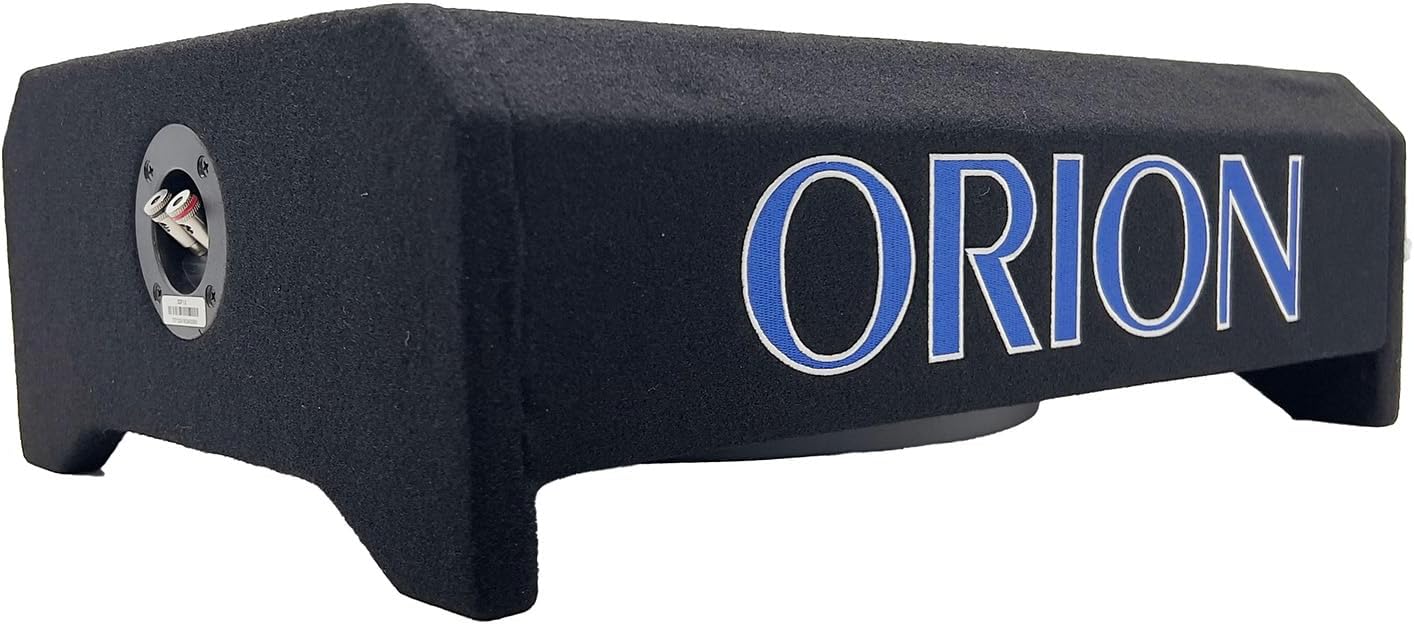
Rear view of the ORION CDF12 subwoofer enclosure showing the speaker wire terminals. Ensure positive (+) and negative (-) terminals are connected correctly to your amplifier.
- Connect to Amplifier: Connect the positive (+) terminal of the subwoofer to the positive (+) output of your amplifier, and the negative (-) terminal of the subwoofer to the negative (-) output of your amplifier.
- Power On and Test: Reconnect the vehicle's negative battery terminal. Turn on your car audio system and amplifier. Start with the amplifier's gain and crossover settings at their lowest, then gradually adjust for desired sound.
Operating Instructions
The ORION CDF12 is a passive subwoofer enclosure, meaning it requires an external amplifier for operation. Once properly installed and connected to an amplifier, its operation is controlled primarily by the amplifier and your car's head unit.
- Amplifier Settings: Adjust the gain, low-pass filter (LPF), and bass boost settings on your amplifier to achieve the desired bass output and blend with your main speakers. Refer to your amplifier's manual for detailed instructions.
- Head Unit Control: Use your car's head unit (stereo) to control the overall volume, subwoofer level, and other audio settings.
- Break-in Period: Allow a break-in period of approximately 10-20 hours of normal listening before operating the subwoofer at high volumes. This allows the speaker components to loosen and perform optimally.
Maintenance
The ORION CDF12 subwoofer enclosure requires minimal maintenance:
- Cleaning: Use a soft, dry cloth to wipe down the enclosure's carpeted finish. Avoid using harsh chemicals or abrasive cleaners.
- Inspection: Periodically check all wiring connections to ensure they are secure and free from corrosion. Inspect the enclosure for any signs of damage or loose components.
- Environment: Ensure the subwoofer is not exposed to direct sunlight for extended periods or extreme temperatures, which can affect its performance and lifespan.
Troubleshooting
If you experience issues with your subwoofer enclosure, refer to the following common problems and solutions:
| Problem | Possible Cause | Solution |
|---|---|---|
| No Sound from Subwoofer |
|
|
| Distorted Sound |
|
|
| Weak Bass Output |
|
|
If the problem persists after attempting these solutions, consult a professional car audio technician.
Warranty
The ORION CDF12 Cobalt 12-inch Passive Down-Firing Subwoofer Enclosure comes with a 1-year manufacturer limited warranty. This warranty covers defects in materials and workmanship under normal use. It does not cover damage resulting from improper installation, accident, misuse, abuse, neglect, unauthorized modification, or normal wear and tear. Please retain your proof of purchase for warranty claims.
Support
For technical assistance, warranty inquiries, or further information regarding your ORION CDF12 subwoofer enclosure, please refer to the contact information provided with your purchase or visit the official ORION website. Always provide your product model number (CDF12) and proof of purchase when seeking support.
