
Introduction
The darkFlash DG360 is an all-in-one liquid CPU cooler designed to provide efficient thermal management for your computer's processor. It features a high-performance pump, ARGB synchronization capabilities, and PWM daisy-chain connection fans. This manual provides detailed instructions for installation, operation, maintenance, and troubleshooting to ensure optimal performance and longevity of your cooler.
Package Contents
Before proceeding with installation, please verify that all components are present in the package:
- DG360 AIO Liquid CPU Cooler (Radiator, Pump/Water Block, Tubing)
- 3 x 120mm ARGB PWM Fans
- Mounting Hardware for Intel Sockets (LGA 1200/115X/1700/1851)
- Mounting Hardware for AMD Sockets (AM4/AM5)
- Thermal Paste
- User Manual
Setup and Installation
Follow these steps carefully to install your darkFlash DG360 AIO Liquid CPU Cooler. Ensure your system is powered off and unplugged before beginning installation.
1. Prepare the CPU Socket
Identify your CPU socket type (Intel or AMD) and select the appropriate mounting brackets and backplate. Attach the standoffs to the motherboard according to your CPU socket type.

Image: Intel and AMD CPU mounting brackets. The image displays two circular mounting brackets, one labeled 'Intel' and the other 'AMD', indicating compatibility for different CPU platforms.
2. Install the Radiator and Fans
Mount the fans to the radiator using the provided screws. Ensure the fan airflow direction is appropriate for your case (typically exhausting air out or drawing air in). Install the radiator assembly into your PC case in an available mounting location (e.g., top, front, or rear).
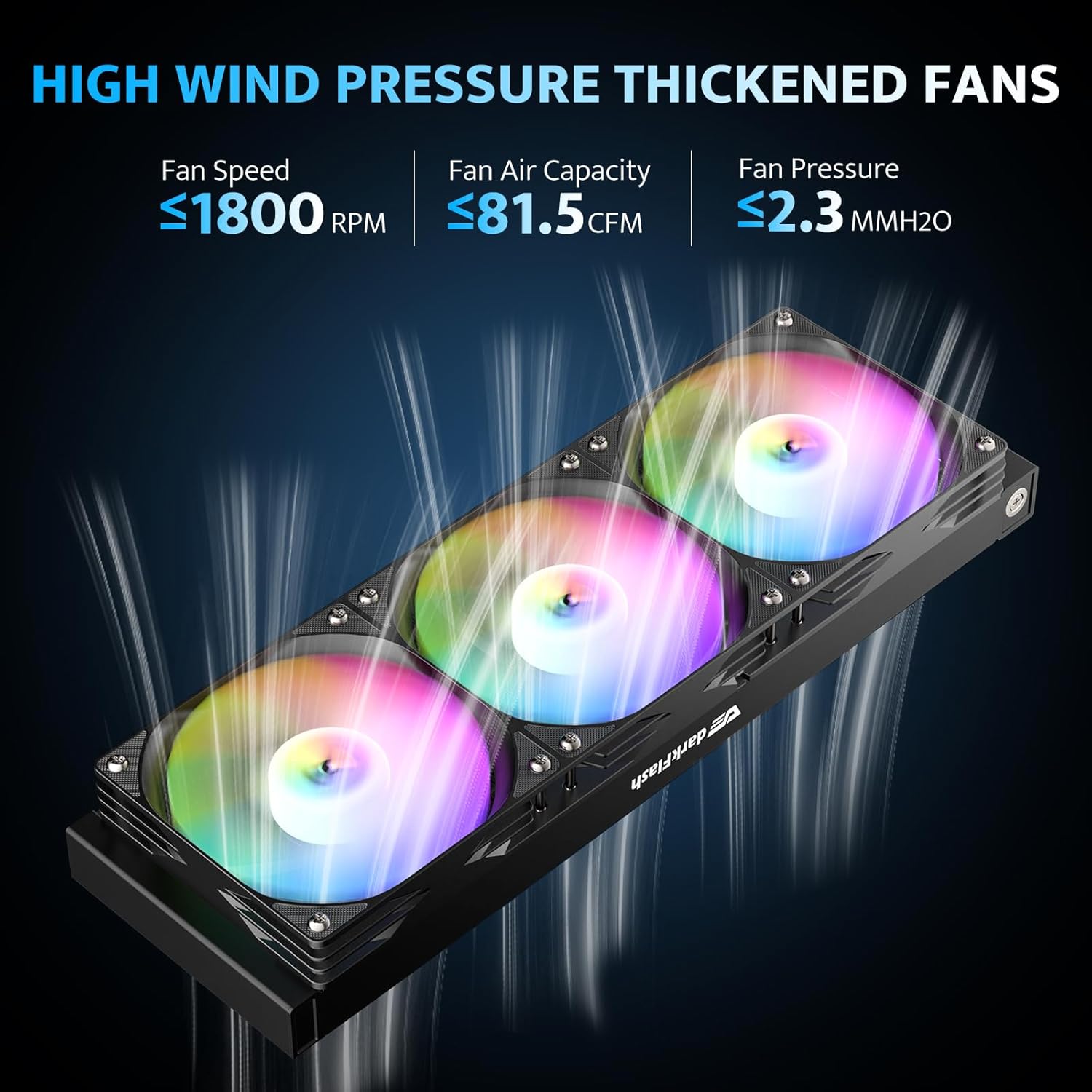
Image: Radiator with three ARGB fans. This image shows the darkFlash DG360 radiator with three illuminated ARGB fans attached, highlighting their high wind pressure design.
3. Apply Thermal Paste and Mount Water Block
Clean the CPU surface and apply a small amount of thermal paste to the center of the CPU. Carefully place the water block onto the CPU, aligning it with the standoffs. Secure the water block with the appropriate screws, tightening them in a cross pattern until snug.

Image: Optimized copper cooling plate of the water block. This image illustrates the design of the water block's copper cold plate, emphasizing its 57x57mm surface area and 1.5mm micro-channel spacing for improved heat transfer.
4. Connect Cables
Connect the pump's 3-pin power cable to the CPU_FAN or AIO_PUMP header on your motherboard. Connect the fan PWM cables to the CPU_FAN or other fan headers. For ARGB lighting, connect the 3-pin ARGB cables from the fans and pump to a compatible 5V ARGB header on your motherboard or an ARGB controller. The fans support daisy-chain connection for simplified wiring.
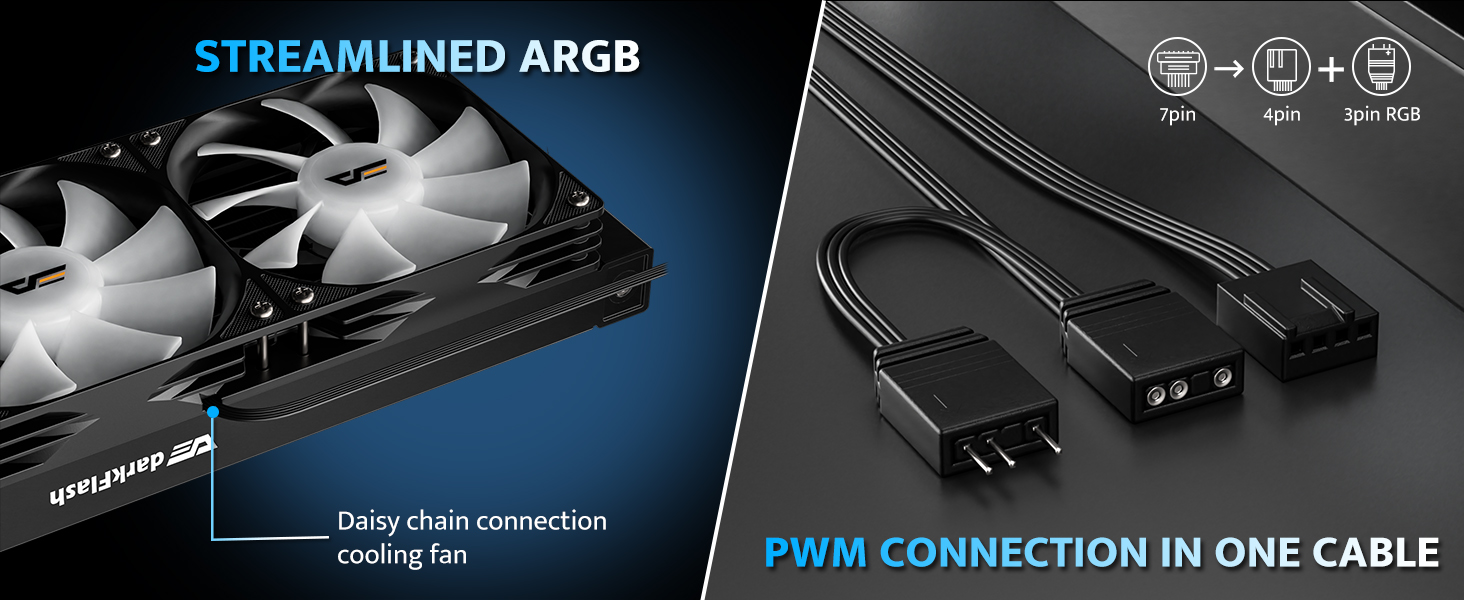
Image: ARGB and PWM connection cables. This image shows the streamlined ARGB and PWM connection cables, indicating how they can be connected in a single cable for easier management.
Operating Instructions
PWM Fan Control
The DG360's fans feature PWM (Pulse Width Modulation) control, allowing their speed to be adjusted automatically based on CPU temperature. This ensures efficient cooling when needed and quiet operation during lighter loads. Configure fan curves in your motherboard's BIOS/UEFI settings or through compatible software.
ARGB Lighting Synchronization
The pump head and fans are equipped with 5V 3-pin Addressable RGB (ARGB) lighting. This allows for dynamic and customizable lighting effects. Connect the ARGB cables to a compatible motherboard header (e.g., ASUS Aura Sync, Gigabyte RGB Fusion, MSI Mystic Light Sync, ASRock Polychrome RGB) to synchronize lighting effects across your system. Use your motherboard's software to control the lighting patterns and colors.

Image: ARGB Sync compatibility with motherboards. This image displays the darkFlash DG360 cooler's ARGB lighting in a PC build, alongside logos of compatible motherboard ARGB sync technologies like ASUS Aura Sync, MSI Mystic Light Sync, Gigabyte RGB Fusion, and ASRock Polychrome RGB.
Maintenance
Regular maintenance helps ensure the longevity and optimal performance of your liquid CPU cooler.
- Dust Cleaning: Periodically clean the radiator fins and fan blades to prevent dust buildup, which can impede airflow and reduce cooling efficiency. Use compressed air or a soft brush.
- Check Tubing and Connections: Inspect the tubing for any signs of kinks, leaks, or damage. Ensure all cable connections (power, PWM, ARGB) are secure.
- Pump Operation: Listen for any unusual noises from the pump. A properly functioning pump should operate quietly.
Troubleshooting
If you encounter issues with your darkFlash DG360 cooler, refer to the following common problems and solutions:
| Problem | Possible Cause | Solution |
|---|---|---|
| High CPU Temperatures | Poor thermal paste application, loose water block, insufficient airflow, pump failure. | Reapply thermal paste, ensure water block is securely mounted, clean radiator/fans, check pump connection. |
| Fans Not Spinning/ARGB Not Lighting Up | Incorrect cable connection, faulty fan/ARGB header, software conflict. | Verify all PWM and ARGB cables are correctly connected to the motherboard or controller. Check motherboard BIOS/software settings. |
| Pump Noise | Air bubbles in the loop, pump running at maximum speed, faulty pump. | Gently tilt the PC case to dislodge air bubbles. Adjust pump speed in BIOS. If noise persists, contact support. |
| ARGB cable too short (as noted in a review) | Limited cable length for specific PC case layouts or motherboard header locations. | Consider using an ARGB extension cable if the pump's ARGB cable cannot reach the desired header. |
Specifications
Detailed technical specifications for the darkFlash DG360 AIO Liquid CPU Cooler:
- Product Dimensions: 15.51"L x 4.72"W x 1.06"H (Radiator)
- Cooling Method: Liquid (Water)
- Compatible Devices: Desktop PCs
- Noise Level: 33 Decibels (Max)
- Material: Aluminium (Radiator), Copper, Micro Skived Fins (Cold Plate)
- Maximum Rotational Speed (Fans): 1800 RPM
- Air Flow Capacity (Fans): 81.5 Cubic Feet Per Minute (CFM)
- Pump Speed: Up to 3000 RPM
- TDP Support: Up to 315W
- Power Connector Type: 5-Pin (Fans), 3-Pin (Pump)
- Voltage: 12 Volts
- Wattage: 1.8 watts
- CPU Socket Compatibility: Intel LGA 1200/115X/1700/1851, AMD AM4/AM5
- Item Weight: 4.6 pounds
Warranty and Support
darkFlash provides a 3-year assurance for the DG360 AIO Liquid CPU Cooler. This warranty covers defects in materials and workmanship under normal use. For warranty claims, technical assistance, or any product-related inquiries, please contact darkFlash customer support through their official website or the retailer where the product was purchased.
For additional resources and support, visit the official darkFlash store: darkFlash Store on Amazon


