
BURCHDA AZ20
BURCHDA AZ20 E-MTB User Manual
Model: AZ20
Introduction
Welcome to the user manual for your new BURCHDA AZ20 E-MTB. This electric mountain bike is designed for versatile riding, featuring a robust full-suspension system, powerful motor, and long-lasting battery. This manual provides essential information for the safe assembly, operation, maintenance, and troubleshooting of your E-MTB. Please read it thoroughly before your first ride to ensure optimal performance and safety.

Image: The BURCHDA AZ20 E-MTB in blue, shown with an optional front basket, highlighting its robust design and fat tires.
Safety Information
Your safety is paramount. Always wear a helmet and appropriate safety gear when riding. Adhere to local traffic laws and regulations. Regular maintenance checks are crucial for safe operation.
Important Safety Precautions:
- Ensure all bolts and quick releases are securely tightened before each ride.
- Check tire pressure regularly.
- Test brakes before riding to ensure proper function.
- Do not ride under the influence of alcohol or drugs.
- Be aware of your surroundings and potential hazards.
- The bike is equipped with an automatic taillight for enhanced visibility.

Image: Close-up of the BURCHDA AZ20 E-MTB's automatic taillight, designed to improve visibility and safety for vehicles behind.
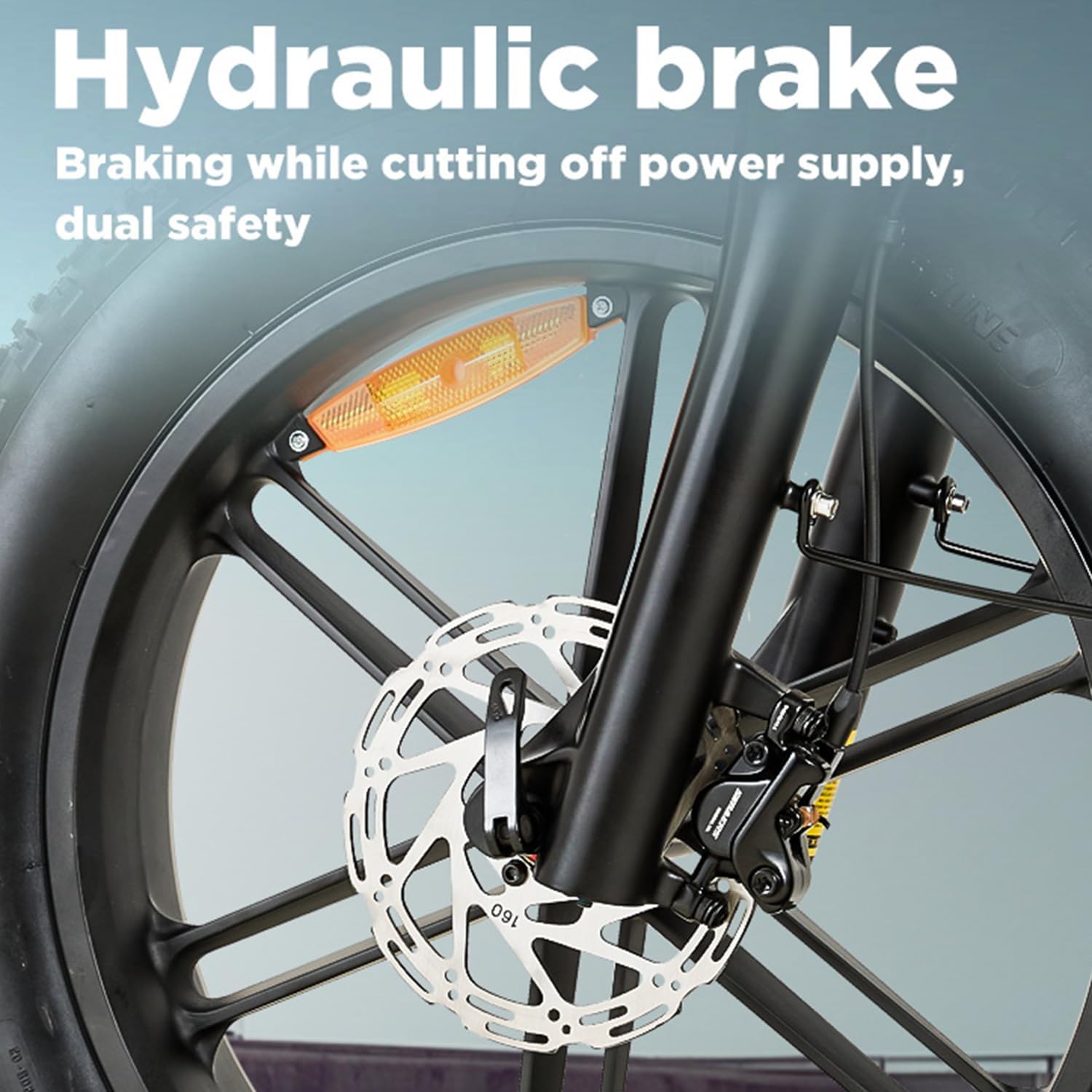
Image: Detailed view of the hydraulic disc brake system on the BURCHDA AZ20 E-MTB, emphasizing its power cut-off feature for dual safety.
What's in the Box
Upon unpacking, please verify that all components are present and undamaged:
- BURCHDA AZ20 E-MTB (partially assembled)
- Gepäckträger (Rear Rack)
- Korb (Basket)
- Kotflügel (Fenders)
- Reflektoren (Reflectors)
- Horn (Horn)
- Battery Charger
- User Manual (this document)
- Assembly Tools (basic)
Setup
Your BURCHDA AZ20 E-MTB comes partially assembled. Follow these steps for final assembly:
- Unpack: Carefully remove all components from the packaging.
- Install Front Wheel: Attach the front wheel, ensuring the disc brake rotor is correctly seated in the caliper. Secure with the quick release or axle nuts.
- Install Handlebars: Insert the handlebar stem into the fork steerer tube and tighten the stem bolts. Adjust the handlebar angle for comfortable riding.
- Install Pedals: Identify left (L) and right (R) pedals. Thread the left pedal counter-clockwise and the right pedal clockwise into the crank arms. Tighten firmly.
- Install Seat Post: Insert the seat post into the frame and adjust the height. Secure with the quick release lever.
- Attach Fenders and Rack: Mount the front and rear fenders, and the rear luggage rack using the provided hardware.
- Charge Battery: Before first use, fully charge the battery. Refer to the "Battery Charging" section for details.
- Pre-Ride Check: Perform all safety checks listed in the "Safety Information" section.

Image: The BURCHDA AZ20 E-MTB frame with the integrated battery compartment open, showing the removable battery for charging or replacement.
Operating
The BURCHDA AZ20 E-MTB offers multiple riding modes and an intuitive control system.
Control System:
The bike features a three-part control system: an intelligent display, a smart controller, and a 7-speed gear shift.
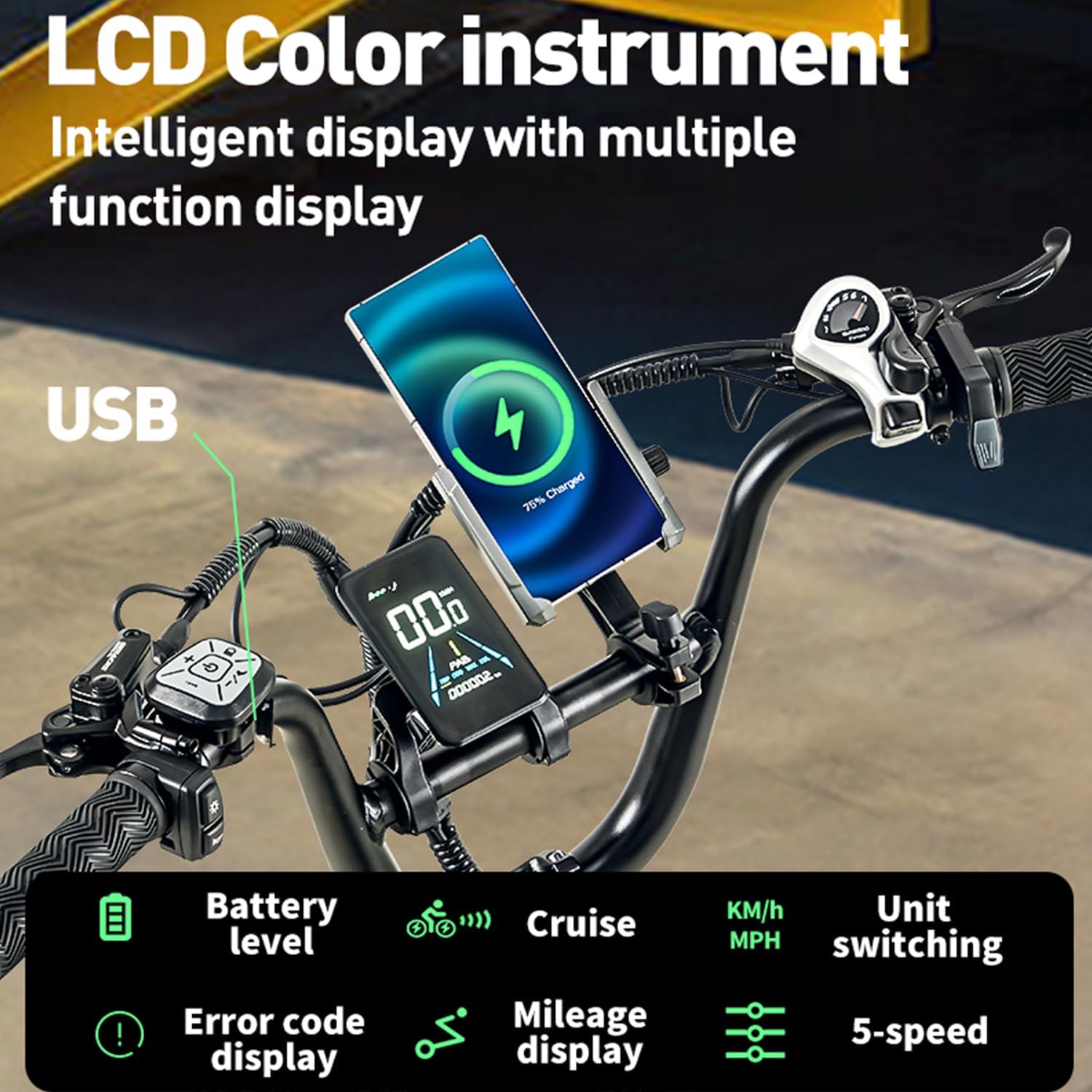
Image: Close-up of the BURCHDA AZ20 E-MTB's LCD color instrument display and handlebar controls, showing battery level, cruise, speed unit switching, error codes, mileage, and 5-speed assist levels. A USB charging port is also visible.

Image: Top-down view of the BURCHDA AZ20 E-MTB handlebars, showcasing the central LCD display, left-side control panel, and right-side gear shifter.
Riding Modes:
- E-Bike Mode: Provides full electric power, no pedaling required.
- Assistance Mode: The motor provides power assistance as you pedal. Adjust the assist level via the display.
- Manual Mode: Ride like a traditional bicycle without electric assistance.
Battery Charging:
The 48V20Ah Li-Ion battery can be charged on or off the bike. Connect the charger to the battery port and a standard power outlet. A full charge takes approximately 4-6 hours. The display indicates battery level.

Image: Close-up of the BURCHDA AZ20 E-MTB's integrated 48V20Ah battery, highlighting its large capacity and the Battery Management System (BMS) for multi-functional protection.
Maintenance
Regular maintenance ensures the longevity and safe operation of your BURCHDA AZ20 E-MTB.
- Cleaning: Use a damp cloth to clean the frame. Avoid high-pressure washing directly on electrical components.
- Lubrication: Regularly lubricate the chain and other moving parts.
- Brakes: Check brake pads for wear and replace as needed. Ensure hydraulic fluid levels are adequate.
- Tires: Maintain recommended tire pressure (refer to tire sidewall). Inspect tires for wear and damage.
- Battery Care: Store the battery in a cool, dry place. If storing for extended periods, charge it to 50-70% every few months.
- Fasteners: Periodically check and tighten all bolts and screws, especially on the handlebars, seat post, and wheels.

Image: Close-up of the BURCHDA AZ20 E-MTB's rear wheel, showing the 7-speed derailleur and chain, critical components for regular maintenance.
Troubleshooting
This section addresses common issues you might encounter with your BURCHDA AZ20 E-MTB.
| Problem | Possible Cause | Solution |
|---|---|---|
| Bike does not power on. | Battery not charged, battery not properly seated, power cable loose. | Charge battery, ensure battery is fully inserted, check all electrical connections. |
| Motor not assisting. | Low battery, assist level set to zero, brake levers engaged, error code on display. | Charge battery, increase assist level, release brake levers, consult display for error codes. |
| Brakes feel weak. | Worn brake pads, air in hydraulic system, misaligned caliper. | Inspect and replace brake pads, bleed hydraulic system (professional recommended), adjust caliper alignment. |
| Unusual noises from drivetrain. | Dry chain, misaligned derailleur, loose components. | Lubricate chain, adjust derailleur, check and tighten all bolts. |
If the problem persists, please contact BURCHDA customer support.
Specifications
Detailed technical specifications for the BURCHDA AZ20 E-MTB:
- Model: AZ20
- Brand: BURCHDA
- Frame Material: High-strength Aluminum Alloy
- Suspension: Full Suspension (Dual Suspension System with lockable front fork)
- Motor: High Power Motor (provides strong output and excellent torque for climbing)
- Battery: 48V20Ah Removable Li-Ion Battery
- Charging Time: 4-6 hours
- Range: 60-70km (depending on riding conditions and assist level)
- Brakes: Hydraulic Disc Brakes (with power cut-off)
- Gears: 7-Speed Gear System
- Tires: 20-inch 4.0 Fat Tires
- Max Load Capacity: 200kg
- Item Weight: 35 Kilograms
- Display: Intelligent LCD Color Instrument (shows battery level, cruise, speed, error codes, mileage, 5-speed assist)
- Special Features: Automatic Taillight, USB Charging Port on display, Ergonomic 27cm Comfort Saddle, EN 15194-certified.
- Recommended Height: 5'2" - 6'0" (157cm - 183cm)

Image: Diagram illustrating the dimensions of the BURCHDA AZ20 E-MTB, including length, height, and wheel size, along with key specifications like weight, load capacity, and recommended rider height.

Image: Close-up of the BURCHDA AZ20 E-MTB's high-power motor, located in the rear wheel hub, illustrating its internal components and highlighting its capability for climbing and adjustable speed.

Image: Visual representation of the dual shock suspension system on the BURCHDA AZ20 E-MTB, showing both front fork suspension and rear frame suspension for enhanced comfort and off-road capability.

Image: Close-up of the BURCHDA AZ20 E-MTB's extra-wide 27cm comfort saddle, designed for ergonomic support and long-ride comfort.
Related documentsAZ20


Ask a question about this manual
Ask about setup, troubleshooting, compatibility, parts, safety, or missing instructions. Manuals+ will review the question and use this page’s manual context to help answer it.