
Product Overview
The AONIMI Portable Charger is a high-capacity 40800mAh power bank designed to keep your electronic devices charged on the go. It features multiple output options, including built-in Type-C and for iPhone cables, a dedicated Apple Watch charger, and additional USB-A and USB-C ports. With 25W PD QC4.0 fast charging technology, it provides efficient power delivery for a wide range of smartphones, tablets, and other USB-powered devices.
Image: The AONIMI 40800mAh Power Bank (labeled "Ours") is shown next to four separate 10000mAh power banks (labeled "Others"), illustrating its high capacity in a single, compact unit. Text on the image indicates it can provide 10 charges for an iPhone 16, 13.5 charges for a Samsung S24, 4.2 charges for an iPad mini, and 106 charges for an Apple Watch S10.
Package Contents
- 1 x AONIMI 40800mAh Portable Charger Power Bank
- 1 x USB Charging Cable (for recharging the power bank)
- 1 x User Manual
Product Features
- High Capacity: 40800mAh battery provides multiple charges for various devices.
- Integrated Cables: Built-in Type-C and for iPhone charging cables for convenience.
- Apple Watch Charger: Integrated magnetic wireless charger for Apple Watch.
- Multiple Outputs: 5 output ports (built-in Type-C, built-in for iPhone, USB-A, USB-C, Apple Watch wireless) to charge up to 5 devices simultaneously.
- Dual Inputs: 2 input options (USB-C port, built-in Type-C cable) for recharging the power bank.
- Fast Charging: Dual 25W PD (Power Delivery) and QC4.0 (Quick Charge) technology for rapid charging.
- Smart LCD Display: Digital display shows remaining power percentage.
- Safety Protections: Built-in safeguards against over-charge, over-discharge, short circuit, high temperature, over-voltage, over-current, over-power, and anti-interference.
- Compact Design: Portable and travel-friendly dimensions (5.8 x 2.75 x 1.06 inches, 0.98lb).

Image: A detailed view of the AONIMI Power Bank highlighting its features. It shows the built-in USB-C cable (input/output), built-in for iPhone cable (input), wireless charging for Apple Watch, 100% LCD display, USB-A output, USB-C input/output, and power button. The image also notes the weight (447g), dimensions (5.8"x2.75"x1.06"), and bendable TPU material for the cables, rated for 10,000+ folds.
Setup and Initial Use
1. Recharging the Power Bank
Before first use, fully charge your AONIMI Power Bank. The device can be recharged using two methods:
- Using the Built-in Type-C Cable: Pull out the integrated Type-C cable and connect it to a compatible USB wall adapter (not included) or a powered USB-C port.
- Using the USB-C Port: Connect an external USB-C to USB-C cable (not included) to the power bank's USB-C input/output port and a compatible USB wall adapter.
The LCD display will show the charging progress. Once it reaches 100%, the power bank is fully charged.

Image: This image illustrates the two methods for recharging the power bank. The top diagram shows the power bank being recharged via its USB-C port using an external USB-C cable and wall adapter. The bottom diagram shows it being recharged using its built-in USB-C cable connected to a wall adapter. Both scenarios show the LCD display indicating "100%".
2. Powering On/Off
Press the power button located on the side of the power bank to turn it on and activate the LCD display. The display will show the current battery percentage. The power bank will automatically turn off after a period of inactivity to conserve power.
Operating Instructions
1. Charging Devices
The AONIMI Power Bank offers multiple ways to charge your devices:
- Built-in Type-C Cable: Pull out the integrated Type-C cable and connect it to your compatible device.
- Built-in for iPhone Cable: Pull out the integrated for iPhone cable and connect it to your compatible Apple device.
- USB-A Output Port: Use your device's standard USB-A charging cable and plug it into the USB-A output port on the power bank.
- USB-C Input/Output Port: Use your device's USB-C charging cable and plug it into the USB-C port on the power bank. This port supports 25W PD fast charging.
- Apple Watch Wireless Charger: Place your Apple Watch on the designated magnetic charging area on the power bank. Ensure proper alignment for charging to begin.
The power bank can charge up to 5 devices simultaneously using a combination of its built-in cables, USB ports, and wireless Apple Watch charger.
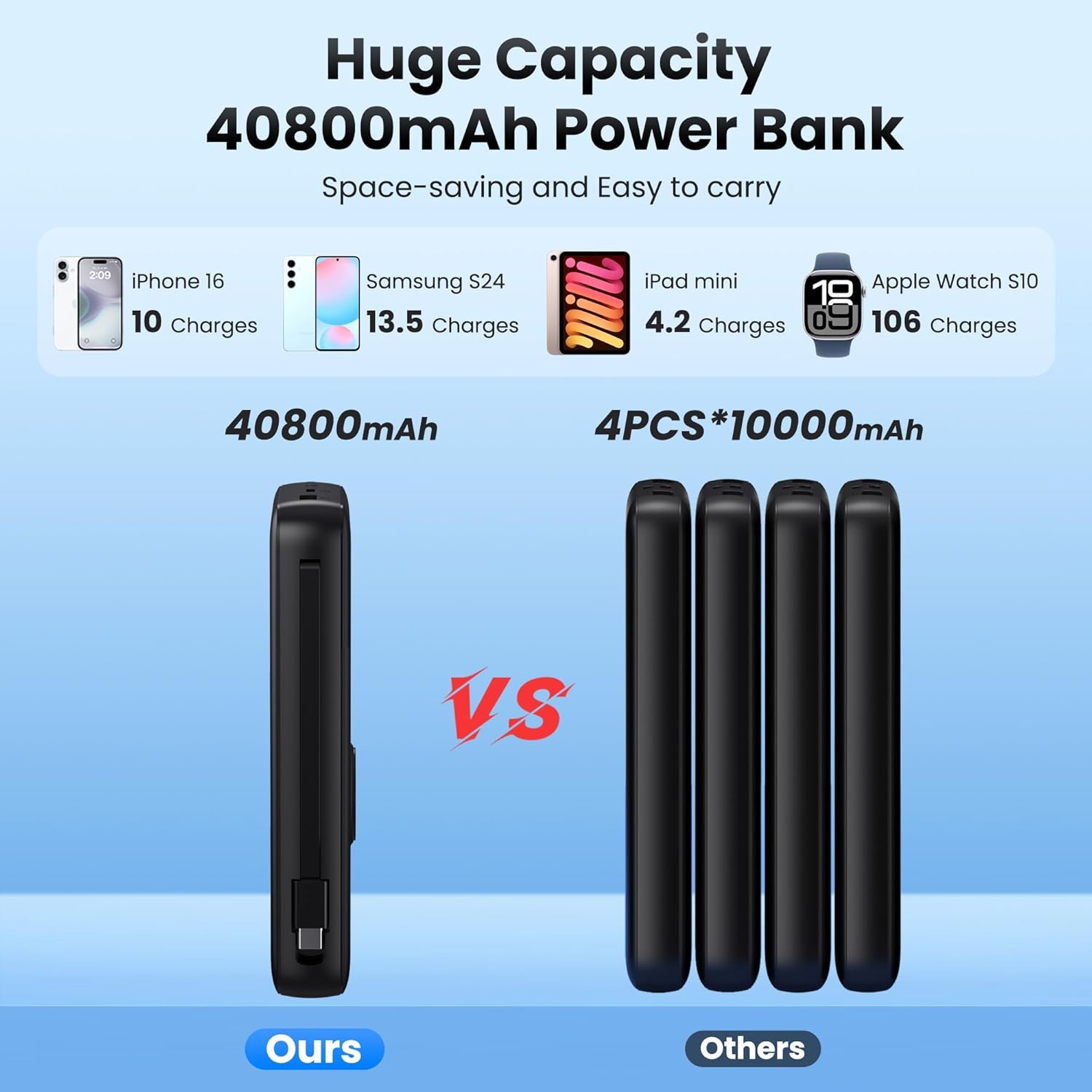
Image: The AONIMI Power Bank is shown actively charging an iPhone via its built-in iOS cable, a Samsung phone via its built-in Type-C cable, an iPad via the USB-C PD port, and an Apple Watch wirelessly. The image highlights the 5-in-1 functionality and simultaneous charging capability.
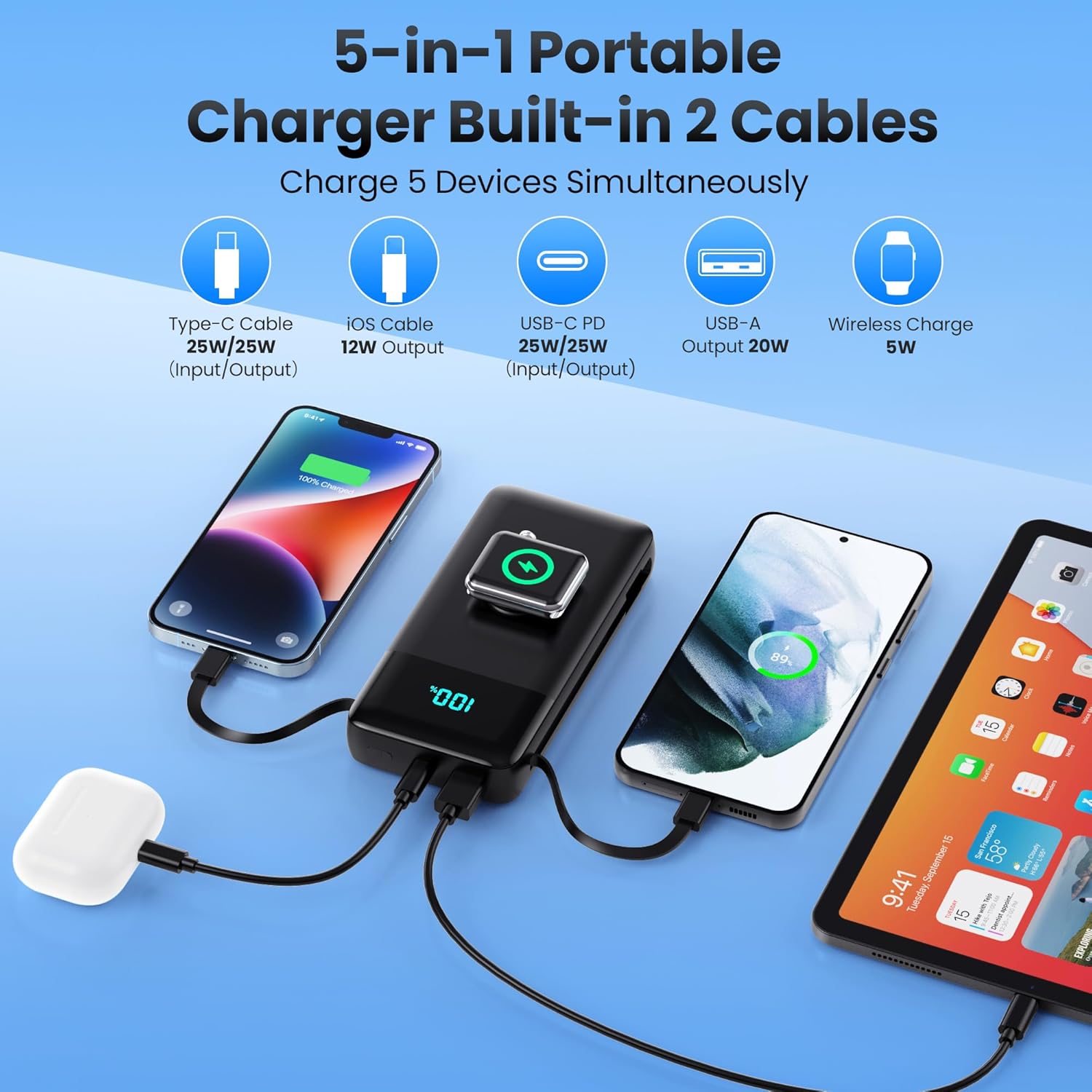
Image: This image illustrates the 25W PD + QC4.0 fast charging capability. The power bank is shown charging an iPhone 16, with text indicating it can reach 50% charge in 30 minutes, significantly faster than standard 2.4A chargers.
2. Understanding the LCD Display
The integrated LCD display provides real-time information about the power bank's battery status. The percentage shown indicates the remaining charge. During charging, the numbers will blink until fully charged, then remain solid at 100%.
3. Using the Built-in Flashlight
To activate the flashlight, double-press the power button. Double-press again to turn it off. This feature is useful in low-light conditions or emergencies.
Compatibility
The AONIMI Power Bank is widely compatible with a variety of devices:
- For iPhone Series: iPhone 17/Air/16e/16/15/14/13/12/11/X/8/7/6/SE Series (including Pro/Pro Max/Plus/Mini models).
- For iWatch Series: Apple Watch Ultra 2/Ultra/10/9/8/7/6/SE/5/4/3/2.
- For Samsung/Android: Galaxy S24/S23/S22/S21/S20/S10/S9/Z Fold2/Note20/Note10, Google Pixel 9Pro/P5/P4/P3XL, LG, Moto, Nexus series, and other Android phones.
- For iPad & Tablets: Various iPad models and Android tablets.
- Other Devices: Apple AirPods Pro/AirPods and other USB-powered gadgets.

Image: A visual representation of the power bank's broad compatibility, displaying various models of iPhones, Apple Watches, Samsung/Android phones, iPads, and AirPods, all compatible with the charger.
Safety Information
The AONIMI Power Bank is equipped with multiple safety features to ensure reliable operation and protect your devices:
- Over-voltage Protection: Prevents damage from excessive voltage.
- Over-charge Protection: Stops charging once the battery is full to prevent overcharging.
- Over-current Protection: Safeguards against excessive current flow.
- Over-power Protection: Protects against power surges.
- Short-Circuit Protection: Automatically shuts off in case of a short circuit.
- High Temperature Protection: Monitors and regulates internal temperature to prevent overheating.
- Over-discharge Protection: Prevents the battery from being fully depleted, extending its lifespan.
- Anti-interference Protection: Minimizes electromagnetic interference.
Always use the power bank in a well-ventilated area and avoid exposing it to extreme temperatures or direct sunlight.

Image: This graphic displays a shield icon over the power bank, surrounded by icons representing its safety features: Over-voltage Protection, Over-charge Protection, Over-current Protection, Over-power Protection, Short-Circuit Protection, High Temperature Protection, Over-discharge Protection, and Anti-interference Protection. The background shows ice, suggesting a low-temperature core.
Maintenance and Care
- Keep the power bank away from water, fire, and high temperatures.
- Avoid dropping or subjecting the device to strong impacts.
- Do not attempt to disassemble or modify the power bank.
- Clean the device with a soft, dry cloth. Do not use harsh chemicals or abrasive materials.
- For long-term storage, charge the power bank to approximately 50-70% and store it in a cool, dry place. Recharge every 3-6 months to maintain battery health.
Troubleshooting
- Device not charging:
- Ensure the power bank is sufficiently charged (check LCD display).
- Verify that the charging cable is securely connected to both the power bank and your device.
- Try a different charging cable or port on the power bank.
- Ensure your device is compatible with the power bank's output specifications.
- Power bank not recharging:
- Ensure the charging cable is securely connected to the power bank's input port and the wall adapter/power source.
- Try a different wall adapter or power outlet.
- Ensure the wall adapter provides sufficient power (e.g., 5V/2A or higher for faster charging).
- Slow charging:
- Ensure you are using a fast-charging compatible cable and adapter if available.
- Some devices may limit charging speed when multiple devices are connected.
- Check if your device supports 25W PD or QC4.0 for optimal speed.
- Apple Watch not charging wirelessly:
- Ensure the Apple Watch is correctly placed on the magnetic charging area.
- Remove any thick cases from the Apple Watch that might interfere with wireless charging.
- Verify the power bank has sufficient charge.
Specifications
| Feature | Detail |
|---|---|
| Model Number | T1 |
| Battery Capacity | 40800 Milliamp Hours (mAh) |
| Product Dimensions | 5.9 x 2.67 x 1.18 inches |
| Item Weight | 12 ounces (0.98 lbs) |
| Input (USB-C Port) | 25W PD (Power Delivery) |
| Output (USB-C Port) | 25W PD (Power Delivery) |
| Output (USB-A Port) | 20W |
| Output (Built-in Type-C Cable) | 25W PD (Power Delivery) |
| Output (Built-in for iPhone Cable) | 12W |
| Output (Apple Watch Wireless) | 5W |
| Total Outputs | 5 (Built-in Type-C, Built-in for iPhone, USB-A, USB-C, Apple Watch Wireless) |
| Total Inputs | 2 (USB-C Port, Built-in Type-C Cable) |
| Display | Smart LCD Digital Display |
| Manufacturer | DONGGUAN BANGYUAN NEW ENERGY CO.,LTD. |
Warranty and Support
For warranty information or technical support, please refer to the contact details provided on the product packaging or visit the official AONIMI website. Keep your purchase receipt for warranty claims.