
SUPERJARE B0DYC8VN7G
SUPERJARE Boho TV Stand User Manual
Model: B0DYC8VN7G
Introduction
Thank you for choosing the SUPERJARE Boho TV Stand. This entertainment center is designed to accommodate TVs up to 65 inches, offering both aesthetic appeal and practical storage solutions for your living space. Its blend of retro and boho styles, along with thoughtful features like adjustable shelving and cable management, makes it a versatile addition to any home. This manual provides essential information for assembly, operation, maintenance, and troubleshooting to ensure you get the most out of your product.
Features
- Eye-pleasing Design: Rattan-decorated doors complement the walnut surface, creating a blend of retro and boho styles suitable for various room aesthetics.
- TV Compatibility: Designed to support TVs up to 65 inches, with a spacious desktop measuring 53.9'' x 15.7''. Can be used as a standalone TV support or with a wall-mounted TV to free up surface space.
- Ample Storage: Features two large cabinets for concealed storage and a middle open shelf with adjustable height for media devices or other items.
- Cable Management: Equipped with four cord holes at the back to help organize and manage cables, keeping your entertainment area tidy.
- Durable Construction: Built with sturdy P2 particleboard for long-lasting support. Features six solid wood feet, two of which are adjustable to ensure stability on uneven floors.
Setup
Assembly of the SUPERJARE Boho TV Stand is designed to be straightforward. Please follow the illustrated instructions provided in the packaging carefully. All necessary tools for assembly are included.
Assembly Steps Overview:
- Unpack all components and verify against the parts list in the instruction manual.
- Assemble the main frame of the TV stand according to the diagrams.
- Install the adjustable shelf in the central compartment. Note that the shelf height can be adjusted to three levels to accommodate different item sizes.
- Attach the solid wood feet to the base of the unit. Ensure the adjustable feet are properly installed and leveled.
- Mount the rattan-decorated cabinet doors. Ensure they close securely, utilizing the magnetic closures.
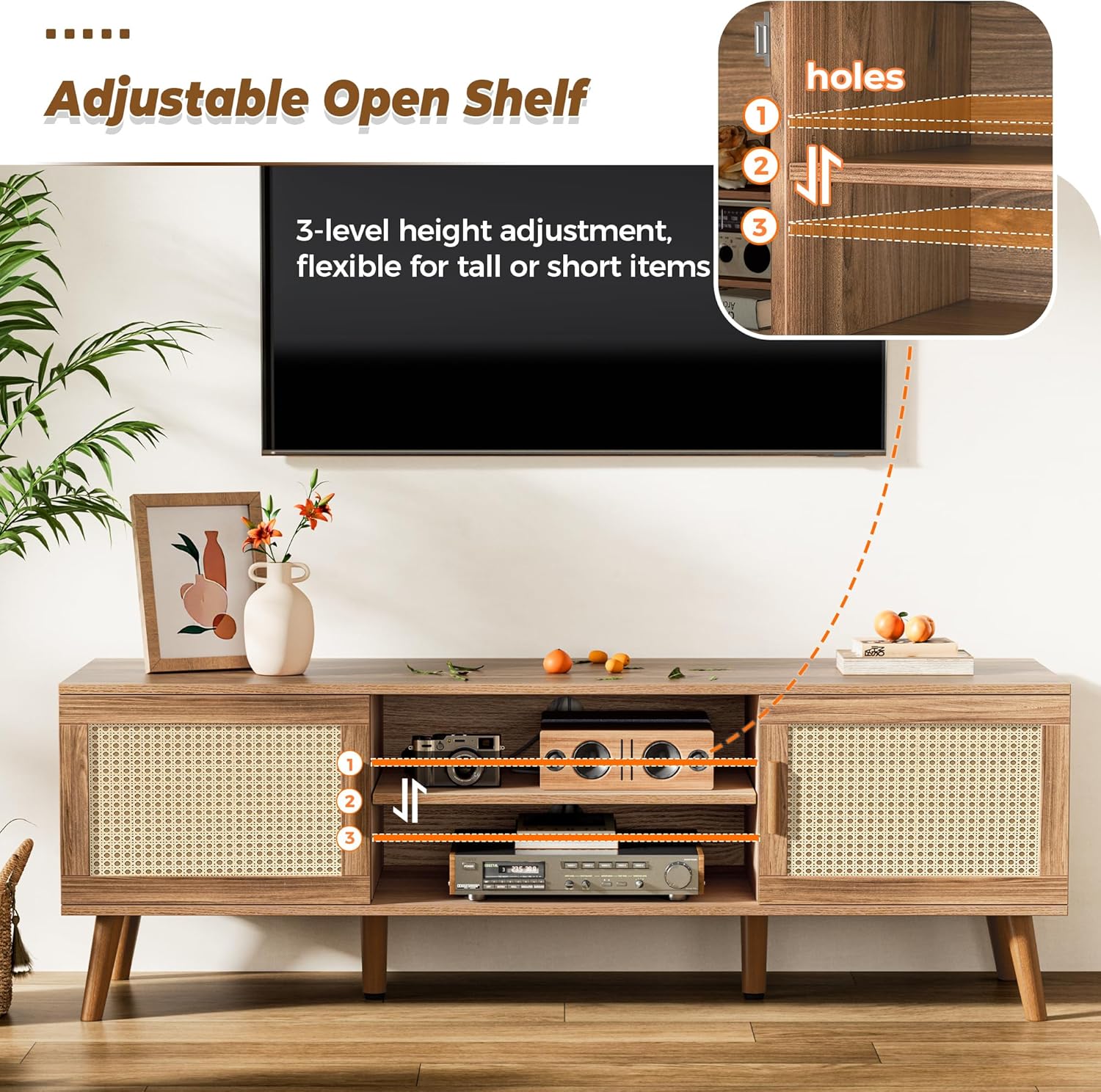
Image: The adjustable open shelf in the center of the TV stand, showing three possible height settings for flexible storage.

Image: Close-up of one of the adjustable feet, illustrating how it can be rotated to stabilize the TV stand on uneven surfaces.
Operating Instructions
Storage and Organization:
- Utilize the two side cabinets to store items you wish to keep out of sight, such as DVDs, games, or other media accessories. The doors feature magnetic closures for secure keeping.
- The central open shelf is ideal for media players, gaming consoles, or soundbars. Adjust the shelf height as needed to fit your devices.
Cable Management:
- Feed power cords and audio/video cables through the four pre-drilled cord holes located at the back of the unit. This helps maintain a clean and organized appearance, preventing tangled wires.
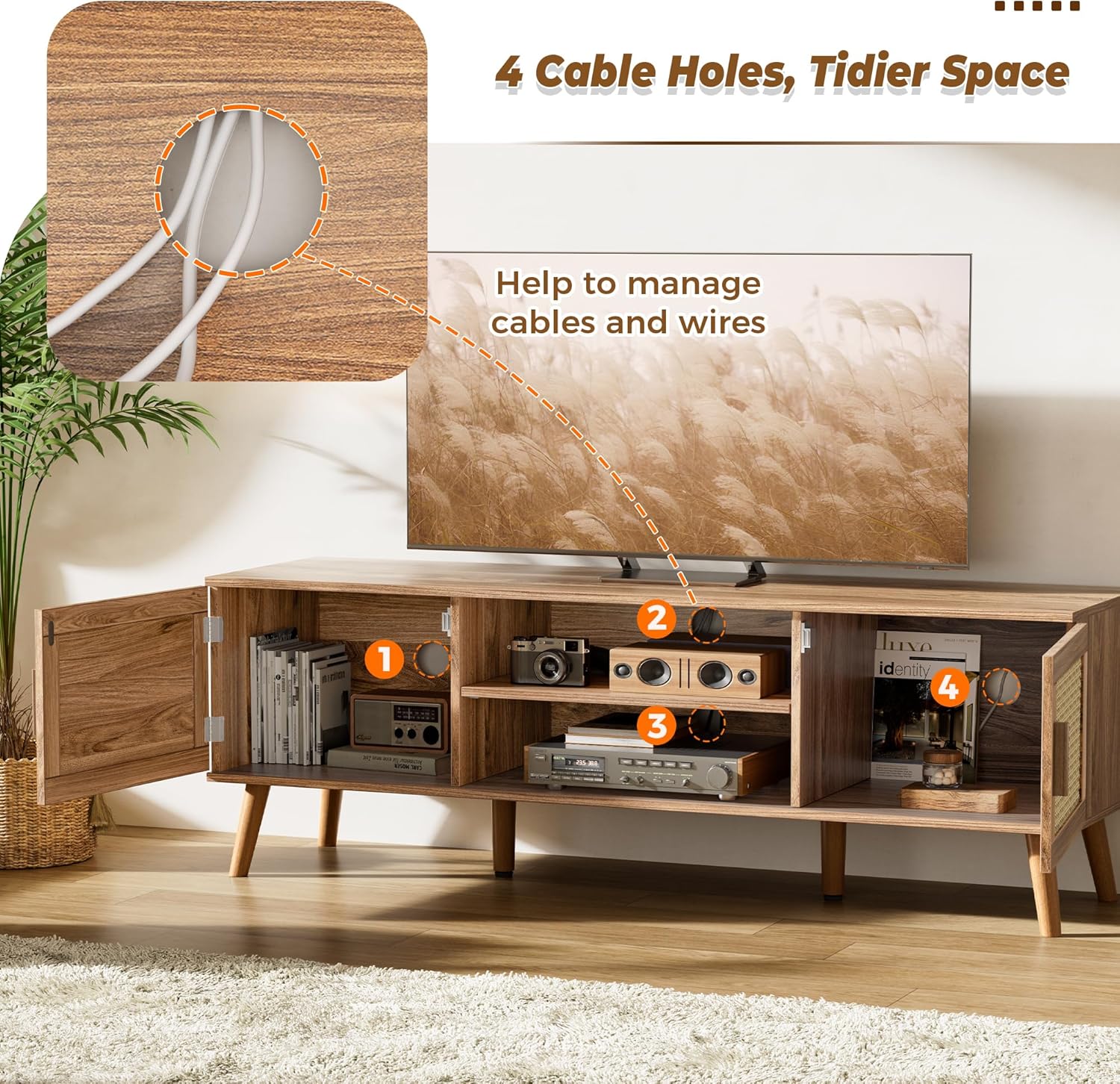
Image: The back of the TV stand showing the four circular cable management holes designed to route and organize electronic device cords.
Maintenance
- Cleaning: Wipe surfaces with a soft, damp cloth. Avoid harsh chemicals or abrasive cleaners, as they may damage the finish.
- Spills: Immediately wipe up any spills to prevent moisture damage to the particleboard.
- Stability Check: Periodically check all screws and connections to ensure they remain tight. Re-tighten if necessary to maintain structural integrity.
- Leveling: Re-adjust the leveling feet as needed to ensure the TV stand remains stable on your floor.

Image: Close-up of the particle board surface, highlighting its anti-scratch and waterproof properties for easy maintenance.
Troubleshooting
| Problem | Possible Cause | Solution |
|---|---|---|
| Stand is wobbly/unstable. | Uneven floor; loose feet/connections. | Adjust the leveling feet at the bottom of the stand. Check and tighten all assembly screws. |
| Cabinet doors do not close properly. | Misaligned hinges; obstructed magnetic closure. | Check hinge alignment and adjust if necessary. Ensure nothing is blocking the magnetic closure points. |
| Missing parts during assembly. | Packaging error. | Refer to the parts list in your instruction manual. Contact SUPERJARE customer support with details of the missing components. |
Specifications
- Brand: SUPERJARE
- Model: B0DYC8VN7G
- Color: Walnut
- Size: 53.9" (Length)
- Dimensions: Approximately 53.9'' (L) x 15.7'' (W) x 19.7'' (H) (based on image 71hO7g17yjL)
- Item Weight: 39.1 pounds
- Material: P2 Particleboard, Solid Wood Feet, Rattan Cabinet Doors
- TV Compatibility: Up to 65 inches
- Storage: 2 Cabinets, 1 Adjustable Open Shelf
- Cable Management: 4 Cord Holes

Image: Diagram illustrating the dimensions of the TV stand and its compatibility with various TV sizes up to 65 inches.
Warranty and Support
For warranty information and customer support, please refer to the documentation included with your product or contact SUPERJARE directly through their official website or the retailer where the product was purchased. Keep your proof of purchase for any warranty claims.
Contact Information: Please visit the official SUPERJARE website for the most up-to-date contact details for customer service and support.
Related documentsB0DYC8VN7G

Ask a question about this manual
Ask about setup, troubleshooting, compatibility, parts, safety, or missing instructions. Manuals+ will review the question and use this page’s manual context to help answer it.