
Product Overview
The AC Infinity Controller AI+ with CO2 Sensor Bundle is an advanced environmental control system designed for gardens and grow tents. This AI-powered controller actively learns and adapts to its environment, automating equipment to precisely regulate carbon dioxide levels, temperature, humidity, and VPD (Vapor Pressure Deficit). It features Bluetooth and WiFi connectivity, allowing for remote control and monitoring via a dedicated mobile application.

The AC Infinity Controller AI+ with its CO2 sensor and the accompanying mobile application for comprehensive environmental management.

The Controller AI+ and CO2 Sensor Bundle provide precise AI measurements for optimal environmental control.
Setup Guide
Follow these steps to set up your AC Infinity Controller AI+ and CO2 Sensor Bundle:
- Unpack Components: Carefully remove the controller, CO2 sensor, and any included cables from the packaging.
- Mount the Controller: Choose a suitable location for the controller, ensuring it is easily accessible and away from direct heat or moisture. The unit can be mounted using the keyhole slots on the back.
- Connect the CO2 Sensor: Plug the CO2 sensor cable into the designated sensor port on the controller. Ensure a secure connection.
- Connect Devices: Connect your compatible AC Infinity devices (fans, lights, humidifiers, heaters, etc.) to the device ports on the controller using UIS cables. The controller supports up to 8 devices directly, or up to 32 with splitters.
- Power On: Connect the power cable to the controller and plug it into a standard electrical outlet. The display should illuminate.
- Download the App: Download the AC Infinity app from your device's app store (available for iOS and Android).
- Pair with App: Open the app and follow the on-screen instructions to pair your controller via Bluetooth or WiFi. Ensure your phone is connected to a 2.4GHz WiFi network during initial setup if using WiFi.

The Controller AI+ and CO2 sensor bundle integrates seamlessly into a grow environment, connecting wirelessly to the mobile app for smart control.
Operating Instructions
The Controller AI+ offers both on-device control and comprehensive app-based management. The AI-powered system learns and adapts to maintain optimal conditions.
On-Device Control
The controller's large backlit LCD display provides real-time data and allows for direct adjustments. Use the physical buttons to navigate menus, set parameters, and control connected devices. The display shows temperature, humidity, VPD, and CO2 levels, along with current time and device status.

The controller's interface is designed for clear visibility and easy interaction, even in low-light conditions.
Mobile App Control (AI App Assistant)
The AC Infinity app provides advanced control and monitoring capabilities:
- Real-time Monitoring: View live data for temperature, humidity, VPD, and CO2 levels from anywhere via WiFi.
- AI Insights & Learning: The AI analyzes climate patterns, anticipates spikes, and dynamically adjusts equipment to maintain optimal conditions. It can self-teach to preemptively manage environmental factors.
- Dynamic CO2 Programming: Adjust carbon dioxide levels based on PPM (Parts Per Million) to optimize fresh air exchange (FAE) and set minimum intake speeds for maximum efficiency.
- Automated Cycles: Set up fully automated light cycles and other device operations optimized for plant growth stages.
- Alerts & Notifications: Receive alerts for critical environmental changes or system issues.
- Data Tracking & Charts: Access historical data and graphical representations of environmental conditions.
- AI Bot Assistant: Chat with the integrated AI bot for guidance and answers to your grow-related questions.

The AI App Assistant provides comprehensive control, real-time insights, and an interactive AI bot for user support.

The AI App Assistant provides comprehensive control, real-time insights, and an interactive AI bot for user support.
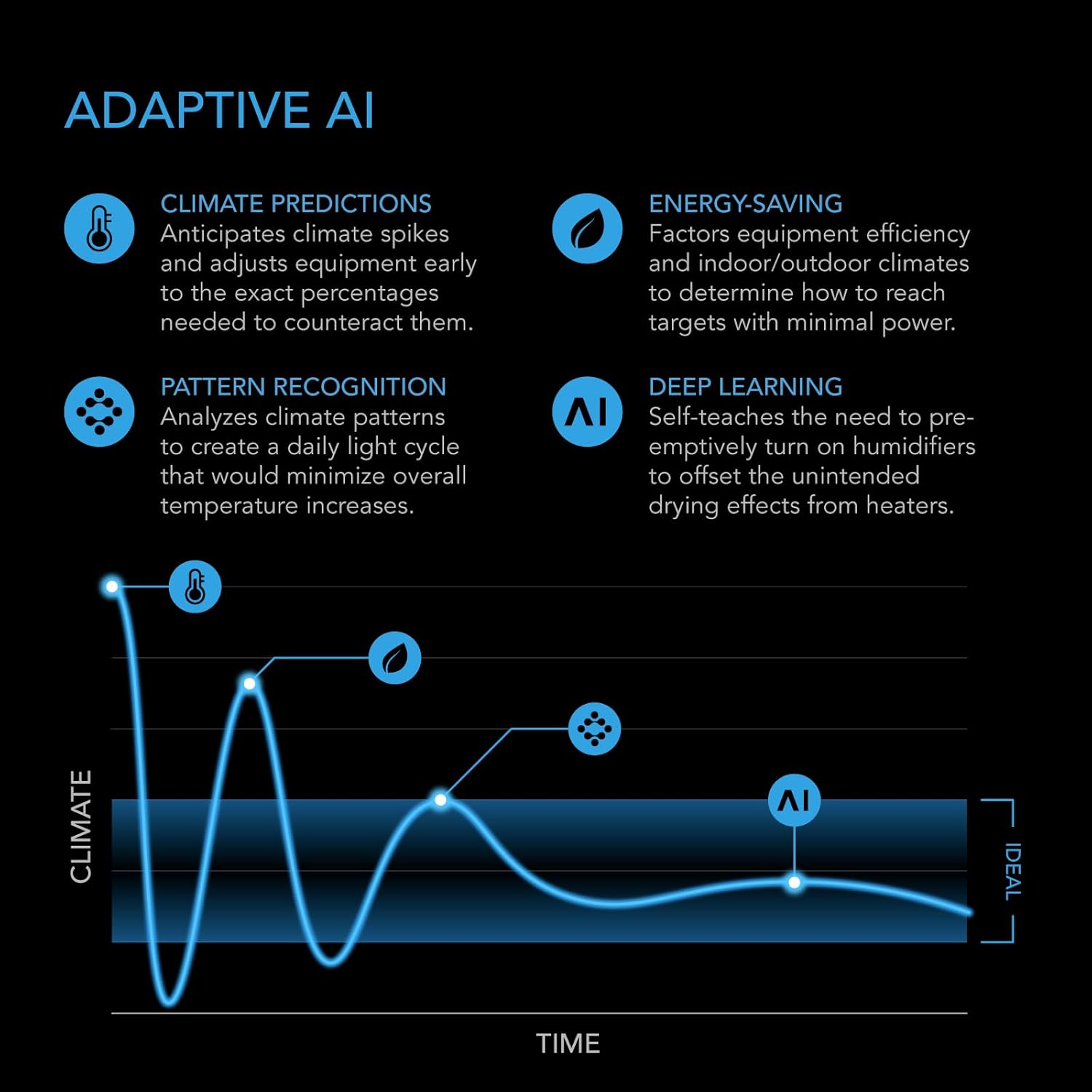
The Adaptive AI system uses climate predictions, pattern recognition, and deep learning to optimize environmental control and save energy.

The data-driven AI controller actively learns and adapts to its environment to precisely regulate carbon dioxide levels and other parameters.

The intelligent ecosystem, when paired with the Controller AI+, enables dynamic CO2 level adjustments and optimized fresh air exchange.
Maintenance
Proper maintenance ensures the longevity and optimal performance of your Controller AI+ and CO2 Sensor Bundle:
- Cleaning: Regularly wipe the controller and sensor surfaces with a soft, dry cloth to remove dust and debris. Avoid using abrasive cleaners or solvents.
- Sensor Care: Keep the CO2 sensor clean and free from obstructions. Do not expose it to direct water spray or extreme temperatures.
- Cable Management: Ensure all cables are neatly organized and not under tension to prevent damage to the ports or cables themselves.
- Software Updates: Periodically check the AC Infinity app for firmware updates for your controller. Updates often include performance improvements and new features.
- Environmental Conditions: Operate the controller within its specified environmental limits to prevent damage.
Troubleshooting
If you encounter issues with your Controller AI+, refer to the following common troubleshooting steps:
- Controller Not Powering On:
- Check if the power cable is securely connected to both the controller and the power outlet.
- Ensure the power outlet is functional by testing it with another device.
- App Connectivity Issues (Bluetooth/WiFi):
- Ensure Bluetooth is enabled on your mobile device.
- For WiFi, confirm your router is broadcasting a 2.4GHz signal and your phone is connected to it during setup.
- Restart both the controller and your mobile device.
- Check for app updates in your app store.
- Ensure the controller is within range of your WiFi router.
- Inaccurate Sensor Readings:
- Ensure the sensor is clean and free from dust or debris.
- Verify the sensor is properly connected to the controller.
- Avoid placing the sensor in direct airflow from fans or near heat sources that could skew readings.
- Connected Devices Not Responding:
- Check that the UIS cables are securely plugged into both the controller and the devices.
- Verify that the device settings within the controller or app are correctly configured for automation or manual control.
- Ensure the connected devices are compatible with the AC Infinity UIS system.
- AI Not Adapting/Learning:
- Ensure the controller has been running for a sufficient period (at least 24-48 hours) to gather enough data for learning.
- Check that all sensors are providing consistent data.
- Review your AI settings in the app to ensure they are enabled and configured as desired.
For further assistance, consult the AC Infinity app's AI bot or contact AC Infinity customer support.
Specifications
| Feature | Detail |
|---|---|
| Model | CONTROLLER AI+ with CO2 Sensor Kit |
| Item Model Number | CTR89A |
| Manufacturer | AC Infinity |
| Product Dimensions | 3.42"L x 0.94"W x 5.8"H (8.7 x 2.4 x 14.9 cm) |
| Item Weight | 2.68 pounds |
| Display Type | Large 4.5" Backlit LCD |
| App Control | Wi-Fi + Bluetooth |
| Devices Supported | 8 (up to 32 with Splitters) |
| Sensors Supported | 3 (1 Built-In) |
| Voltage | 100-240V AC |
| Included Components | CONTROLLER AI+ with CO2 Sensor |
| Color | Black |
| UPC | 819137024960 |

Detailed specifications and physical dimensions of the Controller AI+ and its components.
Warranty and Support
AC Infinity products are designed for reliability and performance. For warranty information, product support, or to purchase protection plans, please refer to the official AC Infinity website or contact their customer service directly.
- Manufacturer: AC Infinity
- Protection Plans: Optional 3-Year and 4-Year protection plans are available for purchase.
- Online Support: Visit the AC Infinity Store on Amazon or their official website for FAQs, guides, and contact information.


