
Chefman RJ55-11-V2
Chefman Countertop Microwave Oven RJ55-11-V2 User Manual
Model: RJ55-11-V2
Introduction
This manual provides essential instructions for the safe and efficient operation of your Chefman Countertop Microwave Oven, Model RJ55-11-V2. Please read all instructions carefully before use and retain this manual for future reference.

Image: Front view of the Chefman Countertop Microwave Oven, Model RJ55-11-V2, showcasing its sleek black design and digital control panel.
Important Safety Instructions
When using electrical appliances, basic safety precautions should be followed, including the following:
- Read all instructions before using the appliance.
- Do not operate any appliance with a damaged cord or plug, or after the appliance malfunctions or has been damaged in any manner.
- Do not use outdoors.
- Do not immerse cord, plugs, or the appliance in water or other liquid.
- Close supervision is necessary when any appliance is used by or near children.
- Always ensure the appliance is unplugged from the outlet when not in use and before cleaning.
- Do not block any ventilation openings.
- Do not heat liquids or other foods in sealed containers as they are liable to explode.
- Do not attempt to operate this oven with the door open since open-door operation can result in harmful exposure to microwave energy.
- Do not place any object between the oven front face and the door or allow soil or cleaner residue to accumulate on sealing surfaces.
- Do not operate the oven if it is damaged. It is particularly important that the oven door closes properly and that there is no damage to the (1) door (bent), (2) hinges and latches (broken or loosened), (3) door seals and sealing surfaces.
- The oven should not be adjusted or repaired by anyone except properly qualified service personnel.
Setup and Installation
Unpacking
Carefully remove the microwave oven and all packaging materials. Ensure all components are present: microwave unit, glass turntable, and turntable ring. Inspect the appliance for any damage incurred during shipping.
Placement
Place the microwave oven on a stable, level surface capable of supporting its weight (approximately 30.9 pounds). Ensure there is adequate ventilation space around the unit: at least 4 inches (10 cm) of clearance on the top, back, and sides.
Turntable Assembly
- Place the turntable ring in the center of the microwave cavity.
- Position the glass turntable securely on top of the turntable ring, ensuring it sits correctly on the center hub.

Image: The interior of the microwave showing the glass turntable correctly installed, with a bag of popcorn and a bowl of popped popcorn nearby.
Power Connection
Plug the microwave into a standard 120V AC electrical outlet. The microwave operates at 1000 Watts.
Initial Door Opening (Child Safety Lock)
The microwave features a child safety lock on the door handle. To open the door for the first time or when the lock is engaged:
- Locate the release trigger inside the handle.
- Pull upwards on this release trigger.
- While holding the trigger, pull the handle to open the door.
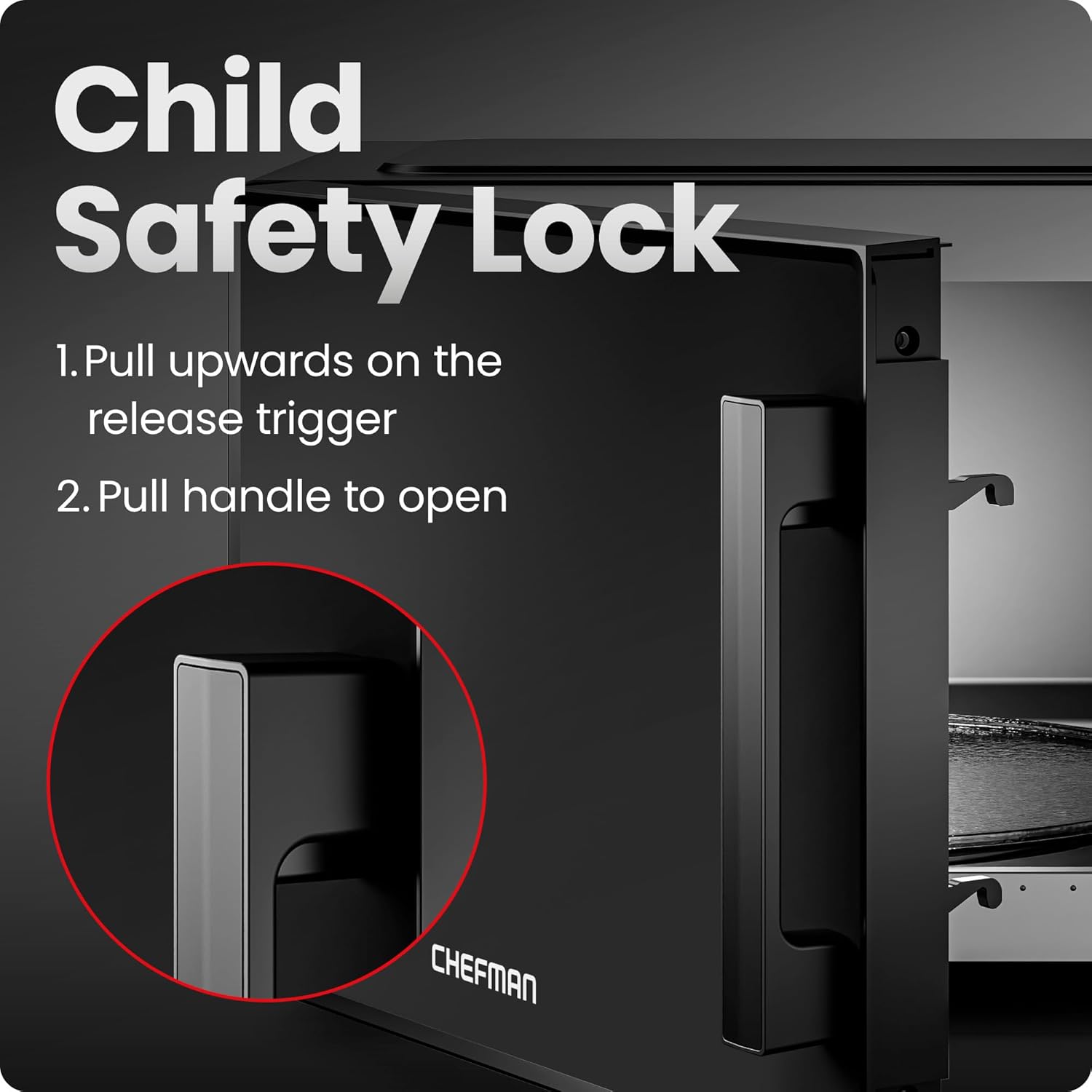
Image: A close-up diagram illustrating the two-step process to open the microwave door using the child safety lock: pull up on the trigger, then pull the handle.
Operating Instructions
Control Panel Overview

Image: A detailed view of the microwave's digital control panel, highlighting the 6 cooking presets and other function buttons.
Setting the Clock
To set the current time, press the CLOCK button, then use the number pad to enter the time. Press CLOCK again to confirm.
Manual Cooking
- Place food in the microwave.
- Enter the desired cooking time using the number pad.
- Press P.LEVEL to adjust power if needed (default is 100%). Use numbers 1-10 for power levels.
- Press START/+30 SEC to begin cooking.
Express Cook Function
For quick cooking, simply press any number key (1-6) to instantly start cooking for that number of minutes at full power. Alternatively, press the START/+30 SEC button to add 30 seconds of cooking time at full power. This can be pressed multiple times to increase cooking duration.

Image: A hand interacting with the microwave's control panel, demonstrating the ease of using the express cook function.
Cooking Presets
The microwave includes six one-touch cooking presets for common food items:
- POPCORN: For popping popcorn.
- PIZZA: For reheating pizza slices.
- BEVERAGE: For heating drinks.
- VEGGIE: For cooking vegetables.
- POTATO: For baking potatoes.
- LEFTOVERS: For reheating various leftovers.
To use a preset, simply press the corresponding button once. The microwave will automatically set the optimal cooking time and power level.
Defrost Function
The microwave offers defrosting by time or by weight. Press the DEFROST button and follow the prompts on the display to select the desired method and input the time or weight.
Memory Function (FAV)
Program up to three frequently used cooking settings for one-touch access. To set a memory function:
- Enter your desired cooking time and power level.
- Press and hold the FAV button until the display confirms the setting is saved.
- To use a saved setting, simply press the FAV button.
Eco Mode
To save power and disable the display when not in use, press the ECO button. Press any button to reactivate the display.
Mute Option (AUDIO)
To silence the microwave's beeps and alerts, press the AUDIO button. Press it again to re-enable sounds.
Child Safety Lock (Control Panel)
In addition to the door lock, you can disable the control panel to prevent accidental operation. To activate Lock Mode, press and hold the STOP/LOCK button for 3 seconds. The display will indicate 'LOCK'. To deactivate, press and hold STOP/LOCK again for 3 seconds.
Maintenance and Cleaning
Exterior Cleaning
The microwave's black exterior is designed for easy cleaning. Wipe the exterior surfaces with a damp, soft cloth. Avoid abrasive cleaners or scouring pads that could scratch the finish.
Interior Cleaning
Clean the interior cavity regularly with a damp cloth and mild detergent. For stubborn food splatters, place a bowl of water with lemon slices inside and microwave for 2-3 minutes to create steam, then wipe clean.
Glass Turntable
The glass turntable is removable and top-rack dishwasher safe for convenient cleaning. Ensure it is completely dry before placing it back into the microwave.
Troubleshooting
If you encounter issues with your microwave, refer to the following common problems and solutions:
| Problem | Possible Cause | Solution |
|---|---|---|
| Microwave does not start | Power cord unplugged; Door not closed properly; Fuse blown or circuit breaker tripped; Control panel locked. | Ensure plug is firmly in outlet; Close door securely; Check household fuse/circuit breaker; Deactivate Child Safety Lock (control panel). |
| Food not heating | Cooking time too short; Power level too low; Incorrect dish used. | Increase cooking time; Select a higher power level; Use microwave-safe cookware. |
| Turntable not rotating | Turntable not properly seated; Turntable ring obstructed. | Ensure turntable is correctly placed on the hub and ring; Clean any food debris from beneath the turntable and ring. |
| Unusual noises during operation | Food container touching cavity walls; Turntable not centered. | Adjust food container position; Re-center the turntable. |
If the problem persists after attempting these solutions, please contact Chefman Customer Support.
Specifications
| Feature | Detail |
|---|---|
| Model Number | RJ55-11-V2 |
| Capacity | 1.1 Cubic Feet |
| Wattage | 1000 Watts |
| Voltage | 120 Volts |
| Product Dimensions (D x W x H) | 14.47" x 20.1" x 12" |
| Item Weight | 30.9 Pounds |
| Material | Metal, Plastic |
| Special Features | Mute Button, Child Safety Lock, Eco Mode, 6 Cooking Presets, 10 Power Levels |
| Included Components | Turntable |
Warranty and Support
The Chefman Countertop Microwave Oven RJ55-11-V2 comes with a 1-year assurance provided by Chefman. For warranty claims, technical support, or service inquiries, please contact Chefman Customer Support directly.
For the most up-to-date contact information, please visit the official Chefman website or refer to the product packaging.
Related documentsRJ55-11-V2


Ask a question about this manual
Ask about setup, troubleshooting, compatibility, parts, safety, or missing instructions. Manuals+ will review the question and use this page’s manual context to help answer it.