
1. Important Safety Information
Please read and understand all instructions before assembly and use. Keep this manual for future reference.
- Do not exceed the weight capacity of 450 lbs.
- Exercise caution around sharp edges and corners during assembly and use.
- Follow assembly instructions carefully to prevent instability or collapse.
- Keep electrical components (charging station) dry and away from heat sources.
- Unplug the charging station when not in use.
2. Product Overview
The DICTAC Corner Twin Bed Frame is designed for efficient space utilization, offering integrated storage and a charging station. Its U-shaped semi-enclosed design provides a secure and comfortable sleeping area.

Image 2.1: Overview of the DICTAC Corner Twin Bed Frame, showcasing its U-shaped design, integrated shelves, and under-bed drawers.
Key Features:
- Corner Design: U-shaped semi-enclosed design with storage shelves and upholstered guardrails.
- Integrated Storage: Two large drawers and a hidden storage headboard with two side shelves.
- Charging Station: Built-in power strip with USB ports and AC outlets.
- Durable Construction: Sturdy metal frame and heavy-duty metal slats, supporting up to 450 lbs.
- Mattress Compatibility: No box spring needed; recommended mattress thickness is 8-12 inches.
- Stability Features: Mattress slide stoppers and plastic corner protectors.
3. Assembly Instructions
Assembly is required for this bed frame. All necessary components and tools are included. It is recommended to have assistance during assembly.
3.1 Unpacking and Preparation
- Open the packaging and carefully remove all components.
- Verify that all parts listed in the included assembly instructions are present.
- Lay out all parts on a clean, soft surface to prevent scratches.
3.2 Frame Assembly
Follow the step-by-step diagrams provided in the separate assembly manual. Ensure all connections are secure.
- The metal frame features a buckle design for simplified installation of slats.
- Install the guardrail on either the left or right side, depending on your room layout.

Image 3.1: Detail of the metal frame construction, showing the tightly spaced metal slats and mattress slide stoppers for enhanced stability.
3.3 Drawer and Shelf Installation
- Assemble the two large wire netting storage drawers according to the instructions. These drawers feature easy-glide casters.
- Integrate the hidden storage headboard and side shelves into the frame.

Image 3.2: Dimensional diagram of the twin bed frame, including measurements for the bed, shelves, and drawers.

Image 3.3: Close-up of the built-in charging station, showing 2 AC outlets and 2 USB ports, with a 6.56-foot power cord.
Video 3.1: This video demonstrates the features of the DICTAC Daybed, including its hidden storage space and open shelves, providing a visual guide to its design and functionality.
4. Operating Instructions
4.1 Using the Charging Station
- Locate the built-in power strip on the headboard shelf.
- Plug the bed frame's power cord into a standard wall outlet.
- Connect your electronic devices to the available 2 AC outlets or 2 USB ports.
- Unplug the bed frame from the wall outlet when the charging station is not in use.
4.2 Utilizing Storage Features
- Under-bed Drawers: Pull out the two large drawers from beneath the bed frame to access storage for linens, clothing, or toys. The non-woven drawer bottom prevents items from falling through.
- Headboard Shelves: Use the open shelves on the headboard and side sections for books, decorative items, or personal belongings.
- Hidden Storage: Lift the upholstered sections of the headboard to reveal hidden storage compartments for magazines, books, phones, or other small items.
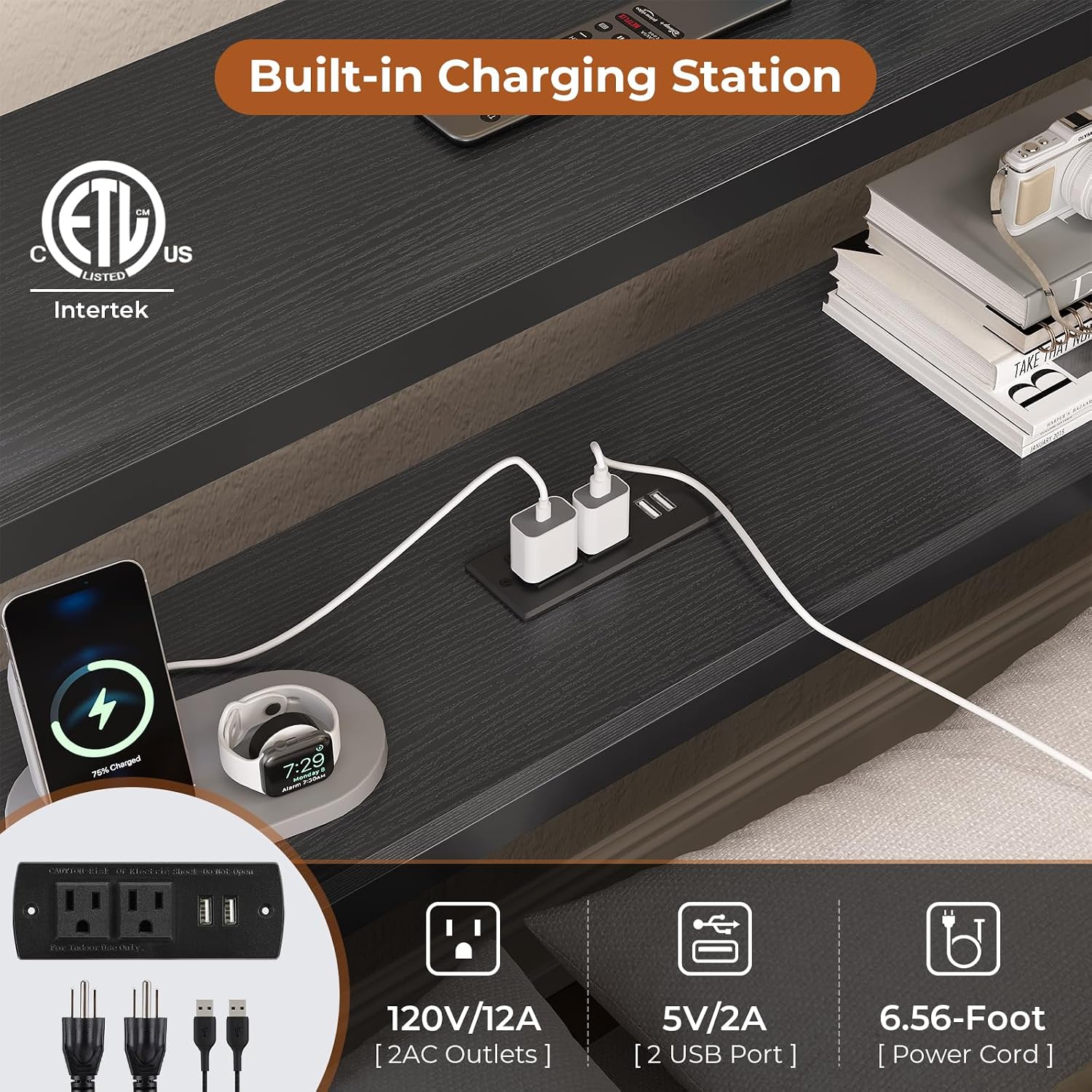
Image 4.1: Illustration of the hidden storage compartments located behind the upholstered backrest, accessible by lifting the panels.

Image 4.2: View of the two pull-out under-bed drawers, demonstrating their capacity for storing various items and the wire netting design.
5. Maintenance and Care
- Cleaning the Frame: Wipe the metal frame and wooden shelves with a soft, damp cloth. Avoid harsh chemicals that may damage the finish.
- Upholstered Backrest: Spot clean the fabric upholstered backrest with a mild fabric cleaner as needed. Test on an inconspicuous area first.
- Drawer Maintenance: Periodically check the drawer casters for smooth operation and clean any accumulated dust or debris.
- Hardware Check: Regularly inspect all bolts and screws to ensure they remain tight. Retighten as necessary to maintain stability.
- Electrical Components: Ensure the charging station remains dry. Do not attempt to disassemble or repair the charging station yourself.
6. Troubleshooting
| Problem | Possible Cause | Solution |
|---|---|---|
| Bed frame is wobbly or unstable. | Loose bolts or screws. Uneven floor. | Tighten all assembly hardware. Ensure the bed is on a level surface. |
| Squeaking noises from the bed. | Loose connections. Friction between metal parts. | Retighten all bolts. Apply a small amount of lubricant (e.g., silicone spray) to contact points if necessary. |
| Charging station not working. | Not plugged into wall outlet. Device not properly connected. Power outage. | Ensure the bed frame's power cord is securely plugged into a functional wall outlet. Check device connections. Verify power to the outlet. |
| Drawers do not slide smoothly. | Debris in casters. Overloaded drawer. | Clean casters of any dust or obstructions. Reduce the weight in the drawer. |
7. Specifications
| Feature | Detail |
|---|---|
| Model Number | CBF-05 |
| Size | Twin |
| Product Dimensions (L x W x H) | 87.9" x 45.7" x 31.6" |
| Weight Capacity | 450 lbs |
| Recommended Mattress Thickness | 8-12 inches |
| Material | Metal frame, Fabric headboard, Wooden shelves |
| Charging Station | 2 AC Outlets (120V/12A), 2 USB Ports (5V/2A), 6.56-Foot Power Cord |
| Included Components | Assembly Instructions, Charging Station, Drawers, Corner Bed, Simple Assembly Tools |
8. Warranty and Support
DICTAC is committed to providing quality products and customer satisfaction.
- Returns: This product is eligible for 90-day easy returns. Please refer to the retailer's return policy for detailed information.
- Customer Support: For any issues regarding damaged, scratched, or missing parts, or other concerns, please contact DICTAC customer service. Contact information can typically be found on the retailer's website or within your purchase documentation.
For additional support or to view other DICTAC products, please visit the official DICTAC Store.