
KAIWEETS KTA01
KAIWEETS Non Contact RPM Tachometer User Manual
Model: KTA01
1. Introduction
Thank you for choosing the KAIWEETS Non Contact RPM Tachometer, Model KTA01. This high-accuracy laser digital tachometer is designed for precise measurement of rotational speed (RPM) and counting. Featuring a large LCD with backlight, data hold, and Max/Min/Avg functions, it offers reliable performance for both professional and DIY projects. Its non-contact measurement capability ensures safety and convenience, especially for hard-to-reach or high-speed equipment.

Image: KAIWEETS KTA01 Non Contact RPM Tachometer with its protective cap.
2. What's in the Box
Upon opening your KAIWEETS KTA01 package, please verify that all components are present and in good condition:
- 1 x KTA01 Industrial Tachometer
- 10 x Reflection Tape strips
- 3 x AAA Batteries
- 1 x User Manual

Image: The KTA01 tachometer, user manual, reflective tape, and AAA batteries as included in the package.
3. Product Features
The KAIWEETS KTA01 Tachometer is equipped with several features designed for optimal performance and user convenience:
- High-Precision RPM Readings: Features a clear 40mm, 5-digit LCD screen for easy-to-read measurements with an accuracy of ±(0.05%+1).
- Auto-Ranging: Automatically selects the optimal measurement range, simplifying operation.
- Dual Modes for Versatile Use: Offers a wide measurement range of 10~99999 rpm in photoelectric mode and 1~99999 rotations in counting mode.
- Compact and Portable: Weighs only 140g (including batteries) and is powered by 3 AAA batteries for on-the-go use.
- User-Friendly Design: Ergonomic design and intuitive interface for ease of use.
- Data Hold: Freeze the current reading on the display.
- Max/Min/Avg Function: View the maximum, minimum, and average readings during a measurement session.
- Backlight: Improves visibility in low-light conditions.
- Sound On/Off: Control audible feedback.
- Auto Off: Automatically powers down after 15 minutes of inactivity to conserve battery life.

Image: Visual representation of the tachometer's key features including Data Hold, Backlight, Max/Min/Avg, Battery indicator, Auto off, and Sound on/off.
4. Setup
Before using your KAIWEETS KTA01 Tachometer, follow these simple setup steps:
- Install Batteries: Open the battery compartment on the back of the device and insert 3 AAA batteries, ensuring correct polarity.
- Apply Reflective Tape: Tear off a small piece of the provided reflective tape and stick it onto the object you wish to measure. Ensure the tape is securely attached and positioned where the laser can easily target it.
- Remove Sensor Cover: Remove the protective sensor cover from the top of the tachometer to expose the laser emitter and receiver.

Image: Step-by-step visual guide showing how to apply reflective tape, aim the laser, and press the test button.
5. Operating Instructions
The KTA01 offers two primary measurement modes: Photoelectric RPM and Counting.
5.1. Basic Measurement (RPM or Counting)
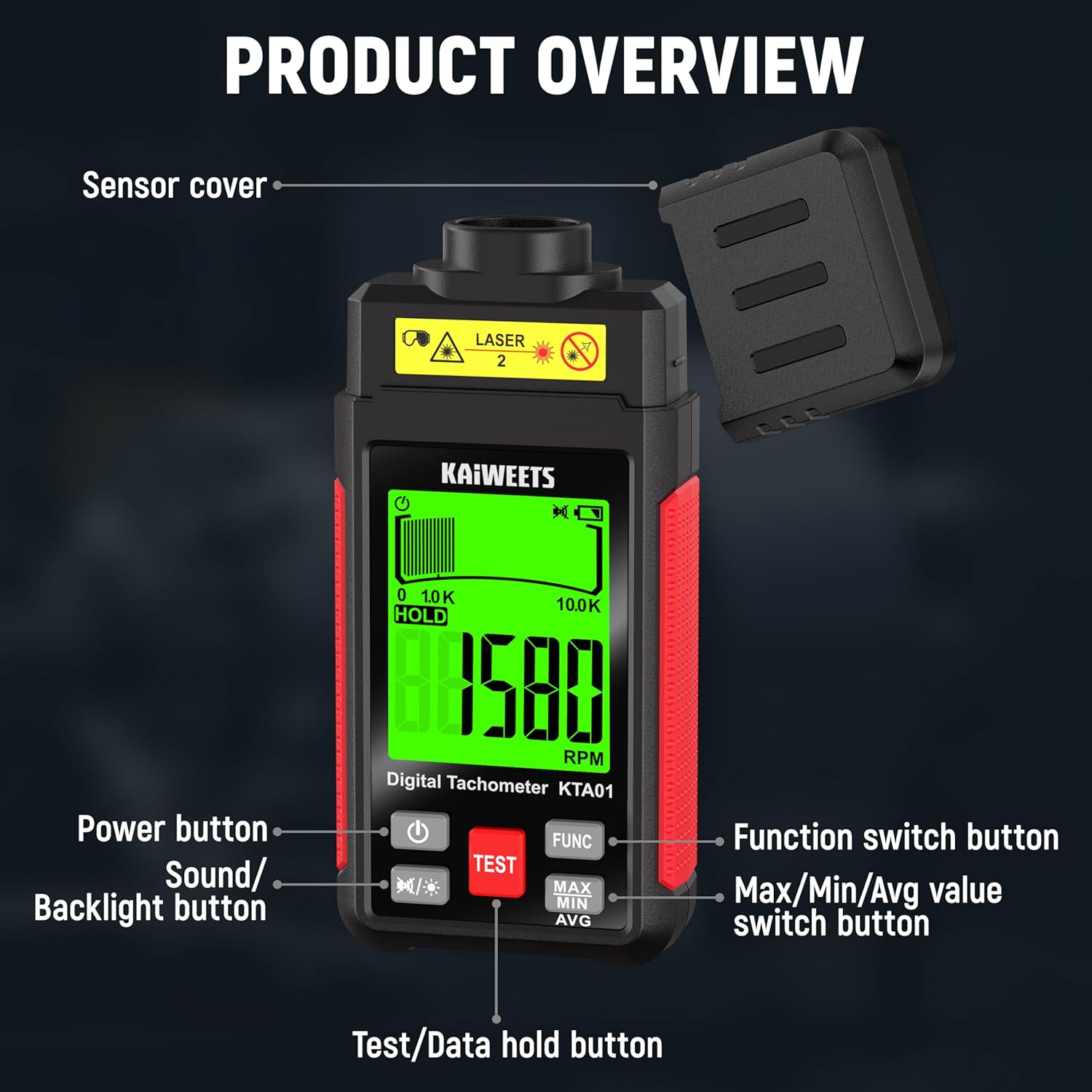
- Power On: Press the Power button (
 ) to turn on the device.
 - Select Mode: Press the FUNC button to switch between RPM (revolutions per minute) and COUNT (counting) modes. The selected mode will be displayed on the LCD.
- Aim Laser: Point the tachometer's laser at the reflective tape area on the object to be measured. Maintain an effective measurement distance of up to 1000mm.
- Start Measurement: Press and hold the TEST button. The device will begin measuring and display the real-time reading.
- End Measurement: Release the TEST button to stop measuring. The last reading will be held on the display.

Image: The tachometer in use, demonstrating both RPM measurement on a rotating shaft and counting mode on a fan blade.
5.2. Advanced Functions
- Data Hold: While measuring, press the TEST button briefly to hold the current reading. Press again to resume real-time measurement.
- Max/Min/Avg: After a measurement, press the MAX/MIN/AVG button repeatedly to cycle through the maximum, minimum, and average recorded values.
- Backlight & Sound Control: Press the Sound/Backlight button () to toggle the backlight on/off or to switch the sound on/off.
5.3. Official Product Video
Video: An official product video demonstrating the KAIWEETS Non-Contact RPM Tachometer's features, including its large screen, non-contact measurement, RPM and counting tests, data hold, Max/Min/Avg functions, backlight, sound control, and auto-off feature.
6. Maintenance
To ensure the longevity and accuracy of your KAIWEETS KTA01 Tachometer, follow these maintenance guidelines:
- Cleaning: Use a soft, dry cloth to clean the device. Do not use abrasive cleaners or solvents. Keep the laser emission and reception lenses clean and free of dust or debris.
- Storage: Store the tachometer in a cool, dry place away from direct sunlight and extreme temperatures. If storing for an extended period, remove the batteries to prevent leakage.
- Battery Replacement: Replace batteries promptly when the low battery indicator appears on the display to ensure accurate readings.
7. Troubleshooting
If you encounter issues with your KAIWEETS KTA01 Tachometer, refer to the following common troubleshooting steps:
- No Display/Power On: Check if the batteries are correctly installed and have sufficient charge. Replace batteries if necessary.
- Inaccurate Readings:
- Ensure the reflective tape is securely attached and clean.
- Verify the measurement distance is within the effective range (up to 1000mm).
- Ensure the laser is directly aimed at the reflective tape.
- Check for any obstructions between the tachometer and the reflective tape.
- Laser Not Emitting: Ensure the sensor cover is removed and the device is powered on. If the issue persists, contact customer support.
8. Specifications
Detailed technical specifications for the KAIWEETS KTA01 Tachometer:
| Specification | Value |
|---|---|
| Model Number | KTA01 |
| Measurement Range (Photoelectric) | 10~99999 RPM |
| Measurement Range (Counting) | 1~99999 Rotations |
| Accuracy | ±(0.05%+1) |
| Effective Measurement Distance | Up to 1000mm |
| Power Supply | 3 x 1.5V AAA Batteries |
| Power Consumption | Approx. 50mA |
| Weight (including batteries) | Approx. 140g |
| Dimensions | 142 x 58 x 27.5 mm (5.59 x 2.28 x 1.08 inches) |
| Material | Plastic |

Image: The KTA01 tachometer with its dimensions (18cm / 7.08in height, 8.7cm / 3.4in width) and weight (120g / 0.26lb) indicated.
9. Warranty & Support
KAIWEETS products are designed for reliability and performance. For warranty information or technical support, please refer to the warranty card included in your product packaging or visit the official KAIWEETS website. If you have any questions or require assistance, please do not hesitate to contact KAIWEETS customer service.
Ask a question about this manual
Ask about setup, troubleshooting, compatibility, parts, safety, or missing instructions. Manuals+ will review the question and use this page’s manual context to help answer it.