
1. Introduction
Thank you for choosing the BITIWEND Wireless Signal Forwarding System. This product is designed to extend the range and functionality of your existing doorbell system, ensuring you never miss a visitor. It includes a wireless signal converter (transmitter) and a plug-in receiver, offering flexible installation and operation for various doorbell types.
2. Safety Information
- Do not expose the devices to rain or moisture.
- Do not disassemble or attempt to repair the devices yourself. Refer to qualified personnel for service.
- Ensure the power supply to your existing doorbell system is disconnected before installing the wireless converter.
- Keep out of reach of children.
- Use only as intended for doorbell signal forwarding.
3. Product Overview
The BITIWEND Wireless Signal Forwarding System consists of two main components:
- Wireless Signal Converter (Transmitter): This small, round device connects to your existing doorbell system and converts its signal into a wireless one. It features two wires for connection and an LED indicator.
- Plug-in Receiver: This square device plugs into a standard electrical outlet and receives the wireless signal from the converter, playing a chime. It has volume control buttons and an LED indicator.

Figure 3.1: Overview of the BITIWEND Wireless Signal Forwarding System components.
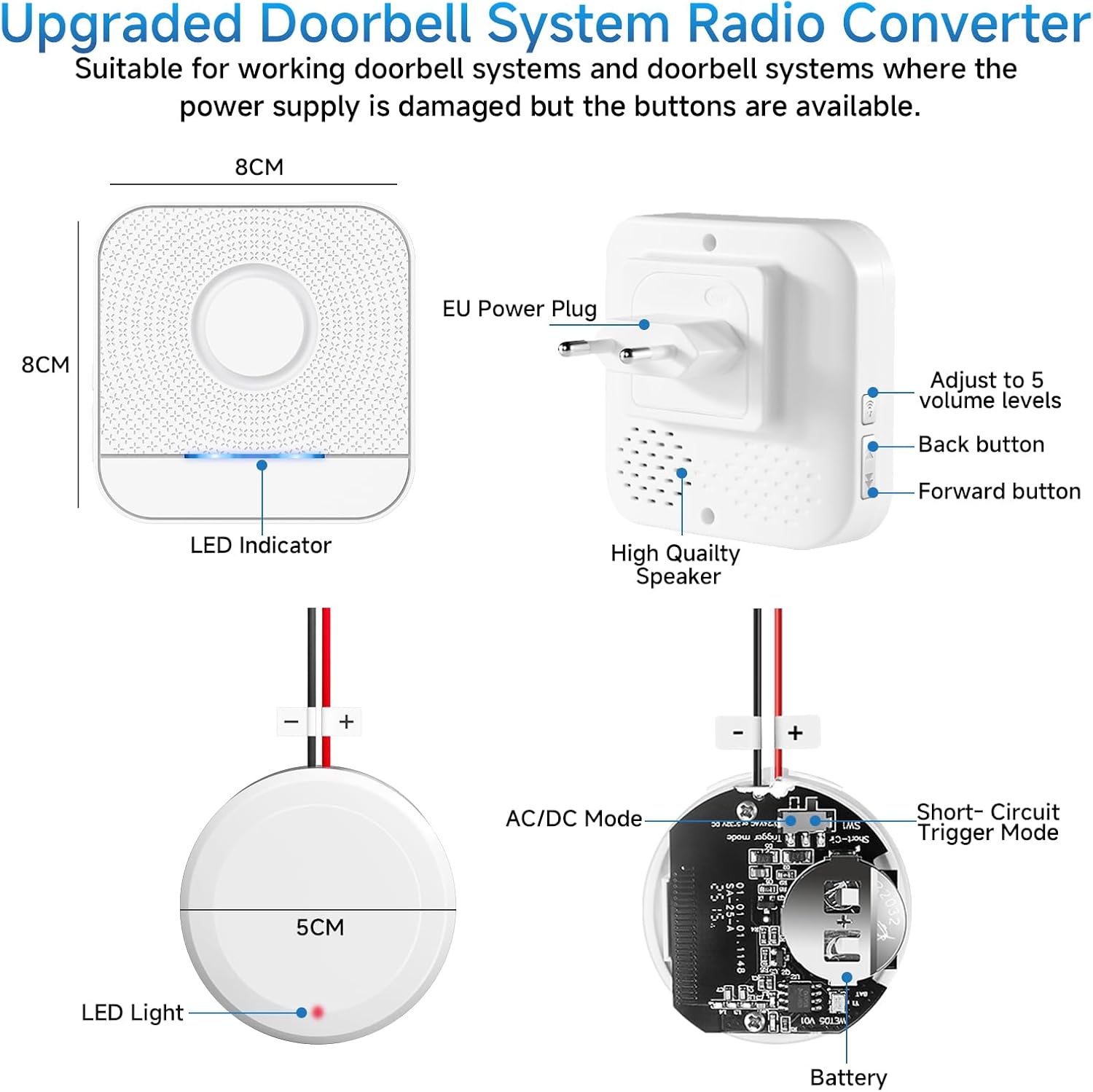
Figure 3.2: Detailed view of receiver and converter features and dimensions.
4. Setup and Installation
The BITIWEND wireless converter supports two operating modes for integration with various doorbell systems:
4.1. AC/DC Input Mode
This mode is suitable for existing doorbell systems with a functional power supply. The two wires of the converter are connected to the power supply terminal and the control button terminal of your doorbell.
- AC Systems: No distinction between positive and negative wires (+/-) is required.
- DC Systems: The red wire must be connected to the positive (+) terminal and the black wire to the negative (-) terminal.
- Input Voltage Range: AC 3-24V / DC 5-32V.
4.2. Short-Circuit Trigger Mode
This mode is ideal if the power supply of your doorbell system is damaged, but the doorbell button itself is still functional. Connect the two wires of the converter to the ends of the output signal buttons, regardless of polarity. When the doorbell button is pressed, the converter sends a wireless signal, and the receiver will chime.

Figure 4.1: Wiring diagrams for AC/DC Input Mode and Short-Circuit Trigger Mode.
4.3. Pairing the Receiver and Converter
Follow these steps to pair the receiver with the wireless converter:
- Plug the receiver into an electrical outlet. Briefly press the Up or Down button on the receiver to select your preferred chime melody.
- Press and hold the Down button (or music button) on the receiver for approximately 5-7 seconds until the receiver makes a "ding-dong" sound and its LED indicator flashes rapidly. This indicates it is in pairing mode.
- Within 5 seconds of the receiver entering pairing mode, activate your existing doorbell button (the one connected to the converter). The converter will send a wireless signal.
- If successful, the receiver will play the selected chime, and the pairing is complete.

Figure 4.2: Visual guide for the pairing process.
5. Operating Instructions
5.1. Adjusting Volume
The receiver offers 5 levels of adjustable volume, from 0dB (mute) to 110dB, to suit different environments and preferences. Use the volume buttons on the side of the receiver to cycle through the volume levels.

Figure 5.1: Adjustable volume levels for the receiver.
5.2. Mute Mode and LED Indicator
The receiver features an LED indicator that flashes when the doorbell is activated, providing a visual alert. A mute mode (0dB) is available, which is particularly useful for quiet environments or for individuals with hearing impairments, as the LED still provides a visual notification.

Figure 5.2: LED Indicator and Mute Mode functionality.
5.3. Wireless Range
The system offers an effective wireless range of up to 200 meters (656 feet) in open areas, allowing for comprehensive coverage throughout your home or property. Multiple receivers can be added to extend the chime notification to various locations.

Figure 5.3: Wireless range and multi-receiver capability.
6. Maintenance
The BITIWEND Wireless Signal Forwarding System requires minimal maintenance. Follow these guidelines to ensure optimal performance:
- Clean the devices with a soft, dry cloth. Do not use abrasive cleaners or solvents.
- Keep the devices away from direct sunlight, extreme temperatures, and high humidity.
- Ensure the receiver is plugged into a stable power outlet.
- Periodically check the wiring connections of the converter to ensure they are secure.
7. Troubleshooting
If you encounter issues with your BITIWEND Wireless Signal Forwarding System, refer to the following common solutions:
7.1. Resetting Pairing
If the receiver and converter lose connection or behave unexpectedly, you can reset the pairing:
- Press and hold the Down button (or music button) on the receiver for 5 seconds.
- The receiver will make a "ding-dong" sound and its LED will flash, indicating a successful reset.
- After resetting, follow the pairing steps in Section 4.3 to re-establish the connection.
7.2. No Chime Sound from Receiver
- Ensure the receiver is properly plugged into a working electrical outlet.
- Check the volume level on the receiver. It might be set to mute (0dB).
- Verify that the converter is correctly wired to your existing doorbell system and that the doorbell button is functional.
- Re-pair the receiver and converter as described in Section 4.3.
7.3. Short Wireless Range
- Ensure there are no significant obstructions (thick walls, metal objects) between the converter and the receiver.
- Relocate the receiver to a more central position or closer to the converter.
- Avoid placing the receiver near large electronic devices that may cause interference.
8. Specifications
| Feature | Specification |
|---|---|
| Model Number | B8+B25 |
| Product Dimensions | 10 x 10 x 8.5 cm |
| Item Weight | 150 grams |
| Converter Input Voltage (AC) | 3-24V AC |
| Converter Input Voltage (DC) | 3-32V DC |
| Wireless Range | Up to 200m / 656ft (open area) |
| Volume Levels | 5 (0dB to 110dB) |
| Included Components | 1 Receiver, 1 Wireless Converter |
9. Warranty and Support
BITIWEND products come with a standard limited warranty. For detailed warranty information, please refer to the product packaging or contact your retailer. If you require technical assistance or have questions regarding your product, please contact BITIWEND customer support through the official website or your purchase platform.

