
1. Introduction
This manual provides essential information for the safe and efficient installation, operation, and maintenance of your Dawnice 10KW Hybrid Solar Power System. This system is designed to provide reliable power using solar panels, a hybrid inverter with a built-in MPPT controller, and a LiFePo4 solar battery. Please read this manual thoroughly before proceeding with any installation or operation.
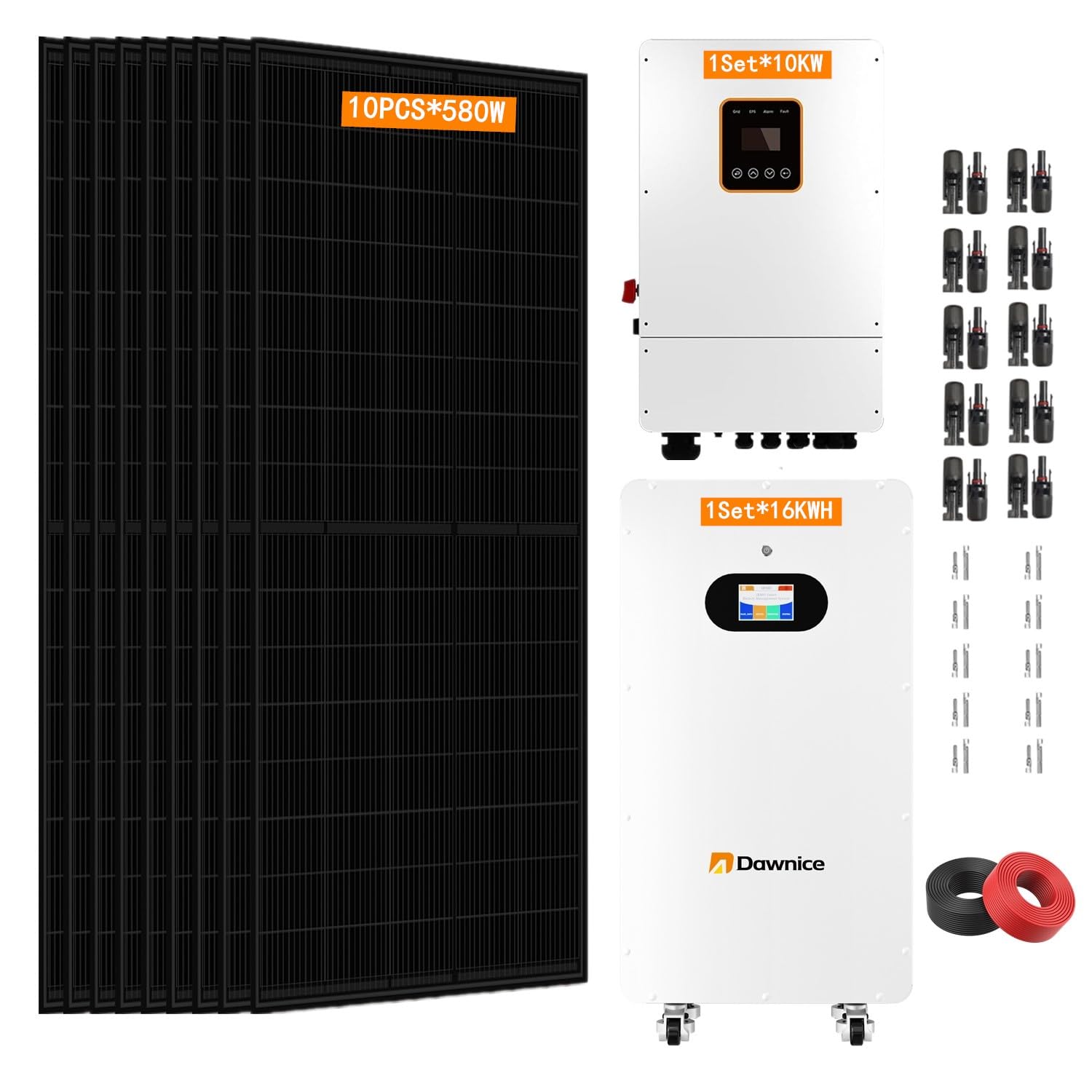
Image: Overview of the Dawnice 10KW Hybrid Solar Power System components, including solar panels, inverter, and battery.
2. Safety Information
Always prioritize safety during installation, operation, and maintenance. Failure to follow these instructions may result in serious injury or damage to the equipment.
- Qualified Personnel: Installation and maintenance should only be performed by qualified and trained personnel.
- Electrical Hazards: Solar power systems generate high voltage DC and AC electricity. Always disconnect all power sources (solar, battery, grid) before servicing.
- Battery Safety: LiFePo4 batteries are powerful. Avoid short circuits, punctures, or exposure to extreme temperatures. Wear appropriate personal protective equipment (PPE) including insulated gloves and eye protection.
- Grounding: Ensure all components are properly grounded according to local electrical codes.
- Environmental Conditions: Install components in well-ventilated areas, away from flammable materials, and protected from direct sunlight, rain, and excessive dust.
- Tool Usage: Use insulated tools when working with electrical components.
3. Setup and Installation
This section outlines the general steps for setting up your hybrid solar power system. Refer to detailed component manuals for specific wiring diagrams and installation procedures.
3.1. Site Preparation
- Select a suitable location for solar panels, ensuring maximum sun exposure and minimal shading.
- Choose a cool, dry, and well-ventilated area for the inverter and battery installation.
- Ensure the mounting surfaces are structurally sound to support the weight of the equipment.
3.2. Solar Panel Installation

Image: Bifacial solar panels with 550W rating and 21.5% maximum module efficiency, designed to withstand various weather conditions.
- Mount solar panels securely using appropriate racking systems (not included).
- Connect solar panels in series or parallel configurations as specified by the inverter's input voltage and current requirements.
- Ensure all MC4 connectors are properly seated and watertight.
- Verify polarity before connecting to the inverter.
3.3. Inverter Installation

Image: A white hybrid inverter unit, a key component of the solar power system.
- Mount the 10KW hybrid inverter on a vertical surface, ensuring adequate clearance for ventilation.
- Connect the DC input from the solar panels to the inverter's PV input terminals.
- Connect the AC output of the inverter to your home's electrical panel or designated load center.
- Connect the grid input to the inverter if operating in hybrid mode.
- Ensure all wiring is correctly sized and protected with appropriate circuit breakers.
3.4. Battery Installation

Image: A 51.2V 314AH LiFePo4 solar battery unit with a smart LED touchscreen and freewheeling casters for mobility. It also shows a fully removable bracket.
- Position the 51.2V LiFePo4 battery in its designated location.
- Connect the battery's positive and negative terminals to the inverter's battery input terminals, observing correct polarity.
- Ensure all battery connections are tight and secure.
- If applicable, connect the battery's communication cable to the inverter for proper battery management system (BMS) integration.

Image: A diagram illustrating the components of a hybrid grid home solar power system, showing solar panels, inverter, battery, generator, utility grid, and home appliances.
4. Operating Instructions
Once installation is complete and all connections are verified, you can begin operating your system.
4.1. Initial Startup
- Ensure all circuit breakers and disconnect switches are in the OFF position.
- Connect the battery circuit breaker (if external) or switch on the battery.
- Switch on the solar panel DC disconnect switch.
- Switch on the grid AC input breaker (if connected to the grid).
- Finally, switch on the inverter's AC output breaker.
- Observe the inverter's display for status indicators and ensure it initializes correctly.
4.2. Inverter Display and Settings
The inverter features a display for monitoring system performance and adjusting settings. Refer to the inverter's specific manual for detailed navigation and parameter adjustments.
- Monitoring: View real-time data such as PV input voltage/current, battery state of charge, AC output power, and grid status.
- Operating Modes: Configure the inverter's operating mode (e.g., self-consumption, battery priority, grid-tie with backup) based on your energy needs and local regulations.
- Battery Parameters: Adjust charging and discharging parameters for the LiFePo4 battery as recommended by the battery manufacturer.

Image: The 10000W AC output inverter shown powering various household appliances, demonstrating its compatibility with 95% of common devices.
4.3. System Shutdown
- Disconnect the AC output breaker from the load.
- Disconnect the grid AC input breaker.
- Disconnect the solar panel DC disconnect switch.
- Disconnect the battery circuit breaker or switch off the battery.
- Allow the inverter to fully power down.
5. Maintenance
Regular maintenance ensures optimal performance and longevity of your solar power system.
5.1. Solar Panels
- Cleaning: Periodically clean solar panels to remove dust, dirt, and debris that can reduce efficiency. Use soft brushes and water; avoid abrasive materials.
- Inspection: Annually inspect panels for physical damage, loose connections, or signs of corrosion.
5.2. Inverter
- Ventilation: Ensure the inverter's ventilation openings are clear and free from obstructions.
- Connections: Periodically check electrical connections for tightness and signs of overheating.
- Firmware: Keep inverter firmware updated as recommended by the manufacturer.
5.3. Battery
- Visual Inspection: Check the battery for any physical damage, swelling, or leaks.
- Connections: Ensure battery terminals are clean and connections are secure.
- Temperature: Maintain the battery within its recommended operating temperature range.
6. Troubleshooting
This section provides solutions for common issues. For complex problems, contact customer support.
6.1. No Power Output from Inverter
- Check Breakers: Ensure all AC and DC breakers are in the ON position.
- Battery Connection: Verify battery connections are secure and the battery is charged.
- PV Input: Check if solar panels are producing power (e.g., during daylight hours).
- Error Codes: Consult the inverter display for any error codes and refer to the inverter manual.
6.2. Low Power Production
- Panel Cleanliness: Clean solar panels if they are dirty or shaded.
- Shading: Identify and mitigate any shading on the solar panels.
- Connections: Inspect PV string connections for loose wiring.
- Weather: Cloudy or rainy weather will naturally reduce solar production.
6.3. Battery Not Charging/Discharging
- BMS Communication: Ensure the battery's communication cable is properly connected to the inverter.
- Battery Settings: Verify battery charging/discharging parameters in the inverter settings.
- Temperature: Check if the battery is operating within its optimal temperature range.
7. Technical Specifications
Key technical specifications for the Dawnice 10KW Hybrid Solar Power System (Model DWPFHBD-001).
| Component | Specification |
|---|---|
| System Type | Hybrid Solar Power System |
| Total PV Power | 5.8KW (10 x 580W Solar Panels) |
| Inverter Power | 10KW (Pure Sine Wave, Built-in MPPT Controller) |
| Battery Type | 51.2V LiFePo4 Solar Battery |
| Battery Capacity | 16KWH |
| Output Voltage | 48 volts DC (Inverter output to AC loads) |
| Maximum Power (System) | 5800 watts (PV input) |
| Product Dimensions (Inverter) | 32"L x 15"W x 45"H |
| Connector Type | MC4 (for solar panels) |
| Model Number | DWPFHBD-001 |
| Manufacturer | Dawnice |
8. Warranty Information
The Dawnice 10KW Hybrid Solar Power System comes with a 10-Year limited Warranty. This warranty covers defects in materials and workmanship under normal use and service conditions. Please retain your proof of purchase for warranty claims. For detailed terms and conditions, refer to the official warranty document provided with your product or contact Dawnice customer support.
Additionally, a 4-Year Protection Plan may be available for purchase, offering extended coverage. Please check with your retailer for details.
9. Customer Support
For technical assistance, troubleshooting guidance, or warranty inquiries, please contact Dawnice customer support. Our team is available to provide lifetime technical support.
- Contact Method: You can send a message via the Amazon platform.
- Response Time: We aim to reply within 24 hours.
- Online Resources: Visit the official Dawnice store on Amazon for additional product information and resources: Dawnice Store