
1. Introduction
Thank you for purchasing the GGGUOJINN F-4A Professional 4-Channel Audio Mixer. This manual provides essential information for the safe and efficient operation of your device. Please read it thoroughly before use and retain it for future reference.
Package Contents:
- 1 x F-4A Audio Mixer
- 1 x Power Adapter
- 1 x Connecting Cable
- 1 x User Manual (Chinese and English)
2. Safety Instructions
To ensure safe operation and prevent damage, please observe the following precautions:
- Power Source: Use only the specified power adapter. Ensure the voltage matches your local power supply.
- Water and Moisture: Do not expose the mixer to water, rain, or high humidity. Avoid placing liquid containers near the device.
- Ventilation: Ensure adequate ventilation. Do not block ventilation openings.
- Heat: Keep the mixer away from heat sources such as radiators, heat registers, stoves, or other heat-producing appliances.
- Cleaning: Disconnect power before cleaning. Use a dry, soft cloth. Do not use liquid cleaners or aerosols.
- Servicing: Do not attempt to service this product yourself. Refer all servicing to qualified service personnel.
- Placement: Place the mixer on a stable, level surface.
3. Product Overview
The F-4A is a professional 4-channel audio mixer designed for various audio applications, offering features such as phantom power, USB connectivity, and monitoring capabilities.
Key Features:
- Monitor function for real-time audio feedback.
- 48V phantom power supply for condenser microphones.
- Integrated sound card function for direct computer connection.
- USB connectivity for audio playback and recording.
- Support for U disk (USB drive) playback.
- 5V power supply, compatible with power bank charging for portable use.
- Adjustable reverb effects.
Controls and Connections:
Refer to the diagram below for an overview of the mixer's controls and connection points.

Figure 3.1: Labeled diagram of the F-4A Audio Mixer showing various inputs, outputs, and control knobs. Key elements include mono input jacks, 48V phantom power switch, stereo input jack, USB socket, MP3 playback adjustment, reverberation delay, reverb time adjustment, monitor headphone jack, monitor volume knob, gain knobs, high and low EQ knobs, channel effect switches, channel volume adjustments, total volume knob, and ST/USB channel switch.
- Mono Input (MIC/LINE): Supports XLR and 1/4" TRS/TS jacks for microphones or line-level instruments.
- 48V Phantom Power: Button to activate +48V phantom power for condenser microphones.
- Stereo Input Jack (RCA): For connecting stereo line-level devices.
- Main Out (L/R): RCA outputs for connecting to main speakers or recording devices.
- USB Socket: For connecting to a computer or USB drive.
- MP3 Playback Adjustment: Controls for USB/MP3 playback.
- Reverberation Delay & Reverb Time Adjustment: Knobs to control the delay and duration of the reverb effect.
- Monitor Headphone Jack: 1/4" TRS output for headphones.
- Monitor Volume Knob: Adjusts the headphone output level.
- Gain Knob: Adjusts the input sensitivity for each channel.
- High and Low Knobs: Equalization controls for high and low frequencies on each channel.
- Channel Effect Switch (EFF): Activates the effect send for individual channels.
- Channel Volume Adjustment (LEVEL): Controls the output level of each channel.
- Total Volume Knob (MAIN): Adjusts the overall output level of the mixer.
- ST/USB Channel Switch: Selects between stereo input and USB input for a channel.
Application Scenarios:
The F-4A mixer can be integrated into various audio setups, as illustrated below.

Figure 3.2: Diagram illustrating various devices that can be connected to the F-4A Audio Mixer, including notebooks, computers, loudspeakers, home theater systems, headsets, phones, amplifiers, and packet power amplifiers, demonstrating its versatility in different audio environments.
Dimensions:
The compact design of the F-4A mixer makes it suitable for portable use.
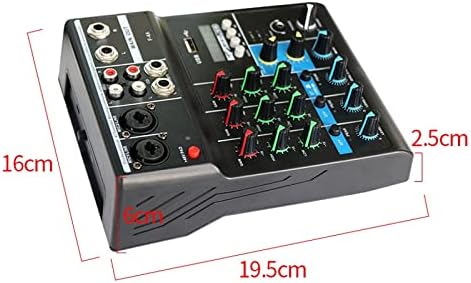
Figure 3.3: Image displaying the dimensions of the F-4A Audio Mixer, indicating a width of approximately 19.5 cm, a depth of 16 cm, and a height of 2.5 cm.
4. Setup
4.1 Power Connection:
- Ensure the mixer's power switch is in the "OFF" position.
- Connect the provided power adapter to the mixer's DC input jack.
- Plug the power adapter into a suitable electrical outlet.
- Alternatively, for portable use, connect a 5V power bank to the USB power input.
4.2 Connecting Audio Sources:
- Microphones: Connect microphones to the MIC/LINE mono input jacks using XLR or 1/4" cables. If using condenser microphones, ensure the 48V phantom power is activated (see Section 5.3).
- Line-Level Instruments/Devices: Connect instruments (e.g., keyboards) or other line-level devices to the MIC/LINE mono input jacks using 1/4" cables, or to the Stereo Input (RCA) jacks for stereo sources.
- USB Device: Insert a USB drive with compatible audio files into the USB socket for MP3 playback.
- Computer Connection: Connect the mixer to a computer via the USB port for use as an external sound card.
4.3 Connecting Outputs:
- Main Speakers/Recording: Connect your main speakers or recording device to the MAIN OUT (L/R) RCA jacks.
- Headphones: Plug your headphones into the MONITOR HEADPHONE jack.
5. Operating Instructions
5.1 Powering On/Off:
- To power on, ensure all volume knobs are at their minimum setting, then flip the power switch to "ON".
- To power off, turn down all volume knobs, then flip the power switch to "OFF".
5.2 Adjusting Channel Levels:
- Gain: For each active input channel, slowly turn the GAIN knob clockwise until the PEAK indicator occasionally flashes during the loudest parts of the signal. Then, slightly reduce the gain until the PEAK indicator no longer flashes.
- Equalization (EQ): Use the HIGH and LOW knobs to adjust the treble and bass frequencies for each channel to achieve the desired tone.
- Channel Volume: Adjust the LEVEL knob for each channel to balance the individual input levels within the mix.
- Main Volume: Use the MAIN knob to control the overall output volume of the mixer.
5.3 Using 48V Phantom Power:
- Only activate 48V phantom power when using condenser microphones that require it.
- Ensure all channel volumes are turned down before activating or deactivating phantom power to prevent loud pops that could damage speakers or headphones.
- Press the "48V PAD" button to engage phantom power. The indicator light will illuminate.
5.4 USB/MP3 Playback:
- Insert a USB drive with MP3 files into the USB socket.
- Use the MP3 playback adjustment controls (play/pause, next/previous track, mode) to navigate and play audio.
- Adjust the ST/USB channel switch to select the USB input for the desired channel.
5.5 Reverb Effects:
- Use the REVERBERATION DELAY and REVERB TIME ADJUSTMENT knobs to customize the reverb effect.
- Activate the EFF (Effect) switch on individual channels to send their signal to the reverb processor.
5.6 Monitoring:
- Connect headphones to the MONITOR HEADPHONE jack.
- Adjust the MONITOR VOLUME knob to set the desired listening level.
6. Specifications
Detailed technical specifications for the F-4A Audio Mixer:
| Parameter | Value |
|---|---|
| Model | F-4A |
| Gain Range (Input) | 10 Hz to 200 kHz |
| Signal to Noise Ratio (Input) | +14 dB to +60 dB |
| Line Input E.I.N. | 120 dB |
| Frequency Response | Electronic Balance |
| Gain Range (Output) | 10 Hz to 130 kHz |
| Signal-to-Noise Ratio (Output) | -6 dB to +38 dB |
| Low EQ | 50 Hz, +/-15 dB |
| Intermediate Frequency EQ | 700 Hz, +/- 15 dB |
| High EQ | 10 kHz, +/- 15dB |
| Main Output | +28 dBu balanced / +22 dBu unbalanced |
| AUX Send | +22 dBu unbalanced |
| EFF Send | +22 dBu unbalanced |
| Tape Out | +22 dBu unbalanced |
| Headphone Output | +15 dBu / 150 Ohms |
| Dimensions (L*W*H) | 19.5 cm * 16 cm * 2.5 cm (approx. 180*150*50mm from description) |
Note: Dimensions are approximate and may vary slightly.
7. Troubleshooting
If you encounter issues with your F-4A mixer, refer to the following common problems and solutions:
- No Sound Output:
- Check all power connections and ensure the mixer is powered on.
- Verify that all input sources are connected correctly and are active.
- Ensure channel GAIN, LEVEL, and MAIN volume knobs are turned up.
- Check connections to main speakers/recording devices and their power/volume.
- Confirm headphones are properly plugged in and MONITOR VOLUME is adjusted.
- Distorted Sound:
- Reduce the GAIN knob for the affected channel if the PEAK indicator is constantly lit.
- Lower the channel LEVEL or MAIN volume.
- Check input source levels to ensure they are not overdriving the mixer.
- Phantom Power Not Working:
- Ensure the "48V PAD" button is pressed and its indicator light is on.
- Verify that the microphone connected is a condenser microphone requiring phantom power.
- Check the XLR cable for proper connection and integrity.
- USB Playback Issues:
- Ensure the USB drive is properly inserted and contains compatible MP3 files.
- Check the ST/USB channel switch is set correctly.
- Try reformatting the USB drive (FAT32) or using a different USB drive.
8. Maintenance
- Cleaning: Regularly wipe the mixer's surface with a soft, dry cloth. Do not use abrasive cleaners, solvents, or waxes.
- Storage: When not in use for extended periods, store the mixer in a cool, dry place, away from direct sunlight and extreme temperatures.
- Cable Care: Avoid bending or crimping cables excessively. Disconnect cables by pulling the plug, not the cable itself.
9. Warranty and Support
For warranty information or technical support, please refer to the documentation provided with your purchase or contact your retailer. Keep your proof of purchase for any warranty claims.