
1. Introduction
Thank you for choosing the JUNJIEUNVO Q16 Wireless Translation Earbuds. These open-ear design earbuds offer a comfortable listening experience, advanced Bluetooth 5.4 connectivity, IPX5 waterproof rating, and support for real-time language translation across over 100 countries. This manual provides detailed instructions on how to set up, operate, and maintain your earbuds to ensure optimal performance.
2. Package Contents
Please check the package for the following items:
- JUNJIEUNVO Q16 Wireless Translation Earbuds (Left and Right)
- Charging Case
- User Manual
- Charging Cable (USB-C, not always included, please check packaging)
3. Product Overview
The Q16 earbuds feature an open-ear design for comfort and situational awareness, housed in a compact charging case. The case includes a digital display for battery status.

Figure 3.1: Q16 Earbuds in their charging case, showing the left (L) and right (R) indicators along with the digital battery display.

Figure 3.2: The open-ear design of the Q16 earbuds, emphasizing comfort and awareness of surroundings.

Figure 3.3: Diagram illustrating the directional sound transmission technology, designed to protect privacy and reduce sound leakage.
4. Setup
4.1 Charging the Earbuds and Case
Before first use, fully charge the earbuds and the charging case. The charging case has a 500mAh battery, and each earbud has a 40mAh battery. A full charge takes approximately 1.5 hours.
- Connect the charging cable (typically USB-C) to the charging port on the case and to a USB power source.
- The digital display on the charging case will show the charging progress.
- Place the earbuds into the charging case. Ensure they are correctly seated; the case will indicate if they are charging.
4.2 Bluetooth Pairing
The Q16 earbuds use Bluetooth 5.4 for a stable and efficient connection. The pairing process is automatic upon opening the case.
- Ensure your smartphone or device's Bluetooth is turned on.
- Open the lid of the charging case. The earbuds will automatically enter pairing mode.
- On your device, search for Bluetooth devices and select "Q16" from the list.
- Once connected, you will hear a confirmation tone, and the earbuds will be ready for use.
- For subsequent connections, simply open the charging case, and the earbuds will automatically reconnect to the last paired device.
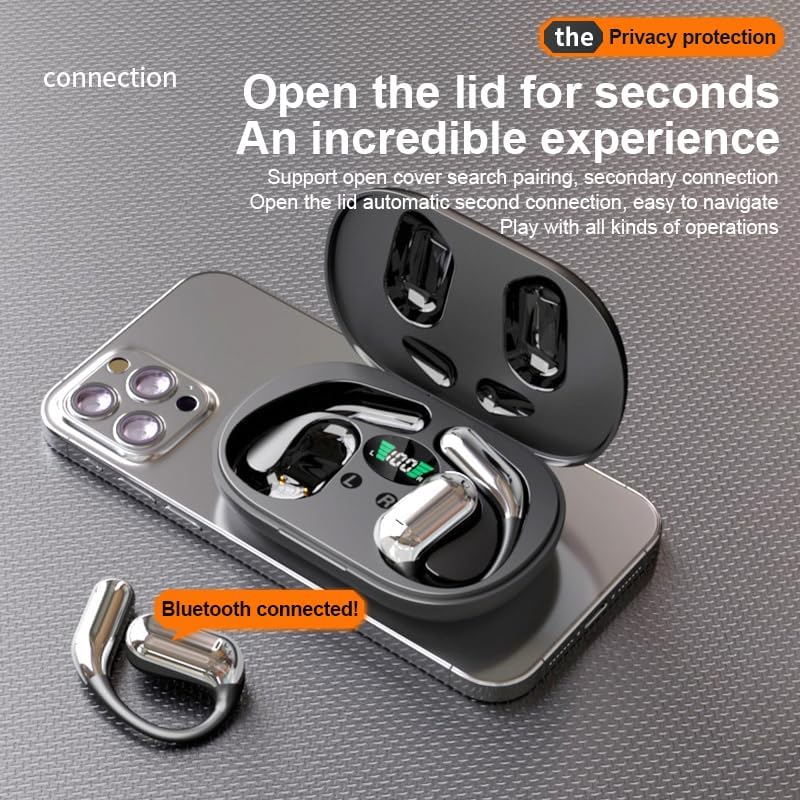
Figure 4.1: The Q16 earbuds connected to a smartphone, indicating successful Bluetooth pairing.
5. Operating Instructions
5.1 Power On/Off
- Power On: Open the charging case lid, and the earbuds will automatically power on.
- Power Off: Place the earbuds back into the charging case and close the lid. They will automatically power off and begin charging.
5.2 Music Playback
(Specific touch controls are not detailed in the provided product data. The following are common gestures; refer to the manufacturer's official app or website for precise controls.)
- Play/Pause: Tap either earbud once.
- Next Track: Double-tap the right earbud.
- Previous Track: Double-tap the left earbud.
- Volume Control: (Typically a long press or triple tap, specific action not provided. Adjust via your connected device if not available on earbuds.)

Figure 5.1: Illustration of the panoramic stereo surround sound feature, enhancing the audio experience.
5.3 Call Management
- Answer/End Call: Tap either earbud once.
- Reject Call: Long press either earbud for 2 seconds.
5.4 Language Translation Function
The Q16 earbuds support real-time translation for over 100 languages. This feature typically requires a dedicated translation application on your paired smartphone.
- Download and install the recommended translation app (refer to product packaging or manufacturer's website for app details) on your smartphone.
- Ensure the earbuds are connected to your smartphone via Bluetooth.
- Open the translation app and follow its instructions to initiate real-time translation. The earbuds will act as your audio input/output device for the translation.
5.5 IPX5 Waterproof Rating
The earbuds are rated IPX5 waterproof, meaning they are resistant to splashing water from any direction. This makes them suitable for sports and outdoor activities. Note: The charging case is not waterproof. Avoid exposing the charging case to water.
6. Maintenance and Care
- Cleaning: Gently wipe the earbuds and charging case with a soft, dry, lint-free cloth. Do not use harsh chemicals or abrasive materials.
- Storage: When not in use, store the earbuds in their charging case to protect them and keep them charged. Store in a cool, dry place away from extreme temperatures.
- Avoid Water: While the earbuds are IPX5 waterproof, avoid submerging them in water. The charging case is not waterproof.
- Battery Care: To prolong battery life, avoid fully discharging the earbuds and charging case frequently. Charge them regularly, even if not in constant use.
7. Troubleshooting
| Problem | Solution |
|---|---|
| Earbuds not pairing with device. |
|
| No sound from earbuds. |
|
| Earbuds not charging. |
|
| Translation function not working. |
|
8. Specifications
| Feature | Detail |
|---|---|
| Model Name | YYK-Q16 |
| Bluetooth Version | V5.4+EDR |
| Chip | Blue Flood |
| Supported Protocols | AVRCP V1.6, A2DP V1.3, HFP V1.7 (Simultaneous LE and BR / EDR) |
| Usage/Playback Time | Approximately 8 hours (at 80% volume) |
| Standby Time | 80 hours |
| Charging Time | Approximately 1.5 hours |
| Wireless Distance | 10 meters |
| Earbud Battery Capacity | 40mAh (each) |
| Charging Case Battery Capacity | 500mAh |
| Waterproof Rating | IPX5 (earbuds only) |
| Translation Support | Over 100 languages |
| Ear Placement | On Ear (Open-ear design) |
| Impedance | 32 Ohms |
| Net Weight | 84g (total) |
9. Warranty and Support
For warranty information and customer support, please refer to the documentation included with your purchase or visit the official JUNJIEUNVO website. If you encounter any issues not covered in this manual, please contact our customer service team for assistance.
Manufacturer: UNVO
Brand: JUNJIEUNVO