
1. Introduction
Thank you for choosing the ECOVACS DEEBOT T30C Pro OMNI Robot Vacuum and Mop. This advanced cleaning system is designed to provide efficient and thorough cleaning of your home with minimal effort. Featuring an OMNI cleaning station, powerful 12800Pa suction, ZeroTangle 2.0 brush, TrueEdge cleaning technology, and smart navigation, your DEEBOT ensures a pristine living environment. This manual provides essential information for setup, operation, maintenance, and troubleshooting to help you get the most out of your device.
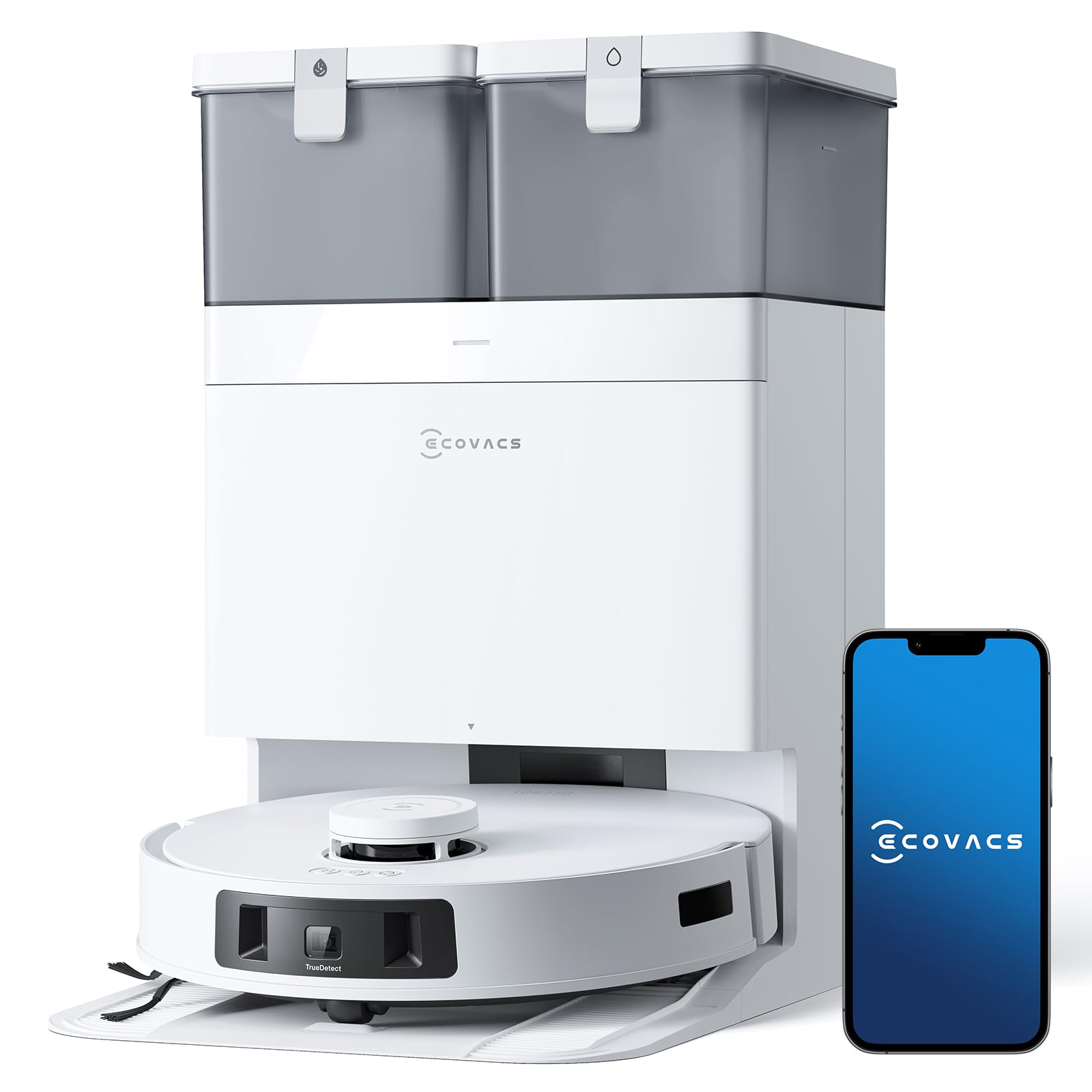
Image: ECOVACS DEEBOT T30C Pro OMNI Robot Vacuum and Mop with its OMNI Station. This image shows the complete product setup, highlighting its sleek design and integrated cleaning station.
2. Important Safety Information
Please read all safety instructions carefully before using this appliance. Failure to follow these instructions may result in electric shock, fire, or serious injury.
- This appliance is for indoor household use only. Do not use outdoors or on commercial or industrial surfaces.
- Do not allow children to play with the appliance. Supervise children and pets when the DEEBOT is operating.
- Ensure the power voltage matches the voltage marked on the charging dock.
- Do not handle the power cord or appliance with wet hands.
- Keep hair, loose clothing, fingers, and all parts of the body away from openings and moving parts.
- Do not operate the DEEBOT in areas with open flames, flammable liquids, or combustible materials.
- Do not use the appliance to pick up large debris, sharp objects, or liquids.
- Always turn off the DEEBOT and unplug the OMNI station before performing any maintenance or cleaning.
- Use only manufacturer-specified attachments and accessories.
3. Package Contents
Verify that all components are present and in good condition upon unpacking:
- ECOVACS DEEBOT T30C Pro OMNI Robot Vacuum
- ECOVACS DEEBOT T30C Pro OMNI Base Station
- Instruction Manual
- OMNI Base Station Charging Cable
- Mop Pads (pre-installed or separate)
- Side Brushes (pre-installed or separate)
- Cleaning Tool
4. Product Overview
The DEEBOT T30C Pro OMNI combines powerful vacuuming with effective mopping, managed by an intelligent OMNI station.
Key Features:
- OMNI Cleaning Station: Fully automated maintenance including automatic dust emptying, 70°C hot water mop washing, 45°C hot air mop drying, and automatic water refilling.
- 12800Pa Suction Power: Exceptional suction for deep cleaning carpets and hard floors, effectively removing embedded dirt and debris.
- ZeroTangle 2.0 Brush: Innovative triple V-structure brush designed to actively collect, lift, and detangle hair, ensuring a 0% clogging rate.
- TrueEdge Adaptive Edge Cleaning: Cleans corners and edges with 1mm precision, covering up to 99% of difficult-to-reach areas.
- TrueMapping 2.0: Rapid and accurate mapping of your home (100m² in 6 minutes) for optimized cleaning paths.
- TrueDetect 3D 3.0: Advanced infrared 3D sensors detect and avoid obstacles like cables, pet waste, and small objects with a success rate of ≥98%.
- 9mm Auto-Lift Mop: Automatically lifts mop pads by 9mm when detecting carpets to prevent wetting and allow for vacuum-only cleaning.
- Intelligent Intensive Cleaning: Detects stubborn stains and repeats cleaning cycles for enhanced effectiveness.
- Long Battery Life & Fast Charging: 5200mAh battery provides up to 200 minutes of runtime (for areas up to 300m²), with quick charging to minimize interruptions.
- YIKO Voice Assistant & App Control: Control your DEEBOT with natural voice commands or through the ECOVACS Home App, compatible with Google Assistant and Alexa.


5. Setup
5.1 OMNI Station Placement
- Place the OMNI station on a hard, level surface against a wall.
- Ensure there is at least 0.5 meters (1.6 feet) of clear space on both sides and 1.5 meters (4.9 feet) in front of the station.
- Avoid placing the station near stairs, heat sources, or direct sunlight.
- Plug the charging cable into the OMNI station and then into a power outlet.
5.2 Initial Charging and Water Tanks
- Remove the clean water tank and dirty water tank from the OMNI station.
- Fill the clean water tank with tap water up to the MAX line. Do not add cleaning solutions unless specified by ECOVACS.
- Place the DEEBOT onto the OMNI station to begin charging. Ensure the charging contacts align. The indicator light on the DEEBOT will show charging status.
- Allow the DEEBOT to fully charge before its first use (approximately 6.5 hours).
5.3 App Connection and Mapping
- Download the ECOVACS HOME App from your mobile app store.
- Register an account and follow the in-app instructions to add your DEEBOT T30C Pro OMNI.
- Once connected, initiate a mapping run. The DEEBOT will navigate your home to create a detailed map, which can be viewed and customized in the app.

6. Operating Instructions
6.1 Starting/Pausing/Stopping Cleaning
- Start: Press the Auto Mode button on the DEEBOT, use the ECOVACS HOME App, or issue a voice command (e.g., "YIKO, start cleaning!").
- Pause: Press the Auto Mode button during cleaning or use the app.
- Stop: Press and hold the Auto Mode button for 3 seconds, or use the app to send the DEEBOT back to the OMNI station.

6.2 Cleaning Modes
Select cleaning modes via the ECOVACS HOME App:
- Auto Cleaning: The DEEBOT automatically cleans the entire mapped area.
- Area Cleaning: Select specific rooms or zones to clean.
- Custom Cleaning: Draw a custom area on the map for targeted cleaning.
- Vacuum Only: For carpets or when mopping is not desired.
- Mop Only: For hard floors, focusing on mopping.
- Vacuum & Mop: Simultaneous vacuuming and mopping.
6.3 Scheduling and Smart Control
- Scheduling: Set cleaning schedules for specific times and days using the ECOVACS HOME App.
- Voice Control: Integrate with YIKO, Google Assistant, or Amazon Alexa for hands-free control.
- App Control: Use the ECOVACS HOME App to monitor cleaning status, adjust settings, create virtual boundaries, and more.


7. Maintenance
Regular maintenance ensures optimal performance and extends the lifespan of your DEEBOT.
7.1 OMNI Station Maintenance
- Emptying Dust Bag: The OMNI station automatically empties the DEEBOT's dustbin. Replace the disposable dust bag in the station when full (indicated by the app).
- Clean/Dirty Water Tanks: Regularly empty the dirty water tank and refill the clean water tank. Clean both tanks with water and a mild detergent as needed.
- Base Plate Cleaning: The OMNI station features an automatic self-cleaning function for its base plate. Ensure this area is free of debris.


7.2 DEEBOT Component Cleaning
- Main Brush (ZeroTangle 2.0): Remove the main brush cover and lift out the brush. Use the cleaning tool to cut and remove any tangled hair. Clean the brush bearings.
- Side Brushes: Regularly check side brushes for wear or damage. Remove any tangled hair or debris. Replace if worn.
- Mop Pads: Remove mop pads after each cleaning cycle. Wash them by hand or machine. Ensure they are completely dry before reattaching.
- Filter: Tap the filter to remove dust. Rinse the filter with water if necessary, but ensure it is completely dry before reinstallation. Replace the filter every 3-6 months.
- Sensors: Wipe all sensors (anti-drop sensors, anti-collision sensors, TrueDetect 3D sensors) with a clean, dry cloth.
- Charging Contacts: Clean the charging contacts on both the DEEBOT and the OMNI station with a dry cloth.
8. Troubleshooting
If your DEEBOT encounters an issue, refer to the following common solutions:
| Problem | Possible Cause | Solution |
|---|---|---|
| DEEBOT does not start/charge. | Not properly docked; power cable unplugged; battery depleted. | Ensure DEEBOT is correctly docked. Check power cable connection. Allow DEEBOT to charge for several hours. |
| Poor cleaning performance. | Dustbin full; brushes tangled; filter clogged; mop pads dirty. | Empty dustbin. Clean main brush and side brushes. Clean/replace filter. Wash mop pads. |
| DEEBOT gets stuck frequently. | Obstacles on floor; sensors dirty. | Clear cables, small objects, and loose rugs. Clean all sensors. |
| OMNI station not emptying dust. | Dust bag full; suction port blocked. | Replace dust bag. Check for blockages in the station's suction port. |
| OMNI station not washing/drying mops. | Clean water tank empty; dirty water tank full; water nozzles blocked. | Refill clean water tank. Empty dirty water tank. Clean water nozzles. |
| App connection issues. | Wi-Fi signal weak; incorrect Wi-Fi password; app outdated. | Ensure strong 2.4GHz Wi-Fi signal. Re-enter Wi-Fi password. Update app to latest version. Restart DEEBOT and router. |
For more detailed troubleshooting, refer to the ECOVACS HOME App or the official ECOVACS support website.
9. Specifications
| Feature | Specification |
|---|---|
| Brand | ECOVACS |
| Model Name | Ecovacs DEEBOT T30C Pro OMNI |
| Model Number | DLX14 |
| Suction Power | 12800 Pa |
| Battery Capacity | 5200 mAh |
| Battery Run Time | Up to 200 minutes |
| Noise Level | 60 Decibels |
| Filter Type | E11 Air Filter |
| Water Tank Capacity | 55 ml (internal) |
| Voltage | 14.4 Volts |
| Control Type | Button Control, App Control, Voice Control |
| Compatible Devices | Amazon Echo, Google Home, Siri, Smartwatch |
| Recommended Surfaces | Carpet, Wood, Tile |
| Dimensions (L x W x H) | 44.3L x 39.4W x 52.8H cm |
| Item Weight | 12.2 Kilograms |
| Year of Production | 2025 |
10. Warranty and Support
For warranty information, please refer to the warranty card included in your product packaging or visit the official ECOVACS website. For technical support, frequently asked questions, or to purchase replacement parts, please visit the ECOVACS support page or contact their customer service directly.
ECOVACS Brand Store: Visit ECOVACS Store on Amazon


