
1. Introduction
Thank you for purchasing the Gracioso CD19 Portable CD Player. This device combines a classic CD player with modern features such as Bluetooth 5.3 connectivity, FM radio, USB/TF card playback, and a rechargeable battery. Please read this manual carefully before use to ensure proper operation and to maximize your listening experience.
2. Safety Instructions
- Do not expose the device to rain, moisture, or extreme temperatures.
- Avoid placing the device near heat sources or in direct sunlight.
- Do not disassemble or attempt to repair the device yourself. Contact qualified service personnel.
- Use only the provided charging cable.
- Keep out of reach of children.
- Clean the device with a soft, dry cloth. Do not use liquid cleaners.
3. Package Contents
Verify that all items are present in the package:
- Gracioso CD19 Portable CD Player (1 unit)
- USB Type-C Charging Cable (1 unit)
- Remote Control (1 unit)
- User Manual (1 unit)
4. Product Overview
Familiarize yourself with the components and controls of your CD player.

Figure 4.1: Front view of the Gracioso CD19 Portable CD Player, showing the CD compartment, control buttons, LCD display, and dual speakers.
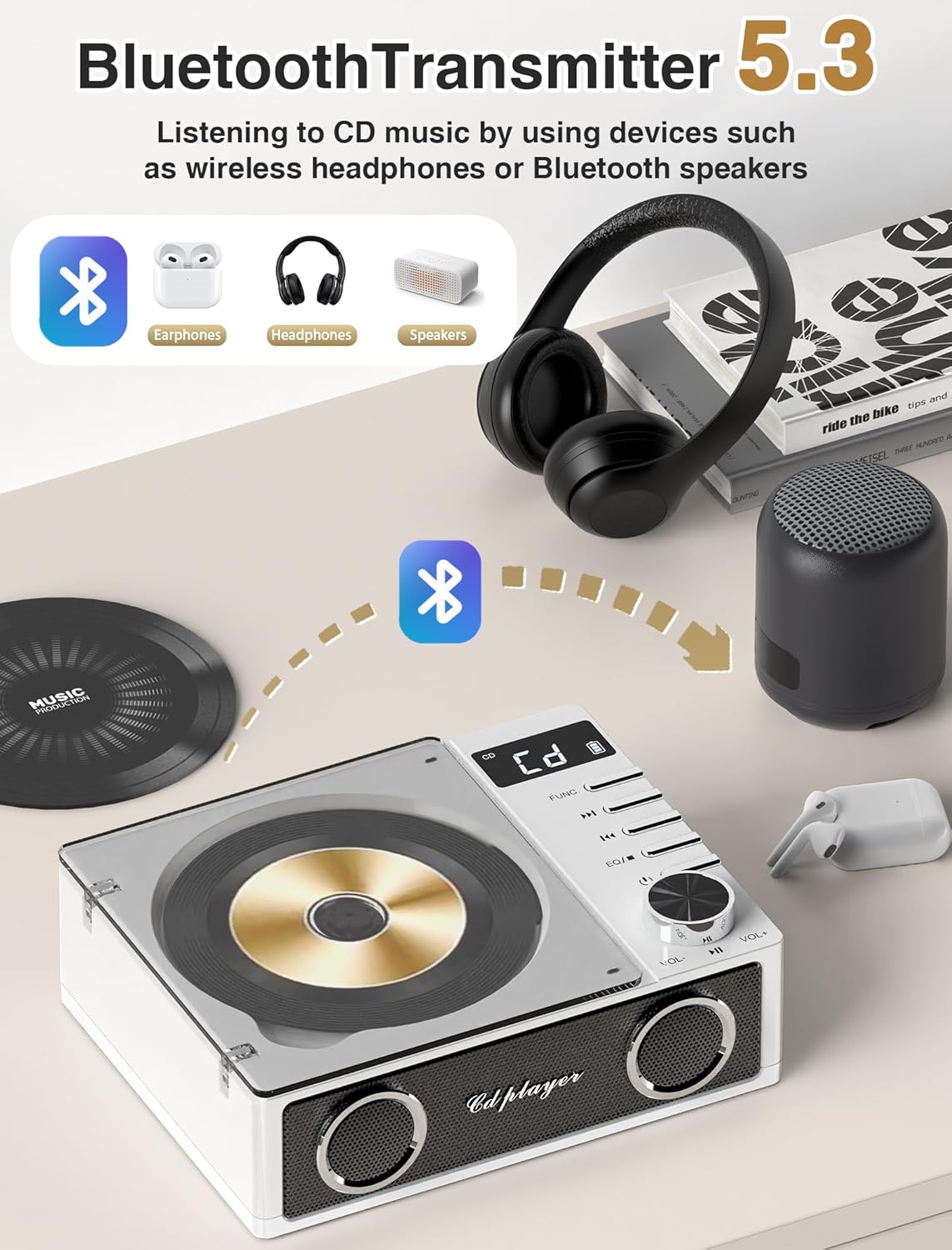
Figure 4.2: Side view illustrating the various input/output ports, including USB, TF card slot, AUX, and headphone jack.
Controls and Ports:
- Power Button: Turns the device on/off.
- Mode Button: Switches between CD, Bluetooth, FM, USB, TF, and AUX modes.
- Play/Pause Button: Starts or pauses playback.
- Skip/Search Buttons: Skips tracks or searches within a track.
- Volume Knob: Adjusts the audio volume.
- EQ Button: Cycles through equalizer presets.
- LCD Display: Shows current mode, track information, and battery status.
- CD Compartment: For inserting audio CDs.
- USB Port: For USB flash drive playback.
- TF Card Slot: For TF (MicroSD) card playback.
- AUX Input: For connecting external audio devices via a 3.5mm cable.
- 3.5mm Headphone Jack: For private listening.
- Type-C Charging Port: For charging the internal battery.
5. Setup
5.1 Initial Charging
Before first use, fully charge the CD player. Connect the provided USB Type-C charging cable to the device's charging port and the other end to a USB power adapter (not included) or a computer's USB port. The LCD display will indicate charging status. A full charge takes approximately 7 hours.

Figure 5.1: The CD player connected to a power source via its Type-C charging port, illustrating the charging process.
5.2 Remote Control Battery Installation
The remote control requires two AAA batteries (not included). Open the battery compartment on the back of the remote, insert the batteries according to the polarity markings, and close the compartment.
6. Operating Instructions
6.1 Power On/Off
Press and hold the Power button on the device or the remote control to turn the CD player on or off.
6.2 Mode Selection
Press the 'Mode' button repeatedly to cycle through available modes: CD, Bluetooth (BT TX/RX), FM Radio, USB, TF Card, and AUX Input.
6.3 CD Playback
- Open the CD compartment cover.
- Carefully place an audio CD onto the spindle with the label side facing up.
- Close the CD compartment cover.
- Select 'CD' mode using the Mode button. The player will automatically begin reading the disc and start playback.
- Use the Play/Pause button to pause or resume playback.
- Use the Skip buttons (◀◀ / ▶▶) to navigate between tracks. Press and hold to fast-forward or rewind within a track.
6.4 Bluetooth Transmitter (BT TX) Mode
This mode allows the CD player to transmit audio to Bluetooth headphones or speakers.
- Ensure your Bluetooth headphones or speaker are in pairing mode.
- Switch the CD player to 'BT TX' mode. The LCD display will show 'BT TX' and an icon indicating it is searching for devices.
- The CD player will automatically connect to the nearest available Bluetooth device. Once connected, the Bluetooth icon on the display will become solid.
- You can now play audio from the CD player through your connected Bluetooth device.

Figure 6.1: The CD player wirelessly transmitting audio to various Bluetooth receiving devices like headphones and speakers.
6.5 Bluetooth Receiver (BT RX) Mode
This mode allows the CD player to act as a Bluetooth speaker, receiving audio from your smartphone, tablet, or computer.
- Switch the CD player to 'BT RX' mode. The LCD display will show 'BT RX' and an icon indicating it is ready to pair.
- On your smartphone, tablet, or computer, enable Bluetooth and search for available devices.
- Select 'Gracioso CD19' from the list of devices to pair.
- Once connected, the Bluetooth icon on the display will become solid. You can now play audio from your paired device through the CD player's speakers.

Figure 6.2: A smartphone connected to the CD player via Bluetooth, demonstrating the receiver function.
6.6 FM Radio Mode
- Switch the CD player to 'FM' mode.
- Press the Play/Pause button to initiate an automatic scan for FM stations. The player will scan and save available stations (up to 30 presets) within the 87.5-108MHz range.
- Use the Skip buttons (◀◀ / ▶▶) to navigate between saved stations.

Figure 6.3: The CD player operating in FM radio mode, showing the frequency range and preset capabilities.
6.7 USB/TF Card Playback
- Insert a USB flash drive into the USB port or a TF (MicroSD) card into the TF card slot.
- Switch the CD player to 'USB' or 'TF' mode. The player will automatically detect and begin playing MP3 files.
- Use the Play/Pause and Skip buttons for control.
6.8 AUX Input Mode
- Connect an external audio device (e.g., smartphone, MP3 player) to the AUX input port using a 3.5mm audio cable (not included).
- Switch the CD player to 'AUX' mode.
- Play audio from your external device. The sound will be output through the CD player's speakers.
6.9 Headphone Jack
Plug 3.5mm headphones into the headphone jack for private listening. The internal speakers will automatically mute when headphones are connected.
6.10 Equalizer (EQ) Modes
Press the 'EQ' button on the device or remote control to cycle through different sound equalizer presets:
- FLAT: No equalization applied.
- POP: Optimized for pop music.
- JAZZ: Optimized for jazz music.
- CLASSIC: Optimized for classical music.
- ROCK: Optimized for rock music.

Figure 6.4: Illustration of the dual speakers and the five available equalizer modes (FLAT, ROCK, POP, CLASSIC, JAZZ).
6.11 Remote Control Functions
The remote control provides convenient access to all major functions:
- Power On/Off
- Mode Selection
- Play/Pause
- Skip/Search Tracks
- Volume Up/Down
- EQ Mode Selection
- Mute
7. Battery and Charging
The Gracioso CD19 features a built-in 4000mAh rechargeable Lithium Polymer battery. A full charge takes approximately 7 hours and provides up to 19 hours of playback depending on the mode and volume level.
- Charging Time: Approximately 7 hours.
- Playback Duration: Up to 19 hours (Bluetooth playback), 15 hours (TF play), 12 hours (USB play), 6 hours (CD play).
- Charging Indicator: The LCD display will show a charging icon. It will turn off or change when fully charged.
To prolong battery life, avoid completely draining the battery frequently and store the device in a cool, dry place when not in use for extended periods.
8. Troubleshooting
| Problem | Possible Cause | Solution |
|---|---|---|
| Device does not power on. | Battery is depleted. | Charge the device using the provided USB Type-C cable. |
| No sound from speakers. | Volume is too low or muted. Headphones are connected. | Increase volume. Disconnect headphones. |
| CD does not play. | CD is dirty, scratched, or inserted incorrectly. Incorrect mode selected. | Clean the CD, check for scratches, reinsert correctly. Ensure 'CD' mode is selected. |
| Bluetooth device won't pair. | Device is not in pairing mode. Too far from the CD player. | Ensure the CD player is in 'BT TX' or 'BT RX' mode. Place devices closer (within 26 ft). Restart both devices. |
| FM radio reception is poor. | Weak signal. | Relocate the CD player to an area with better reception. |
| Remote control not working. | Batteries are depleted or inserted incorrectly. Obstruction between remote and player. | Replace AAA batteries. Ensure clear line of sight to the player's sensor. |
9. Specifications
- Model Name: CD19
- Brand: Gracioso
- Connectivity Technology: USB, Bluetooth 5.3, AUX
- Supported Audio Format: MP3
- Number of Discs: 2 (CD capacity, though only one can be played at a time)
- Battery: 4000mAh Lithium Polymer (3 required, included)
- Charging Time: Approximately 7 hours
- Playback Time: Up to 19 hours (Bluetooth), 15 hours (TF), 12 hours (USB), 6 hours (CD)
- FM Radio Frequency: 87.5-108MHz
- Item Dimensions (L x W x H): 7.56" x 5.98" x 2.76"
- Included Components: CD Player, Charging Cable, Remote Control, User Manual
10. Warranty and Support
This Gracioso CD19 Portable CD Player comes with a 1-year manufacturer's warranty from the date of purchase. This warranty covers defects in materials and workmanship under normal use.
The warranty does not cover damage caused by misuse, accident, unauthorized modification, or external causes such as power surges. Please retain your proof of purchase for warranty claims.
For technical support, warranty claims, or any questions regarding your product, please contact Gracioso customer service through the retailer where the product was purchased or visit the official Gracioso website for contact information.