
ZAFRO J0A4216-7K-ZA
ZAFRO Portable Spot Air Conditioner User Manual
Model: J0A4216-7K-ZA
Introduction
Thank you for purchasing the ZAFRO Portable Spot Air Conditioner. This unit is designed to provide efficient cooling, air circulation, and dehumidification for your indoor spaces. Please read this manual thoroughly before operating the appliance to ensure safe use, optimal performance, and proper maintenance. Keep this manual for future reference.
Safety Information
Always follow basic safety precautions when using electrical appliances to reduce the risk of fire, electric shock, and injury.
- Ensure the power supply matches the voltage specified on the rating label.
- Do not operate the unit with a damaged cord or plug.
- Do not block air inlets or outlets. Maintain adequate clearance around the unit.
- Do not insert fingers or foreign objects into the air vents.
- Always unplug the unit before cleaning or servicing.
- Keep the unit away from water and other liquids.
- This appliance is not intended for use by persons (including children) with reduced physical, sensory or mental capabilities, or lack of experience and knowledge, unless they have been given supervision or instruction concerning use of the appliance by a person responsible for their safety.
- Children should be supervised to ensure that they do not play with the appliance.
- The unit contains R410A refrigerant. Servicing should only be performed by qualified personnel.

The unit is designed with safety in mind for households with children and pets.
Product Overview
Familiarize yourself with the components of your ZAFRO Portable Spot Air Conditioner.

Image showing the main unit, exhaust hose, window panel kit, and remote control.
Control Panel and Remote Control
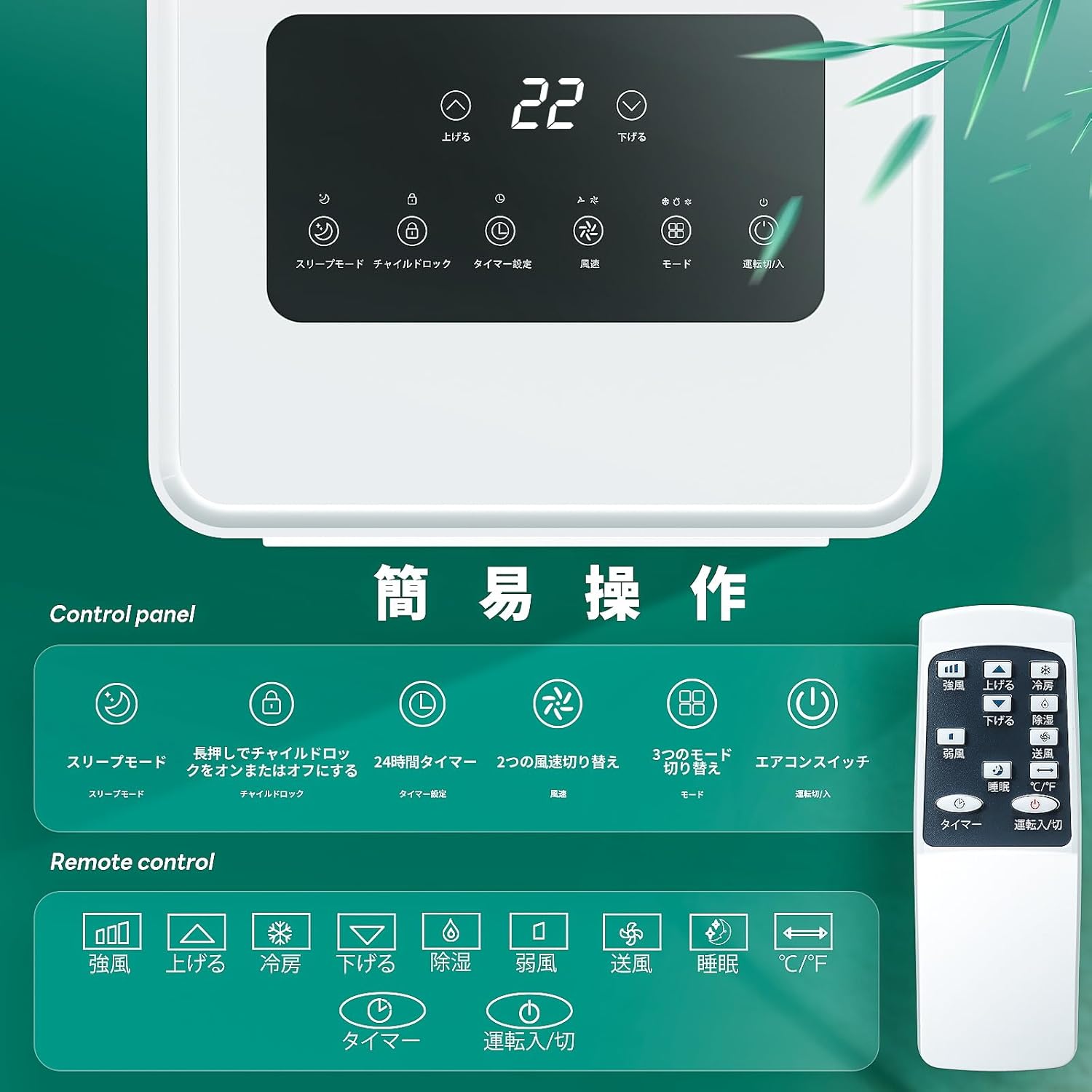
The control panel on top of the unit and the included remote control allow for easy operation of all functions.
- Control Panel: Features a digital display for temperature and timer settings, along with buttons for mode selection, fan speed, timer, sleep mode, and child lock.
- Remote Control: Provides convenient access to all functions from a distance, including power, mode, temperature adjustment, fan speed, and timer.
Setup and Installation
The ZAFRO Portable Spot Air Conditioner is designed for easy setup without complex installation work.
Placement Considerations
- Place the unit on a flat, stable surface.
- Ensure adequate clearance around the unit for proper airflow and heat dissipation.

Maintain at least 50cm clearance from the top and sides, and 30cm from the back for optimal performance.
Window Panel and Exhaust Hose Installation
To ensure effective cooling, the exhaust hose must be properly installed to vent hot air outside.

The unit dimensions are approximately 30.3cm (W) x 29.7cm (D) x 69.3cm (H). The window panel kit is adjustable for both horizontal and vertical sliding windows.

Follow these steps to install the exhaust hose and window panel:
- Step 1: Attach the exhaust hose adapter to the exhaust hose.
- Step 2: Attach the other end of the exhaust hose to the window panel adapter.
- Step 3: Assemble the window panel to fit your window opening.
- Step 4: Connect the exhaust hose to the unit's exhaust port by sliding it in until it clicks securely.
- Step 5: Connect the window panel adapter to the window panel.
- Step 6: Place the window panel in your window opening and seal any gaps to prevent hot air from entering.
Proper installation of the exhaust duct is crucial for effective cooling, as it expels hot air from the room.

The unit cools by drawing in warm air, passing it over a heat exchanger, and expelling hot air through the exhaust duct, while releasing cool air into the room.
Operating Instructions
Your ZAFRO Portable Spot Air Conditioner offers three primary operating modes: Cooling, Fan, and Dehumidification.
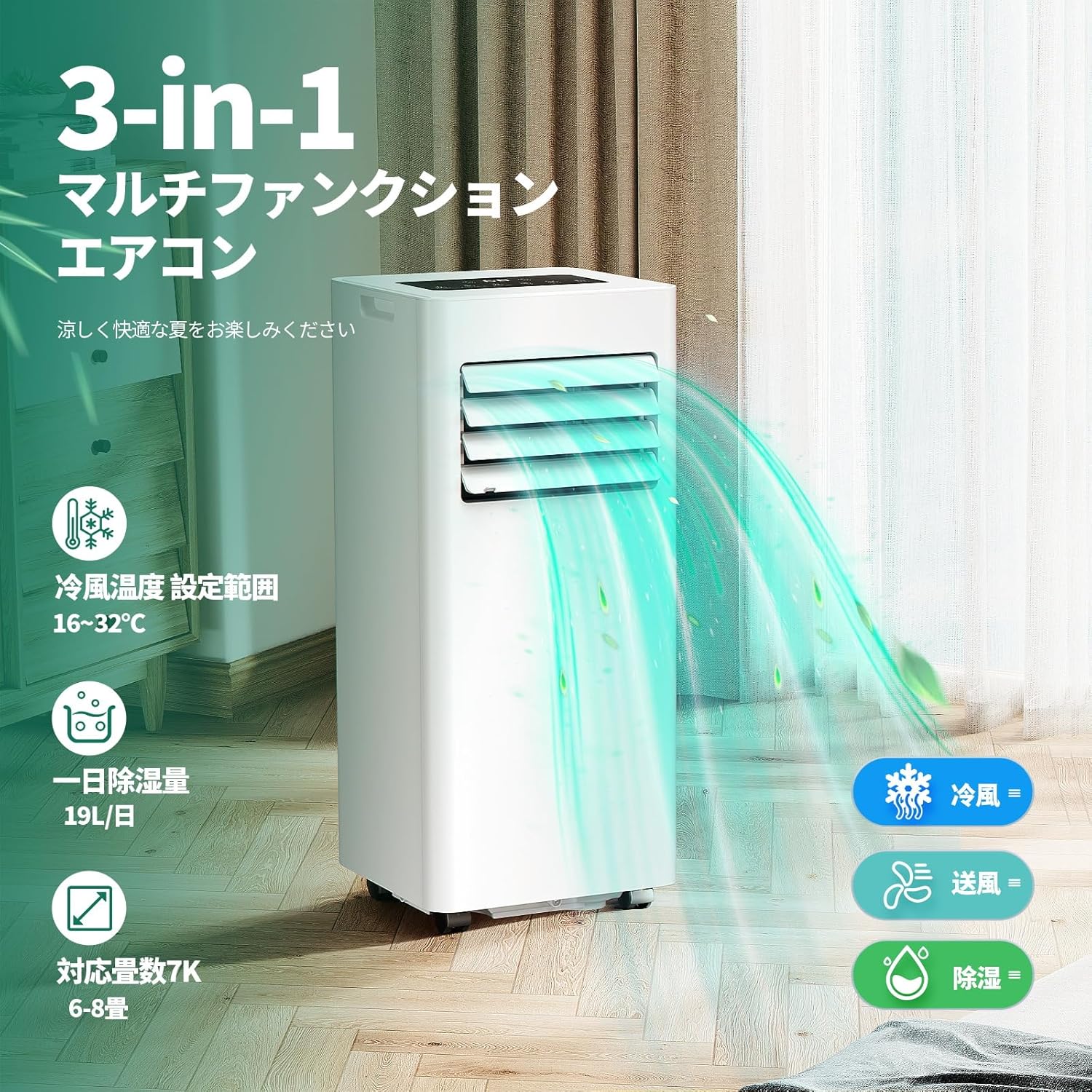
The unit provides Cooling, Fan, and Dehumidification functions for versatile climate control.
Mode Selection
- Cooling Mode: Set desired temperature between 16°C and 32°C. The unit will cool the room to the set temperature.
- Fan Mode: Circulates air without cooling. Choose between low and high fan speeds.
- Dehumidification Mode: Removes excess moisture from the air. The unit can remove up to 19L/day.
Additional Functions
- 24-Hour Timer: Set the unit to turn on or off automatically within a 24-hour period.
- Sleep Mode: Optimizes cooling for comfortable sleep. In this mode, the set temperature will gradually increase by 1°C after 1 hour and another 1°C after 2 hours, and the fan speed will switch to low.
- Child Lock: Press and hold the designated button on the control panel to activate or deactivate the child lock, preventing accidental changes to settings.
- Louver Adjustment: Manually adjust the horizontal louvers to direct airflow as desired.

Sleep mode gradually adjusts the temperature for optimal comfort during rest.

The air louvers can be manually adjusted to direct the cool air.
Maintenance
Regular maintenance ensures the longevity and efficient operation of your air conditioner.
Drainage
In cooling mode, condensed water is typically evaporated and expelled with the hot air. However, in high humidity conditions or during dehumidification mode, the internal tank may fill up and require manual drainage.

To drain the unit, remove the rubber stopper from the drain port and tilt the unit slightly to allow water to flow out. Ensure the drain hose is properly connected and not kinked to prevent water accumulation.
Cleaning the Air Filter
The air filter should be cleaned regularly (every two weeks or as needed) to maintain air quality and unit efficiency.
- Unplug the unit from the power outlet.
- Locate and remove the air filter from the back of the unit.
- Wash the filter with warm, soapy water. Rinse thoroughly.
- Allow the filter to air dry completely before reinserting it into the unit.
Storage
If storing the unit for an extended period, ensure it is completely drained and clean. Store in a dry, cool place, preferably in its original packaging.
Troubleshooting
Before contacting customer support, please refer to the following common issues and their solutions.
| Problem | Possible Cause | Solution |
|---|---|---|
| Unit does not turn on | No power, power cord unplugged, full water tank. | Check power connection, plug in securely, drain water tank. |
| Unit does not cool effectively | Window kit not properly installed, exhaust hose blocked/kinked, dirty air filter, room too large, doors/windows open. | Ensure proper window seal, clear exhaust hose, clean air filter, close doors/windows. |
| Loud noise during operation | Unit not on a level surface, internal component issue. | Place on a flat surface. If noise persists, contact support. |
| Water leakage | Drain plug loose, unit tilted, drain hose not connected properly. | Check drain plug, ensure unit is level, secure drain hose. |
| Remote control not working | Batteries dead, remote out of range, obstruction. | Replace batteries, ensure remote is within range and pointed at unit, remove obstructions. |
Specifications
| Feature | Detail |
|---|---|
| Brand Name | ZAFRO |
| Model Number | J0A4216-7K-ZA |
| Product Dimensions (D x W x H) | 29.7 x 30.3 x 69.3 cm |
| Item Weight | 20 Kilograms |
| Power Source | 100 Volts |
| Wattage | 730 W |
| Cooling Capacity | 7000 BTU (1.8/2 kW) |
| Annual Energy Consumption | 730 Watts |
| Operating Noise Level | 53 dB |
| Refrigerant | R410A (278g) |
| Special Features | Sleep Mode, Child Lock, Dehumidifier, High-Speed Cooling |
| Included Components | Remote Control |
| Applicable Room Size | 6-8 Tatami (approx. 9.7-13 sq meters) |
Warranty and Support
For warranty information or technical support, please contact ZAFRO customer service through the retailer where you purchased the product or visit the official ZAFRO store on Amazon.
Amazon Store Link: ZAFRO Official Store
Ask a question about this manual
Ask about setup, troubleshooting, compatibility, parts, safety, or missing instructions. Manuals+ will review the question and use this page’s manual context to help answer it.