
1. Introduction
Thank you for choosing the HIFIT Upholstered Twin LED Bed Frame. This manual provides essential information for the safe assembly, operation, and maintenance of your new bed frame. Please read these instructions thoroughly before beginning assembly and retain them for future reference.

Image 1: HIFIT Upholstered Twin LED Bed Frame with integrated LED lighting and charging station.
2. Safety Information
To ensure safe use and prevent injury or damage, please observe the following safety guidelines:
- Exercise caution around sharp edges during assembly and use.
- Do not exceed the maximum weight capacity of 750 lbs.
- Follow all assembly instructions carefully to prevent instability.
- Keep the charging station area clear of flammable materials.
- Supervise children around the bed to prevent potential injuries.
- Ensure all connections for the LED lights and charging station are secure before use.
3. Package Contents
Verify that all components are present before beginning assembly. The package should include:
- Floating LED Bed Frame components
- Installation Manual
- Necessary Tools for assembly
4. Assembly Instructions
The HIFIT Twin LED Bed Frame is designed for straightforward assembly, typically completed within 30 minutes. A detailed step-by-step installation manual and all necessary tools are included with your purchase. Please refer to the separate Installation Manual for comprehensive assembly instructions.

Image 2: Product dimensions and estimated assembly time.
Key Assembly Features:
- Velcro Cable Ties: Conveniently secure cables for a tidy appearance.
- Noise-Free Strips: Integrated on the slats to reduce friction and prevent noise.
- Hidden Support Legs: Contribute to the floating design and prevent accidental bumps.

Image 3: Details of Velcro cable ties, noise-free strips, and footboard design.
5. Operating Instructions
5.1. LED Lighting System
The bed frame features a multi-function RGB LED lighting system integrated into the headboard and under the frame. This system offers a range of colors and modes to customize your bedroom ambiance.
- Control: The LED lights can be controlled via a dedicated app or the included remote control.
- Color Options: Over 6W colors are available.
- Modes: Choose from Timing, Flashing, and Microphone modes. Microphone mode allows the lights to sync with music.
- Independent Control: The headboard and under-bed LED lights can be turned on or off independently using the individual LED light switch.

Image 4: Overview of RGB LED lighting features and control options.

Image 5: Location of the individual LED light switch.
5.2. Charging Station
The bed frame includes a built-in power outlet for convenient charging of electronic devices.
- Ports: 1 USB port and 1 Type-C port (5V/2A output).
- Power Cord: Features a 6.5-foot power cord for flexible placement.
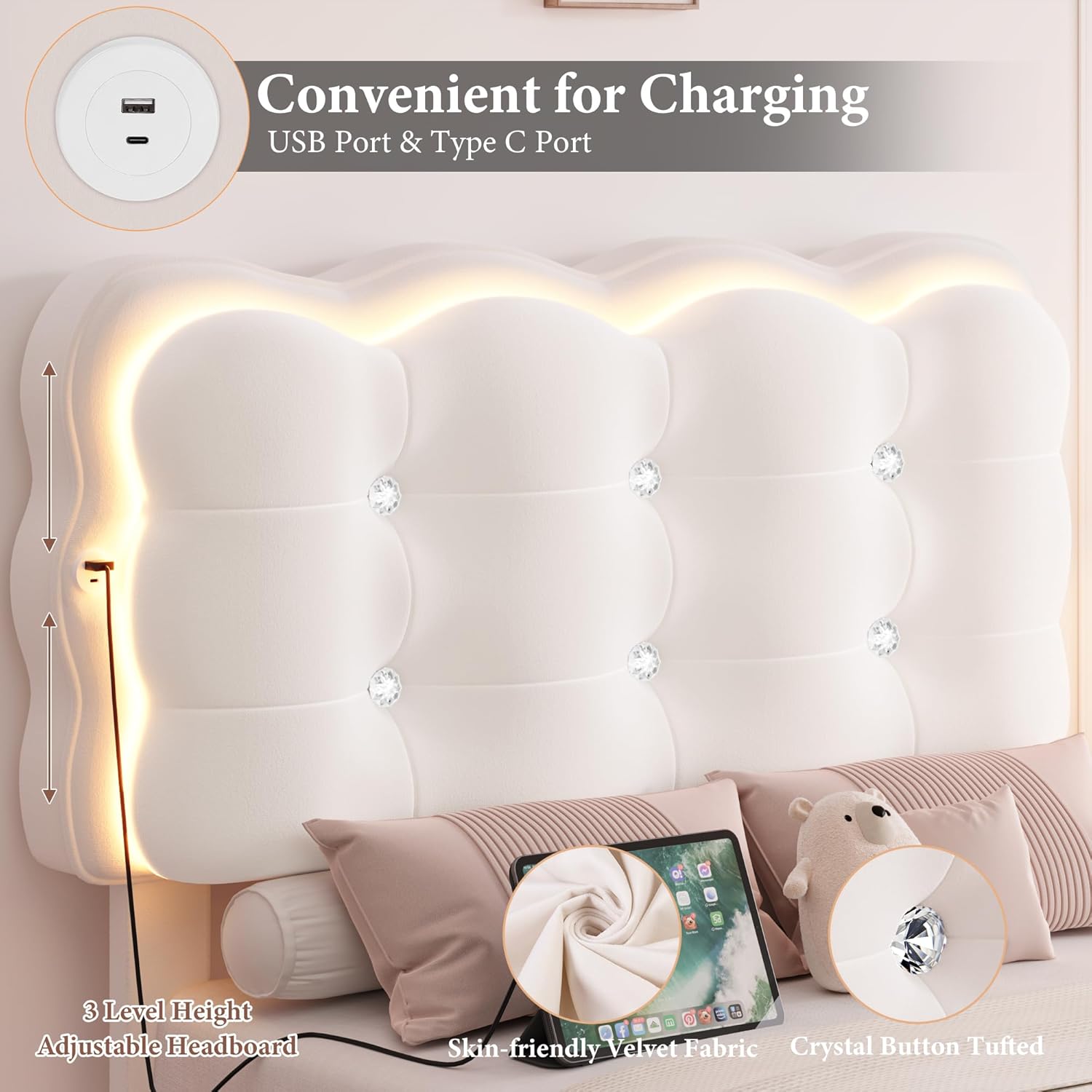
Image 6: Detail of the integrated charging station.
5.3. Adjustable Headboard
The crystal button-tufted headboard is adjustable to accommodate various mattress heights and user preferences.
- Height Adjustment: The headboard can be adjusted between 41.3 inches and 42.9 inches.
- Material: Upholstered in ultra-soft velvet for comfort.
6. Maintenance and Care
Proper care will extend the life and appearance of your bed frame.
- Upholstery: For velvet upholstery, gently vacuum with a soft brush attachment to remove dust. Spot clean with a damp cloth and mild soap if necessary, then blot dry. Avoid harsh chemicals.
- LED Lights: Wipe LED strips and headboard surface with a dry, soft cloth. Do not use liquid cleaners directly on electrical components.
- Frame: Periodically check all bolts and connections to ensure they remain tight. Retighten as needed.
- Weight Capacity: Adhere to the 750 lbs weight limit to prevent structural damage.
7. Troubleshooting
| Problem | Possible Cause | Solution |
|---|---|---|
| Bed frame is noisy/squeaky | Loose connections; lack of noise-reducing strips. | Ensure all bolts are tightened. Verify noise-free strips are correctly placed on slats. |
| LED lights not working | Power connection issue; remote/app malfunction; individual switch off. | Check power cord connection. Ensure individual LED switch is on. Replace remote batteries or re-pair with app. |
| Charging station not functioning | Power connection issue; device compatibility. | Ensure the bed frame is properly plugged into a working outlet. Test with a different device and cable. |
| Bed feels unstable | Incomplete or incorrect assembly; loose fasteners. | Review the assembly manual and ensure all parts are correctly installed and tightened. |
8. Product Specifications
| Feature | Detail |
|---|---|
| Model Number | UP-122 |
| Size | Twin |
| Product Dimensions | 79.1"L x 43.3"W x 42.9"H |
| Weight Capacity | Up to 750 lbs |
| Material | Velvet upholstery, Heavy-duty steel frame, Wood slats |
| Headboard Features | Adjustable height (41.3"-42.9"), Crystal-Tufted, Curved design |
| LED Lights | RGB, App/Remote control, Timing, Flashing, Microphone modes, Independent control |
| Charging Station | 1 USB port, 1 Type-C port (5V/2A), 6.5 ft power cord |
| Assembly Required | Yes (approx. 30 minutes) |
| Box Spring Needed | No |
| Item Weight | 64 pounds |
9. Warranty and Support
HIFIT is committed to providing quality products and customer satisfaction. For any questions, missing parts, or issues encountered during assembly or use, our post-sale service team is available 24/7 to assist you.
Please refer to your purchase documentation for specific warranty details. Contact information for support can typically be found on the HIFIT official website or through your retailer.

