
1. Introduction
Thank you for choosing the BLUETTI AORA 100 Portable Power Station. This manual provides essential information for the safe and efficient use of your device. The AORA 100 is designed for versatility, offering a reliable power source for various applications, from emergency backup to outdoor adventures. It features a 1152Wh capacity, 1800W AC output, ultra-fast UPS functionality, and multiple charging options.
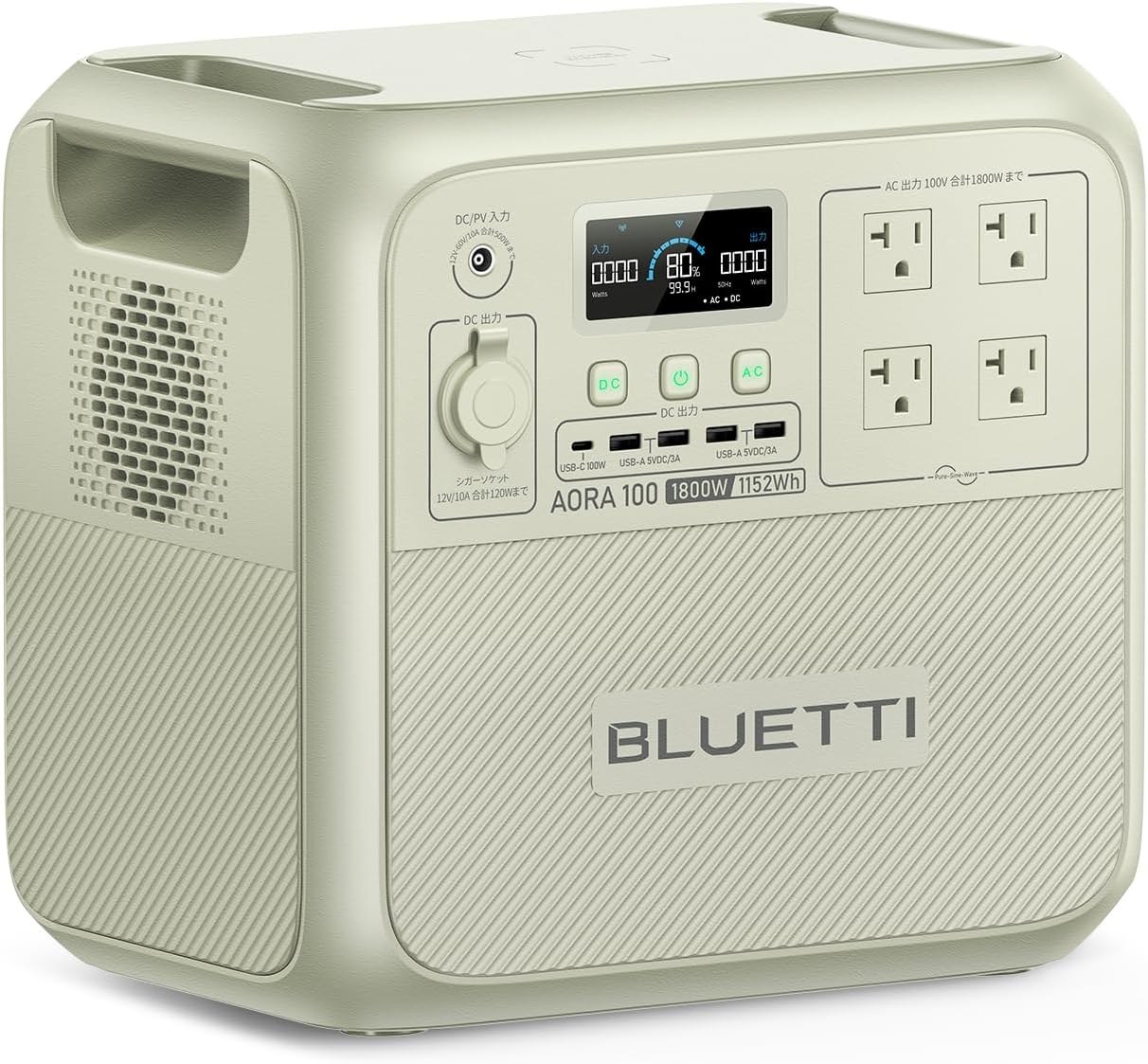
Image 1.1: The BLUETTI AORA 100 Portable Power Station, showcasing its compact design and multiple output ports.
2. Safety Instructions
Please read and understand all safety instructions before operating the BLUETTI AORA 100. Failure to follow these instructions may result in electric shock, fire, or serious injury.
- Do not disassemble, repair, or modify the unit.
- Keep the unit away from heat sources, direct sunlight, and flammable materials.
- Do not expose the unit to water or other liquids.
- Ensure proper ventilation during use and charging. Do not block ventilation openings.
- Use only BLUETTI-approved accessories and charging cables.
- Store the unit in a cool, dry place when not in use.
- The casing is made from UL94V-0 certified flame-retardant material for enhanced safety.
- The BLUETOPUS BMS (Battery Management System) monitors for overcharge and overheating in real-time.
3. Package Contents
Verify that all items are included in your package:
- BLUETTI AORA 100 Portable Power Station Unit
- AC Charging Cable
- MC4 Solar Charging Cable / Car Charging Cable
- User Manual (this document)
4. Product Overview
Familiarize yourself with the ports and controls of your AORA 100 unit.

Image 4.1: Front panel of the BLUETTI AORA 100, highlighting the 11 output ports and wireless charging pad.
4.1. Ports and Controls
- 15W Qi Wireless Charging Pad: Located on the top surface for compatible devices.
- AC Output Ports: 4 x 100V AC outlets (1800W total, 2700W Power Lift mode).
- USB-A Ports: 4 x USB-A ports (18W each).
- USB-C Port: 1 x USB-C port (PD3.0/100W).
- Cigarette Lighter Socket: 1 x 12V/10A (150W) cigarette lighter socket.
- DC/PV Input: For charging via AC adapter, solar panels, or car charger.
- LCD Screen: Displays power consumption, battery status, and other operational information.
5. Setup
Before first use, fully charge your BLUETTI AORA 100.
5.1. Initial Charging
- Connect the AC charging cable to the DC/PV input port on the AORA 100.
- Plug the other end of the AC charging cable into a standard wall outlet.
- The LCD screen will indicate charging status. The unit can charge to 80% in approximately 45 minutes using TurboBoost 1440W AC charging.
- Once fully charged, disconnect the cable.

Image 5.1: The BLUETTI AORA 100 connected to a wall outlet for rapid AC charging.
6. Operating Instructions
6.1. Powering On/Off
Press and hold the main power button to turn the unit on or off. The LCD screen will illuminate upon power-on.
6.2. Charging the AORA 100
The AORA 100 supports 7 charging methods:
- AC Wall Outlet: Use the provided AC charging cable. Supports TurboBoost 1440W for 80% charge in 45 minutes.
- Solar Panels: Connect compatible solar panels (up to 500W input) using the MC4 solar charging cable. MPPT technology ensures up to 97% charging efficiency even on cloudy days. Full charge in approximately 3.4 hours with 500W solar input.
- Car Charging: Connect to your vehicle's cigarette lighter socket using the car charging cable. A full charge can be achieved in 2.5 hours with BLUETTI Charger1 car charging (500W).
- Other methods may include generator, lead-acid battery, etc. Refer to the full manual for details.

Image 6.1: The BLUETTI AORA 100 being charged via a car's cigarette lighter socket, ideal for travel.
6.3. Discharging (Powering Devices)
Connect your devices to the appropriate output ports:
- AC Output: For household appliances (e.g., refrigerators, microwave ovens, rice cookers).
- USB-A/USB-C Output: For smartphones, tablets, laptops, and other USB-powered devices.
- Cigarette Lighter Socket: For 12V DC devices (e.g., car refrigerators).
- Wireless Charging: Place Qi-compatible devices on the charging pad.

Image 6.2: The BLUETTI AORA 100 powering a kettle and a refrigerator, demonstrating its high output capability.
6.4. UPS Functionality
The AORA 100 features an ultra-fast Uninterruptible Power Supply (UPS) function. In the event of a power outage, it detects the interruption in 0.02 seconds and automatically switches to battery power, protecting sensitive electronics like computers from data loss or damage.
6.5. Power Lift Mode (2700W)
The 1800W high output can be boosted to 2700W in Power Lift mode for resistive load appliances with heating elements that exceed 1800W. This allows for simultaneous use of multiple high-power devices, such as a toaster (1000W) and a hairdryer (1200W).
6.6. Pass-Through Charging
The AORA 100 supports pass-through charging, allowing you to power devices while the unit itself is being charged. This is particularly useful during extended power outages or at job sites.
6.7. App Control
Download the BLUETTI app to remotely control your AORA 100. The app allows you to:
- Turn output ports on/off.
- Monitor power consumption and usage data.
- Perform wireless firmware updates (OTA).
7. Maintenance
Proper maintenance ensures the longevity and optimal performance of your AORA 100.
- Cleaning: Use a dry, soft cloth to clean the unit. Do not use abrasive cleaners or solvents.
- Storage: If storing for an extended period, charge the unit to 50-80% every 3-6 months to maintain battery health. Store in a cool, dry environment.
- Battery Lifespan: The AORA 100 uses LiFePO4 batteries, offering over 3500 charge/discharge cycles and a 10-year lifespan.

Image 7.1: Internal structure of the BLUETTI AORA 100, highlighting the LiFePO4 battery cells and the advanced Battery Management System (BMS).
8. Troubleshooting
If you encounter issues with your AORA 100, refer to the following common problems and solutions:
| Problem | Possible Cause | Solution |
|---|---|---|
| Unit does not power on | Battery is depleted; Power button not pressed correctly | Charge the unit; Press and hold the power button for 3 seconds. |
| AC output not working | AC output is off; Overload protection activated | Ensure AC output is enabled; Reduce connected load; Restart unit. |
| Slow charging | Low input power; High ambient temperature | Ensure charger is fully connected; Use higher wattage input (e.g., TurboBoost AC); Move to a cooler environment. |
| App connection issues | Bluetooth/Wi-Fi off; App not updated | Ensure Bluetooth/Wi-Fi is enabled on your device and AORA 100; Update the app to the latest version. |
If the problem persists, please contact BLUETTI customer support.
9. Specifications
| Feature | Specification |
|---|---|
| Model | BLUETTI AORA 100 |
| Battery Capacity | 1152Wh |
| AC Output Power | 1800W (Rated), 2700W (Power Lift Mode) |
| Battery Type | LiFePO4 (Lithium Iron Phosphate) |
| Lifespan | Over 3500 cycles to 80% capacity, 10-year lifespan |
| UPS Switching Time | 0.02 seconds (20ms) |
| AC Input Power | Up to 1440W (TurboBoost) |
| Solar Input Power | Up to 500W |
| Wireless Charging | 15W Qi |
| Weight | 16.4 kg |
| Voltage | 100 Volts (AC) |
| Connector Types | USB Type A, USB Type C, AC, Cigarette Lighter |
| Safety Features | UL94V-0 flame-retardant casing, BLUETOPUS BMS (overcharge, overheat protection) |
| Recommended Uses | Camping, Household, Outdoor work, Commercial, Emergency |
10. Warranty and Support
BLUETTI offers an industry-leading 5-year warranty service for the AORA 100 Portable Power Station, demonstrating confidence in its quality and durability. This warranty covers manufacturing defects and ensures comprehensive after-sales support.
10.1. Customer Support
For technical assistance, warranty claims, or any inquiries, please contact BLUETTI customer support through the official website or your purchase platform. Please have your product model and purchase date available when contacting support.
For more information, visit the official BLUETTI Store on Amazon.


