
1. Introduction to WHOOP Peak 5.0
The WHOOP Peak 5.0 is an advanced health and fitness wearable designed to provide continuous monitoring of your body's key metrics. It offers personalized insights into your sleep, recovery, and daily strain, helping you optimize your performance and overall well-being. This device is intended for informational purposes to help you understand your physiological data and is not a medical device.

Figure 1: The WHOOP Peak 5.0 device.
2. Setup and Getting Started
2.1 Unboxing and Initial Charge
Your WHOOP Peak 5.0 package includes the WHOOP 5.0 device, a SuperKnit band, a Wireless PowerPack, and a charging cable. Before first use, ensure your device is fully charged using the provided Wireless PowerPack.

Figure 2: Items included with your WHOOP Peak 5.0 purchase.
2.2 App Download and Pairing
- Download the official WHOOP app from your smartphone's app store (iOS or Android).
- Create a new WHOOP account or log in with existing credentials.
- Follow the in-app instructions to pair your WHOOP 5.0 device via Bluetooth. Ensure Bluetooth is enabled on your smartphone.
- Wear the WHOOP device snugly on your wrist or other preferred location for accurate data collection.
3. Operating Instructions
3.1 Continuous Monitoring
The WHOOP Peak 5.0 continuously monitors your physiological data 24/7. This includes heart rate, heart rate variability (HRV), respiratory rate, skin temperature, and blood oxygen (SpO2). These metrics contribute to your daily recovery, strain, and sleep scores.
3.2 Health Monitor
The Health Monitor feature provides a comprehensive overview of your baseline vitals. It alerts you when any of your key metrics deviate from your established personal ranges, helping you identify potential health changes early.

Figure 3: Health Monitor displaying key vital signs.
3.3 Stress Monitor
The Stress Monitor tracks your stress levels in real-time, providing insights into how daily activities and events impact your physiological state. This feature helps you understand and respond to stressors more effectively.

Figure 4: Stress Monitor indicating current stress levels.
3.4 Sleep and Recovery Insights
WHOOP analyzes your sleep stages (REM, Deep, Light) and provides a daily Sleep Performance score. It also calculates a Recovery score based on your HRV, resting heart rate, and sleep, guiding you on when to train hard and when to prioritize rest.
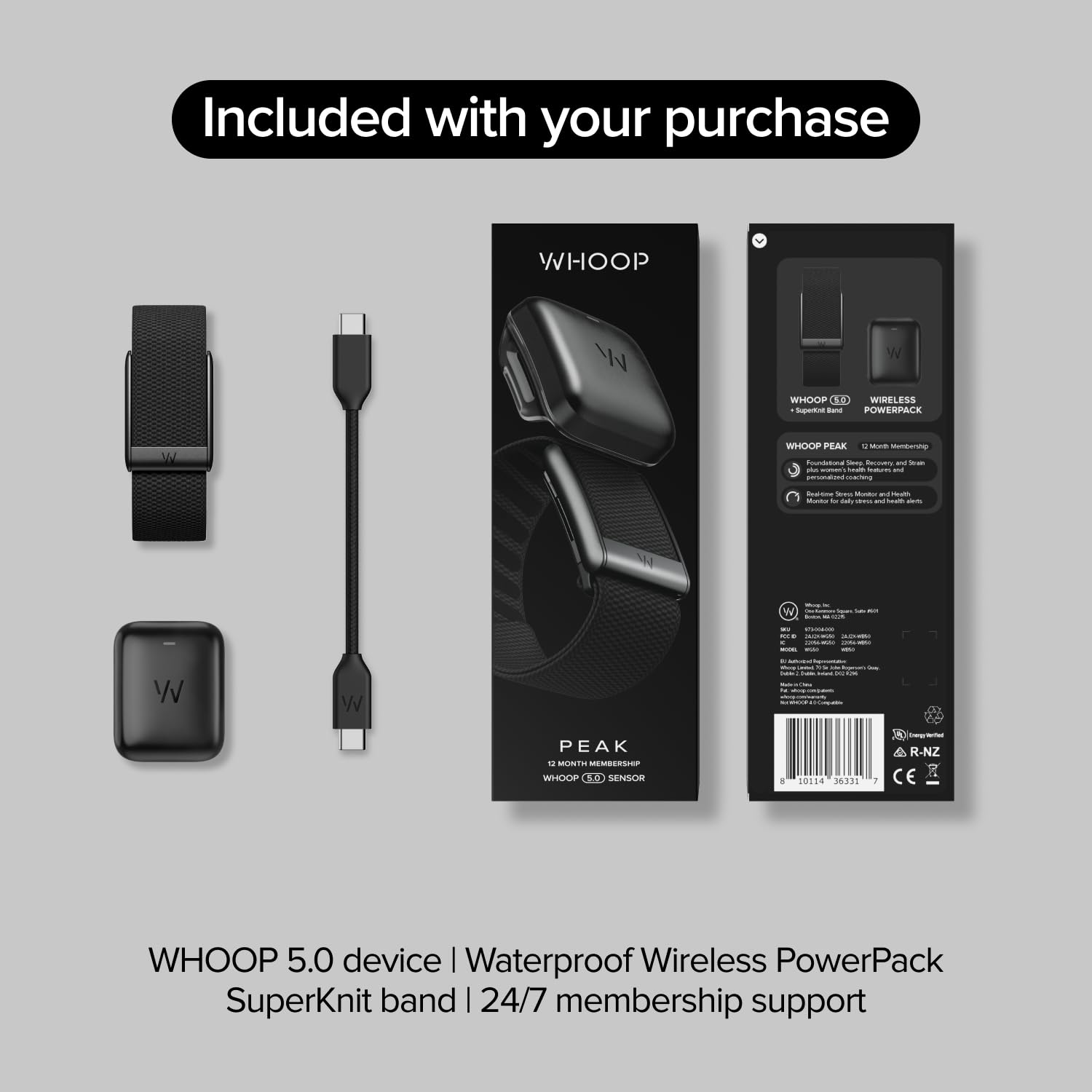
Figure 5: Sleep Performance tracking in the WHOOP app.

Figure 6: Recovery and Day Strain metrics.
3.5 Healthspan and Pace of Aging
This feature quantifies your physiological age and provides insights to help you slow your Pace of Aging, guiding you towards habits that support long-term health. Note: This feature is for wellness purposes only and not for medical use.

Figure 7: Healthspan metric in the WHOOP app.
3.6 Habit Tracking and Menstrual Cycle Insights
Log over 160 behaviors in the app to understand their impact on your recovery and performance. For female users, the device tracks your menstrual cycle and hormonal changes, offering personalized guidance for training, sleep, and nutrition throughout the month.

Figure 8: Habit tracking and its impact on your body.

Figure 9: Menstrual cycle tracking interface.
4. Key Features Overview
The WHOOP Peak 5.0 offers a robust set of features designed for comprehensive health and performance tracking. Below is a summary of its capabilities:
- Continuous Monitoring: 24/7 tracking of sleep, heart rate, blood oxygen, stress, and more.
- Health Monitor: Understand baseline vitals and receive alerts for deviations.
- Stress Monitor: Pinpoint and respond to stress in real-time.
- Personalized Coaching: Daily recommendations for sleep, strain, and recovery.
- Healthspan: Quantify physiological age and receive guidance to slow Pace of Aging.
- 14+ Days Battery Life: Extended battery life with wireless charging capability.
- Waterproof: Designed for continuous wear, including during water activities.
- SuperKnit Band: Comfortable and durable band with Fast Link slider for easy swapping.
4.1 Feature Comparison (Peak vs. Other Models)
The following table highlights the features included with the WHOOP Peak 5.0 compared to other WHOOP models:

Figure 10: Feature comparison across WHOOP models.
5. Maintenance
5.1 Charging Your Device
The WHOOP Peak 5.0 features a Wireless PowerPack that allows you to charge the device without removing it from your wrist. Simply slide the PowerPack onto the device. A full charge provides over 14 days of battery life. Ensure the PowerPack is charged using the provided USB-C cable.
5.2 Cleaning and Care
To maintain optimal performance and hygiene, regularly clean your WHOOP device and band. Wipe the sensor area with a soft, damp cloth. The SuperKnit band can be hand-washed with mild soap and water, then air-dried. Avoid harsh chemicals or abrasive materials.
5.3 Band Replacement
The WHOOP 5.0 device uses a Fast Link slider mechanism, allowing for easy swapping of SuperKnit bands. To replace, slide the existing band off and slide a new compatible band into place until it clicks securely.
Figure 11: WHOOP 5.0 device with Fast Link slider for band changes.
6. Troubleshooting
If you encounter issues with your WHOOP Peak 5.0, refer to the following common troubleshooting steps:
- Device Not Syncing: Ensure Bluetooth is enabled on your phone and the WHOOP app is open. Try restarting both your phone and the WHOOP device. Check if the device battery is charged.
- Inaccurate Readings: Ensure the device is worn snugly on your wrist or chosen body location. Avoid excessive movement during passive data collection. Clean the sensor area to remove any debris.
- Battery Not Charging: Verify the Wireless PowerPack is correctly attached to the device and the PowerPack itself is charged. Try a different USB-C cable or power adapter.
- App Issues: Ensure your WHOOP app is updated to the latest version. Clear the app cache or reinstall the app if problems persist.
For persistent issues, please contact WHOOP customer support.
7. Specifications
| Feature | Detail |
|---|---|
| Brand | WHOOP |
| Model Number | 973-004-000 |
| Material | Nylon |
| Color | Black |
| Item Weight | 113 g |
| Battery Life | 14+ Days |
| Sensor Type | Optical, PPG |
| Water Resistance | IP68 (up to 10 meters for 2 hours) |
| Compatible Devices | Smartphones, Tablets |
8. Warranty and Support
Your WHOOP Peak 5.0 purchase includes a 12-month WHOOP membership, which provides access to all app features and continuous support. For any product-related inquiries, technical assistance, or warranty claims, please visit the official WHOOP support website or contact their customer service directly.
8.1 Legal Disclaimers
- WHOOP is not a medical device and should not be used to diagnose, cure, mitigate, manage, treat, or prevent any condition or disease. WHOOP should not be used in place of a medical device. WHOOP does not provide medical advice and is not a substitute for advice from your doctor or other medical professionals. If you have any health-related questions, please see your healthcare provider. You should never disregard medical advice or delay in seeking medical advice because of information from WHOOP. All content is for general informational purposes.
- Blood Pressure Insights: Blood Pressure Insights is not a medical device and cannot diagnose or manage medical conditions. It does not provide medical advice. Always consult your doctor for health concerns and never delay or modify medical care based on its information.
- ECG: This feature is not intended for users with known arrhythmias other than AFib or users under 22 years old. It is not recommended for users with a cardiac pacemaker, ICDs or other implanted electronic devices. This is a medically regulated feature and is not currently available in every region. Find out if it's supported in your region here.
- Healthspan: This feature is not available for users under the age of 18. This feature is for wellness purposes only and not for medical use.
- Waterproof: IP68 water-resistant up to 10 meters for 2 hours.
