
Introduction
The INXING JP 6Pin Electric Scooter Throttle with LCD Instrument is designed for electric scooters utilizing the JP controller system. This manual provides essential information for the proper installation, operation, and maintenance of your throttle unit. It is crucial to read and understand these instructions before attempting any installation or use.
Package Contents
Verify that all items listed below are present in your package:
- 1 x JP 6Pin Electric Scooter Throttle (with waterproof cable)
- 1 x Extension Cable

Image: Overview of the INXING JP 6Pin Electric Scooter Throttle and its included extension cable.
Setup and Installation
This throttle is designed for specific compatibility. Ensure your scooter's controller is a JP brand controller and uses a 6-pin connection. The unit supports 52V and 60V electric scooter systems.
- Compatibility Check: Before installation, confirm that your electric scooter's controller is a JP brand and utilizes a 6-pin communication protocol. This throttle is exclusively compatible with JP scooter controllers.
- Mounting the Throttle: Securely attach the throttle unit to your scooter's handlebar. Ensure it is positioned for comfortable and safe operation.
- Connecting the Main Cable: Connect the 6-pin waterproof plug from the throttle to the corresponding port on your scooter's controller. Ensure the connection is firm and secure to maintain waterproof integrity.
- Using the Extension Cable: If the main cable length is insufficient, use the provided extension cable to bridge the connection between the throttle and the controller.
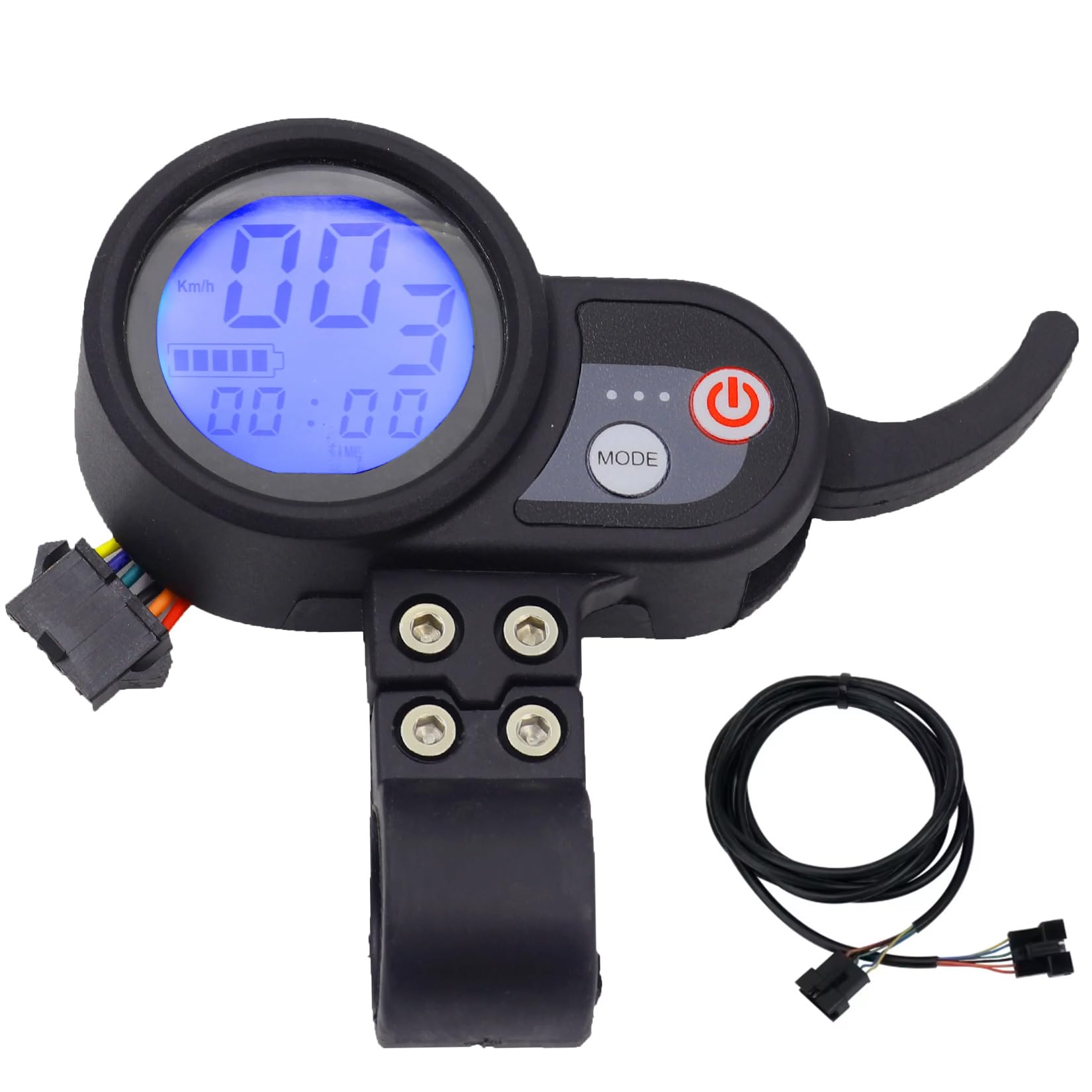
Image: Internal view of the throttle showing the 6-color wire connection and charger port. This illustrates the wiring configuration.

Image: Detailed view of the 6-pin wire terminals, highlighting the individual color-coded wires for connection.

Image: The provided extension cable, used to extend the reach of the throttle's connection to the controller.
Operating Instructions
The LCD instrument provides essential information and controls for your electric scooter.
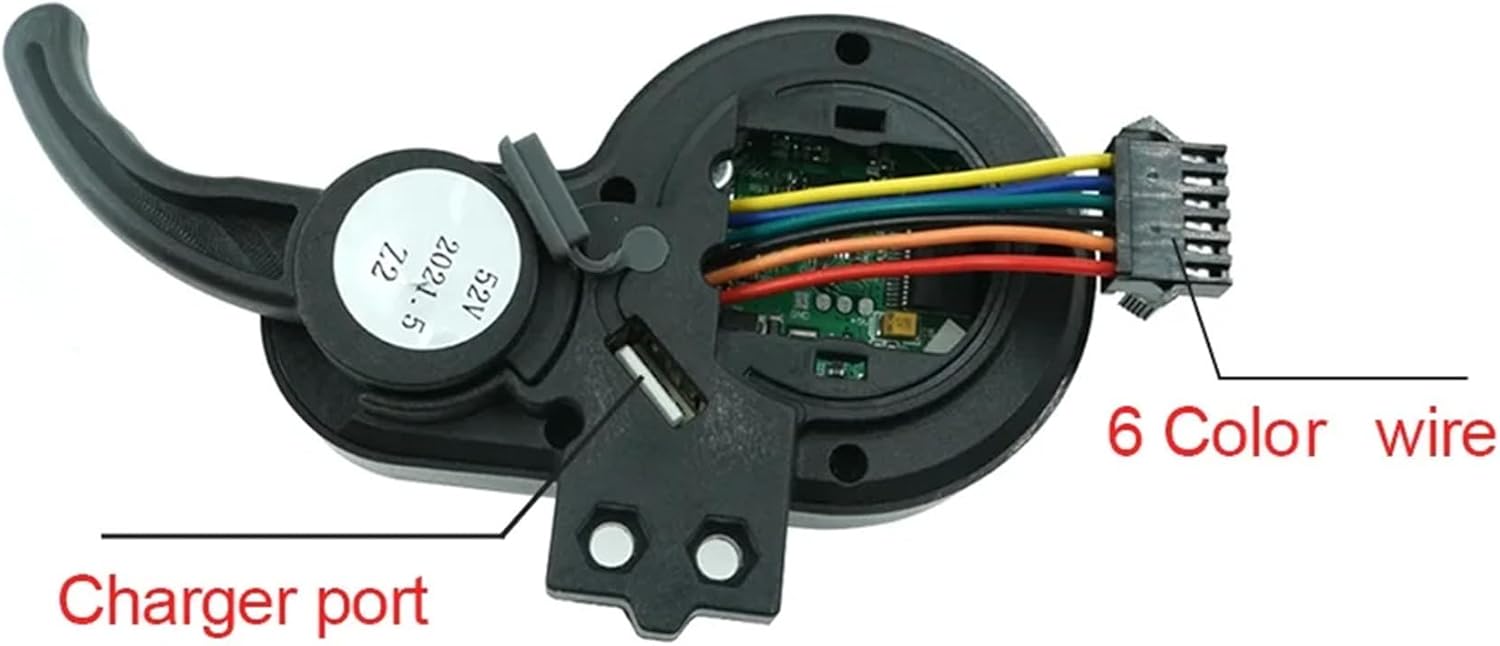
Image: Front view of the throttle unit, showing the LCD display, power button, and mode button.
- Power On/Off: Press and hold the power button (red button with power symbol) to turn the LCD display and scooter system on or off.
- Mode Button: Press the 'MODE' button to cycle through different display modes, which may include speed, distance, battery level, and other parameters.
- Throttle Control: The lever on the right side acts as the accelerator. Gently press it down to increase speed. Release it to decelerate.
- USB Charging Port: A discreet USB port on the back of the LCD display allows for convenient charging of small electronic devices while riding.
- P-Settings: This throttle uses JP's proprietary communication protocol. Accessing and adjusting 'P-Settings' (programmable settings) will depend on your specific JP controller model. Refer to your scooter's main controller manual for detailed instructions on P-settings.
Maintenance
Proper maintenance ensures the longevity and optimal performance of your electric scooter throttle.
- Cleaning: Wipe the display and throttle body with a soft, damp cloth. Avoid using abrasive cleaners or solvents that could damage the ABS material or LCD screen.
- Waterproof Integrity: The unit is designed with waterproof performance. However, avoid submerging the throttle in water or exposing it to high-pressure water jets. Ensure all connections remain secure to maintain waterproofing.
- Cable Inspection: Periodically check the cables and connectors for any signs of wear, fraying, or damage. Replace any damaged components immediately to prevent electrical issues.
- Storage: When not in use for extended periods, store the scooter and throttle in a dry, cool place away from direct sunlight and extreme temperatures.
Troubleshooting
If you encounter issues with your INXING JP 6Pin Electric Scooter Throttle, refer to the following common problems and solutions:
- Display Not Turning On:
- Ensure the throttle is correctly connected to the scooter's controller.
- Check the scooter's main power supply and battery charge.
- Verify that the 6-pin connector is fully seated and not damaged.
- Throttle Not Responding:
- Confirm that the scooter is powered on and the display is active.
- Check for any loose connections between the throttle and the controller.
- Ensure the throttle lever moves freely without obstruction.
- Incorrect Voltage Display:
- This throttle is designed for 52V/60V systems. If your scooter is a different voltage (e.g., 48V), it may not display correctly or function optimally. Verify your scooter's voltage compatibility before use.
- Incompatibility Issues:
- This throttle is strictly compatible with JP brand scooter controllers using a 6-pin protocol. If your scooter uses a different brand controller or a different pin configuration, it will not function.
Specifications
| Model Name | TF-100 Electric Scooter Throttle |
| Brand | INXING |
| Compatibility | JP 6Pin Electric Scooter Controllers (52V/60V) |
| Material | ABS Plastic |
| Color | Black |
| Item Dimensions (LxWxH) | 5.1 x 4.7 x 1.59 inches |
| Item Package Dimensions (LxWxH) | 5.1 x 4.7 x 1.99 inches |
| Package Weight | 14.56 ounces |

Image: Rear view of the throttle unit, indicating its voltage compatibility (e.g., 60V).
Warranty Information
The manufacturer states that there is no warranty provided with this product. Please refer to the seller's return policy for any issues upon receipt.
Support
For further assistance or inquiries regarding the INXING JP 6Pin Electric Scooter Throttle, please contact the seller or the manufacturer directly through their official support channels. Ensure you have your product model number (TF-100) and purchase details available when seeking support.
