
1. Product Overview
This manual provides detailed instructions for the assembly, operation, and maintenance of your BORNOON Vanity Desk. This vanity desk features a large LED mirror with adjustable lighting, RGB glass cabinets, multiple storage drawers, and integrated power outlets with USB ports. Please read this manual thoroughly before assembly and use to ensure proper function and longevity of your product.

Figure 1: Overview of the BORNOON Vanity Desk (Pink model).
2. Safety Information
- Keep all small parts and packaging materials away from children.
- Ensure all connections are secure before use.
- Do not overload drawers or shelves.
- Use only in dry indoor environments.
- Avoid direct exposure to sunlight or extreme temperatures.
3. Package Contents
Before beginning assembly, verify that all components listed below are present and undamaged. If any parts are missing or damaged, please contact customer support.
- Vanity Desk Panels (various sizes)
- LED Mirror Assembly
- Glass Cabinet Doors and Shelves
- Drawers and Drawer Slides
- Hardware Kit (screws, dowels, cam locks, handles, etc.)
- Power Strip with AC Outlets and USB Ports
- Instruction Manual
4. Setup and Assembly
Assembly is required for this product. It is recommended to have two people for assembly. Please follow the step-by-step instructions provided in the separate assembly guide included with your package. Ensure you have a clear, spacious area for assembly.
4.1 Tools Required (Not Included)
- Phillips Head Screwdriver
- Hammer (optional, for dowels)
4.2 Assembly Tips
- Identify all parts before starting.
- Do not overtighten screws.
- Refer to the detailed diagrams in the assembly guide for each step.
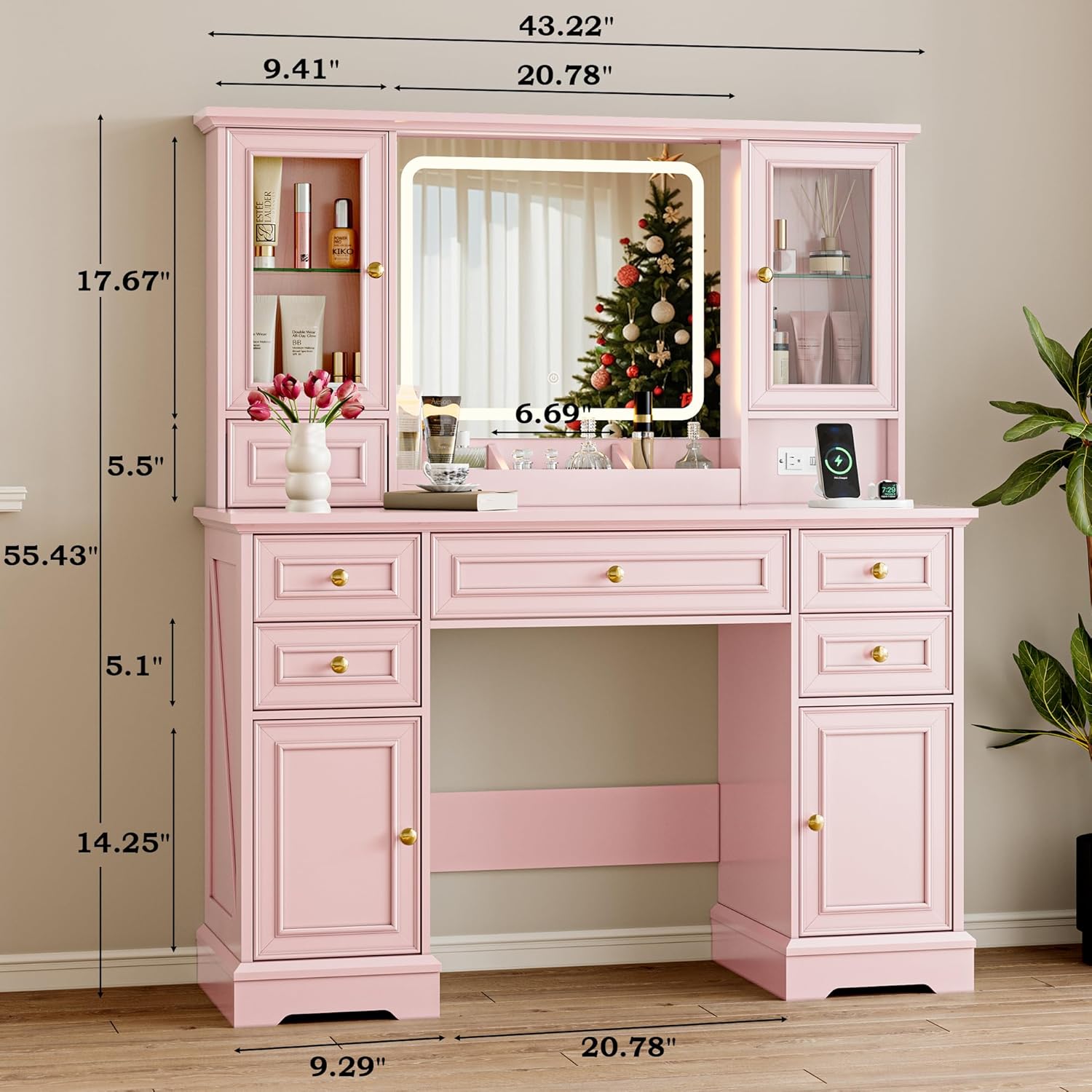
Figure 2: Product dimensions for planning placement and assembly.

Figure 3: Illustrates the various storage compartments and drawers of the vanity desk.
5. Operating Instructions
5.1 LED Mirror Operation
The integrated LED mirror offers three color modes and adjustable brightness.
- Power On/Off: Touch the power button icon on the mirror surface to turn the LED lights on or off.
- Change Color Mode: Briefly touch the power button icon to cycle through the three color temperatures:
- 3000K (Yellow White)
- 4500K (Warm White)
- 6000K (Cold White)
- Adjust Brightness: Long press the power button icon to adjust the brightness level from 0% to 100%. Release when the desired brightness is achieved.
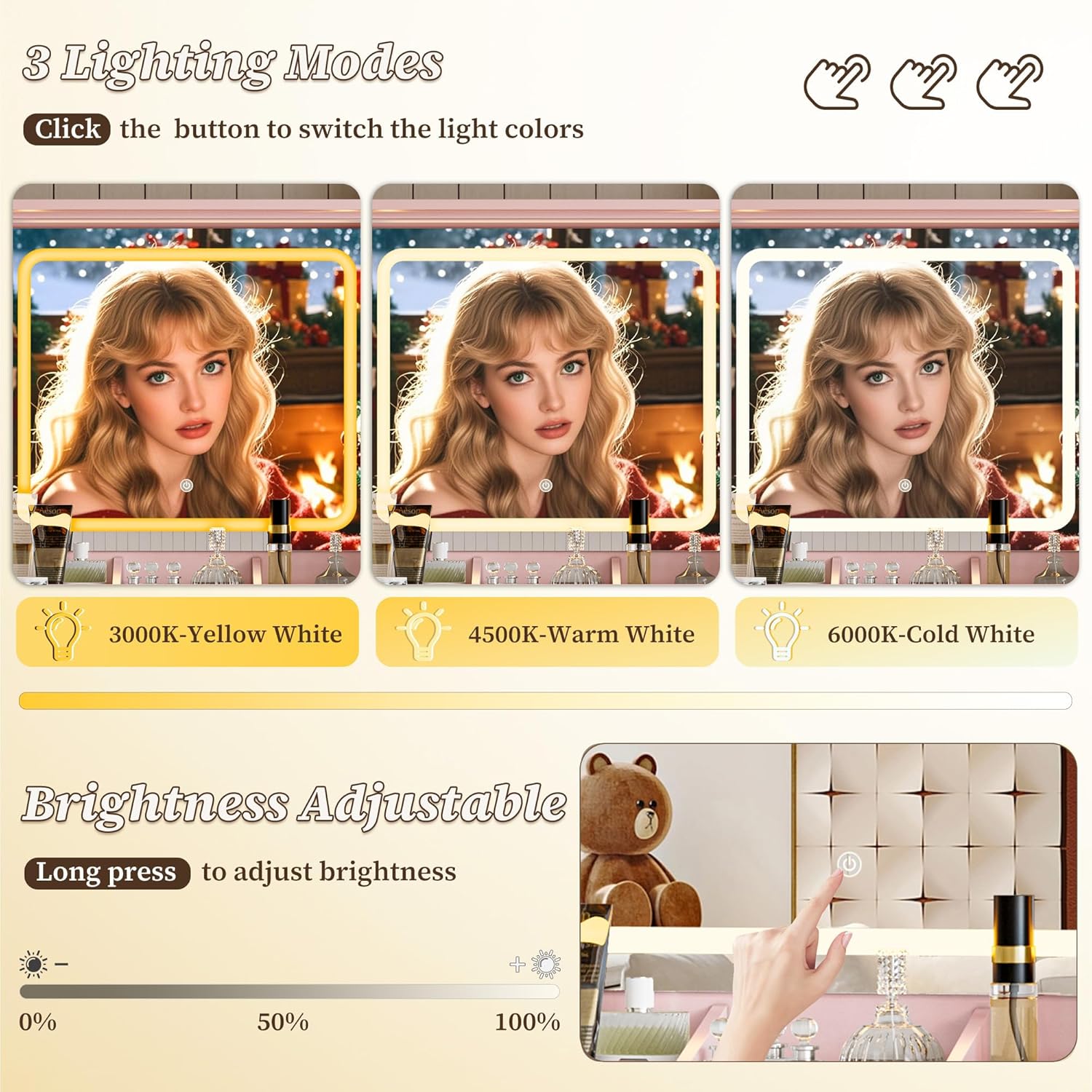
Figure 4: Controls for the LED mirror, showing the three color modes and brightness adjustment.
5.2 RGB Glass Cabinet Lighting
The glass cabinets feature RGB ambient lighting, allowing for customizable color options.
- Refer to the separate RGB lighting controller instructions (if included) for detailed operation of color selection and effects.
- Typically, a remote control or an app (if smart-enabled) is used to select from over 60,000 color options.
5.3 Power Outlet and USB Ports
The vanity desk includes a built-in power strip for convenient charging and powering of devices.
- AC Outlets: Two 125V/12A AC outlets (1500W MAX) are provided for beauty tools like hair dryers or curling irons.
- USB Ports: Two 5V/2A MAX USB ports are available for charging smartphones, tablets, or other USB-powered devices.
- Ensure the vanity desk is plugged into a wall outlet for these features to function.

Figure 5: Close-up of the integrated power strip, showing AC outlets and USB ports.
6. Maintenance and Care
6.1 Cleaning
- Surface: Wipe the desk surface with a soft, damp cloth. Avoid abrasive cleaners or harsh chemicals that may damage the finish.
- Mirror: Clean the LED mirror with a glass cleaner and a lint-free cloth. Do not spray cleaner directly onto the mirror; apply to the cloth first.
- Glass Cabinets: Use a glass cleaner for the cabinet doors and shelves.
6.2 General Care
- Periodically check all screws and connections to ensure they remain tight.
- Avoid placing hot items directly on the surface without protection.
- Protect from prolonged exposure to direct sunlight to prevent fading.
7. Troubleshooting
| Problem | Possible Cause | Solution |
|---|---|---|
| LED Mirror lights not turning on. | Power cable not connected; power strip not plugged in; faulty connection. | Ensure the vanity desk is plugged into a working wall outlet. Check all internal connections to the mirror. |
| Power outlets/USB ports not working. | Vanity desk not plugged in; power strip switch off (if applicable); overloaded circuit. | Verify the main power cord is securely plugged into a functional wall outlet. Check for any reset buttons on the power strip. Do not exceed 1500W total load. |
| Drawers are stiff or not closing smoothly. | Improper assembly of drawer slides; obstruction in the drawer. | Recheck drawer slide installation according to the assembly guide. Remove any obstructions. |
| RGB cabinet lights not changing color. | Controller battery low; incorrect remote pairing; faulty connection. | Replace controller battery. Refer to RGB controller manual for pairing instructions. Check power connection to RGB lights. |
8. Product Specifications
| Feature | Detail |
|---|---|
| Brand | BORNOON |
| Model Number | BRN-060 |
| Product Dimensions | 15.75"D x 43.22"W x 55.43"H |
| Item Weight | 100.5 pounds |
| Material | Engineered Wood |
| Furniture Finish | Glossy |
| LED Mirror | 3 Color Modes (3000K, 4500K, 6000K), Adjustable Brightness |
| RGB Cabinets | Yes, with ambient lighting (60,000+ color options) |
| Power Outlets | 2 x 125V/12A AC Outlets (1500W MAX) |
| USB Ports | 2 x 5V/2A MAX USB Ports |
| Storage | 6 Drawers, 2 Glass Cabinets, 3 Makeup Trays |
| Assembly Required | Yes |
9. Warranty and Support
BORNOON offers a free replacement service for any lost or damaged parts, whether due to installation, use, or transportation.
For further assistance, missing parts, or warranty claims, please contact BORNOON customer support through the retailer where the product was purchased or visit the official BORNOON website for contact information.
Manufacturer: BORNOON
ASIN: B0DY1HSGN3