
Polibi B0DY1HGYWP
Polibi Twin XL Size Horizontal Murphy Bed User Manual
Model: B0DY1HGYWP
Introduction
Thank you for choosing the Polibi Twin XL Size Horizontal Murphy Bed. This manual provides essential information for the safe and efficient assembly, operation, and maintenance of your new furniture. Please read all instructions carefully before beginning assembly or use.
Safety Information
- Ensure all parts are present and undamaged before assembly.
- Follow assembly instructions precisely to ensure structural integrity.
- Do not exceed the maximum weight capacity of 500 lbs.
- Keep children and pets away from the bed during operation to prevent injury.
- Only use the bed with a mattress of appropriate size and weight.
- Do not attempt to modify the bed's structure or mechanisms.
Setup and Assembly
The Polibi Murphy Bed is designed for straightforward assembly. It is recommended that two adults perform the assembly. All necessary parts and a step-by-step installation manual are included in your package. Pre-drilled holes simplify the process.
Before You Begin
- Unpack all components and verify against the parts list provided in the separate assembly manual.
- Clear a spacious area for assembly, ensuring enough room to maneuver large components.
- Gather necessary tools (e.g., screwdriver, hammer) if not provided.
Assembly Steps (Refer to separate Assembly Manual for detailed diagrams)
- Assemble the main cabinet frame according to the provided diagrams.
- Attach the bed frame components, ensuring all connections are secure.
- Install the lifting mechanism and ensure it operates smoothly.
- Mount the desk and shelving unit.
- Connect the LED light and USB charging module wiring.
- Securely anchor the unit to a wall stud as per instructions to prevent tipping. This is a critical safety step.

Figure 1: Internal mechanism of the Murphy bed, showing the lifting components and bed slats. This image illustrates the robust construction designed for smooth operation.
Operating Instructions
Transforming from Desk to Bed Mode
The unique design allows for effortless transformation. To convert the unit from desk mode to bed mode:
- Ensure the desk surface is clear of items that could obstruct the bed's descent.
- Gently pull the bed frame downwards from the top edge. The mechanism will assist in lowering the bed smoothly.
- Once fully extended, ensure the support legs are securely locked into place.
To convert from bed mode back to desk mode:
- Remove any bedding or pillows that might interfere with the closing mechanism.
- Fold the support legs inwards.
- Gently lift the bed frame upwards until it locks securely into the upright cabinet position.
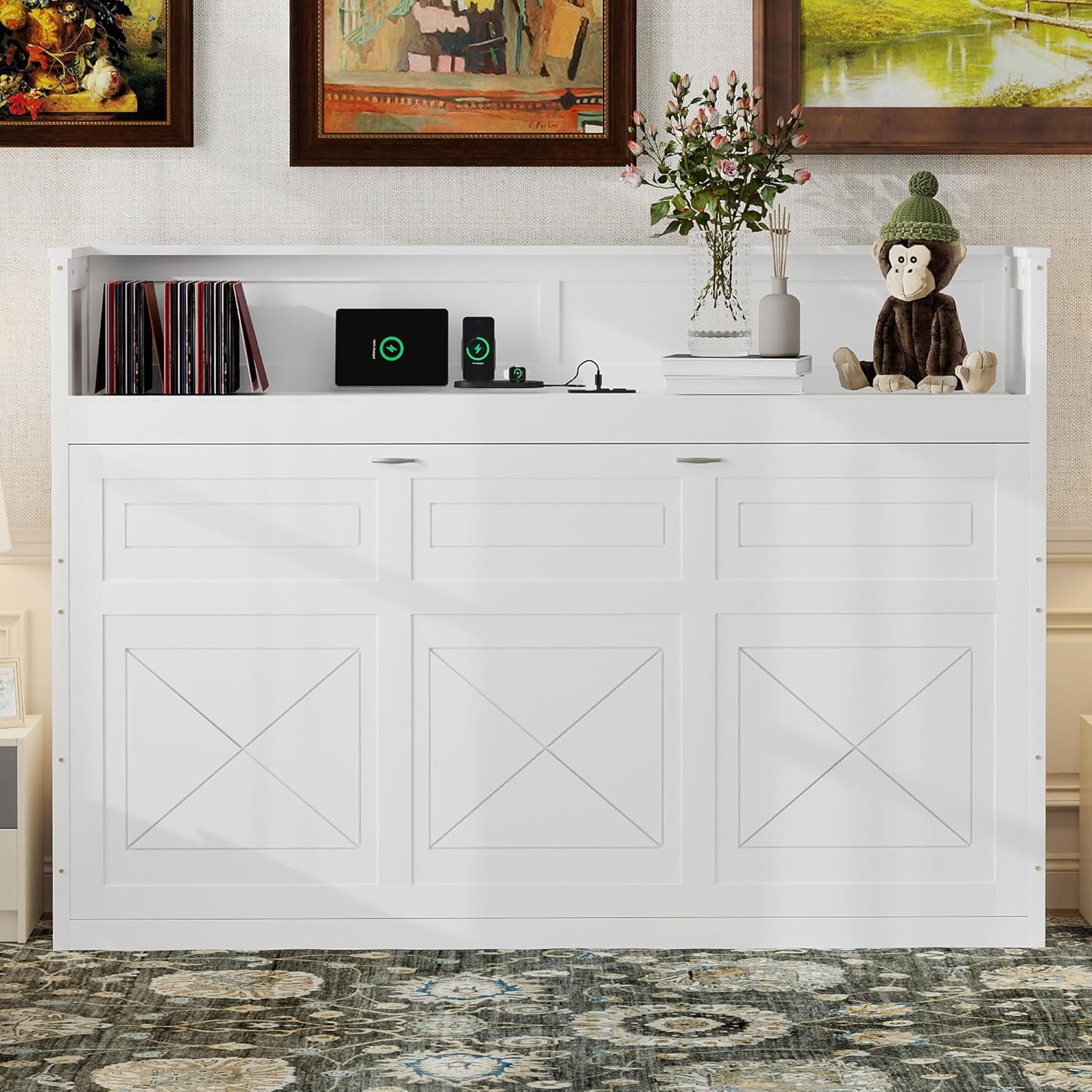
Figure 2: The Murphy bed in its closed position, functioning as a desk and shelving unit. This configuration maximizes space when the bed is not in use.
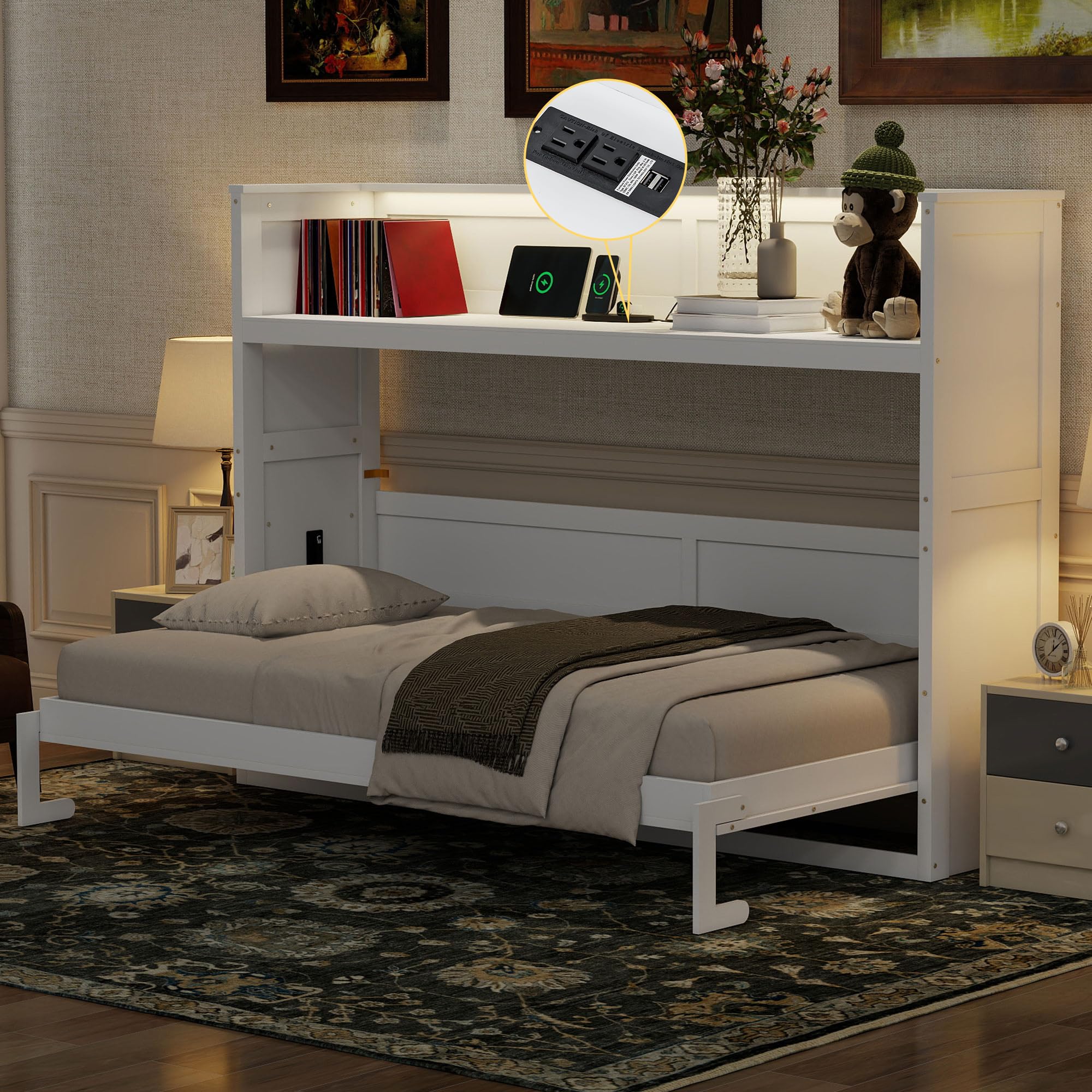
Figure 3: The Murphy bed in its open position, ready for use as a bed. The desk surface remains horizontal, allowing items to stay in place.
Using the LED Light
The integrated LED light offers three color options: yellow, white, and light blue. A control switch, typically located on the shelving unit, allows you to cycle through the colors and turn the light on/off.

Figure 4: Demonstration of the LED light feature, showing the light in both on and off states. The light strip is integrated into the shelving above the bed.
Utilizing the Dual Power/USB Module
The bed includes a convenient dual power outlet and USB charging module. This allows you to power or charge electronic devices directly from the unit. Simply plug your devices into the available outlets or USB ports.
- Ensure the bed is connected to a power source for the module to function.
- Do not overload the outlets; refer to the module's specifications for maximum wattage.

Figure 5: A detailed view of the dual power and USB charging module integrated into the Murphy bed's design. This provides convenient access to power for electronic devices.
Maintenance
Regular maintenance will help prolong the life and functionality of your Polibi Murphy Bed.
- Cleaning: Wipe surfaces with a soft, damp cloth. Avoid harsh chemicals or abrasive cleaners that could damage the finish.
- Mechanism Check: Periodically inspect the lifting mechanism and all fasteners to ensure they are tight and operating smoothly. Tighten any loose screws.
- Mattress Storage: The built-in storage space accommodates both the bed and mattress, keeping your room tidy. Ensure the mattress fits properly within the designated area.
- Weight Capacity: Adhere strictly to the 500 lbs weight capacity to prevent damage to the bed frame and mechanism.

Figure 6: Illustration highlighting the bed's stable structure and the integrated mattress storage feature. The image shows a weight indicator of 500 lbs, emphasizing the bed's capacity.
Troubleshooting
If you encounter any issues with your Polibi Murphy Bed, refer to the following common problems and solutions:
| Problem | Possible Cause | Solution |
|---|---|---|
| Bed does not lower/raise smoothly. | Obstruction, loose fasteners, or mechanism issue. | Check for obstructions. Ensure all assembly fasteners are tight. If the issue persists, contact customer support. |
| LED light not working. | Not plugged in, loose connection, or faulty bulb/strip. | Verify the power cord is securely plugged into an outlet. Check all wiring connections. If the light still doesn't work, contact customer support. |
| USB/Power outlets not functioning. | Not plugged in, circuit breaker tripped, or module issue. | Ensure the bed is plugged into a live power outlet. Check your home's circuit breaker. If the problem continues, contact customer support. |
| Bed feels unstable or squeaks. | Loose fasteners, uneven floor, or improper wall anchoring. | Tighten all assembly screws. Ensure the unit is anchored to a wall stud. Check if the floor is level; use shims if necessary. |
Specifications
| Feature | Detail |
|---|---|
| Model | B0DY1HGYWP |
| Brand | Polibi |
| Size | Twin XL Size |
| Color | White |
| Product Dimensions (L x W x H) | 88.2"L x 19.1"W x 57.4"H (Closed) |
| Special Features | Integrated Desk, LED Light (3 colors: yellow, white, light blue), Dual Power/USB Charging Station |
| Weight Capacity | 500 lbs |
| Material | Solid Pine Wood Frame, Commercial Grade MDF Board |
| Included Components | Bed Frame, Desk, LED Light, USB Charging Station |

Figure 7: Detailed dimensional diagram of the Murphy bed in both open and closed configurations, showing key measurements in inches.
Warranty and Support
For any questions, concerns, or assistance with your Polibi Murphy Bed, please contact Polibi customer support. Refer to your purchase documentation for specific warranty details.
Manufacturer: Polibi
Contact Information: Please refer to the contact details provided with your product packaging or visit the official Polibi website for support.
Protection Plans: Extended protection plans may be available for purchase. Please check with your retailer for options such as 2-Year or 3-Year Protection Plans.
Ask a question about this manual
Ask about setup, troubleshooting, compatibility, parts, safety, or missing instructions. Manuals+ will review the question and use this page’s manual context to help answer it.