
1. Package Contents
Your VIRAN Military Smart Watch C21Pro package includes the following items:
- Smart Watch
- Watch Bands (Orange and Black)
- Charging Cable
- User Manual
For a visual guide to unboxing, please refer to the video below:
Video: Unboxing the VIRAN Military Smart Watch. This video demonstrates the contents of the product packaging, including the watch, bands, charging cable, and user manual.
Video: Smartwatch Unboxing Video 1846. This video provides another perspective on the unboxing experience, showcasing the watch and its accessories.
2. Setup and Initial Use
2.1 Charging the Watch
Before first use, please ensure the watch is fully charged. Connect the magnetic charging cable to the charging points on the back of the watch and plug the USB end into a compatible power adapter or computer. A full charge typically takes approximately 2 hours.

Image: The VIRAN Military Smart Watch C21Pro connected to its magnetic charging cable, illustrating the charging process and battery life indicators.
2.2 App Installation and Pairing
To unlock the full potential of your smartwatch, install the companion app on your smartphone. The VIRAN Military Smart Watch C21Pro is compatible with Android 6.0/iOS 9.0 and above.
- Download the App: Scan the QR code in the user manual or visit http://plus.crrepa.com/app-download/dafit to download the 'Da Fit' app.
- Enable Bluetooth: Ensure Bluetooth is enabled on your smartphone.
- Pair the Devices: Open the 'Da Fit' app, navigate to 'Device', and select 'Add Device'. Find 'W101' (or similar model name) in the list and connect.
- Enable Call Function: Go to your phone's Bluetooth settings, find 'W101' (or similar model name), and click to connect for the call function.

Image: A step-by-step visual guide on how to connect the VIRAN W101 smartwatch to a smartphone and enable its call function using the Da Fit app.
3. Operating Instructions
3.1 Basic Navigation
The watch features a 1.39” HD AMOLED touch screen with a 360*360 resolution. Swipe left, right, up, or down to navigate through menus and features. Use the physical buttons on the side for quick access to specific functions or to go back.
3.2 Customizable Watch Faces
Choose from numerous well-crafted watch styles with informative displays. You can change watch faces directly on the watch by long-pressing the screen or through the 'Da Fit' app for more options.

Image: The VIRAN W101 smartwatch showcasing a selection of its rich watch faces, offering diverse styles and information displays.
3.3 Bluetooth Calling and AI Voice Assistant
With Bluetooth 5.2, you can answer or dial calls directly from your wrist. The built-in AI Voice assistant allows you to manage tasks, make inquiries, and navigate your day using just your voice.

Image: The VIRAN Military Smart Watch C21Pro displaying message reminders from various apps and demonstrating the AI Voice Assistant feature for setting alarms or asking questions.

Image: A user making a call via the VIRAN W101 smartwatch, showing calling, incoming call, dial pad, and recent call screens.

Image: A user interacting with the AI Voice Assistant on the VIRAN W101 smartwatch, setting an alarm and asking about the weather.
3.4 Message Notifications
Receive call and message notifications directly on your wrist, ensuring you stay connected without needing to check your phone constantly.
3.5 Flashlight Function
The watch includes a convenient flashlight function, accessible through the watch interface.
4. Health Monitoring
The VIRAN Military Smart Watch C21Pro offers 24/7 health monitoring features to help you stay proactive about your wellness. Note: The measurement data is for reference only and should not be used as a medical device.
- Heart Rate Monitoring: Continuous tracking of your heart rate.
- Blood Pressure Monitoring: Real-time monitoring of your blood pressure.
- Blood Oxygen Monitoring: Measure your blood oxygen levels.
- Sleep Monitoring: Tracks and analyzes your sleep patterns, including awake, light, and REM sleep stages.

Image: The VIRAN Military Smart Watch C21Pro showing various health metrics including heart rate, blood pressure, SpO2 (blood oxygen), and sleep data.

Image: An overview of the VIRAN W101 smartwatch's all-round health management features, including heart rate, blood pressure, SpO2, and sleep tracking, displayed alongside hikers in a natural setting.

Image: The VIRAN W101 smartwatch displaying its heart rate monitor, showing a graph of heart rate measurements over time.

Image: The VIRAN W101 smartwatch displaying its blood pressure monitor, showing a bar graph of blood pressure readings over several days.

Image: The VIRAN W101 smartwatch displaying its blood oxygen monitor, showing a bar graph of SpO2 readings over several days.

Image: The VIRAN W101 smartwatch displaying a detailed sleep quality analysis, including sleep ratio, total sleep time, and sleep score.
5. Fitness Tracking
The smartwatch is your personal coach, offering an expansive selection of over 100 sport modes to track your activities and fitness goals effectively.
- 100+ Sport Modes: Includes walking, running, mountaineering, cycling, basketball, and many more.
- Activity Tracking: Monitors steps, distance, calories burned, and heart rate during workouts.
- GPS via Smartphone: Utilizes your smartphone's GPS for accurate route tracking during outdoor activities.
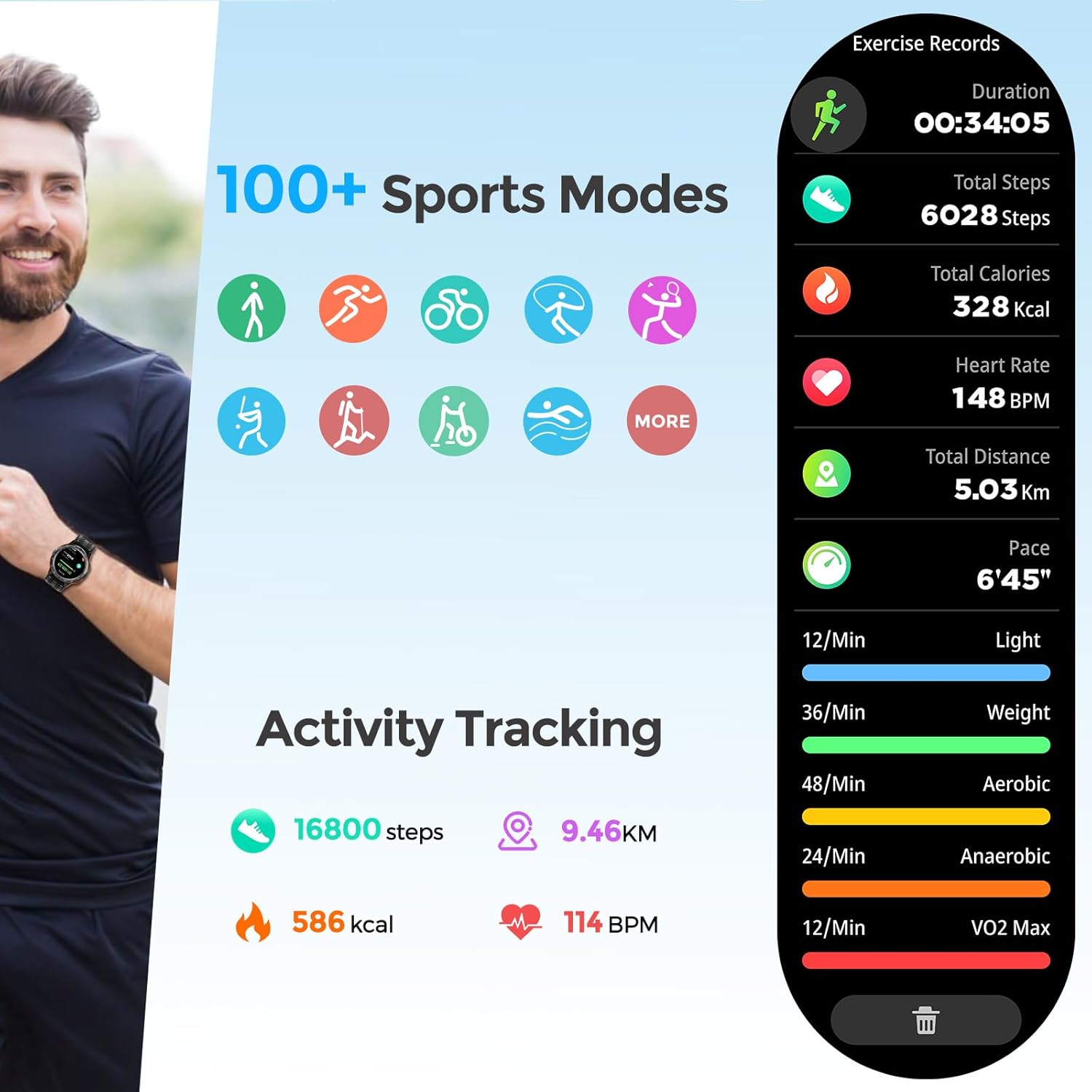
Image: The VIRAN Military Smart Watch C21Pro showcasing its 100+ sport modes and detailed activity tracking data, including duration, steps, calories, heart rate, distance, and pace.

Image: The VIRAN W101 smartwatch displaying all-day activity tracking, including steps, distance, heart rate, and calories, with a background of hikers.

Image: The VIRAN W101 smartwatch highlighting its 100+ sport modes fitness tracker, showing various sport icons and users engaged in different physical activities.
6. Maintenance and Durability
The VIRAN Military Smart Watch C21Pro is built with military-grade toughness to withstand challenging environments.
- 5ATM IP68 Waterproof: Withstands water submersion up to 50 meters. Suitable for swimming and water sports (immersion in seawater is not recommended).
- Rugged Construction: Shockproof, dustproof, high-temperature resistant, and anti-cold/anti-freeze (-40°C low temp). MIL-STD certified for military-grade toughness.
- Scratch-Resistant Glass: The 1.39” HD display is protected by scratch-resistant glass.

Image: The VIRAN Military Smart Watch C21Pro showcasing its IP68/5ATM waterproof rating and rugged features, including 10M waterproof, anti-scratch, anti-drop, high-temp resistance, and anti-cold capabilities.

Image: The VIRAN W101 smartwatch highlighting its rugged features, including IP68 waterproof, IP69K dustproof, 1.5M drop proof, and resistance to extreme temperatures (-40°C to 70°C).
6.1 Cleaning
To maintain the watch's appearance and functionality, regularly wipe the screen and strap with a soft, damp cloth. Avoid using harsh chemicals or abrasive materials.
7. Specifications
| Item Model Number | C21Pro |
| Brand | VIRAN |
| Display Size | 1.39 Inches HD AMOLED (360*360 resolution) |
| Battery Capacity | 410 mAh |
| Battery Life | 5-7 days (daily use), 40 days (standby) |
| Charging Time | Approx. 2 hours |
| Connectivity | Bluetooth 5.2 |
| Waterproof Rating | 5ATM IP68 |
| Operating System Compatibility | Android 6.0/iOS 9.0 and above |
| Special Features | Activity Tracker, Blood Pressure Monitor, Heart Rate Monitor, Multisport Tracker, Sleep Monitor, AI Voice Assistant, Bluetooth Call (Answer/Dial) |
| Item Weight | 110 Grams (3.88 ounces) |
| Memory Storage Capacity | 128 MB |
8. Warranty & Support
VIRAN is committed to your satisfaction. Your purchase is backed by a substantial 1-year warranty. For any inquiries or concerns, our 24/7 customer service is available to assist you.
Please refer to the contact information provided in your user manual or on the product packaging for support details.
