
1. Introduction
This manual provides essential information for the safe and efficient operation of your Aninerel 3600W Solar Inverter Charger, Model ANJ-3600W-LV. This device is a pure sine wave hybrid inverter designed to convert DC 48V to AC 110V, featuring a built-in 80A MPPT solar charge controller. It supports various battery types, including battery-less operation, and offers flexible charging and output modes for diverse energy requirements. Please read this manual thoroughly before installation and use.

Figure 1: Aninerel 3600W Solar Inverter Charger and Wi-Fi module.
2. Safety Information
Please observe the following safety precautions to prevent injury and damage to the inverter or connected equipment.
- Installation must be performed by qualified personnel in accordance with local electrical codes.
- Ensure all power sources (PV, battery, AC grid) are disconnected before installation or maintenance.
- Do not disassemble the inverter. There are no user-serviceable parts inside.
- Avoid exposing the inverter to rain, snow, liquids, or excessive dust.
- Ensure proper ventilation around the inverter to prevent overheating.
- Connect the inverter to a proper ground.
- Verify correct polarity when connecting batteries and PV arrays.
- This inverter is designed for single-phase (120V) output and does not support parallel operation for increased power or split-phase configurations.

Figure 2: Inverter Protection Features.
3. Product Features
The Aninerel 3600W Solar Inverter Charger offers a range of features for efficient power management:
- All-in-One Design: Combines a 3.6KW pure sine wave inverter, a 40A battery charger, and an 80A MPPT solar charge controller.
- High PV Input: Supports a maximum PV open circuit voltage of 300VDC.
- Battery Compatibility: Compatible with 48V AGM/Sealed, Gel, Flooded, and Lithium batteries. Also supports battery-less operation.
- Flexible Charging Modes: Offers Hybrid Charging, Utility Priority Charging, Solar Priority Charging, and Only Solar Charging.
- Multiple Output Modes: Includes Utility Priority, Solar and Utility Hybrid, Solar Priority, and Inverter Priority.
- Time-Slot Function: Allows setting specific charging and discharging periods to optimize energy usage based on local tariffs.
- Communication Interfaces: Supports CAN, USB, and RS485 for communication with compatible batteries and monitoring systems.
- Comprehensive Protection: Features PV input over-voltage/current protection, AC input over-voltage protection, battery over-voltage protection, and overload protection.

Figure 3: Key Features of the Aninerel Hybrid Solar Inverter Charger.
4. Product Components and Ports
Familiarize yourself with the inverter's components and connection ports before installation.

Figure 4: Inverter Front and Side Panel Overview with Labeled Ports.
- Indicator Light
- LCD Screen
- Touch Keys (ESC, UP, DOWN, ENTER)
- Overload Protector
- Grounding Screw Hold
- AC Output Port
- Wi-Fi Port (Optional)
- AC Input Port
- RS485-2 Communication Port
- RS485-1 Communication Port
- USB Communication Port
- Cooling Fan
- ON/OFF Rocker Switch
- Dry Contact Port
- Current Sharing Port (for parallel module only, not supported by this model)
- Parallel Communication Port (for parallel module only, not supported by this model)
- Battery Port
- PV Port
Note: This specific model (ANJ-3600W-LV) does not support parallel operation. Therefore, ports 15 and 16 are not applicable for this unit.
5. Setup and Installation
Proper installation is crucial for the inverter's performance and safety.
5.1 Unpacking and Inspection
- Open the package and verify all accessories are present as shown in Figure 5.
- Inspect the inverter for any physical damage. Contact your dealer immediately if any damage is found.

Figure 5: Product Accessories.
5.2 Mounting the Inverter
- Choose a suitable location: indoors, protected from direct sunlight, rain, and dust.
- Ensure adequate clearance around the inverter for proper airflow (at least 20 cm on all sides).
- Mount the inverter vertically on a sturdy wall using appropriate fasteners.
5.3 Wiring Connections
Follow the wiring diagram carefully. All wiring should be done by a qualified electrician.

Figure 6: Typical Wiring Diagram.
- Battery Connection: Connect the 48V battery bank to the BAT+ and BAT- terminals. Ensure correct polarity. Recommended cable: 2 AWG/25 mm². Recommended fuse: 150A.
- PV Array Connection: Connect solar panels to the PV+ and PV- terminals. Max PV input power: 4000W. Max PV open circuit voltage: 300Vdc. MPPT voltage range: 80Vdc-300Vdc. Recommended cable: 10 AWG/6 mm². Connect solar modules in series.
- AC Input Connection: Connect the AC grid or generator to the AC Input port. Max AC input voltage: 300VAC. Max AC charging current: 80A. Recommended cable: 10 AWG/6 mm². Recommended breaker: 63A.
- AC Output Connection: Connect your AC loads to the AC Output port. AC output power: 3600W. AC output voltage: 110V / 120V. Recommended cable: 10 AWG/6 mm². Recommended breaker: 63A.
- Grounding: Connect the grounding screw to a reliable earth ground.
Important: Double-check all connections before powering on the inverter. Incorrect wiring can cause severe damage.
6. Operating Instructions
Once installed, you can configure and operate your inverter using the LCD display and touch keys.
6.1 Initial Power-Up
- Ensure all wiring is secure and correct.
- Turn on the battery breaker.
- Turn on the PV array breaker (if connected).
- Turn on the AC input breaker (if connected).
- Flip the ON/OFF rocker switch on the inverter to the "ON" position.
- The LCD screen will light up, and the inverter will perform a self-test.
6.2 LCD Display and Settings
Use the ESC, UP, DOWN, and ENTER buttons to navigate the LCD menu and adjust settings. Refer to the detailed manual for specific menu options.
6.3 Charging Priority Modes
These settings determine how your battery bank is charged from available power sources.

Figure 7: Charger Source Priority Options.
- Solar First AC Input Next: Solar panels prioritize charging the battery. AC input charges only if solar power is insufficient.
- Solar and AC Input Simultaneously: Both solar energy and utility power charge the battery bank at the same time.
- Solar Only: Solar energy is the exclusive charging source, regardless of AC input availability.
6.4 Output Source Priority Modes
These settings determine which power source the inverter uses to supply connected appliances.

Figure 8: Output Source Priority Options.
- Solar First: Prioritizes powering appliances from solar. If solar is insufficient, AC input will supplement.
- AC First: Redirects AC input to power all appliances and uses solar and batteries only when AC input is unavailable.
- DC Priority (Solar and Battery First): Prioritizes solar power. If solar is insufficient, the battery bank supplies power. AC input powers only when battery voltage drops to a programmable value.
6.5 Battery Type Configuration
The inverter is compatible with various 48V battery types. Ensure the correct battery type is selected in the settings for optimal charging and discharge management.

Figure 9: Supported Battery Types.
- AGM/Sealed
- Gel
- Flooded
- Lithium
- User Mode (for custom battery parameters)
The inverter also supports battery-free operation. For lithium batteries, the shore power and photovoltaic can activate dormant lithium batteries.
7. Wi-Fi Monitoring
The inverter comes with an optional Wi-Fi module for remote monitoring.
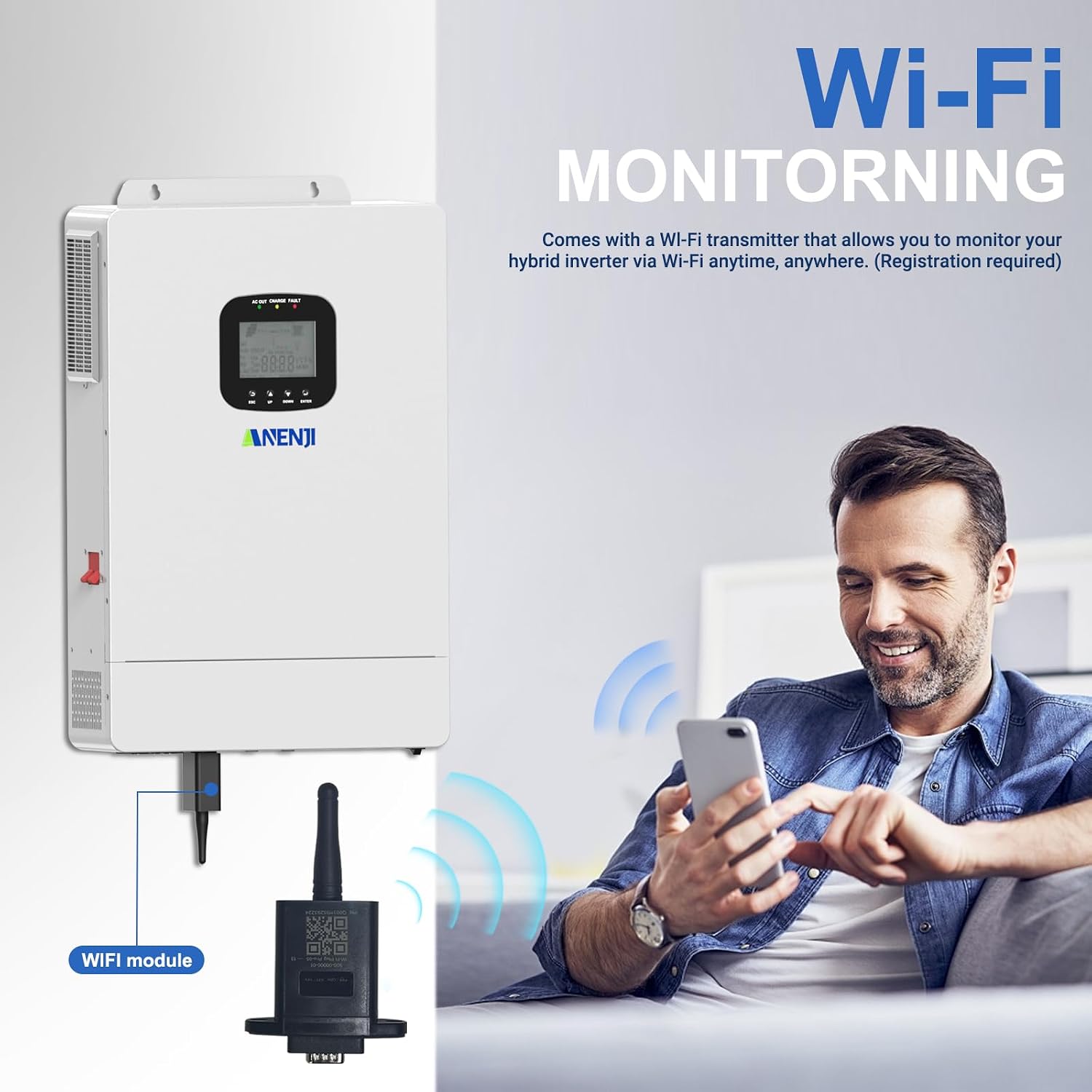
Figure 10: Wi-Fi Monitoring Setup.
- Connect the Wi-Fi module to the designated Wi-Fi port on the inverter.
- Download the compatible monitoring application to your smartphone or tablet.
- Follow the app's instructions to register your device and connect it to your local Wi-Fi network.
- Once connected, you can monitor the inverter's status, energy production, and consumption in real-time from anywhere.
Note: Refer to the Wi-Fi module's separate instruction guide for detailed setup procedures, as app names and connection steps may vary.
8. Maintenance
Regular maintenance ensures the longevity and optimal performance of your inverter.
- Cleaning: Periodically clean the inverter's exterior with a dry, soft cloth. Ensure ventilation openings are free from dust and debris.
- Connections: Annually check all electrical connections for tightness and signs of corrosion.
- Environment: Ensure the operating environment remains within specified temperature and humidity ranges.
- Battery Inspection: If using lead-acid batteries, check electrolyte levels and terminal conditions as per battery manufacturer guidelines.
Always disconnect all power sources before performing any maintenance.
9. Troubleshooting
This section provides solutions to common issues. For problems not listed here, contact customer support.
| Problem | Possible Cause | Solution |
|---|---|---|
| Inverter does not power on. | No battery connection, low battery voltage, ON/OFF switch off, blown fuse/breaker. | Check battery connections and voltage. Ensure ON/OFF switch is on. Check and replace fuses/reset breakers. |
| No AC output. | Overload, short circuit, low battery, inverter fault. | Reduce load. Check for short circuits in wiring. Check battery voltage. Consult LCD error codes. |
| PV not charging batteries. | No sunlight, PV array disconnected, incorrect PV voltage, MPPT controller fault. | Check sunlight conditions. Verify PV connections and voltage. Ensure PV input is within operating range. |
| Wi-Fi module not connecting. | Incorrect app, poor Wi-Fi signal, incorrect setup steps. | Ensure correct app is used. Check Wi-Fi signal strength. Re-follow Wi-Fi module setup instructions carefully. |
10. Specifications
Key technical specifications for the Aninerel 3600W Solar Inverter Charger (Model ANJ-3600W-LV):
- Model Name: ANJ-3600W-LV
- Rated Output Power: 3600 Watts
- Max Peak Power: 7200 VA
- Input Voltage (DC): 48 Volts
- Output Voltage (AC): 110V / 120V (Single Phase)
- Max. PV Open Circuit Voltage: 300 Vdc
- PV Operating Voltage Range: 80 - 300 Vdc
- MPPT Voltage Range: 90 - 260 Vdc
- Max. AC Charging Current: 80A
- Battery Voltage Range: 40 - 60 Vdc
- Item Weight: 19.36 pounds
- Package Dimensions: 19.57 x 14.17 x 7.09 inches
- Manufacturer: Shenzhen Anenji Energy Technology Co.,Ltd
11. Warranty and Support
For warranty information, technical assistance, or customer support, please contact Aninerel directly.

Figure 11: Aninerel Customer Support Contact Information.
- Email: anenji168@outlook.com
- Phone: +86 188 0375 9233
- Support Hours (PDT): 9 AM - 6 PM
Please have your model number (ANJ-3600W-LV) and purchase date ready when contacting support.


