
1. Introduction
The Gain Express 8-in-1 Bluetooth Soil Meter is a versatile tool designed for comprehensive soil analysis. It accurately measures eight critical parameters: pH, Electrical Conductivity (EC), Salt content, Soil Fertility, Soil Moisture, Air Humidity, Temperature, and Light Intensity. This device connects via Bluetooth to your Android or iOS smartphone, providing real-time data, app-controlled settings, and data logging capabilities. It is suitable for various applications including gardening, farming, horticulture, and laboratory use.

Image 1.1: The 8-in-1 Soil Meter is suitable for a wide range of applications, from home gardening to professional agriculture and laboratory analysis.
2. Product Features
- 8-in-1 Soil Analysis: Measures pH, EC, Salt, Fertility, Soil Moisture, Air Humidity, Temperature, and Light Intensity for precise plant health insights.
- Smart Bluetooth Connectivity: Connects to Android/iOS devices (8–10m range) for real-time data, app control, and customizable alerts.
- High Precision & Durability: Features a sensitive metal probe (6cm insertion depth) with high accuracy (e.g., ±0.1pH for pH, ±0.5°C for temperature).
- Pre-calibrated: Comes pre-calibrated with buffer powders for immediate use.
- Flexible Data Logging: Supports manual and automatic recording with adjustable intervals (1–99 hours) and easy data sharing.
- User-Friendly Design: Powered by 4 AAA batteries, includes a cleaning brush, and features a compact, portable build (29.5cm length).

Image 2.1: The durable metal probe is designed for resistance to rust and corrosion, ensuring longevity and accuracy across various soil types.
3. Package Contents
Verify that all items listed below are included in your package:
- 1 x Electrode (main soil meter unit)
- 3 x pH Buffer Solution (pH 4.0, pH 7.0, and pH 10.01)
- 1 x Cleaning Brush
- 4 x AAA Battery
- English Instruction Manual
- Standard Factory Packaging

Image 3.1: The complete set includes the soil meter, pH buffer solutions for calibration, a cleaning brush, and batteries.
4. Setup
4.1 Battery Installation
The device requires 4 AAA batteries for operation. To install or replace batteries:
- Locate the battery compartment on the back of the meter's main unit.
- Open the battery compartment cover.
- Insert 4 AAA batteries, ensuring correct polarity (+/-).
- Close the battery compartment cover securely.

Image 4.1: The meter is powered by replaceable AAA batteries, offering over a year of continuous use on a single set.
4.2 App Installation and Bluetooth Pairing
To utilize the smart features of your soil meter, download the dedicated app and connect via Bluetooth:
- Search for the official 'Soil Tester' app on the Apple App Store (for iOS) or Google Play Store (for Android).
- Download and install the app on your smartphone.
- Ensure Bluetooth is enabled on your smartphone.
- Press the ON/OFF button on the soil meter to power it on.
- Open the app and follow the on-screen instructions to pair with your device. The app will typically detect the meter automatically.

Image 4.2: The meter offers smart Bluetooth connectivity, allowing seamless data transfer to both Android and iOS devices.
4.3 Calibration
The meter comes pre-calibrated from the factory. However, for optimal accuracy, especially for pH measurements, periodic calibration using the provided buffer solutions is recommended. Refer to the detailed instructions within the app or the included English Instruction Manual for the specific calibration procedure.
5. Operating Instructions
5.1 Taking Measurements
Follow these steps to take accurate soil measurements:
- Ensure the meter is powered on and connected to your smartphone via Bluetooth.
- Gently insert the metal probe 2-4 inches (approximately 5-10 cm) into the soil you wish to test. Ensure the probe is fully submerged in the soil for accurate readings.
- Wait for a few moments for the readings to stabilize on your smartphone app.
- Avoid forcing the probe into hard soil to prevent damage. If the soil is too hard, moisten it slightly before insertion.
Image 5.1: Insert the probe 2-4 inches into the soil for optimal measurement depth.
5.2 Understanding Readings
The app displays various parameters. Here's a brief overview:
- pH: Measures soil acidity or alkalinity (0.0-14.0 pH).
- EC (Electrical Conductivity): Indicates the concentration of soluble salts in the soil (0.01-9.99 mS/cm).
- Salt: Direct measurement of salt content (0-5110 mg/L).
- Fertility: Assesses the overall nutrient level in the soil (0-99%).
- Soil Moisture: Indicates the water content in the soil (Dry, Normal, Wet).
- Air Humidity: Measures the humidity of the air surrounding the plant (0-100% RH).
- Temperature: Measures both soil and ambient temperature (0.0-50.0°C / 32.0-122.0°F).
- Light Intensity: Detects the light level (Dark, Normal, Bright).
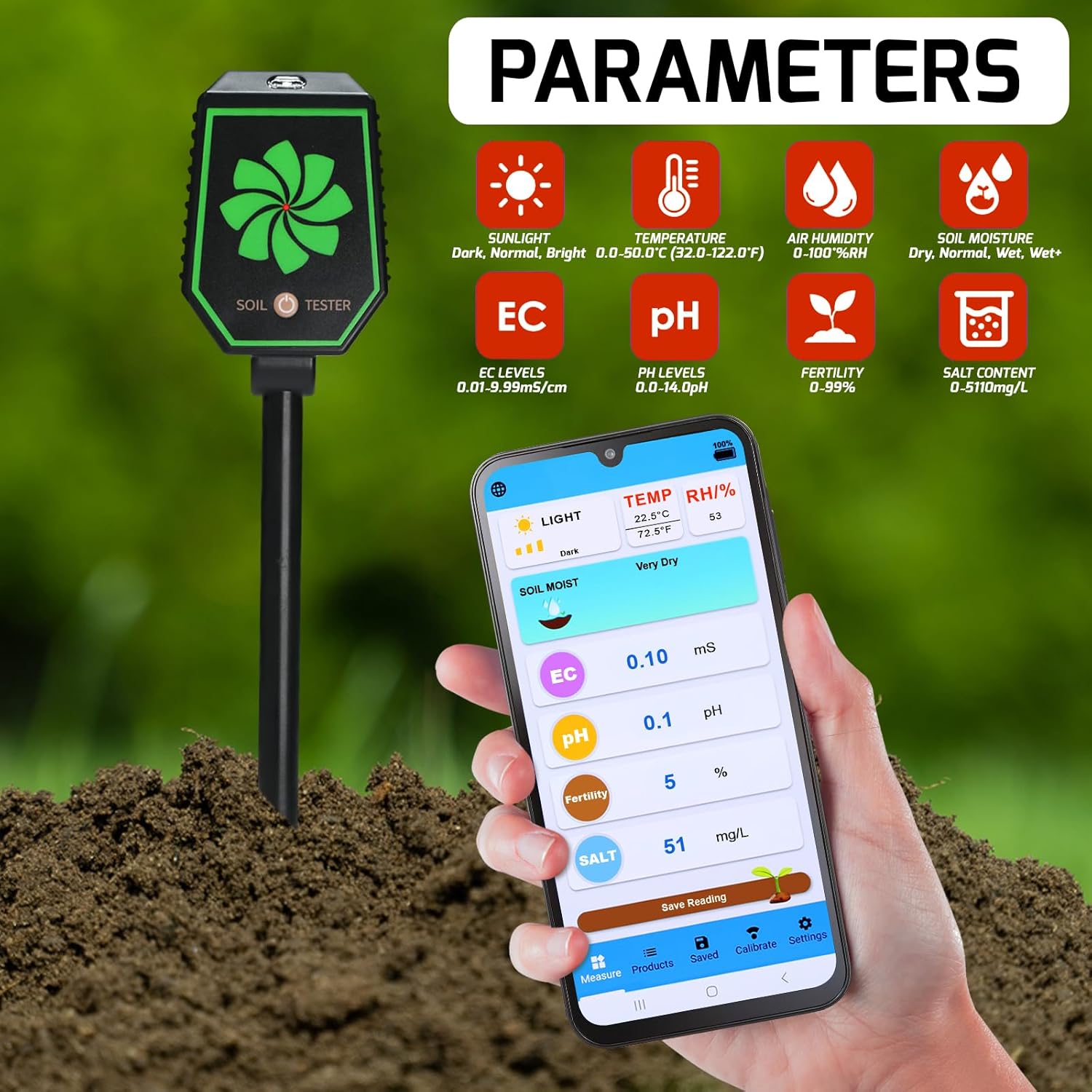
Image 5.2: The app interface clearly displays all eight measured parameters, providing a comprehensive overview of soil conditions.
5.3 Data Logging and Sharing
The app allows for both manual and automatic data recording. You can set adjustable intervals for automatic logging (1-99 hours). All recorded data can be easily accessed, reviewed, and shared directly from the app for long-term tracking or collaboration.

Image 5.3: The app provides a detailed log of saved data, allowing users to track changes over time and share information.
5.4 Temperature Unit Switch
You can switch between Celsius (°C) and Fahrenheit (°F) temperature units directly within the app settings to suit your preference.

Image 5.4: Easily switch between Celsius and Fahrenheit temperature units within the app interface.
6. Maintenance
6.1 Cleaning the Probe
To ensure accurate and consistent readings, it is crucial to clean the metal probe immediately after each use.
- After removing the probe from the soil, use the provided cleaning brush to gently remove any soil residue from the metal tip and electrodes.
- Rinse the probe thoroughly with clean water.
- Wipe the probe dry with a soft cloth.
- Do not use abrasive materials or harsh chemicals, as these can damage the probe.
6.2 Storage
When not in use, store the soil meter in a clean, dry place away from direct sunlight and extreme temperatures. Ensure the probe is clean and dry before storage.
7. Troubleshooting
- No Power: Check if the AAA batteries are correctly installed and have sufficient charge. Replace if necessary.
- Bluetooth Connection Issues: Ensure Bluetooth is enabled on your phone and the meter is powered on. Try restarting both the app and the meter. Ensure you are within the 8-10m Bluetooth range.
- Inaccurate Readings: Ensure the probe is clean and inserted deeply enough into the soil (2-4 inches). Calibrate the pH sensor if readings seem consistently off. Avoid testing in extremely dry or hard soil.
- App Not Responding: Close and reopen the app. If the issue persists, try reinstalling the app.
- Probe Damage: If the metal probe is visibly bent or damaged, it may affect accuracy. Contact customer support for assistance.
8. Specifications
| Parameter | Range | Resolution | Accuracy |
|---|---|---|---|
| pH | 0.0 - 14.0 pH | 0.1 pH | ±0.1 pH |
| EC | 0.01 - 9.99 mS/cm | 0.01 mS/cm | ±0.01 mS/cm |
| Salt | 0 - 5110 mg/L | 1 mg/L | ±2% F.S. |
| Fertility | 0 - 99% | 0.01% | ±0.01% |
| Air Humidity | 0 - 100% RH | 1% RH | ±2% RH/Year |
| Temperature | 0.0 - 50.0°C / 32.0 - 122.0°F | 0.1°C / 0.1°F | ±0.5°C / ±1.0°F |
| Light Intensity | Dark, Normal, Bright | N/A | N/A |
| Soil Moisture | Dry, Normal, Wet | N/A | N/A |
Physical Dimensions:
- Overall Length: 29.5 cm (11.6 inches)
- Probe Insertion Depth: 6 cm (2.48 inches)
- Main Unit Width: 6.3 cm (2.48 inches)
- Main Unit Thickness: 3 cm (1.18 inches)
- Item Weight: 10.9 ounces

Image 8.1: Detailed dimensions and probe component identification for the soil meter.
9. Warranty and Support
For warranty information or technical support, please refer to the contact details provided in the packaging or visit the official Gain Express website. Keep your purchase receipt as proof of purchase for any warranty claims.