
1. Introduction
This manual provides essential information for the safe and effective use of your Brookstone Matelassé Knit Heated Mattress Pad. Designed for comfort and warmth, this mattress pad features multiple heat settings and an automatic shut-off timer for peace of mind. Please read all instructions carefully before use and retain this manual for future reference.
2. Important Safety Information
- Always plug the heated mattress pad directly into a wall outlet. Do not use with extension cords, power strips, or surge protectors, as this can affect performance and safety.
- Ensure the controller is not covered by bedding or other materials during use to prevent overheating.
- Do not use this product with infants, children, incapacitated persons, or anyone insensitive to heat.
- Avoid pinching or creasing the heating wires within the mattress pad.
- Disconnect the power cord from the wall outlet when the mattress pad is not in use or before cleaning.
- The mattress pad is equipped with a 12-hour auto shut-off feature for safety.
3. Package Contents
- 1 x Brookstone Matelassé Knit Heated Mattress Pad (Twin Size)
- 1 x Digital Controller with Power Cord
4. Setup Instructions
- Place the Mattress Pad: Lay the heated mattress pad directly on your mattress, ensuring it is spread evenly and smoothly. The deep pockets are designed to fit mattresses up to 22 inches high.
- Connect the Controller: Locate the connection port on the mattress pad. Firmly plug the controller's power cord into this port. The connection is designed to be secure and will not easily detach during use.
- Position the Controller: Place the controller on your bedside table or a convenient surface. The cord is designed to be discreet and will not interfere with your comfort.
- Plug into Power: Plug the controller's main power cord directly into a 120V AC wall outlet.
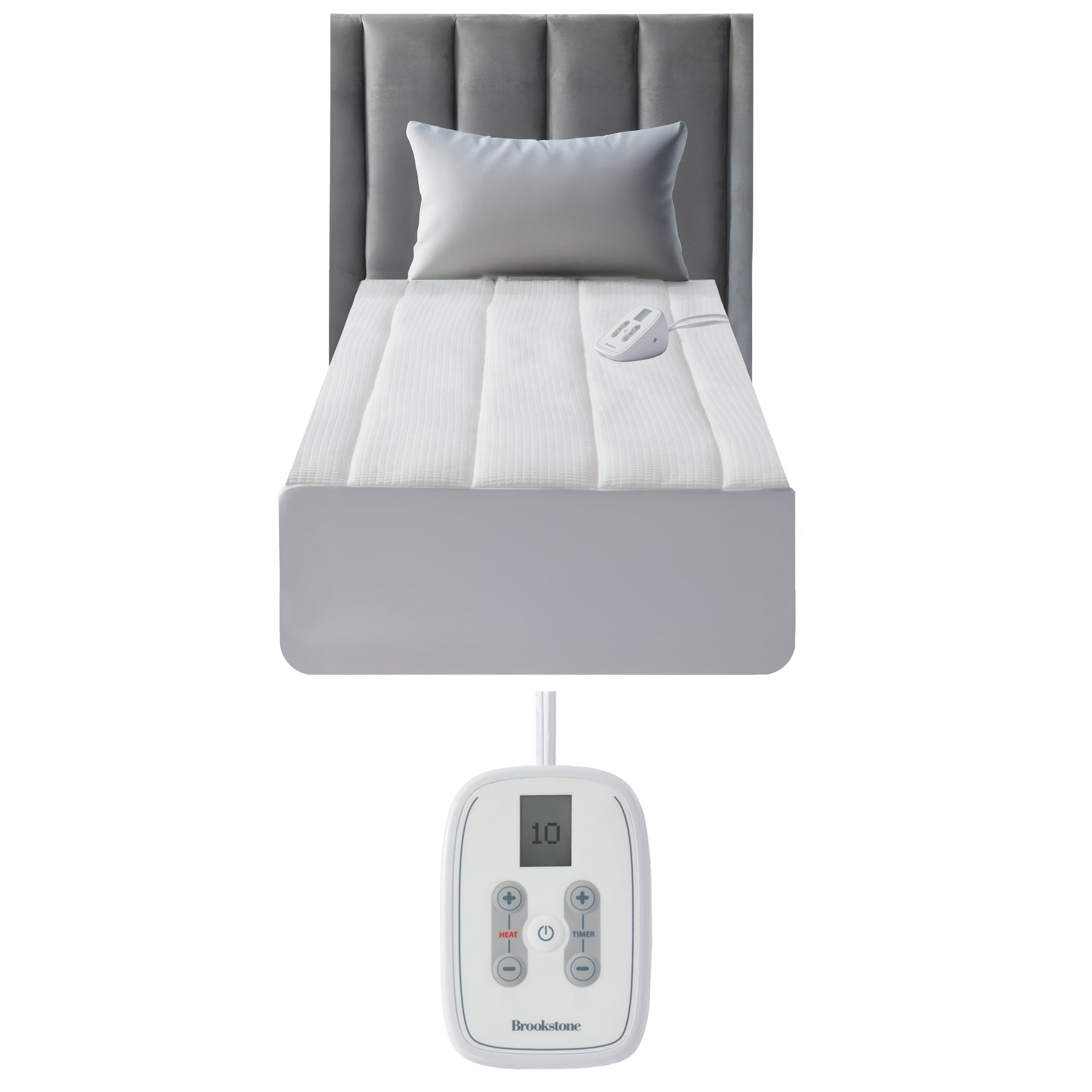
Image: The Brookstone Matelassé Knit Heated Mattress Pad laid out on a bed, showing the two controllers for dual-zone heating (if applicable for larger sizes) and the plush quilted surface.

Image: A heated mattress pad on a bed, illustrating how it fits over a mattress and the placement of the controller on a nightstand. The image highlights the pad's ability to fit mattresses up to 22 inches high.
Video: A demonstration of the Matelassé Heated Mattress Pad controller, showing how to adjust heat settings and set the timer. It also illustrates the secure connection of the power cord to the mattress pad and its discreet placement.
5. Operating Instructions
- Power On/Off: Press the power button (␣) on the controller to turn the mattress pad on or off. The display will illuminate when powered on.
- Adjust Heat Settings: Use the 'HEAT' '+' and '-' buttons to select your desired warmth level. There are 10 customizable heat settings available. Start with a lower setting and adjust as needed for optimal comfort.
- Set the Timer: Use the 'TIMER' '+' and '-' buttons to set the automatic shut-off time. You can set the timer for up to 12 hours. The mattress pad will automatically turn off once the set time has elapsed. This feature ensures safety and energy efficiency.

Image: A detailed view of the Brookstone digital controller, showing the heat adjustment buttons, power button, and timer settings. The display shows the current heat level.

Image: The heated mattress pad with the ETL Intertek certification logo, indicating compliance with safety standards. This highlights the built-in auto shut-off feature for peace of mind.
6. Maintenance and Care
The Brookstone Matelassé Knit Heated Mattress Pad is designed for easy care. Always follow these instructions to maintain product quality and longevity:
- Disconnect Controller: Before washing, ensure the controller is completely disconnected from the mattress pad.
- Machine Wash: Machine wash the mattress pad on a gentle cycle using cold water.
- Drying: The mattress pad is dryer safe. Tumble dry on a low heat setting. To help preserve the internal wiring, avoid high heat drying if possible.
- Storage: When not in use, store the mattress pad in a cool, dry place. Avoid placing heavy objects on top of it to prevent damage to the internal heating elements.

Image: A hand demonstrating how to unplug the controller from the heated mattress pad, a necessary step before laundering the pad.
7. Troubleshooting
- Pad Not Heating: Ensure the power cord is securely plugged into a wall outlet and the controller is firmly connected to the mattress pad. Check if the power button on the controller is pressed and a heat setting is selected.
- Uneven Heating: Ensure the mattress pad is spread smoothly on the bed without any folds or creases that could affect heat distribution.
- Controller Display Not Working: Verify the power connection. If the issue persists, try unplugging and re-plugging the unit.
- Automatic Shut-Off Too Soon: Check the timer setting on your controller. The unit will turn off after the set duration or after 12 hours if no specific timer is set.
8. Specifications
| Brand | Brookstone |
| Model Number | B0DXXFQR3M |
| Size | Twin (75 x 39 x 21 inches) |
| Color | White |
| Fabric Type | Polyester |
| Heat Settings | 10 |
| Auto Shut-Off | 12 Hours |
| Care Instructions | Machine Washable |
| Item Weight | 6.29 pounds |
| UPC | 042075645175 |

Image: A visual representation of the Twin size heated mattress pad, clearly indicating its dimensions as 75 inches by 39 inches.
9. Warranty and Support
Brookstone offers a 5-year warranty covering defects in workmanship and materials for this heated mattress pad. Please retain your proof of purchase for warranty claims.
For product support, troubleshooting assistance, or warranty inquiries, please contact Brookstone customer service. Contact details can typically be found on the product packaging or the official Brookstone website.