1. Introduction
Welcome to the user manual for your new Telefunken VIDAA XF32VP750M 32-inch Full HD HDR Smart TV. This manual provides essential information for setting up, operating, and maintaining your television. Please read it thoroughly to ensure proper use and to maximize your viewing experience.
The Telefunken VIDAA XF32VP750M Smart TV features a 32-inch (80 cm) Full HD display, HDR10 support for enhanced contrast and color, and an integrated triple tuner (DVB-C/T2/S2) for versatile reception. Powered by the VIDAA operating system, it offers access to a wide range of streaming applications and smart features.
2. Safety Information
Always observe the following safety precautions to prevent electric shock, fire, or injury:
- Do not expose the TV to rain or moisture.
- Do not open the TV casing; refer all servicing to qualified personnel.
- Ensure proper ventilation. Do not block ventilation openings.
- Place the TV on a stable, level surface to prevent it from falling.
- Keep the TV away from direct sunlight, heat sources, and excessive dust.
- Unplug the TV from the power outlet during lightning storms or when unused for long periods.
3. Package Contents
Please check that all items are present in your TV package:
- Telefunken VIDAA XF32VP750M 32-inch Full HD HDR Smart TV
- Remote Control (with 2 AAA batteries included)
- TV Stand (feet)
- User Manual (this document)
- Power Cable
4. Setup
4.1. Physical Setup
You can set up your TV using the included stand or by mounting it on a wall (wall mount not included).
Stand Installation
Carefully place the TV screen-down on a soft, flat surface. Attach the provided stand feet to the designated slots on the bottom of the TV using the screws provided. Ensure they are securely fastened.
Wall Mounting (VESA)
This TV supports VESA wall mounts. The VESA pattern for this model is M4 75x75. Please refer to the wall mount manufacturer's instructions for installation. Ensure the wall mount can support the weight of the TV.
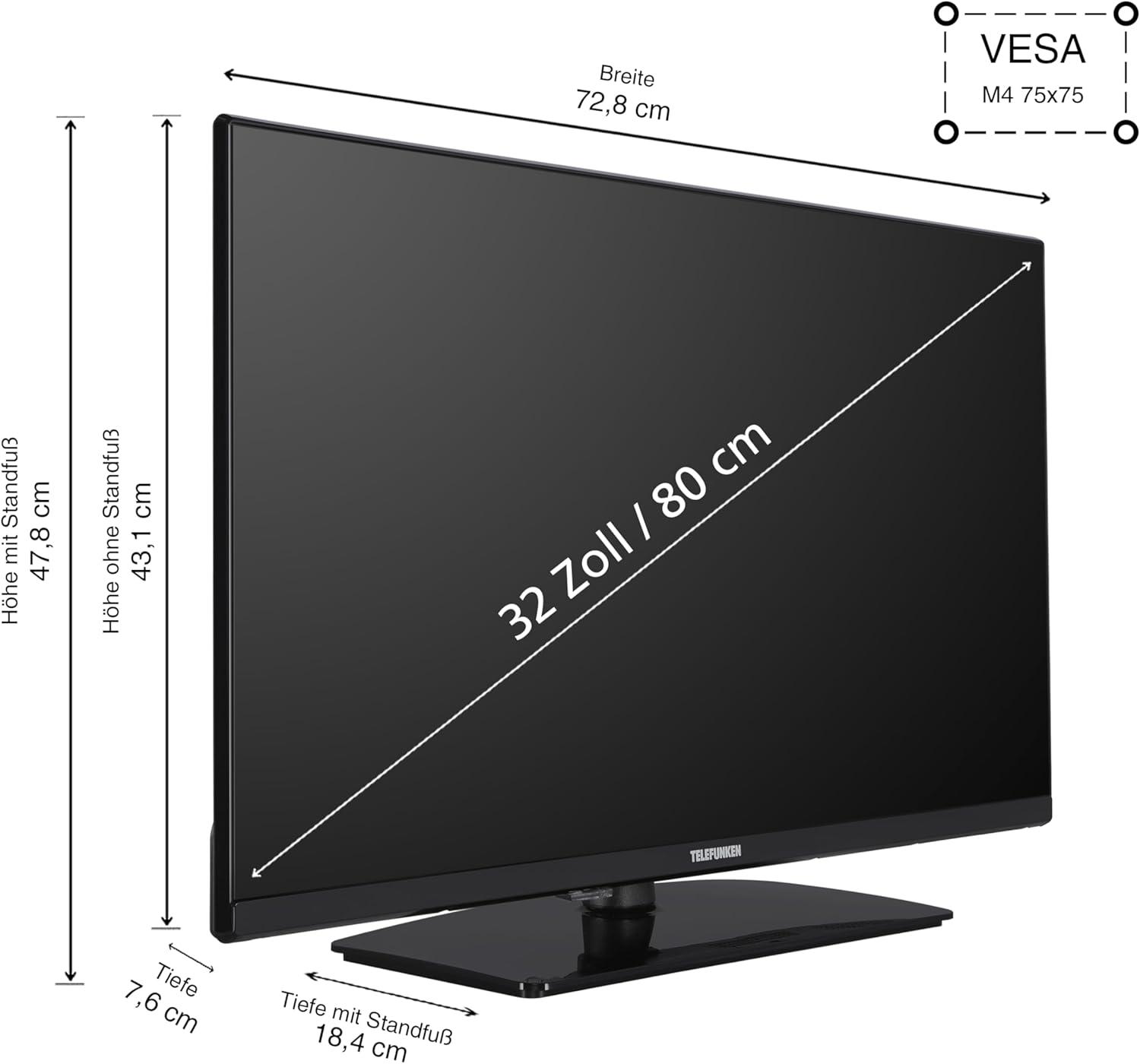
Image 4.1: TV Dimensions and VESA Mount. This diagram illustrates the physical dimensions of the 32-inch TV, showing a width of 72.8 cm, height with stand of 47.8 cm, height without stand of 43.1 cm, and depth with stand of 18.4 cm. It also indicates the VESA M4 75x75 mounting standard for wall installation.
4.2. Connecting Devices
Your TV offers various connection ports for external devices:
- HDMI (x2): Connect Blu-ray players, game consoles, set-top boxes, or other HDMI-enabled devices. Supports CEC (Consumer Electronics Control) and ARC (Audio Return Channel) on one port.
- USB (x1): Connect USB storage devices for media playback.
- LAN (Ethernet): For a wired internet connection.
- Antenna (RF/F): Connect your terrestrial or satellite antenna cable.
- CI Slot: For Common Interface modules (e.g., for pay-TV services).
- Headphones: For connecting headphones.
- Digital Audio Output: For connecting to external audio systems (e.g., soundbars, AV receivers).

Image 4.2: Connection Ports Overview. This image displays the various input and output ports available on the TV, such as two HDMI ports, one USB port, a LAN port for internet, an antenna input, a CI slot, a headphone jack, and a digital audio output.
4.3. First-Time Setup
After connecting the power cable and turning on the TV for the first time, a setup wizard will guide you through the initial configuration:
- Language Selection: Choose your preferred language.
- Network Setup: Connect to your Wi-Fi network or use a wired LAN connection.
- Channel Scan: Select your signal source (Antenna, Cable, or Satellite) and perform an automatic channel scan.
- Time Zone: Set your local time zone.
5. Operating the TV
5.1. Remote Control Overview
The included remote control allows you to navigate the TV's functions and menus. Batteries are pre-installed.

Image 5.1: Remote Control. This image shows the TV remote control, highlighting dedicated buttons for popular streaming services like YouTube, Netflix, and Prime Video, allowing quick access to your favorite applications.
5.2. Basic Functions
- Power: Press the red power button to turn the TV on or off.
- Volume: Use the VOL +/- buttons to adjust the sound level.
- Channel: Use the CH +/- buttons to change channels.
- Input: Press the INPUT button to select different input sources (HDMI, USB, etc.).
- Navigation: Use the arrow keys and OK button to navigate menus.
5.3. VIDAA Smart TV Features
Your Telefunken TV is equipped with the VIDAA operating system, providing a smart TV experience with access to numerous applications and media libraries.

Image 5.2: VIDAA Smart TV Interface. This image displays the home screen of the VIDAA operating system, featuring a clean layout with quick access to popular streaming applications and personalized content recommendations.

Image 5.3: Telefunken TV with Key Features. A front view of the 32-inch TV, visually emphasizing its VIDAA Smart TV capabilities, HDR10 support, and Full HD resolution.
Accessing Apps
From the home screen, you can easily launch applications such as Netflix, Prime Video, Disney+, YouTube, and DAZN. Use the remote's navigation buttons to select and open your desired app.
HDR10 and Full HD Display
The TV supports HDR10 and HLG, delivering stunning images with high contrast, natural colors, and impressive detail sharpness in Full HD resolution.

Image 5.4: HDR10 Visual Enhancement. This image illustrates the difference HDR10 technology makes, showing a split screen where one side has standard image quality and the other displays the vibrant colors and deeper contrasts provided by HDR10.
5.4. Optimal Viewing Distance
For the best viewing experience, consider the recommended viewing distance based on screen size and resolution:

Image 5.5: Optimal Viewing Distance Chart. This chart provides guidelines for the ideal distance between the viewer and the television screen, categorized by screen size and resolution (4K, Full HD, HD), to ensure a comfortable and immersive viewing experience. For a 32-inch Full HD TV, the recommended distance is approximately 160 cm.
6. Maintenance
6.1. Cleaning
- Always unplug the TV before cleaning.
- Use a soft, dry cloth to wipe the screen and casing.
- For stubborn marks, lightly dampen the cloth with water or a mild, non-abrasive screen cleaner.
- Never spray cleaning liquids directly onto the screen or TV.
6.2. Storage
If storing the TV for an extended period, ensure it is kept in a cool, dry place, protected from dust and extreme temperatures. Use the original packaging if available.
7. Troubleshooting
If you encounter issues with your TV, refer to the following common problems and solutions:
| Problem | Possible Cause | Solution |
|---|---|---|
| No power | Power cable disconnected; no power from outlet | Check power cable connection; test outlet with another device |
| No picture, but sound is present | Incorrect input source selected; faulty cable | Press INPUT button to cycle through sources; check HDMI/antenna cable connections |
| No sound, but picture is present | Volume muted or too low; external audio system issue | Increase volume; check mute status; verify external audio connections |
| Remote control not working | Batteries depleted; obstruction between remote and TV | Replace batteries; remove any obstructions; ensure remote is pointed at TV sensor |
| Cannot connect to Wi-Fi | Incorrect password; router issue; TV too far from router | Re-enter password; restart router; move TV closer to router or use wired connection |
If the problem persists, please contact customer support.
8. Specifications
Detailed technical specifications for the Telefunken VIDAA XF32VP750M TV:
- Model Number: XF32VP750M
- Screen Size: 32 inches (80 cm)
- Display Technology: LCD, LED
- Resolution: 1920 x 1080 (Full HD)
- Refresh Rate: 50 Hz
- Special Features: HDR TV, VIDAA Smart TV
- Operating System: VIDAA
- Connectivity: 2x HDMI (CEC, ARC), 1x USB, Wi-Fi, LAN, Antenna (DVB-T2/C/S2), CI Slot, Digital Audio Output, Headphone Jack
- Aspect Ratio: 16:9
- Color: Black
- Dimensions (with stand): 72.8 cm (W) x 18.4 cm (D) x 47.8 cm (H)
- Power Consumption (SDR): 26.0 W
- Power Consumption (HDR): 45.0 W
- Standby Power Consumption: 0.5 W
- Energy Efficiency Class: E (SDR), G (HDR)

Image 8.1: EU Product Fiche. This document provides comprehensive technical details and energy consumption data for the Telefunken XF32VP750M television, as required by EU regulations.

Image 8.2: EU Energy Label. This label indicates the energy efficiency class 'E' for SDR content and 'G' for HDR content, along with power consumption figures (26 kWh/1000h for SDR, 45 kWh/1000h for HDR) and a QR code linking to the EPREL database. For more details, visit the EPREL database (ID: 50745209).
9. Warranty and Support
Telefunken provides a guarantee for the availability of spare parts for 7 years from the date of product discontinuation. For technical support or warranty claims, please refer to the contact information provided with your purchase documentation or visit the official Telefunken website.


