
1. Introduction
This manual provides essential information for the safe and effective use of your Kircuit 2-Prong 5V AC/DC Adapter. This adapter is designed to convert standard AC power into the DC power required by your compatible device, enabling both operation and battery charging from electrical outlets. Kircuit adapters are engineered for portability and reliability, suitable for use at home, in the office, or while traveling.
2. Product Overview
The Kircuit 2-Prong 5V AC/DC Adapter is a robust power solution featuring universal input voltage compatibility (100-240VAC 50/60Hz) and built-in safety protections. It is designed to provide a stable 5V DC output for your electronic devices.
Key Features:
- Universal Input Voltage: 100-240VAC 50/60Hz for worldwide use.
- Safety Protections: OVP (Over Voltage Output Protection), OCP (Over Current Output Protection), SCP (Short Circuit Output Protection) ensure device safety.
- Portable Design: Compact and lightweight for convenient travel and daily use.
- Output: 5V DC, 1A (1000mA), 5W.
Compatible Devices:
This adapter is compatible with various portable oral irrigators and water flossers, including but not limited to:
- h2ofloss HF-6, HF6
- Fitreno HF-6, HF6
- MOSPRO FC159, FC1591, FC152, FC156, FC256, FC259
Product Images:
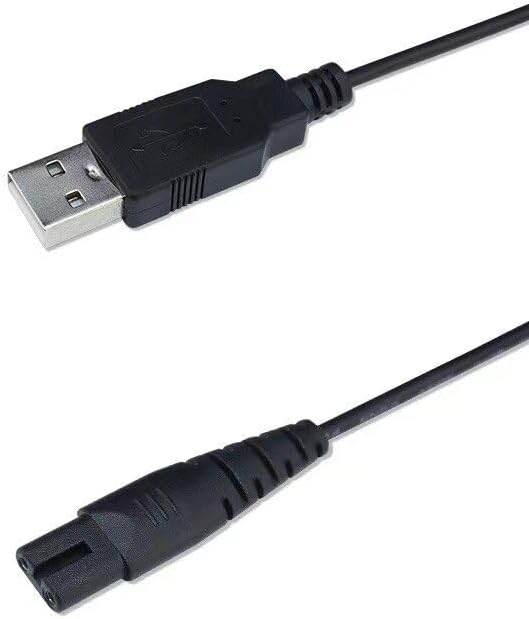
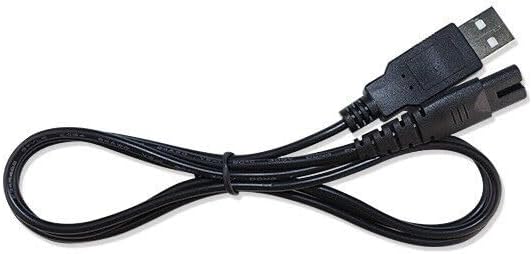
3. Setup
- Connect to Power Source: Insert the 2-prong end of the adapter into a standard electrical power outlet (100-240VAC).
- Connect to Device: Insert the USB-A end of the adapter into the charging port of your compatible oral irrigator or water flosser. Ensure the connection is secure.
4. Operating Instructions
Once properly connected, the adapter will begin to supply power to your device. If your device has a battery, it will start charging. Refer to your device's specific user manual for indicators of charging status or direct power operation.
Important Notes:
- Always ensure the adapter is compatible with your device's voltage and current requirements (5V, 1A).
- Do not force the connector into your device's port.
- Unplug the adapter from the power outlet when not in use or when the device is fully charged.
5. Maintenance
Proper care and maintenance will extend the life of your Kircuit AC/DC Adapter.
- Cleaning: Disconnect the adapter from all power sources and devices before cleaning. Use a soft, dry cloth to wipe the exterior. Do not use liquid cleaners or abrasive materials.
- Storage: Store the adapter in a cool, dry place away from direct sunlight and extreme temperatures. Avoid tightly coiling the cable to prevent damage.
- Handling: Do not expose the adapter to water or excessive moisture. Avoid dropping or subjecting it to strong impacts. Regularly inspect the cable and connectors for any signs of wear or damage.
6. Troubleshooting
If you encounter issues with your Kircuit AC/DC Adapter, try the following steps:
- Device Not Charging/Powering On:
- Ensure the adapter is securely plugged into both the wall outlet and your device.
- Test the wall outlet with another working appliance to confirm it has power.
- Verify that your device is compatible with the adapter's specifications (5V, 1A).
- Check the adapter cable and connectors for any visible damage. If damaged, discontinue use.
- Adapter Overheating: It is normal for the adapter to feel slightly warm during use. However, if it becomes excessively hot, immediately unplug it from the power source and your device. Ensure adequate ventilation around the adapter and avoid covering it.
If problems persist after attempting these troubleshooting steps, please contact customer support.
7. Specifications
| Feature | Detail |
|---|---|
| Brand | Kircuit |
| Manufacturer | Shenzhen Waweis Technology Co., Ltd |
| ASIN | B0DXV9CVMX |
| Connector Type | 2PRONG (for AC input), USB-A (for DC output) |
| Input Voltage | 100-240 Volts (AC) |
| Output Voltage/Current | 5V DC, 1A (1000mA) |
| Power Source | Corded Electric |
| Color | Black |
| Special Feature | 100% Brand New, High Quality AC/DC Power Charger (non-OEM) |
| Compatible Devices | H2OFLOSS HF-6, FITRENO HF6, MOSPRO FC152, FC159, FC1591, FC156, FC256, FC259 |
8. Warranty and Support
For warranty information and customer support, please refer to the documentation provided with your purchase or contact the seller directly. Keep your purchase receipt as proof of purchase for any warranty claims.