
Eonon P6
Eonon P6 Motorcycle Display User Manual
Model: P6
1. Introduction
The Eonon P6 is a 7-inch IPS display system designed for motorcycles, offering advanced connectivity and recording capabilities. It integrates Apple CarPlay and Android Auto for seamless smartphone integration, features dual cameras for front and rear DVR recording, and is built to withstand various weather conditions. This manual provides essential information for setup, operation, maintenance, and troubleshooting.
2. What's in the Box
Before beginning installation, please verify that all components listed below are present in your package:
- Host x 1
- Power Cable x 1
- Customer Test Power Cable x 1
- GPS Antenna x 1
- Camera x 2
- Wired Control x 1
- Tire Pressure Sensor x 2
- Mounting Bracket x 1
- Hex Wrench x 1
- Phillips Screwdriver x 1
- Open-end Wrench x 1
- User Manual x 1

Image: All components included in the Eonon P6 package.
3. Setup and Installation
Follow these steps to properly install your Eonon P6 system on your motorcycle:
- Install the bracket to the handlebar: Securely attach the mounting bracket to your motorcycle's handlebar using the provided screws. Ensure it is firmly in place to prevent movement during rides.
- Install the screen and adjust its angle: Mount the Eonon P6 display onto the installed bracket. Adjust the screen's angle for optimal viewing, then tighten all fasteners to secure it. The bracket allows for 360-degree rotation for flexible positioning.
- Installation completed: Once the display is securely mounted and angled correctly, proceed with connecting the power cables, cameras, GPS antenna, and wired remote control as per the wiring diagram (refer to the full user manual for detailed wiring instructions).
Image: Visual guide for the Eonon P6 installation process.
Applicable Models
The Eonon P6 is compatible with DC12V-24V vehicles, including various types of motorcycles and ATVs.
Image: Various vehicle types compatible with the Eonon P6 system.
4. Operating Instructions
Smart Riding Features
The Eonon P6 records essential ride details such as time, speed, altitude, and compass direction, providing comprehensive data for your journeys.

Image: Eonon P6 displaying real-time riding metrics.
Wireless CarPlay & Android Auto
Connect your smartphone wirelessly to access Apple CarPlay or Android Auto. This allows for hands-free navigation, music playback, and communication, helping you stay focused on the road.
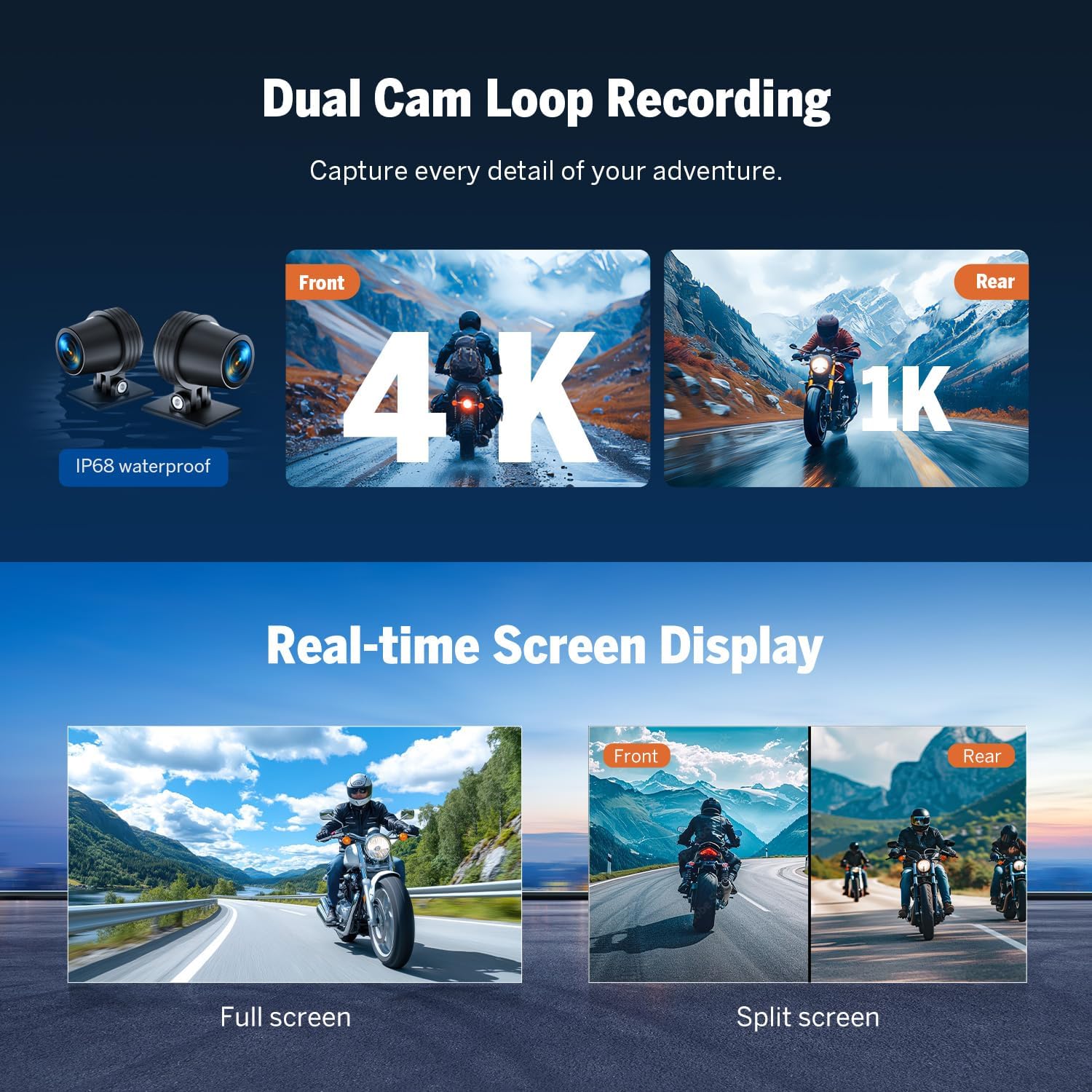
Image: Wireless CarPlay and Android Auto functionality on the Eonon P6.
Dual Cam Loop Recording
Capture every detail of your ride with dual cameras. The front camera records in 4K resolution, and the rear camera records in 1K. Both cameras are IP68 waterproof, ensuring reliable performance in wet conditions. The system supports continuous loop recording.
Real-time Screen Display
View live footage from both cameras on the 7-inch IPS display. You can switch between full-screen view for either front or rear camera, or use the split-screen mode to see both simultaneously.

Image: Dual camera recording and real-time display modes.
Direct Phone-to-Headset Connectivity & Built-in Speaker
Connect your headset directly to your phone via the Eonon P6 for clearer and more stable audio during calls and music playback, even in challenging riding conditions. The unit also features a built-in speaker for audio output.
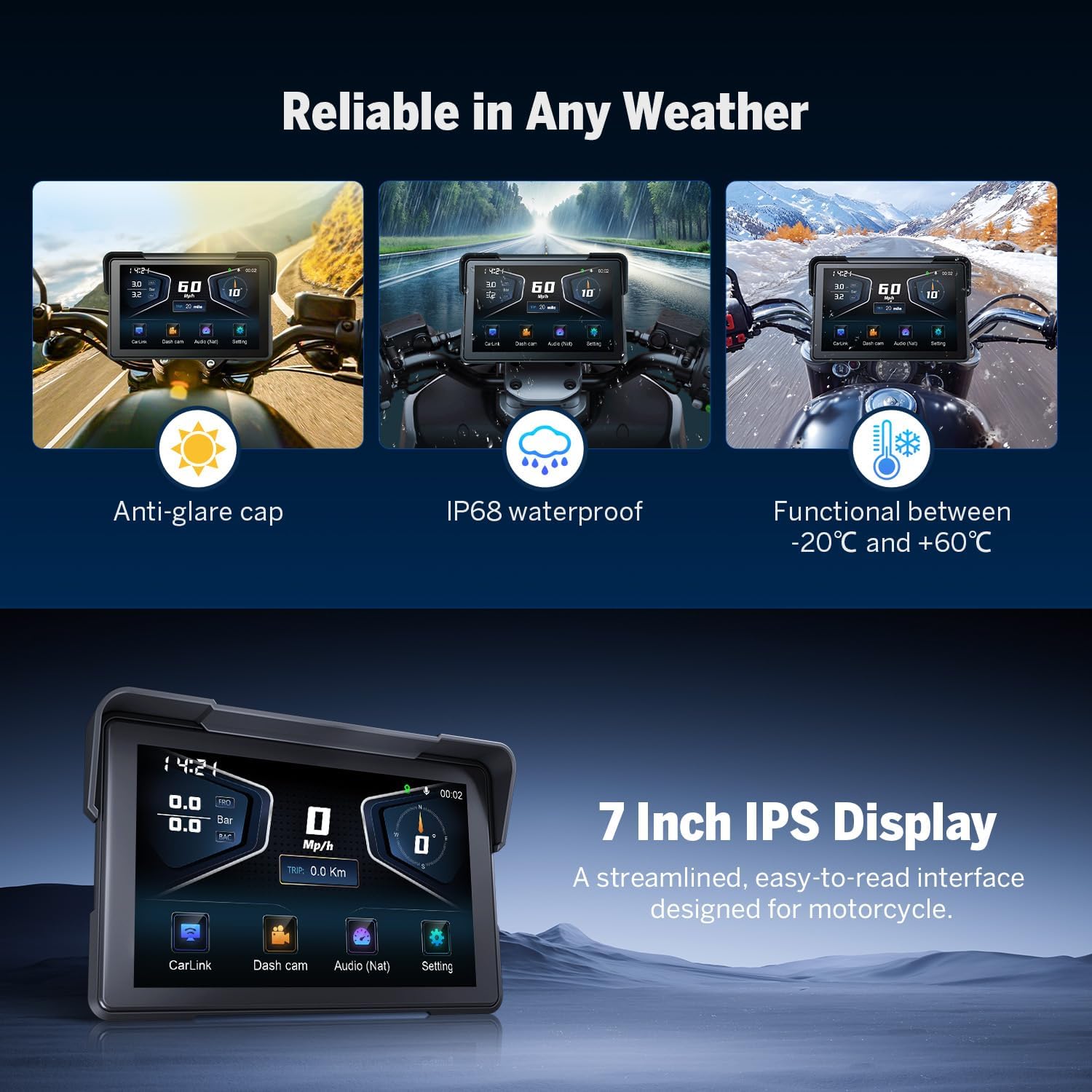
Image: Connectivity options and integrated speaker.
Reliable in Any Weather & 7-Inch IPS Display
The Eonon P6 is designed for durability, featuring an anti-glare cap for visibility in bright sunlight and IP68 waterproofing. It operates reliably in temperatures ranging from -20°C to +60°C. The 7-inch IPS display provides a streamlined, easy-to-read interface optimized for motorcycle use.

Image: Weather resistance and display features of the Eonon P6.
App Integration (Viidure)
Download the Viidure app to access professional riding footage and data. The app allows you to review time, speed, altitude, location, and driving routes recorded by the device. You can download the app from https://www.6zhentan.com/app/d0001/index.html.

Image: Viidure app integration for riding data analysis.
TPMS Supported
The system supports real-time tire pressure monitoring (TPMS) to enhance driving safety. Ensure the tire pressure sensors are correctly installed and paired with the device.
Safeguard Your Data
The Eonon P6 comes with a 64GB microSD card included and is expandable up to 256GB. It records continuously without interruption, ensuring your ride data is safely stored.

Image: TPMS support and data storage features.
Weatherproof Wired Handlebar Remote
Control essential functions easily with the weatherproof wired handlebar remote, ideal for motorcycles and ATVs, allowing for safe operation without taking your hands off the handlebars.
Image: Wired handlebar remote control for the Eonon P6.
5. Specifications
| Brand | Eonon |
| Manufacturer | Eonon |
| Model Name | P6 |
| Part Number | P6 |
| Included Memory Card Size | 64 GB |
| Compatible Devices | Smartphone |
| Special Features | Apple CarPlay, Android Auto |
| Number of Items | 1 |
| Standing Screen Size | 7 inches |
| Screen Type | LCD |
| Batteries Included | No |
| Batteries Required | No |
| Connection Type | Bluetooth |
| Mounting Type | Rearview Mirror Mount |
| Actual Viewing Angle | 110 Degrees |
| Product Dimensions | 29 x 18 x 10 cm; 500 g |
| First Available Date | February 20, 2025 |
| Vehicle Service Type | Motorcycle |
| Control Method | Touch |
6. Maintenance
To ensure the longevity and optimal performance of your Eonon P6, follow these maintenance guidelines:
- Cleaning: Regularly wipe the screen and device body with a soft, damp cloth. Avoid using harsh chemicals or abrasive materials that could damage the display or casing.
- Environmental Conditions: While the device is designed for various weather conditions, avoid prolonged exposure to extreme temperatures outside its operating range (-20°C to +60°C) when not in use.
- Cable Connections: Periodically check all cable connections (power, cameras, GPS, remote) to ensure they are secure and free from damage. Loose connections can lead to intermittent functionality.
- Software Updates: Check the official Eonon website or the Viidure app for any available software or firmware updates to ensure your device has the latest features and bug fixes.
7. Troubleshooting
If you encounter issues with your Eonon P6, refer to the following common problems and solutions:
- Device Does Not Power On:
- Ensure the power cable is correctly connected to the device and the motorcycle's power source.
- Verify that the power connector is not mistakenly plugged into the GPS port, as this can prevent the device from functioning.
- Check the motorcycle's battery and fuse for any issues.
- Device Permanently Boots/Restarts:
- This may indicate a power supply issue or a software malfunction. Ensure stable power delivery.
- Try performing a factory reset (refer to the full user manual for instructions).
- Ensure the device is not overheating.
- TPMS Will Not Connect:
- Ensure the tire pressure sensors are correctly installed and have working batteries.
- Follow the pairing instructions in the full user manual to connect the sensors to the display.
- Check for any obstructions or interference that might affect the wireless signal.
- Screen Brightness is Poor/Hard to See in Sunlight:
- Adjust the screen brightness settings through the device's menu.
- Ensure the anti-glare cap is properly positioned to minimize direct sunlight on the screen.
- Consider the angle of the screen relative to the sun.
For further assistance, please contact Eonon customer support.
8. Warranty and Support
Eonon products are designed for reliability and performance. For information regarding warranty coverage, technical support, or service, please refer to the warranty card included with your product or visit the official Eonon website. Keep your purchase receipt as proof of purchase for warranty claims.
Customer Support: For any operational questions, troubleshooting assistance beyond this manual, or warranty inquiries, please contact Eonon customer service through their official channels.
Related documentsP6

Ask a question about this manual
Ask about setup, troubleshooting, compatibility, parts, safety, or missing instructions. Manuals+ will review the question and use this page’s manual context to help answer it.