
SEDETA B0DXTPLKTT
SEDETA L Shaped Gaming Desk User Manual
Model: B0DXTPLKTT
Introduction
Thank you for choosing the SEDETA L Shaped Gaming Desk. This manual provides essential information for the safe and efficient assembly, operation, and maintenance of your new desk. Please read all instructions carefully before beginning assembly and retain this manual for future reference.
The SEDETA L Shaped Gaming Desk is designed to optimize your workspace with ample storage and integrated features. It includes a spacious desktop, multiple storage shelves, fabric drawers, a glass display cabinet with LED lighting, and a built-in power strip.
Safety Instructions
- Always assemble the desk on a stable, level surface.
- Use appropriate tools and follow the instructions carefully.
- Ensure the desk is properly anchored to the wall or floor to prevent tipping.
- Do not exceed the weight limit of the desk.
- Always unplug the power strip before making any adjustments or repairs.
- Keep small parts away from children during assembly to prevent choking hazards.
- Avoid placing hot items directly on the desk surface without protective padding.
Setup and Assembly
For ease and safety, we recommend two people for assembly. Please take out all parts from the package and check that all components are included and in good condition before starting. Note the warm tips that appear during the installation process.
Assembly Overview
The desk features a reversible design, allowing you to configure the L-shape to either the left or right side to best suit your space. The assembly process involves connecting the metal frame components, attaching the wooden panels, and integrating the storage units and electrical components.

Figure 1: Illustration of the reversible L-shaped desk configuration.
Installation Video Guide
For a detailed visual guide, please refer to the official product installation video below. This video demonstrates the step-by-step assembly process.
Video 1: Official installation guide for the SEDETA L Shaped Gaming Desk.
The video covers the following key steps:
- Installing foot pads (0:16)
- Connecting frame components (0:33)
- Assembling the side shelves (1:06)
- Attaching the main desktop panels (4:51)
- Installing the power strip and cable management (5:46)
- Assembling and inserting the fabric drawers (9:14)
Operating Instructions
Power Strip Usage
The desk includes a built-in power strip with 3 AC outlets (120V/12A) and 2 USB ports (5V/2A). This provides convenient access for charging your gaming gear, tablet, printer, or phone. Ensure the power strip is properly connected to a wall outlet before use.
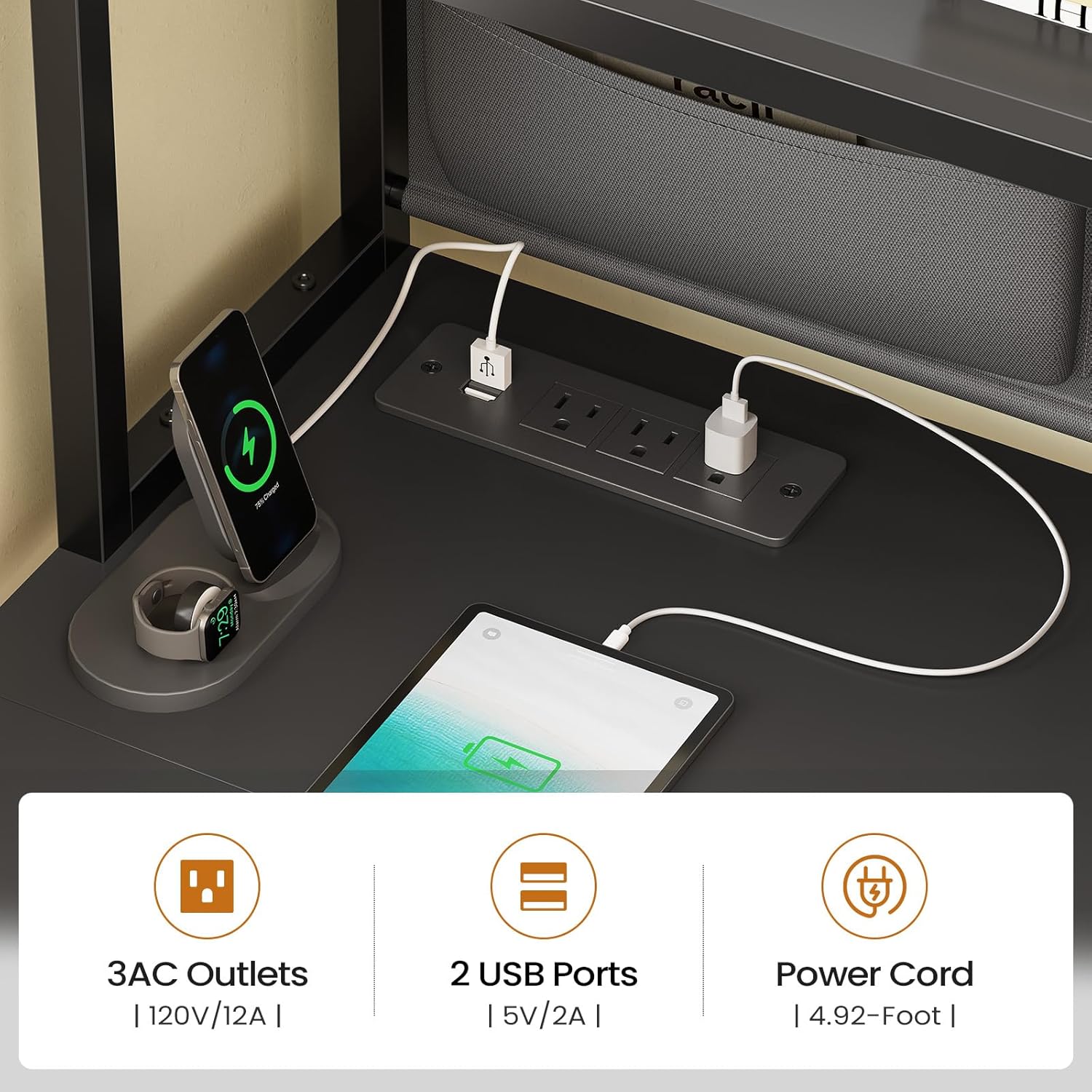
Figure 2: Integrated power strip for convenient device charging.
LED Light Operation
The desk features an RGB LED light strip. Control the lighting via the included remote control or a dedicated mobile application. Choose from over 60,000 colors and 29 flashing modes to customize your ambiance.

Figure 3: RGB LED lighting system with remote and app control.
Storage Features
- Glass Display Cabinet: Use the two glass display cabinets to showcase decorations, photo albums, or collectibles. The doors protect items from dust.
- Open Shelves: Five tiers of open shelves provide ample space for books, files, a printer, or gaming figures.
- Fabric Drawers: Two large fabric drawers offer sufficient storage for various items. These drawers are lightweight and easy to assemble.
- Multifunctional Storage Bag: A dedicated storage bag can hold phones, textbooks, files, magazines, eyeglasses, iPads, and snacks, keeping your desktop clutter-free.
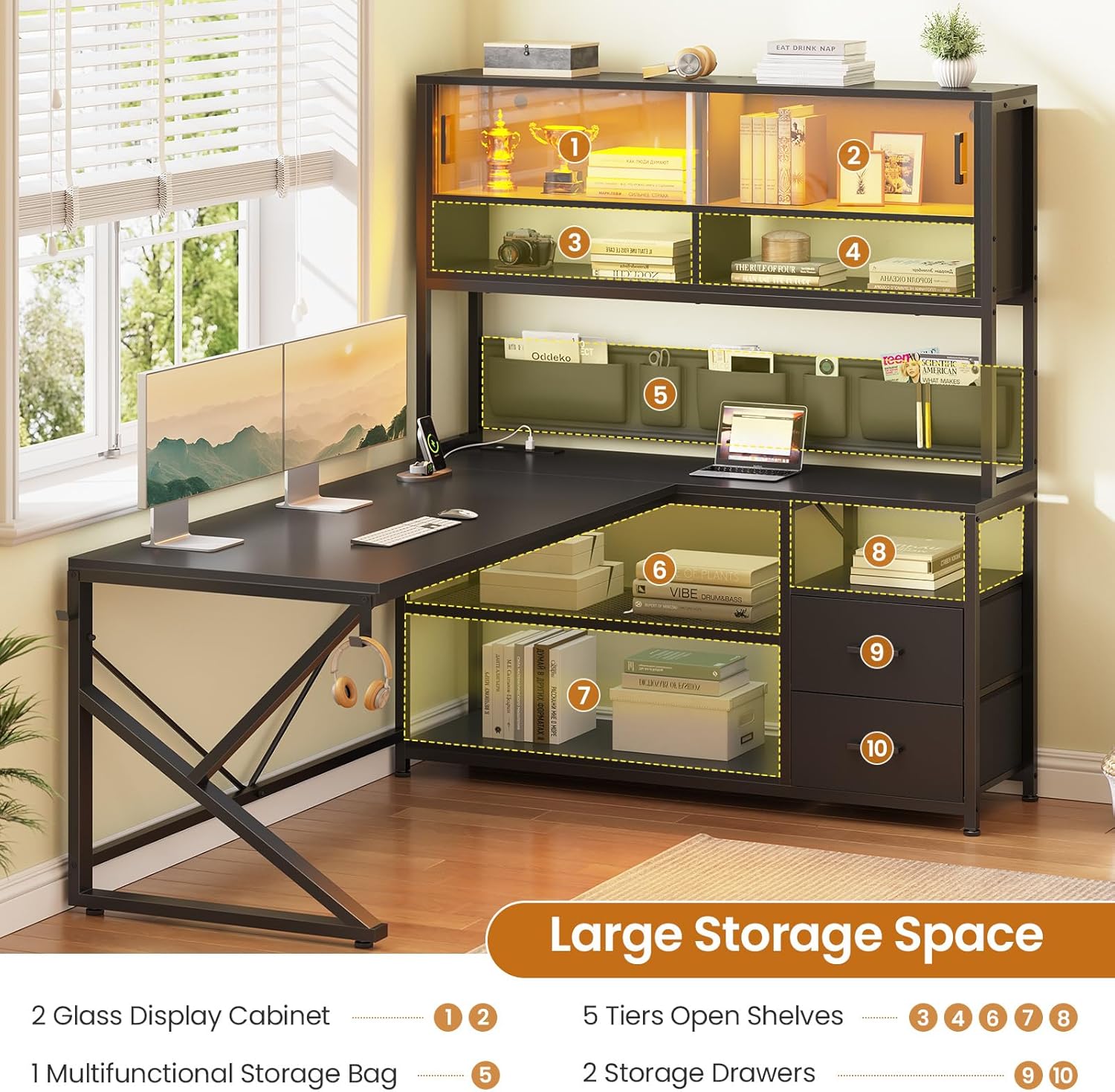
Figure 4: Overview of the desk's extensive storage capabilities.
Maintenance
- Cleaning: Wipe the desk surfaces with a soft, damp cloth. Avoid harsh chemicals or abrasive cleaners that could damage the engineered wood finish.
- Power Strip: Regularly check the power strip for any signs of wear or damage. Unplug it from the wall before cleaning or if any issues are detected.
- Fasteners: Periodically check all screws and fasteners to ensure they remain tight. Retighten as necessary to maintain stability.
- Adjustable Feet: Ensure the adjustable feet are properly set to keep the desk stable and protect your floor.
Troubleshooting
If you encounter any issues with your SEDETA L Shaped Gaming Desk, please refer to the following common solutions:
- Desk Wobbles: Check that all screws are tightened. Adjust the leveling feet on the bottom of the desk to ensure it sits evenly on the floor.
- LED Lights Not Working: Ensure the power strip is on and the LED light strip is properly connected to its power source. Check the remote control battery if applicable.
- Drawers Not Sliding Smoothly: Verify that the fabric drawers are correctly assembled and inserted into their designated slots. Ensure no obstructions are present.
For further assistance, please contact customer support.
Specifications
| Feature | Detail |
|---|---|
| Brand | SEDETA |
| Model | B0DXTPLKTT |
| Shape | L-Shape |
| Desk Design | Computer Desk |
| Product Dimensions | 59"D x 23.6"W x 61"H |
| Color | Black |
| Style | Modern |
| Base Material | Metal |
| Top Material Type | Engineered Wood |
| Finish Type | Powder Coated |
| Special Features | 5 tiers open shelves, 2 display cabinet, 2 Storage Drawers, 1 Storage Bag, Built-in Power Strip with 3 AC Outlets & 2 USB Ports, RGB LED Light Strip |
| Number of Drawers | 2 |
| Number of Shelves | 5 |
| Number of Enclosed Shelves | 2 (Glass Cabinets) |
| Tabletop Thickness | 1.5 Inches |
| Maximum Height | 61 Inches |
| Required Assembly | Yes |
Warranty and Support
The SEDETA L Shaped Gaming Desk comes with a limited warranty. For specific details regarding warranty coverage, please refer to the warranty card included in your product packaging or contact customer service.
For any questions, missing parts, or assistance with assembly or operation, please contact SEDETA customer service. We are committed to providing satisfactory solutions.
Customer Service: [Insert Customer Service Contact Information Here, e.g., email, phone number, website]
Ask a question about this manual
Ask about setup, troubleshooting, compatibility, parts, safety, or missing instructions. Manuals+ will review the question and use this page’s manual context to help answer it.